Ọrọ Iṣaaju
The IMICE T97 RGB Honeycomb Gaming Mouse is designed to provide a precise and comfortable experience for gaming and general computer use. It features a high-precision 4800 DPI sensor, a durable and ergonomic design, and is compatible with various operating systems. This manual will guide you through the setup, operation, and maintenance of your new gaming mouse.
- Brand: IMICE
- Iru: Asin
- Ibamu: Kọmputa ati Kọǹpútà alágbèéká
- Awọn ẹya pataki: High precision 4800 DPI, comfortable and durable design, anti-sweat design, precise positioning.
- Àwọ̀: Dudu
Awọn ilana iṣeto
1. Nsopọ awọn Asin
The IMICE T97 mouse uses a standard USB connection for plug-and-play functionality. No additional drivers are typically required for basic operation on supported operating systems.
- Wa ibudo USB ti o wa lori kọnputa tabi kọǹpútà alágbèéká rẹ.
- Insert the USB connector of the IMICE T97 mouse firmly into the USB port.
- Ẹrọ iṣẹ rẹ yẹ ki o ṣawari laifọwọyi ati fi awọn awakọ pataki sii. Ilana yii le gba awọn iṣẹju diẹ.
- Once installed, the mouse will be ready for use.
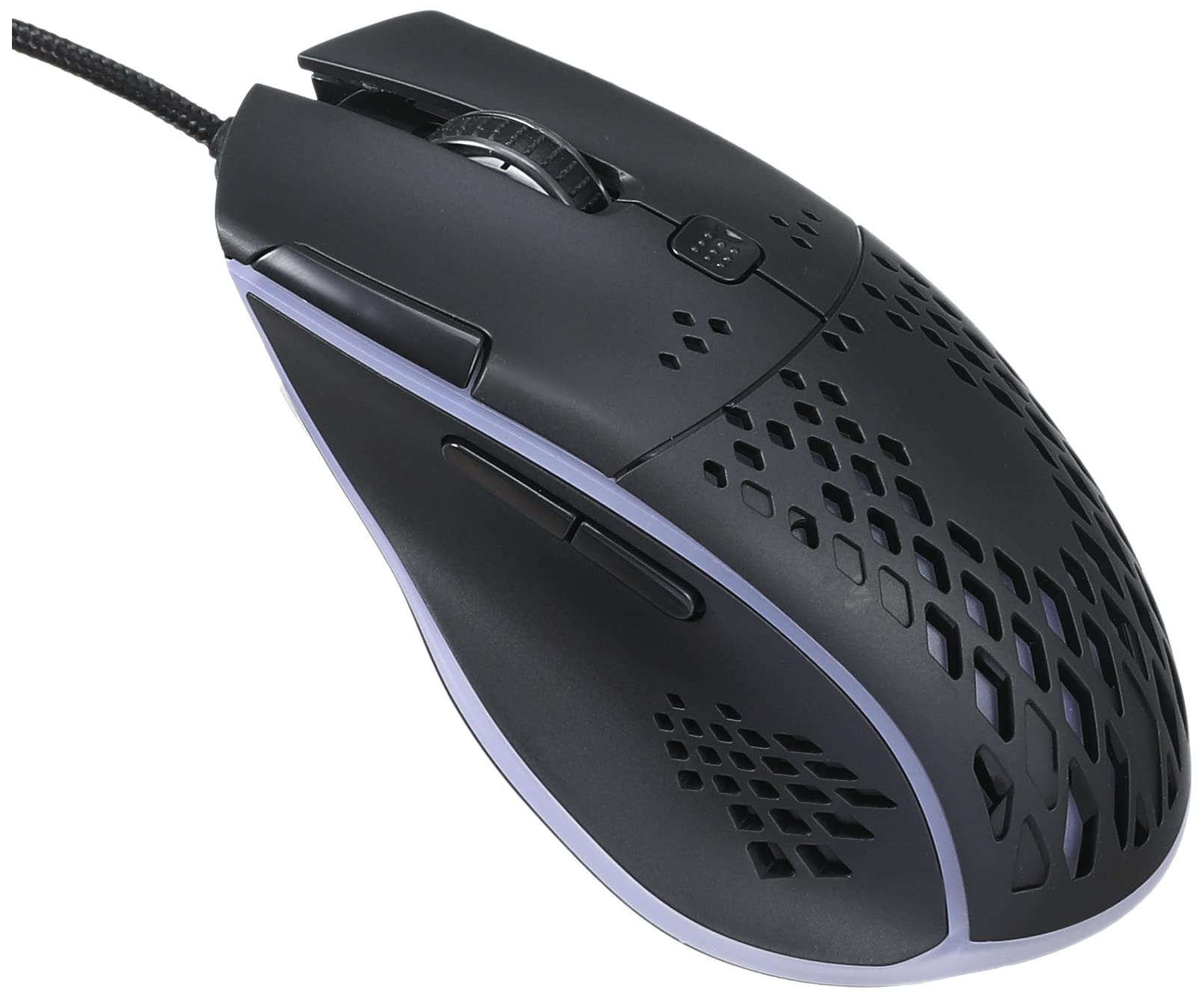
Image: Top-front view of the IMICE T97 RGB Honeycomb Gaming Mouse, showing its ergonomic shape and honeycomb shell design.
Ṣiṣẹ Asin
Awọn iṣẹ ipilẹ
- Tẹ osi: Primary action, selection, activation.
- Tẹ-ọtun: Àkójọ àkójọpọ̀, àwọn ìgbésẹ̀ kejì.
- Yi lọ Kẹkẹ: Yi lọ si oke/isalẹ awọn iwe aṣẹ ati web pages. Can also be clicked for middle-click functionality.
- Awọn bọtini ẹgbẹ: (If present, typically for forward/back navigation in browsers or custom functions in games). The T97 model typically includes two side buttons.
DPI Atunṣe
The IMICE T97 mouse features adjustable DPI (Dots Per Inch) settings, allowing you to change the cursor sensitivity. This mouse supports up to 4800 DPI. There is usually a dedicated button, often located behind the scroll wheel, to cycle through different DPI levels. Press this button to switch between sensitivity settings to find your preferred speed.
Imọlẹ RGB
The mouse features RGB lighting, which typically cycles through various colors automatically. There may not be user-configurable software for lighting control, and it operates as a default aesthetic feature.

Aworan: Underside view of the IMICE T97 RGB Honeycomb Gaming Mouse, showing the optical sensor, product label with model T97, and regulatory marks.
Itoju
Ninu
- Ge asopọ awọn Asin lati kọmputa rẹ ṣaaju ki o to nu.
- Lo asọ rirọ, gbẹ, asọ ti ko ni lint lati nu dada ti Asin naa.
- Fun idoti alagidi, die-die dampfi omi tàbí omi ìwẹ̀nùmọ́ díẹ̀ bò aṣọ náà (yẹra fún àwọn kẹ́míkà líle).
- Lo swab owu tabi afẹfẹ fisinuirindigbindigbin lati nu ni ayika awọn bọtini ati kẹkẹ yi lọ.
- Rii daju pe ko si omi ti o wọ inu awọn paati inu inu Asin naa.
Ibi ipamọ
Store the mouse in a cool, dry place away from direct sunlight and extreme temperatures when not in use for extended periods.
Laasigbotitusita
| Isoro | Ojutu |
|---|---|
| Asin ko dahun. |
|
| Gbigbe kọsọ jẹ aisise tabi fo. |
|
| Àwọn bọ́tìnì tàbí kẹ̀kẹ́ ìyípo kò ṣiṣẹ́. |
|
| Cannot find software for customization. | The IMICE T97 mouse is primarily designed for plug-and-play operation. Dedicated software for advanced customization (like button remapping or detailed RGB control) may not be available or easily accessible for this model. Most functions are hardware-controlled. |
Awọn pato
| Brand | IMICE |
| Awoṣe | T97 |
| Àwọ̀ | Dudu |
| Asopọmọra Technology | USB |
| DPI (Max) | 4800 DPI |
| Pataki Awọn ẹya ara ẹrọ | Comfortable design, RGB lighting, honeycomb shell |
| Ọwọ Iṣalaye | Ambidextrous |
| Niyanju Lilo | Ere |
| Awọn ẹrọ ibaramu | Kọmputa ti ara ẹni, Kọǹpútà alágbèéká |
| Ibamu System isẹ | Lainos, Windows XP (ati awọn ẹya tuntun) |
| Iwọn Nkan | 120 giramu |
| Sowo Mefa | 15 x 11 x 5 cm |
| Awọn batiri To wa | No (Wired USB mouse) |
| ASIN | B0BD2DDWNQ |
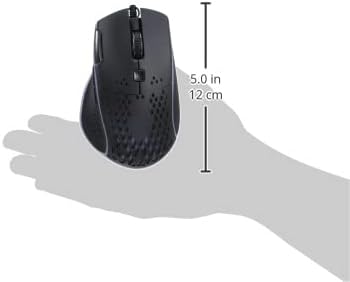
Aworan: Apa view of the IMICE T97 RGB Honeycomb Gaming Mouse held in a hand, illustrating its compact size (approximately 5.0 inches or 12 cm in length).
Alaye atilẹyin ọja
Please refer to the retailer or your purchase documentation for specific warranty terms and conditions. IMICE products typically come with a limited warranty against manufacturing defects. Keep your proof of purchase for warranty claims.
Onibara Support
For technical assistance or further inquiries, please contact your retailer or visit the official IMICE website for support resources. Ensure you have your product model (T97) and purchase details ready when contacting support.