
GOOLOO GTX300
GOOLOO Portable Power Station GTX300 User Manual
Model: Discovery 300 / GTX300
Orúkọ ìtajà: GOOLOO
1. Ifihan
The GOOLOO Portable Power Station GTX300 is a versatile and reliable power solution designed for various applications, from outdoor adventures to emergency home backup. This manual provides essential information for safe and efficient operation, maintenance, and troubleshooting of your device.
Awọn ẹya pataki:
- Apẹrẹ to gbe: Lightweight and compact, weighing approximately 8.8 pounds, with an integrated handle for easy transport.
- Agbara giga: 300Wh (25.6Ah/11.7V) battery capacity provides ample power for multiple devices.
- Ìmújáde AC Sine Wave Pípé: Delivers clean and stable 110V/300W AC power (600W surge) suitable for sensitive electronics.
- Awọn ifihan DC pupọ: Includes 12V/10A car port and two 12V/5A DC 5521 ports.
- Gbigba agbara USB ti o yatọ: Features two USB-A ports (one standard 5V/2.4A, one Quick Charge 3.0) and two USB-C ports (one 5V/3A, one Power Delivery 60W bi-directional).
- Multi-Method Charging: Can be recharged via wall outlet, car charger, or solar panel.
- Ifihan oni-nọmba Smart: Provides real-time information on battery level, input/output wattage, and remaining usage/charging time.
- Ina LED pajawiri: Integrated rear light with Low, High, and SOS modes for various situations.
- Awọn ẹya Aabo To ti ni ilọsiwaju: Built-in Battery Management System (BMS) with multiple protections including over-charge, over-discharge, over-current, over-voltage, ati kukuru-Circuit Idaabobo.

Figure 1: The GOOLOO Portable Power Station GTX300 demonstrating its high capacity by powering a router (10W for 20 hours), mini-fridge (60W for 4 hours), drones (40Wh for 6 times), and cameras (16Wh for 14 times).
2. Ohun ti o wa ninu Apoti
Upon unboxing your GOOLOO Portable Power Station GTX300, please ensure all the following components are present:
- GOOLOO Portable Power Station GTX300 Unit
- Okun gbigba agbara AC
- Okun Ngba agbara ọkọ ayọkẹlẹ
- Itọsọna olumulo
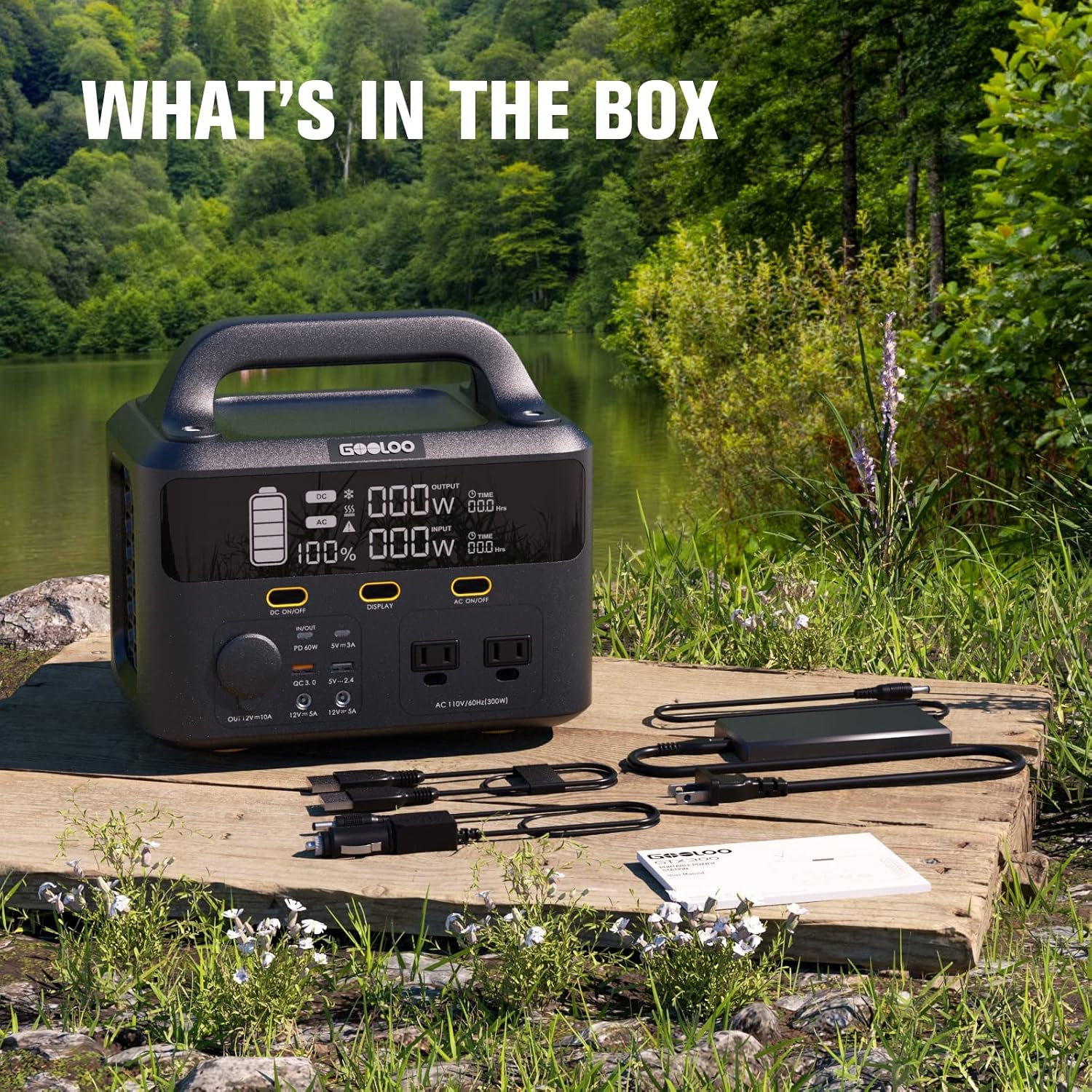
Figure 2: All included accessories with the GOOLOO Portable Power Station GTX300, laid out on a wooden surface in an outdoor setting.
3. Ọja Ipariview
Familiarize yourself with the various ports, controls, and indicators on your power station.
Igbimo iwaju:
- Awọn Iṣẹ́ Afẹ́fẹ́ AC (x2): Standard 110V AC outlets, providing 300W continuous power with a 600W surge capability. These are pure sine wave outputs, safe for sensitive electronics.
- DC Car Port (x1): 12V/10A output, compatible with car appliances.
- DC 5521 Ports (x2): 12V/5A outputs, suitable for various DC-powered devices.
- Awọn ibudo USB-A (x2): One standard 5V/2.4A port and one Quick Charge 3.0 port for rapid charging of compatible devices.
- Awọn ibudo USB-C (x2): One 5V/3A port and one Power Delivery (PD) 60W bi-directional port. The PD port can both charge devices and be used to recharge the power station itself.
- Ifihan Digital: Shows battery charge percentage, input wattage, jade wattage, and estimated time remaining for charge/discharge.
- Awọn bọtini Iṣakoso: Separate buttons to activate DC outputs, AC outputs, and the display.
Iṣakoso yii:
- Ina LED pajawiri: A large panel light with three modes: Low brightness, High brightness, and SOS flashing for emergencies.
- Ibudo Iwọle AC: For charging the power station using the included AC charging cable.
- DC/Solar Input Port: For charging the power station using the included car charging cable or a compatible solar panel (up to 120W).
Awọn Paneli ẹgbẹ:
- Ventilation Grids: Designed to allow internal fans to pull air through the unit, keeping the electronics cool during operation and charging.
Video 1: An official product video from GOOLOO showcasing the GTX300 Portable Power Station, highlighting its features, ports, and various use cases in different environments.
4. Eto
Gbigba agbara akọkọ:
Before first use, it is recommended to fully charge the GOOLOO Portable Power Station. This ensures optimal battery performance and longevity.
- Connect the included AC charging cable to the AC Input Port on the rear of the power station.
- Pulọọgi awọn miiran opin AC gbigba agbara USB sinu kan boṣewa iṣan iṣan.
- The digital display will illuminate, showing the charging status and estimated time to full charge.
- Once fully charged, the display will indicate 100%. Disconnect the charging cable.
5. Awọn ilana Iṣiṣẹ
Turning On/Off Outputs:
- DC Iṣelọpọ: Press the "DC ON/OFF" button on the front panel to activate or deactivate the DC car port and DC 5521 ports. The DC indicator on the display will light up when active.
- Ijade AC: Press the "AC ON/OFF" button on the front panel to activate or deactivate the AC outlets. The AC indicator on the display will light up when active.
- Ifihan: Press the "DISPLAY" button to turn the digital screen on or off.
Using the Emergency LED Light:
The rear LED light can be used for illumination in various situations.
- Press the light button on the rear panel once for Low brightness mode.
- Press again for High brightness mode.
- Press a third time for SOS flashing mode.
- Press a fourth time to turn the light off.

Figure 3: The GOOLOO Portable Power Station GTX300 features a powerful emergency LED light with three distinct modes for various needs.
Gbigba agbara ati gbigba agbara nigbakanna:
The GOOLOO Portable Power Station GTX300 supports simultaneous charging and discharging, allowing you to power your devices while the unit itself is being recharged.

Figure 4: The power station can charge and discharge simultaneously, making it highly efficient for continuous power supply.
6. Ngba agbara si Ibusọ Agbara
Your GOOLOO Portable Power Station GTX300 can be recharged using three primary methods:
Gbigba agbara ogiri:
Use the included AC charging cable to recharge the power station from a standard wall outlet. A full charge typically takes approximately 4 hours.

Figure 5: Wall charging the power station from 0% to 100% in approximately 4 hours.
Gbigba agbara ọkọ ayọkẹlẹ:
Recharge your power station on the go using your vehicle's 12V car outlet.
- Connect the included car charging cable to the DC/Solar Input Port on the rear of the power station.
- Plug the other end into your car's 12V cigarette lighter socket.
- Gbigba agbara ni kikun maa n gba to wakati mẹta.

Figure 6: Car charging the power station from 0% to 100% in approximately 3 hours.
Gbigba agbara Oorun:
Harness solar energy to recharge your power station, ideal for off-grid use. The unit features a built-in MPPT controller for efficient solar charging.
- Connect a compatible solar panel (not included, max 120W) to the DC/Solar Input Port on the rear of the power station.
- Position the solar panel in direct sunlight for optimal charging.
- A full charge using a 120W solar panel typically takes approximately 3.5-6 hours, depending on sunlight conditions.

Figure 7: Solar charging the power station from 0% to 100% in approximately 3.5-6 hours, depending on sunlight intensity.

Olusin 8: Pariview of recharge times for the GOOLOO Portable Power Station using different methods.
7. Itọju
- Ibi ipamọ: Tọju ibudo agbara ni itura, aye gbigbẹ kuro lati orun taara ati awọn iwọn otutu to gaju.
- Recharge Frequency: For optimal battery health, recharge the unit at least once every 3-6 months, even if not in use.
- Ninu: Lo aṣọ gbígbẹ tí ó rọ láti nu ìta ẹ̀rọ náà. Má ṣe lo àwọn ohun ìfọṣọ tàbí kí o fi omi rì ẹ̀rọ náà.
- Yago fun ikojọpọ pupọ: Do not exceed the rated output power of 300W (or 600W surge) to prevent damage to the unit and connected devices.
8. Laasigbotitusita
Ẹka Ko Tii:
- Ensure the battery is charged. Connect to a power source and check the display.
- Press and hold the main power button for a few seconds to ensure it's fully engaged.
Outputs Not Working:
- Ensure the specific output (DC or AC) is activated by pressing its respective ON/OFF button.
- Check if the device being powered exceeds the power station's output limits (300W continuous, 600W surge for AC).
- Verify that the cables are securely connected to both the power station and the device.
Gbigba agbara lọra:
- For solar charging, ensure the solar panel is in direct sunlight and free from obstructions.
- Verify the solar panel's wattage is sufficient (up to 120W recommended).
- Ensure the charging cable is not damaged and is properly connected.
9. Awọn pato
| Ẹya ara ẹrọ | Sipesifikesonu |
|---|---|
| Orukọ awoṣe | Discovery 300 / GTX300 |
| Agbara Batiri | 300Wh (25.6Ah/11.7V) |
| Ijade AC | 110V/300W (Pure Sine Wave, 600W Surge) |
| Ìjáde DC (Ibudo ọkọ ayọkẹlẹ) | 12V/10A |
| Ijade DC (Awọn ibudo 5521) | 12V/5A (x2) |
| Ṣiṣejade USB-A | 5V/2.4A (x1), QC 3.0 (x1) |
| USB-C o wu | 5V/3A (x1), PD 60W (bi-directional) (x1) |
| Iṣagbewọle AC | Iye ti o ga julọ ti 120W |
| DC / Solar Input | 120W Max (MPPT) |
| Awọn iwọn | 9.8 x 6.9 x 9 inches |
| Iwọn Nkan | 8.8 iwon |
| Awọn iwọn otutu ti nṣiṣẹ | -10°C si 40°C (14°F si 104°F) |
| Batiri Cell Type | Litiumu Iwon |
10. Atilẹyin ọja ati Support
GOOLOO products are designed and manufactured to the highest quality standards. For information regarding warranty coverage, technical support, or customer service, please refer to the contact information provided on the product packaging or visit the official GOOLOO webojula.
Ask a question about this manual
Ask about setup, troubleshooting, compatibility, parts, safety, or missing instructions. Manuals+ will review the question and use this page’s manual context to help answer it.