
1. Ifihan
Welcome to your Rointe CT.0 TSMTIB0 Digital Thermostat. This device is engineered to provide intelligent control for Rointe underfloor heating systems. It features an adaptive start mode and three pre-installed programs, designed for efficient energy management and enhanced comfort in your home.
This manual provides essential information for the safe and effective installation, operation, and maintenance of your thermostat. Please read it thoroughly before use and retain it for future reference. Ensure all installation procedures are performed by a qualified professional.
2. Ọja Ipariview
The Rointe CT.0 TSMTIB0 thermostat features a modern design with a backlit display and intuitive button controls for easy interaction.
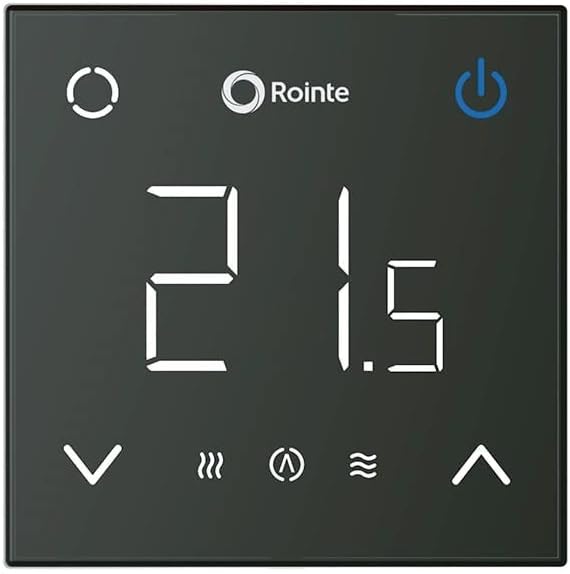
Aworan 1: Iwaju view of the Rointe CT.0 TSMTIB0 digital thermostat. It features a black square face with a large white digital display showing '21.5'. Above the display are the Rointe logo and a power button. Below the display are temperature adjustment arrows (down and up), and icons for heating mode, adaptive start, and a wave symbol, likely indicating comfort or eco mode.

Aworan 2: Igun view of the Rointe CT.0 TSMTIB0 digital thermostat, showcasing awọn oniwe-tẹẹrẹ profile. The display and controls are identical to the front view, providing a clear perspective of the device's physical form.
3. Fifi sori ẹrọ ati Oṣo
3.1 Abo Alaye
- Fifi sori ẹrọ gbọdọ ṣee ṣe nipasẹ oṣiṣẹ ina mọnamọna ti o pe ni ibamu pẹlu awọn ilana wiwọ agbegbe.
- Always disconnect the main power supply before commencing any installation or maintenance work.
- Ensure the thermostat is installed in a dry location, away from direct sunlight or heat sources.
- Ma ṣe fi ẹrọ naa han si ọrinrin tabi iwọn otutu to gaju.
3.2 Iṣagbesori Thermostat
- Choose an appropriate wall location, typically 1.5 meters (5 feet) from the floor, away from drafts or heat-emitting appliances.
- Carefully open the thermostat casing to access the wiring terminals.
- So okùn ina pọ gẹgẹ bi aworan okùn ti a pese (wo itọsọna fifi sori ẹrọ lọtọ fun awọn aworan alaye).
- Secure the thermostat base to the wall using appropriate screws.
- Reattach the front cover of the thermostat, ensuring it clicks securely into place.
3.3 Ibẹrẹ Agbara-soke
After installation, restore power to the circuit. The thermostat display will illuminate. Follow the on-screen prompts to set the initial date, time, and language if applicable. The device may perform a self-test upon first power-up.
4. Isẹ
4.1 Ipilẹ idari
- Bọtini agbara: Located at the top right of the display, press to turn the heating system ON or OFF.
- Awọn bọtini Iṣatunṣe iwọn otutu: Located at the bottom of the display (up and down arrows), use these to increase or decrease the target temperature.
- Bọtini Ipo: (Circular icon, top left) Press to cycle through different operating modes (e.g., Manual, Programmed, Frost Protection).
4.2 Ṣiṣeto iwọn otutu
In Manual mode, press the up or down arrow buttons to adjust the desired room temperature. The new target temperature will be displayed and the system will adjust accordingly.
4.3 Àwọn Ìgbékalẹ̀ Ìṣètò
The Rointe CT.0 TSMTIB0 includes an adaptive start mode and three pre-installed programs to optimize energy consumption and comfort.
- Adaptive Start Mode: This intelligent feature learns the heating characteristics of your room and activates the heating system in advance to reach your desired temperature at the programmed time, rather than starting at the programmed time.
- Pre-installed Programs: The thermostat comes with three factory-set programs. These can be selected via the Mode button or within the settings menu. Refer to the detailed programming section in the full user guide for customization options.
- Custom Programs: You can create and save your own weekly heating schedules to match your lifestyle. Access the programming menu through the thermostat's interface to set specific temperatures for different times of the day and days of the week.
4.4 Ifihan Ifihan
The backlit display provides clear information about the current status of your heating system:
- Iwọn otutu lọwọlọwọ: Large digits in the center of the display.
- Heating On Indicator: A flame or wave icon typically indicates when the heating element is active.
- Adaptive Start Indicator: An icon (e.g., a clock with an arrow) may appear when adaptive start is active.
- Atọka eto: Shows which program (e.g., P1, P2, P3) is currently active.
5. Itọju
The Rointe CT.0 TSMTIB0 thermostat requires minimal maintenance to ensure optimal performance.
- Ninu: Gently wipe the display and casing pẹlu asọ, gbẹ, tabi die-die damp cloth. Do not use abrasive cleaners, solvents, or chemical sprays, as these can damage the surface and internal components.
- Ko si Awọn apakan Iṣẹ Olumulo: The thermostat contains no user-serviceable parts. Do not attempt to open or repair the device yourself. Unauthorized repairs will void the warranty and may pose a safety risk.
- Rirọpo Batiri: If your model includes backup batteries for settings retention during power outages, refer to the full installation guide for instructions on safe replacement.
6. Laasigbotitusita
If you encounter issues with your Rointe CT.0 TSMTIB0 thermostat, please consult the following common problems and solutions before contacting support.
- Ko si Ifihan/Ko si Agbara:
- Check the main power supply to the thermostat and the circuit breaker.
- Ensure all wiring connections are secure (this should be checked by a qualified electrician).
- Kika iwọn otutu ti ko tọ:
- Rii daju pe thermostat ko farahan si orun taara, awọn iyaworan, tabi awọn orisun ooru ti o le ni ipa lori sensọ rẹ.
- Verify that the temperature sensor (if external) is correctly installed and connected.
- Alapapo Ko Mu ṣiṣẹ:
- Check if the thermostat is in the ON position and not in Frost Protection or OFF mode.
- Ensure the target temperature is set higher than the current room temperature.
- Verify that the heating system itself (e.g., boiler, underfloor heating manifold) is operational.
- Àwọn Àṣìṣe Ìṣètò:
- Review the programming instructions in the full user guide to ensure schedules are set correctly.
- Consider resetting the thermostat to factory settings and reprogramming if issues persist (refer to the full user guide for reset procedures).
If these steps do not resolve the issue, please contact Rointe customer support or a qualified technician.
7. Awọn pato
| Brand | ROINTE |
| Nọmba awoṣe | TSMTIB0 |
| Iṣakoso Iru | Iṣakoso bọtini |
| Ara | Igbalode |
| Imọlẹ ẹhin | Bẹẹni |
| Olupese | ROINTE |
| Ìwé awoṣe Number | 8435556137160 |
| ASIN | B0BDBZXFTT |
8. Atilẹyin ọja ati Support
8.1 atilẹyin ọja Alaye
The Rointe CT.0 TSMTIB0 thermostat is covered by a manufacturer's warranty. Specific warranty terms and conditions, including duration and coverage details, are provided at the time of purchase or can be obtained directly from Rointe or your authorized dealer. Please retain your proof of purchase for warranty claims.
8.2 Onibara Support
For technical assistance, troubleshooting beyond the scope of this manual, or warranty inquiries, please contact Rointe customer support through their official website or the retailer from whom you purchased the product. Have your model number (TSMTIB0) and proof of purchase ready when contacting support.