
Ọrọ Iṣaaju
Thank you for choosing the Sharp Big Bang Alarm Clock. This manual provides detailed instructions to help you set up, operate, and maintain your new alarm clock. Please read this manual thoroughly before use and retain it for future reference.
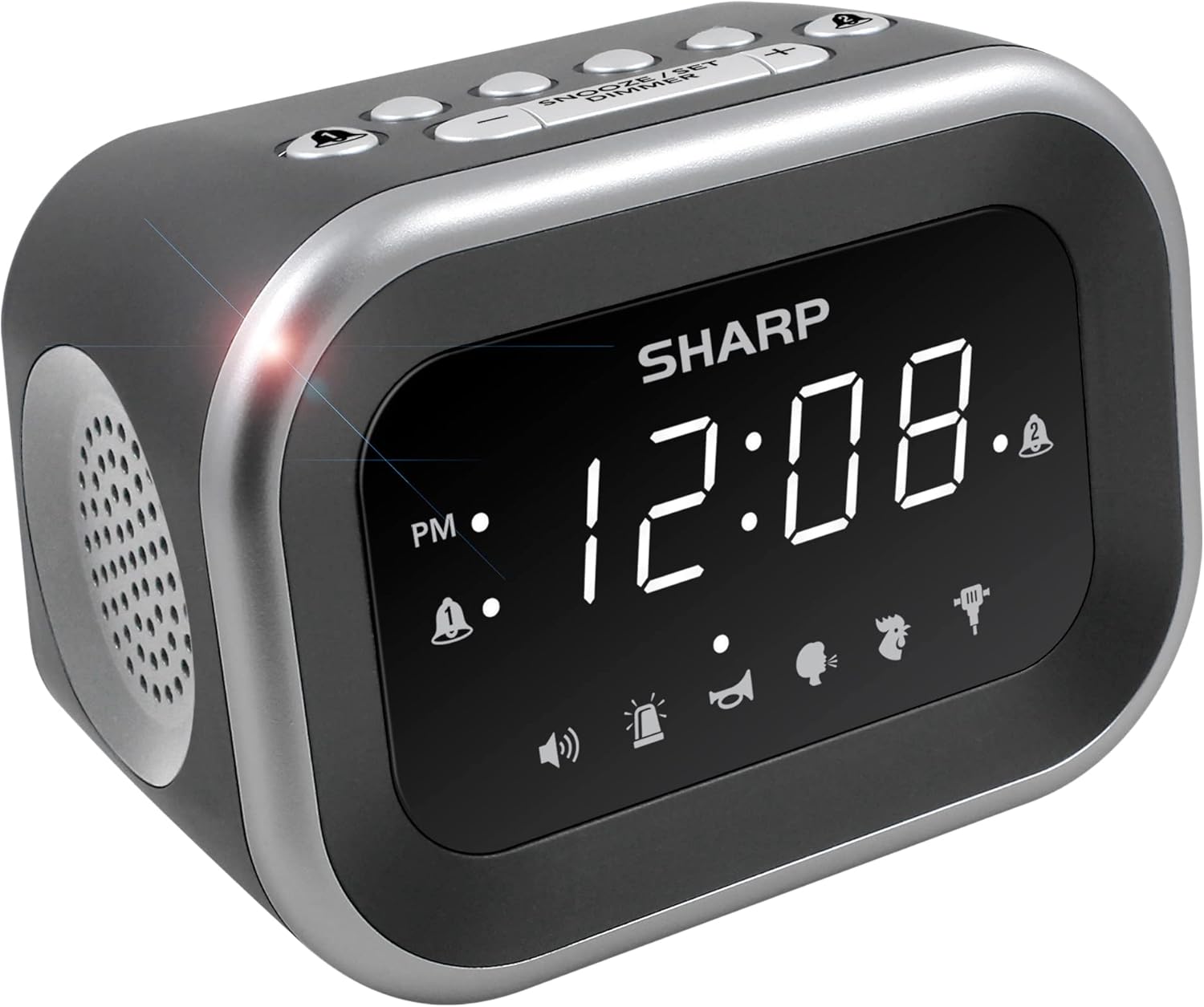
Aworan: Iwaju view of the Sharp Big Bang Alarm Clock, showing the digital display and speaker grille.
Alaye Aabo
- Má ṣe fi ẹ̀rọ náà sí ojú ọjọ́ tí ó le koko, oòrùn tààrà, tàbí ọriniinitutu gíga.
- Keep the unit away from water or other liquids.
- Lo oluyipada agbara pàtó kan.
- Ma ṣe gbiyanju lati ṣajọpọ tabi yi ẹyọ naa pada.
- Jeki kuro ni arọwọto awọn ọmọde.
Package Awọn akoonu
- Sharp Big Bang Alarm Clock
- Adaparọ Agbara AC
- Afowoyi Olumulo (iwe-ipamọ yii)
Ọja Pariview
Familiarize yourself with the various components and controls of your alarm clock.
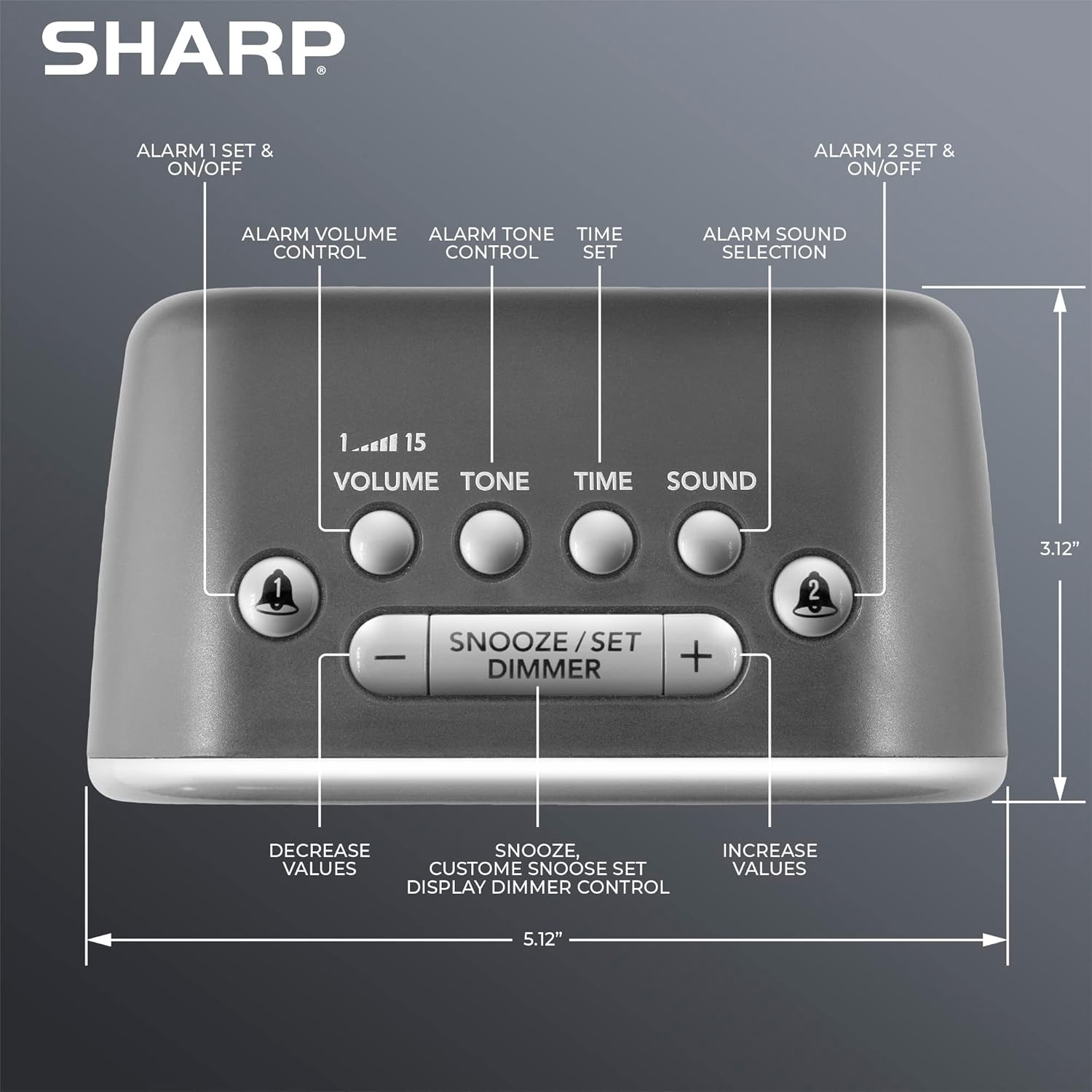
Aworan: Oke view of the alarm clock, highlighting buttons for Alarm 1, Alarm 2, Volume, Tone, Time, Sound, Snooze/Set/Dimmer, and +/- controls.
- Ifihan: Large white LED display for time and settings.
- Alarm 1 & 2 Buttons: Activate/deactivate and set individual alarms.
- Bọtini iwọn didun: Adjusts alarm volume (levels 1-15).
- Bọtini ohun orin: Adjusts alarm tone.
- Bọtini akoko: Used for setting the current time.
- Bọtini Ohun: Selects one of the six alarm sounds.
- Snooze/Set/Dimmer Button: Activates snooze, confirms settings, and adjusts display brightness.
- +/- Awọn bọtini: Adjust values for time, volume, tone, and snooze duration.
Ṣeto
1. Asopọ agbara
- Plug the AC power adapter into the DC IN jack on the back of the alarm clock.
- Plug the other end of the adapter into a standard 110V/120V household wall outlet.
- The display will light up, indicating power is connected.
2. Batiri Afẹyinti fifi sori
The alarm clock requires 2 x AAA batteries (not included) for battery backup. This feature stores your time and alarm settings during a power interruption. The display will not be lit during battery backup mode.
- Ṣii ideri iyẹwu batiri ni isalẹ ẹyọ.
- Insert 2 new AAA batteries, observing the correct polarity (+ and -).
- Pa ideri batiri naa ni aabo.

Image: The alarm clock positioned on a nightstand, ready for use.
Awọn ilana Iṣiṣẹ
1. Ṣíṣeto Àkókò Lọ́wọ́lọ́wọ́
- Tẹ mọlẹ AKOKO bọtini titi ti wakati awọn nọmba filasi.
- Lo awọn + or - Àwọn bọ́tìnì láti ṣàtúnṣe wákàtí náà. Fiyèsí àmì PM náà.
- Tẹ awọn AKOKO bọtini lẹẹkansi lati jẹrisi wakati naa, awọn nọmba iṣẹju naa yoo si tan imọlẹ.
- Lo awọn + or - awọn bọtini lati ṣatunṣe awọn iṣẹju.
- Tẹ awọn AKOKO button once more to save the time setting.
2. Ṣíṣeto Awọn Itaniji (Alarm 1 ati Itaniji 2)
This clock features two independent alarms.
- Tẹ mọlẹ OOGUN 1 or OOGUN 2 bọ́tìnì títí tí àwọn nọ́mbà wákàtí ìkìlọ̀ yóò fi tàn.
- Lo awọn + or - Àwọn bọ́tìnì láti ṣàtúnṣe wákàtí ìkìlọ̀. Ṣàkíyèsí àmì PM.
- Tẹ awọn ti o baamu Itaniji bọtini lẹẹkansi lati jẹrisi wakati naa, awọn nọmba iṣẹju naa yoo si tan imọlẹ.
- Lo awọn + or - awọn bọtini lati ṣatunṣe awọn iṣẹju itaniji.
- Tẹ awọn Itaniji button once more to save the alarm time. The alarm indicator (bell icon) for the set alarm will appear on the display.
- To activate or deactivate an alarm, simply press the OOGUN 1 or OOGUN 2 button briefly. The bell icon indicates if the alarm is active.
3. Selecting Alarm Sounds
The clock offers 6 distinct alarm sounds: Rooster, Bugle, Nagging Mom, Jackhammer, Siren, and Beep.

Image: Visual representation of the six available alarm sounds.
- With an alarm set, press the OHUN button. The current sound icon will flash.
- Lo awọn + or - buttons to cycle through the available sounds.
- Tẹ awọn OHUN bọtini lẹẹkansi lati jẹrisi aṣayan rẹ.
4. Adjusting Alarm Volume and Tone
You can customize the volume (up to 115dB) and tone of your chosen alarm sound.

Image: Decibel reference scale illustrating the loudness of the alarm clock compared to common sounds.
- Tẹ awọn Iwọn didun button. The current volume level (1-15) will flash.
- Lo awọn + or - awọn bọtini lati ṣatunṣe iwọn didun.
- Tẹ awọn Iwọn didun bọtini lẹẹkansi lati jẹrisi.
- Tẹ awọn OHUN button. The current tone setting will flash.
- Lo awọn + or - buttons to adjust the tone.
- Tẹ awọn OHUN bọtini lẹẹkansi lati jẹrisi.
5. Iṣẹ lẹẹkọọkan
Nigbati itaniji ba ndun, tẹ tobi SNOOZE/SET/DIMMER button on top of the clock to temporarily silence the alarm. The default snooze time is 9 minutes.
Customizing Snooze Duration:
- While the alarm is sounding, press and hold the SNOOZE/SET/DIMMER button until the snooze time flashes.
- Lo awọn + or - buttons to set your desired snooze duration (1-59 minutes).
- Tẹ awọn SNOOZE/SET/DIMMER button again to save the custom snooze time.
6. Ìṣàkóso Dimmer Àfihàn
The display has 3 brightness levels (Off, Low, High).
- Ni soki tẹ awọn SNOOZE/SET/DIMMER button (when the alarm is not sounding) to cycle through the brightness levels: High > Low > Off.

Aworan: Pariview of key features including display, volume, sounds, and controls.
Itoju
Ninu
- Yọ aago itaniji kuro ninu ibudo agbara ṣaaju ki o to nu.
- Mu ese ita pẹlu asọ ti o gbẹ.
- Ma ṣe lo awọn afọmọ abrasive, waxes, tabi awọn nkanmimu.
Batiri Rirọpo
- Ti aago ba padanu akoko tabi awọn eto itaniji lakoko agbara outage, the AAA backup batteries may need replacement.
- Follow the battery installation steps in the Setup section to replace the batteries.
Laasigbotitusita
| Isoro | Owun to le Fa | Ojutu |
|---|---|---|
| Aago naa ko dun tabi o dakẹ pupọ. | Alarm is not activated; Volume is too low; Incorrect sound selected. | Ensure the alarm bell icon is displayed. Adjust the volume using the VOLUME button. Verify the selected alarm sound. |
| Display is off during a power outage. | Battery backup only retains settings, not display power. | This is normal operation. The display will relight when power is restored. Ensure backup batteries are fresh to retain settings. |
| Time or alarm settings are lost. | Power interruption and/or dead backup batteries. | Replace the 2 x AAA backup batteries. Reset the time and alarm settings. |
| Awọn bọtini ko dahun. | Ibùgbé software glitch. | Unplug the unit from the power outlet for a few minutes, then plug it back in. |
Awọn pato
- Brand: Dinku
- Awoṣe: B0BDPQNVMR
- Orisun Agbara: Corded Electric (110V/120V compatible)
- Batiri Afẹyinti: Awọn batiri 2 x AAA (kii ṣe pẹlu)
- Iwọn Itaniji: Titi di 115dB
- Awọn ohun itaniji: 6 (Rooster, Bugle, Nagging Mom, Jackhammer, Siren, Beep)
- Ifihan: White LED with 3-level dimmer (High, Low, Off)
- Awọn iwọn (Isunmọ): 5.12" (Width) x 3.12" (Height) x 3.55" (Depth)
- Ìwúwo: 12.5 iwon
- Ohun elo: Acrylonitrile Butadiene Styrene (ABS)
- UPC: 049353008608
Atilẹyin ọja ati Support
For warranty information and customer support, please refer to the documentation provided at the time of purchase or contact Sharp customer service directly. You can also visit the official Sharp store for more information: