
ZABBOW F-SL001A
ZABBOW Scorpion Bluetooth Headset
Itọsọna olumulo
Model: F-SL001A
1. Ọja Ipariview
The ZABBOW Scorpion Bluetooth Headset is a versatile wireless earphone designed for clear communication and audio playback across various activities such as sport, office work, and driving. Featuring Bluetooth V5.3 technology, it ensures stable connections and wide compatibility with devices like iOS, Android, and PS3. Its design prioritizes comfort and includes a noise-canceling microphone for enhanced call quality.

Aworan: Iwaju view of the ZABBOW Scorpion Bluetooth Headset, showcasing its red and black design with an ear hook.
Awọn ẹya pataki:
- Ibamu gbooro: Advanced Bluetooth V5.3 for stable connections with iOS, Android, and PS3 devices.
- Ultra-Long Battery Supply: Up to 10 hours of continuous call time and 160 hours standby on a 2-hour charge.
- Didara Ohun Nla: High-detail treble and bass response with noise reduction and echo cancellation technology.
- Comfort Design for Sports: Lightweight and comfortable fit, suitable for extended wear without discomfort.
2. Ọja irinše ati idari
Familiarize yourself with the various parts and controls of your ZABBOW Scorpion Bluetooth Headset.

Image: Diagram illustrating the essential information and labeled components of the ZABBOW Scorpion Bluetooth Headset, including buttons, ports, and indicators.
| Ẹya ara ẹrọ | Išẹ |
|---|---|
| Bọtini iṣẹ | Power On/Off, Play/Pause, Answer/End Call, Voice Assistant activation. |
| Volume "+" / Previous | Increase volume, skip to previous track. |
| Volume "-" / Next | Decrease volume, skip to next track. |
| Gbigba agbara Port | Connect charging cable to power source. |
| Lamp (LED Indicator) | Indicates power status, pairing mode, charging status. |
| Gbohungbohun | Microphone for voice input during calls. |
| Eti Hook | Provides secure and comfortable fit over the ear. |
3. Eto
3.1 Ngba agbara si Agbekọri
Kí o tó lo ó fún ìgbà àkọ́kọ́, gba agbára lórí agbekọri rẹ pátápátá. Ìgbà tí a bá gba agbára náà tán yóò gba tó wákàtí méjì.
- So okùn gbigba agbara pọ mọ ibudo gbigba agbara agbekọri naa.
- So opin okun miiran pọ si orisun agbara USB (fun apẹẹrẹ, ibudo USB kọnputa, ohun ti nmu badọgba ogiri).
- The LED indicator (Lamp) will show the charging status. It typically turns red during charging and blue or off when fully charged.
3.2 Sisopọ pẹlu ẹrọ kan
To use your ZABBOW Scorpion headset, you must first pair it with your Bluetooth-enabled device.
- Rii daju pe agbekari ti wa ni pipa.
- Tẹ mọlẹ Bọtini iṣẹ for approximately 5-7 seconds until the LED indicator flashes red and blue alternately. This indicates the headset is in pairing mode.
- On your device (smartphone, tablet, PS3, etc.), enable Bluetooth and search for available devices.
- Select "ZABBOW Scorpion" or a similar name from the list of found devices.
- Once paired, the LED indicator on the headset will typically flash blue slowly or turn off, and you will hear a confirmation tone.
Note: The headset will automatically attempt to reconnect to the last paired device when powered on, if that device's Bluetooth is active and within range.
4. Awọn ilana Iṣiṣẹ
4.1 Agbara Tan / Pa
- Agbara Tan: Tẹ mọlẹ Bọtini iṣẹ for about 3 seconds until the LED indicator flashes blue and you hear a power-on tone.
- Agbara Pa: Tẹ mọlẹ Bọtini iṣẹ for about 4 seconds until the LED indicator flashes red and you hear a power-off tone.
4.2 ipe Management
- Idahun/Ipe Ipari: Kukuru tẹ awọn Bọtini iṣẹ.
- Kọ Ipe: Tẹ mọlẹ Bọtini iṣẹ for about 2 seconds during an incoming call.
- Nọmba Ikẹhin Tun Tun: Double-tẹ awọn Bọtini iṣẹ nígbà tí kò bá sí lórí ìpè.
4.3 Sisisẹsẹhin Orin
- Ṣiṣẹ/Daduro: Kukuru tẹ awọn Bọtini iṣẹ.
- Orin t’okan: Kukuru tẹ awọn Volume "-" / Next bọtini.
- Tẹlẹ Orin: Kukuru tẹ awọn Volume "+" / Previous bọtini.
4.4 Iṣakoso iwọn didun
- Mu iwọn didun pọ si: Tẹ mọlẹ Volume "+" / Previous bọtini.
- Din iwọn didun silẹ: Tẹ mọlẹ Volume "-" / Next bọtini.
4.5 Voice Iranlọwọ ibere ise
- Mu Oluranlọwọ Ohun ṣiṣẹ: Meteta-tẹ awọn Bọtini iṣẹ (if supported by your connected device).

Image: A person using the ZABBOW Scorpion Bluetooth Headset while driving, highlighting its suitability for hands-free communication.
5. Itọju
5.1 Ninu
- Fi aṣọ rirọ, gbigbẹ, ati ti ko ni awọ nu agbekọri naa.
- Ma ṣe lo awọn olutọpa abrasive, awọn nkanmimu, tabi awọn ohun elo aerosol.
- Yago fun gbigba ọrinrin sinu eyikeyi awọn ṣiṣi.
5.2 Ibi ipamọ
- Tọju agbekari naa ni itura, aye gbigbẹ kuro ni iwọn otutu ti o ga julọ ati imọlẹ orun taara.
- If storing for an extended period, charge the battery periodically (e.g., every 3 months) to maintain battery health.
5.3 Ear Hook Disassembly/Assembly
The ear hook can be removed or replaced for comfort or maintenance.
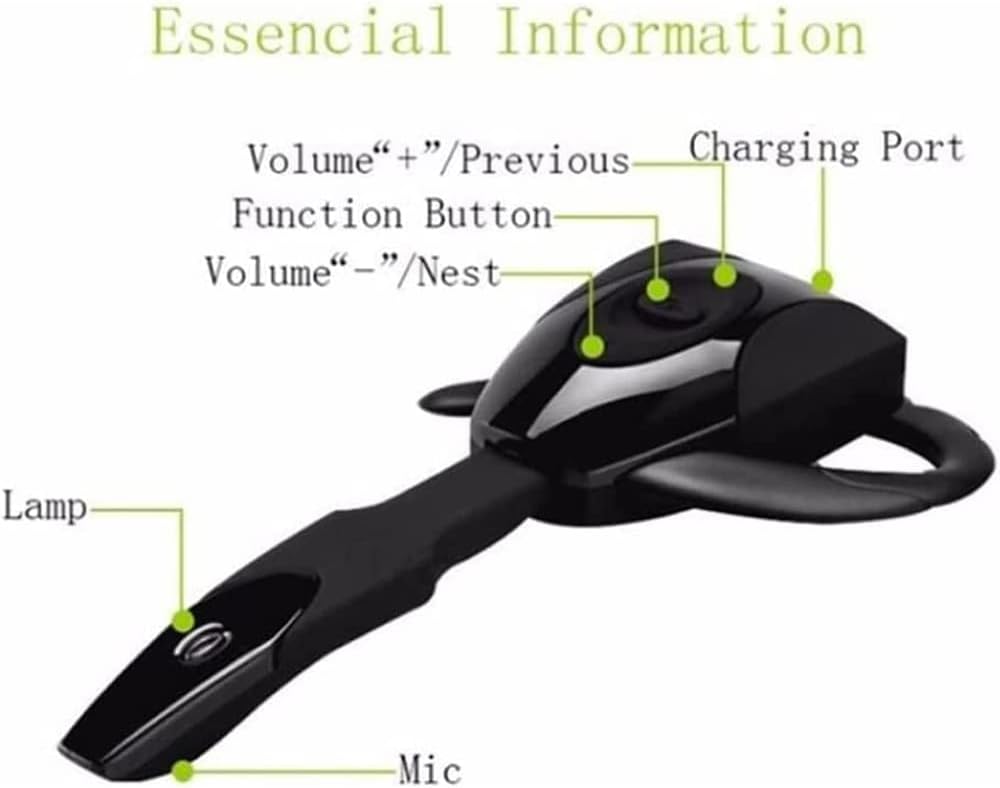
Image: A four-panel schematic diagram illustrating the steps for disassembling and assembling the ear hook of the ZABBOW Scorpion Bluetooth Headset.
- Lati Yọ: Gently buckle the clear lens near the charging port, then push the ear hook out.
- Lati fi sori ẹrọ: Align the ear hook with the slot and push it in until it clicks securely into place.
6. Laasigbotitusita
Tí o bá ní ìṣòro pẹ̀lú agbekọri rẹ, wo àwọn ìṣòro àti ìdáhùn tó wọ́pọ̀ wọ̀nyí.
| Isoro | Owun to le Solusan |
|---|---|
| Agbekọri ko ni agbara. | Ensure the battery is charged. Connect to a charger and check the LED indicator. |
| Cannot pair the headset with my device. |
|
| Ko si ohun tabi iwọn kekere. |
|
| Didara ipe ko dara. |
|
7. Awọn pato
| Iwa | Ẹ̀kúnrẹ́rẹ́ |
|---|---|
| Brand | ZABBOW |
| Orukọ awoṣe | Awọn agbekọri Bluetooth |
| Nọmba Awoṣe Nkan | F-SL001A |
| Asopọmọra Technology | Bluetooth V5.3 |
| Fọọmù ifosiwewe | Lórí Etí (Etí Kanṣoṣo) |
| Ariwo Iṣakoso | Ifagile Ariwo Nṣiṣẹ (fun gbohungbohun) |
| Àwọ̀ | Pupa |
| Ọja Mefa | 10.92 x 5.08 x 2.54 cm |
| Iwọn Nkan | 14 g |
| Igbesi aye batiri (Aago Ọrọ) | Titi di wakati 10 |
| Igbesi aye batiri (Iduroṣinṣin) | Titi di wakati 160 |
| Akoko gbigba agbara | O fẹrẹ to awọn wakati 2 |
8. Atilẹyin ọja ati Support
For warranty information and customer support, please refer to the documentation provided at the time of purchase or contact the retailer/manufacturer directly.
Olupese: ZABBOW
Jọwọ ṣe idaduro ẹri rira rẹ fun eyikeyi awọn ibeere atilẹyin ọja.
Ask a question about this manual
Ask about setup, troubleshooting, compatibility, parts, safety, or missing instructions. Manuals+ will review the question and use this page’s manual context to help answer it.