
Ọrọ Iṣaaju
The FitNation by Echelon Pedal Pro Plus is a motorized seated elliptical designed to provide a convenient and effective way to exercise and aid in rehabilitation. It allows users to improve circulation, decrease joint pain, and engage in physical activity from the comfort of a chair, whether working, watching TV, or reading. This manual provides essential information for the setup, operation, maintenance, and troubleshooting of your device.
Key Awọn ẹya ara ẹrọ
- Exercise and Rehab: Designed to improve circulation, decrease joint pain, and facilitate exercise while seated.
- Auto and Manual Settings: Easily switch between automated programs and manual control for varied workout intensity.
- Improve Range of Motion: Features two-directional movement (forward and reverse) for enhanced flexibility and strength building.
- Preset Training Programs: Built-in display allows for the creation of three separate preset training programs for consistent exercise routines.
- Iṣakoso Latọna jijin To wa: A convenient remote control is provided for effortless adjustment of settings and programs.
- Ifihan LCD: A clear digital display tracks key metrics including Speed, Time, Distance, Steps, and Calories burned.
Ọja irinše
Your FitNation Pedal Pro Plus package includes the following items:
- FitNation Pedal Pro Plus Unit
- Okun agbara
- Remote Control (requires 2x AAA batteries, included)
- Ilana Afowoyi (iwe yii)
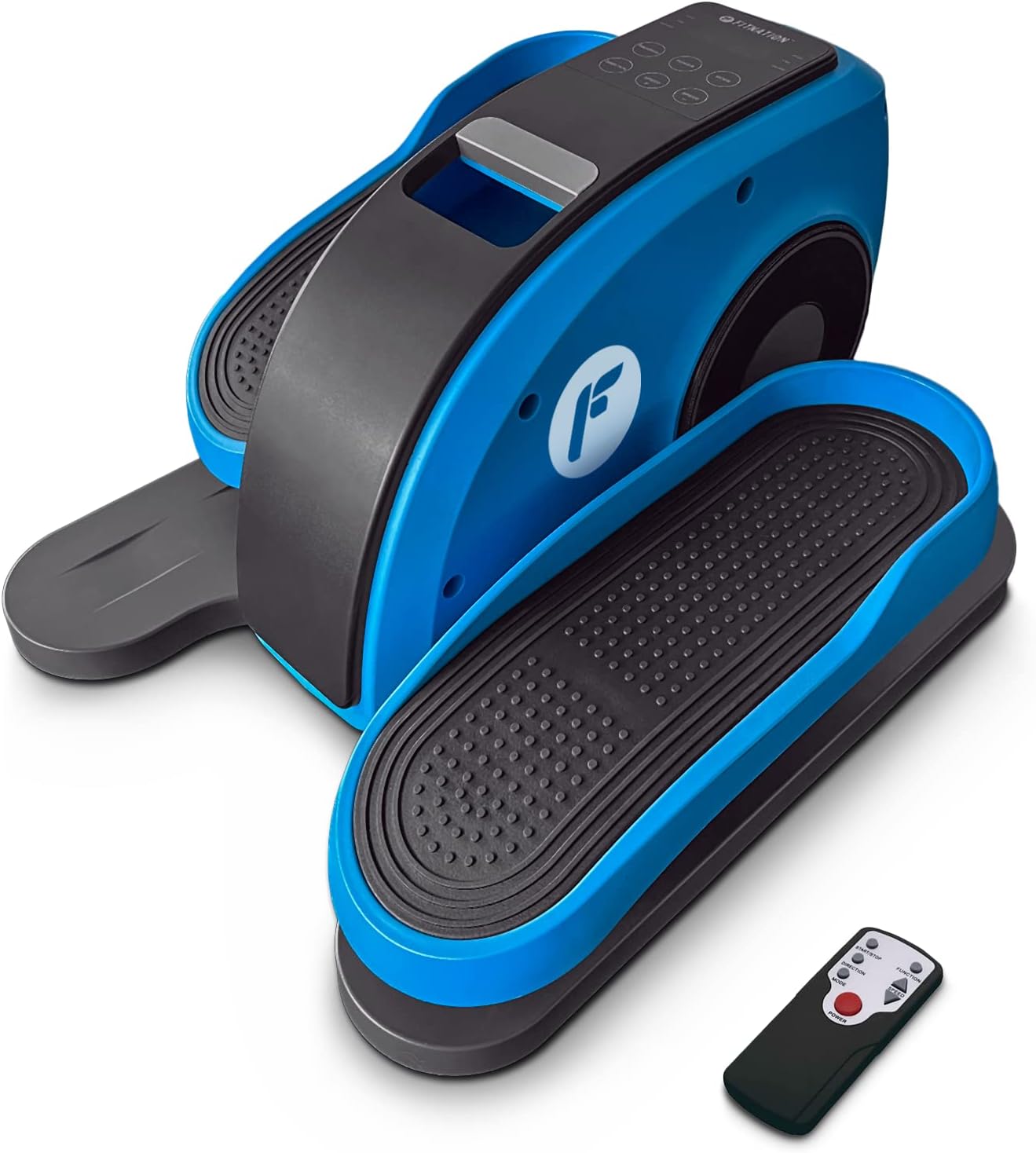
Figure 1: The FitNation Pedal Pro Plus unit with its remote control.
Ṣeto
- Yọ Ẹka naa kuro: Ni ifarabalẹ yọ gbogbo awọn paati kuro ninu apoti. Ṣe idaduro apoti fun ibi ipamọ iwaju tabi gbigbe.
- Gbe Ẹyọ naa: Position the Pedal Pro Plus on a flat, stable surface near a power outlet. Ensure there is enough space for comfortable leg movement. It can be placed under a desk or in front of a chair.
- So agbara: Insert the power cord into the power input port located at the back of the unit. Plug the other end into a standard electrical outlet.

olusin 2: Ẹyìn view of the unit, highlighting the power input.
- Fi awọn batiri Latọna sii: Open the battery compartment on the back of the remote control and insert the two AAA batteries, ensuring correct polarity.

Figure 3: The remote control used to operate the elliptical.
Awọn ilana Iṣiṣẹ
The Pedal Pro Plus can be operated using the control panel on the unit or the included remote control.
Ibi iwaju alabujuto ati Ifihan

Figure 4: The main control panel and LCD display.
- Ifihan LCD: Shows Speed, Time, Distance, Steps, and Calories.
- Bọtini AGBARA: Yipada ẹyọ naa tan tabi pa.
- Bọtini MODE: Cycles through display metrics (Time, Distance, Steps, Calories).
- Bọtini ETO: Selects between preset training programs (P1, P2, P3) or manual mode.
- Bọ́tìnì ÌTỌ́SỌ́NÀ: Changes the direction of pedal rotation (forward or reverse).
- SPEED +/- Buttons: Adjusts the speed level (1-10).
Awọn iṣẹ iṣakoso latọna jijin
The remote control mirrors most functions of the main control panel for convenience.

Figure 5: Remote control button layout and functions.
- Bọtini Ibẹrẹ/Duro: Initiates or pauses the elliptical movement.
- Bọtini Iṣẹ: Toggles between Auto and Manual programs.
- Bọtini Itọsọna: Reverses the pedal movement.
- Awọn bọtini Iṣatunṣe Iyara: Increases or decreases the speed level (1-10).
- Bọtini agbara: Yipada ẹyọ naa tan tabi pa.
Lilo Elliptical
- Ensure the unit is plugged in and the remote has batteries.
- Sit comfortably in a chair with the Pedal Pro Plus positioned in front of you. Place your feet securely on the pedals.
- Tẹ awọn AGBARA button on the unit or remote to turn it on. The LCD display will illuminate.
- Yan ipo ti o fẹ:
- Ipo afọwọṣe: Tẹ awọn ETO button until no program number (P1, P2, P3) is displayed. Use the Iyara +/- buttons to set your desired speed.
- Awọn Eto Tto: Tẹ awọn ETO button to cycle through P1, P2, or P3. These programs have pre-defined speed variations.
- To change the direction of pedal movement, press the ITOJU bọtini.
- Begin pedaling. The display will show your workout metrics.
- To stop the workout, press the Bẹrẹ/Duro bọtini lori latọna jijin tabi AGBARA bọtini lori kuro.
- Nigbati o ba pari, tẹ awọn AGBARA button to turn off the unit and unplug it from the wall outlet if not in use for an extended period.

Figure 6: The elliptical can be used discreetly under a desk.
Itoju
- Ninu: Mu ese kuro pẹlu rirọ, damp Aṣọ lẹ́yìn lílo kọ̀ọ̀kan. Má ṣe lo àwọn ohun ìfọṣọ tàbí àwọn ohun olómi.
- Ibi ipamọ: Tọju ẹyọ naa ni itura, aye gbigbẹ kuro lati orun taara ati awọn iwọn otutu to gaju.
- Ayewo: Periodically check all connections and moving parts for any signs of wear or damage. If any issues are found, discontinue use and contact customer support.
Laasigbotitusita
| Isoro | Owun to le Fa | Ojutu |
|---|---|---|
| Ẹka ko ni agbara lori. | Power cord not properly connected; No power from outlet; Remote batteries dead or incorrectly inserted. | Ensure power cord is securely plugged into unit and outlet. Test outlet with another device. Replace remote batteries, checking polarity. |
| Pedals are not moving smoothly. | Unit placed on uneven surface; Obstruction; Internal issue. | Ensure unit is on a flat, stable surface. Check for any objects obstructing pedal movement. If problem persists, contact customer support. |
| Isakoṣo latọna jijin ko dahun. | Dead or incorrectly inserted batteries; Obstruction between remote and unit; Remote out of range. | Replace remote batteries, checking polarity. Ensure clear line of sight to the unit's sensor. Move closer to the unit. |
| Display not showing correct metrics. | Ipo ti ko tọ ti yan. | Tẹ awọn MODE bọ́tìnì láti yípo àwọn ìwọ̀n ìfihàn. |
Awọn pato

Figure 7: Product dimensions and weight for easy reference.
| Iwa | Ẹ̀kúnrẹ́rẹ́ |
|---|---|
| Orukọ awoṣe | Pedal Pro Plus Blue |
| Brand | IGBAGBÜ |
| Àwọ̀ | bulu |
| Awọn iwọn Ọja (D x W x H) | 17.5"D x 14.5"W x 10.5"H |
| Ohun elo | Steel, Plastic, Synthetic Leather |
| Resistance Mechanism | Oofa |
| Iṣeduro iwuwo ti o pọju | 100 kilogram (220 lbs) |
| Iwọn Nkan | 15.8 iwon (7.17 kg) |
| Nọmba awọn ipele Resistance | 8 |
| UPC | 810091983218 |
| Nọmba Awoṣe (Nọmba Apakan) | PPP-FN-BLUE |
Atilẹyin ọja ati Support
The FitNation Pedal Pro Plus comes with a 1-odun olupese ká atilẹyin ọja. Atilẹyin ọja yi ni wiwa awọn abawọn ninu awọn ohun elo ati iṣẹ ṣiṣe labẹ lilo deede.
For warranty claims, technical assistance, or any questions regarding your product, please contact FitNation customer support. Refer to the contact information provided on the product packaging or the official FitNation webojula.
Please have your model number (PPP-FN-BLUE) and proof of purchase ready when contacting support.