
Ọrọ Iṣaaju
The Xiaomi Redmi Pad L83 is a WiFi-only tablet designed for entertainment and productivity. It features a 10.61-inch display, an Octa-Core MediaTek Helio G99 processor, and a large 8000mAh battery. This manual provides essential information to help you set up, operate, and maintain your device.
Ohun ti o wa ninu Apoti
Upon unboxing your Xiaomi Redmi Pad, you should find the following items:
- 1 x Xiaomi Redmi Pad L83 Tablet
- 1 x Aṣaja ọkọ ayọkẹlẹ
- 1 x Okun USB
Video: Unboxing and First Review of the Xiaomi Redmi Pad. This video demonstrates the contents of the product packaging and initial impressions of the device.
Ṣeto
- Agbara Tan: Press and hold the Power button located on the top edge of the tablet until the Xiaomi logo appears.
- Iṣeto akọkọ: Tẹle awọn itọnisọna loju iboju lati yan ede rẹ, agbegbe, ati sopọ si nẹtiwọki Wi-Fi kan.
- Iṣeto akọọlẹ Google: Wọle pẹlu akọọlẹ Google rẹ tabi ṣẹda tuntun lati wọle si awọn iṣẹ Google ati Play itaja.
- Titiipa iboju: Set up a screen lock method (Pattern, PIN, Password, or Face Unlock) for security. Note that Face Unlock is less secure than other methods.
- Awọn imudojuiwọn sọfitiwia: Ensure your tablet is running the latest software by checking for updates in the Settings menu.
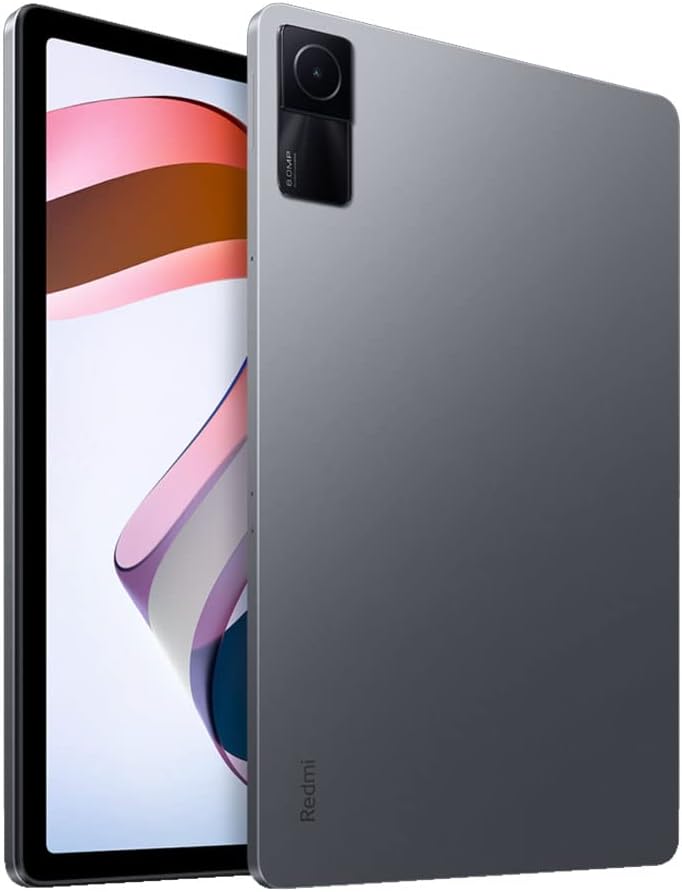
Aworan: Iwaju view of the Xiaomi Redmi Pad, showing the display and the location of the SIM/microSD card tray on the side.
Awọn ilana Iṣiṣẹ
Ifihan & Ohun
The Redmi Pad features a 10.61-inch IPS display with a resolution of 2000x1200 pixels and a 90Hz refresh rate, offering a smooth visual experience. It supports Dolby Atmos audio through its quad speakers, providing immersive sound for media consumption.
- Ifihan: 10.61-inch, 2000x1200 resolution, 90Hz refresh rate, 400 nits (typ) brightness.
- Ohun: Quad speakers with Dolby Atmos support for rich sound.
Fídíò: Àtúnyẹ̀wò pípé kanview of the Xiaomi Redmi Pad, highlighting its display quality, audio performance, and overall user experience.
išẹ & ere
Powered by the MediaTek Helio G99 Octa-core processor, the Redmi Pad delivers smooth performance for daily tasks and medium-graphic gaming. It is available with 3GB, 4GB, or 6GB of RAM and 64GB or 128GB of storage, expandable via microSD card.
- Olupilẹṣẹ: MediaTek Helio G99 Octa-core.
- Ramu: 3GB, 4GB, or 6GB options.
- Ibi ipamọ: 64GB or 128GB, expandable via microSD.
Video: A detailed comparison between the Redmi Pad and Samsung Galaxy Tab S6 Lite 2022, focusing on performance, display, and overall value for money.
Sọfitiwia & Awọn imudojuiwọn
The tablet runs MIUI 13 based on Android 12. Xiaomi promises two major Android updates and three years of security updates, ensuring your device remains up-to-date and secure.
- Eto isesise: Android 12 with MIUI 13.
- Awọn imudojuiwọn: Two major Android updates and three years of security updates.
Kamẹra
The Redmi Pad is equipped with an 8MP rear camera and an 8MP front camera (105° FOV with FocusFrame). Both cameras are suitable for casual photography, video calls, and document scanning.
- Kamẹra Tẹhin: 8MP, Full HD Video Recording.
- Kamẹra iwaju: 8MP (FOV - 105°), ideal for video calls.

Aworan: Pada view of the Xiaomi Redmi Pad, showcasing the single 8MP rear camera module.
Igbesi aye batiri
With an 8000mAh battery, the Redmi Pad offers extended usage times, making it suitable for long commutes or entertainment sessions. It supports 18W fast charging.
- Agbara Batiri: 8000mAh.
- Gbigba agbara: 18W fast charging.
Itoju
- Ninu: Lo asọ ti ko ni lint lati nu iboju ati ara. Yẹra fun awọn kẹmika lile.
- Awọn imudojuiwọn sọfitiwia: Ṣayẹwo nigbagbogbo fun ati fi awọn imudojuiwọn eto sori ẹrọ lati rii daju iṣẹ ṣiṣe ati aabo to dara julọ.
- Isakoso Ibi ipamọ: Lokọọkan ko ṣe pataki files and apps to free up storage space and improve device speed.
- Itọju Batiri: Avoid extreme temperatures and fully draining the battery frequently to prolong its lifespan.
Laasigbotitusita
- Ohun elo Ko dahun: If the tablet becomes unresponsive, press and hold the Power button for about 10 seconds to force a restart.
- Awọn ọran Asopọmọra Wi-Fi: Try restarting your Wi-Fi router and the tablet. If the issue persists, forget the network in Wi-Fi settings and reconnect.
- Awọn ijamba App: Clear the cache and data of the problematic app in Settings > Apps. If it continues, uninstall and reinstall the app.
- Iṣẹ ṣiṣe ti o lọra: Close background apps, clear cache, and ensure sufficient free storage. Consider a factory reset as a last resort (back up your data first).
- Olubasọrọ Support: For persistent issues, refer to the Xiaomi support webojula tabi olubasọrọ onibara iṣẹ.
Awọn pato ọja
| Ẹya ara ẹrọ | Sipesifikesonu |
|---|---|
| Brand | XIAOMI |
| Orukọ awoṣe | Redmi Paadi |
| Nọmba awoṣe | L83 |
| Iwon iboju | 10.61 inches |
| Ipinnu Ifihan | 2000x1200 |
| Iṣafihan Oṣuwọn Sọtuntun | 90 Hz |
| isise | MediaTek Helio G99 Octa-core (2.2 GHz) |
| Ramu Memory | 4 GB (available in 3GB, 4GB, 6GB variants) |
| Agbara ipamọ | 128 GB (available in 64GB, 128GB variants) |
| Eto isesise | Android 12 (MIUI 13) |
| Kamẹra ẹhin | 8 MP |
| Kamẹra iwaju | 8 MP (105° FOV) |
| Agbara Batiri | 8000 mAh |
| Asopọmọra | Wi-Fi 5, Bluetooth v5.3, USB-C |
| Ohun | Awọn Agbọrọsọ Quad, Dolby Atmos ni atilẹyin |
Atilẹyin ọja & Atilẹyin
The Xiaomi Redmi Pad L83 comes with a limited warranty. For detailed warranty terms and conditions, please refer to the warranty card included in the box or visit the official Xiaomi support webojula.
For technical support, troubleshooting assistance, or service requests, please contact Xiaomi customer support through their official channels.