
1. Ifihan
Thank you for choosing the Voktta Battery Capacity Voltage Meter. This device is designed to accurately monitor your battery's capacity, voltage, and temperature, providing essential data for various applications. It features a clear display, alarm functions, and broad compatibility with different battery types. Please read this manual thoroughly before installation and operation to ensure correct usage and optimal performance.
2. Awọn ẹya Ọja
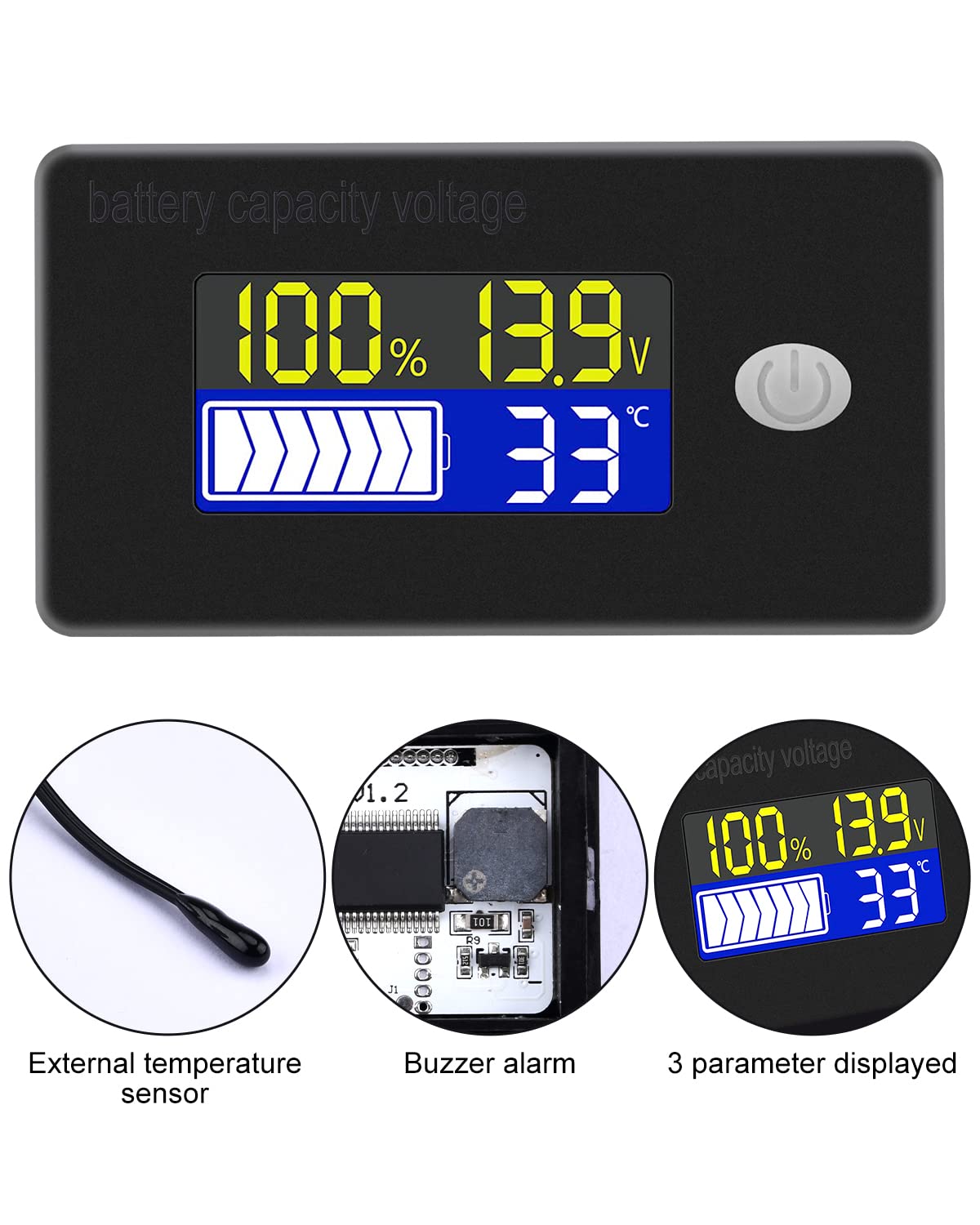
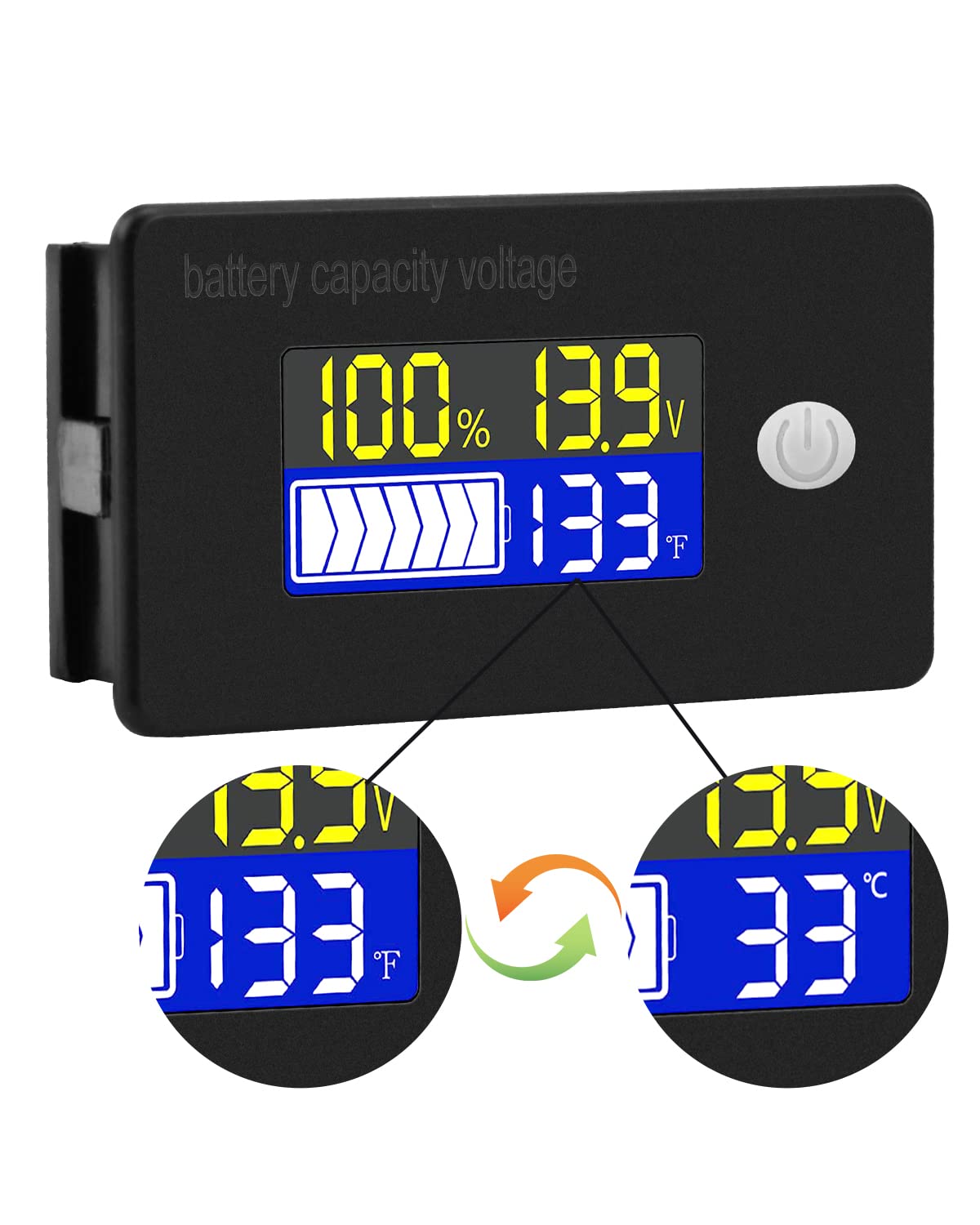
- Ìfihàn alápọ̀lọpọ̀: Simultaneously shows battery capacity percentage, voltage, and temperature (Celsius or Fahrenheit).
- Ààbò Alápọ̀: Equipped with a protective cover, dustproof and waterproof surface, and reverse input connection protection.
- External Temperature Sensor & Buzzer: Includes an external temperature sensor for accurate readings and an internal buzzer for high/low voltage and over-temperature alarms.
- Six Programmable Modes: Allows setting battery type, delay for ultra-low power mode, adjusting battery percentage limits, activating undervoltage alarm and threshold, activating temperature alarm, and voltage odiwọn.
- Ibamu Batiri gbooro: Compatible with 12V, 24V, 36V, 48V, 60V, 72V, 84V lead-acid batteries, lithium-ion batteries, polymer lithium-ion batteries, 3-15 series lithium-ion batteries, water batteries, and lithium iron phosphate batteries.
- Ohun elo gbooro: Suitable for use in jet skis, golf carts, RVs, lawnmowers, aquariums, DIY solar generators, and other systems requiring battery monitoring.
3. Package Awọn akoonu
Jọwọ ṣayẹwo package fun awọn nkan wọnyi:
- Voktta Battery Capacity Voltage Mita
- Connection Wires (Red for positive, Black for negative)
- Sensọ otutu ita
- Afowoyi Olumulo (iwe-ipamọ yii)

4. Alaye Aabo
- Nigbagbogbo ge asopọ agbara ṣaaju fifi sori ẹrọ tabi ṣiṣẹ ẹrọ naa.
- Ensure correct polarity when connecting the wires (Red to positive, Black to negative) to prevent damage to the meter and battery.
- Do not exceed the specified operating voltage ibiti (10-100V).
- Keep the device away from extreme temperatures, moisture, and corrosive environments.
- Ma ṣe gbiyanju lati tunto tabi yi ẹrọ naa pada. Tọkasi gbogbo iṣẹ si oṣiṣẹ oṣiṣẹ.
5. Ọja Ipariview
The Voktta Battery Capacity Voltage Meter features a compact design with a clear LCD display and a single control button. The external temperature sensor provides accurate ambient or battery temperature readings.

6. Fifi sori ẹrọ ati Wiring
Tẹle awọn igbesẹ wọnyi fun fifi sori ẹrọ to dara:
- Iṣagbesori: Choose a suitable location for the meter, ensuring it is protected from direct impact and excessive vibration. The meter is designed for panel mounting.
- Asopọ agbara: Connect the red wire to the positive (+) terminal of your battery system and the black wire to the negative (-) terminal. Ensure a secure connection. The meter supports a wide voltage input ibiti o ti 10-100V.
- Asopọ Sensọ iwọn otutu: Plug the external temperature sensor into its designated port on the back of the meter. Position the sensor to measure the desired temperature (e.g., near the battery for battery temperature, or in the environment for ambient temperature).

7. Ni ibẹrẹ Oṣo
After connecting the meter, you may need to configure it for your specific battery type and preferences.
7.1 Agbara Tan / Pa
Press the power button (usually located on the front panel) to turn the device on or off.

7.2 Eto Batiri Iru
The meter supports various battery types. Refer to the detailed programming instructions (often accessed by holding the power button or a dedicated 'SET' button) to select the correct battery chemistry and voltage configuration (e.g., 3S Lithium, 12V Lead-Acid).

8. Awọn ilana Iṣiṣẹ
Once powered on and configured, the meter will display real-time battery information.
8.1 Ifihan Awọn ipo
The display typically shows battery capacity percentage, lọwọlọwọ voltage, and temperature. Some models allow switching between Celsius and Fahrenheit for temperature display.
8.2 Awọn iṣẹ itaniji
The internal buzzer will activate if the battery voltage falls below the set low voltage threshold, exceeds the high voltage threshold, or if the temperature goes beyond the set limits. This provides an audible warning for critical conditions.
9. To ti ni ilọsiwaju iṣeto ni
The meter offers several programmable modes for fine-tuning its operation. Access these modes by following the specific button press sequences outlined in the full product documentation (if provided separately) or by holding the main button for an extended period.
- Battery Type Setting: Configure the meter for your specific battery chemistry and cell count (e.g., LiFePO4, Li-ion, Lead-Acid, 3S, 4S, etc.).
- Ultra-Low Power Mode Delay: Set a delay (10s, 20s, 30s, 60s, 120s adjustable) before the meter enters a low power consumption state to conserve energy.
- Batiri Percentage Awọn ifilelẹ: Adjust the upper and lower voltage thresholds that correspond to 100% and 0% battery capacity for accurate percentage ifihan.
- Undervoltage Itaniji: Activate and set the specific voltage threshold (e.g., 10.5V to 60.0V) at which the low voltage alarm will trigger.
- Itaniji lori-otutu: Activate and set the temperature threshold (e.g., 0°C to 79°C or 0°F to 179°F) at which the over-temperature alarm will trigger.
- Voltagati Iṣatunṣe: Ṣe voltage calibration to ensure the most accurate readings.
10. Awọn pato
| Paramita | Iye |
|---|---|
| Brand | Voktta |
| Nọmba awoṣe | B0BHSSKRVP |
| Awọn ọna Voltage | 10-100V |
| Ṣiṣẹ lọwọlọwọ | 8-10mA |
| Lilo Agbara (Ipo Orun) | 15-20uA |
| Voltage Yiye | ±0.1% ~ ±0.5% |
| Yiye iwọn otutu | ±0.5℃ ~ ±1℃ (built-in standard, external 30cm probe) |
| Iwọn otutu | -19~80℃ / 0~179℉ |
| Over-temperature Alarm Setting | 0~79℃ / 0~179℉ |
| Kekere Voltage Eto Itaniji | 10.5 ~ 60.0V |
| Iwọn didun Buzzer | 60 ~ 80dB |
| Awọn iwọn otutu ti nṣiṣẹ | -10 ~ 65 ℃ |
| Àwọ̀ | Dudu |
| Ibamu | CE, IP67, RoHS |
| Orisi wiwọn | Voltmeter |
11. Laasigbotitusita
If you encounter issues with your Voktta Battery Capacity Voltage Meter, refer to the following common problems and solutions:
- Ko si Ifihan:
- Check power connections: Ensure red wire is connected to positive and black to negative, and connections are secure.
- Daju batiri voltage: Jẹrisi awọn batiri voltage is within the 10-100V operating range.
- Awọn kika ti ko pe:
- Voltage/Agbara: Ensure the correct battery type and voltage configuration are set in the meter's settings. Perform voltage calibration if available.
- Iwọn otutu: Check if the external temperature sensor is properly connected and positioned.
- Alarm Constantly Triggering:
- Review alarm thresholds: Adjust the low voltage, oke voltage, or over-temperature alarm settings to appropriate levels for your battery and application.
- Check battery health: A constantly triggering low voltage alarm might indicate a failing battery.
- Awọn bọtini Ko dahun:
- Power cycle the device: Turn the meter off and then on again.
- Rii daju pe ko si idoti ti n ṣe idiwọ awọn bọtini.
12. Itọju
To ensure the longevity and accurate operation of your Voktta Battery Capacity Voltage Meter, follow these maintenance guidelines:
- Ninu: Use a soft, dry cloth to clean the display and housing. Do not use abrasive cleaners or solvents.
- Awọn isopọ: Lokọọkan ṣayẹwo gbogbo awọn asopọ onirin lati rii daju pe wọn wa ni aabo ati ominira lati ipata.
- Idaabobo Ayika: While the device has some dust and water resistance (IP67), avoid prolonged exposure to harsh weather conditions or direct water immersion.
- Ibi ipamọ: If storing the device for an extended period, disconnect it from the power source and store it in a cool, dry place.
13. Atilẹyin
For any questions, technical assistance, or if you encounter issues not covered in this manual, please contact Voktta customer support. We are committed to providing assistance to resolve any problems you may experience.
Àwọn ìwífún ìbáṣepọ̀ ni a lè rí lórí àpótí ọjà tàbí lórí ilé ìtajà náà. webaaye ti o ti ra ọja naa.