
1. Ifihan
The TTArtisan 50mm F1.4 Tilt Manual Lens is a full-frame lens designed for Sony E-Mount mirrorless cameras. This lens features a large F1.4 aperture and a unique tilt mechanism, allowing for creative control over the plane of focus and depth of field. It is ideal for achieving miniature effects, selective focus, and artistic blur in photography and videography.
The lens is constructed with a durable full metal body and optimized focus and aperture rings for smooth manual operation, including compatibility with cine lens accessories like focus followers.
2. Ọja Ipariview
Familiarize yourself with the components of your TTArtisan 50mm F1.4 Tilt Manual Lens.

Figure 2.1: The TTArtisan 50mm F1.4 Tilt Manual Lens, showcasing awọn oniwe-logan oniru.

olusin 2.2: Top-isalẹ view of the lens, highlighting the focus and aperture rings.

Figure 2.3: Close-up of the tilt lock mechanism, used to secure the lens at a desired tilt angle.

Figure 2.4: Close-up of the rotation lock mechanism, allowing the lens to rotate for different tilt directions.

Figure 2.5: The included metal lens cap, providing protection for the front element.

Figure 2.6: Detail of the full metal body construction, ensuring durability and a premium feel.
3. Eto
3.1 So awọn lẹnsi
- Ensure your camera is turned off before attaching or detaching any lens.
- Mú àmì pupa tó wà lórí àgbá lẹ́nsì náà pọ̀ mọ́ àmì pupa tó bá a mu lórí àgbá lẹ́nsì kámẹ́rà rẹ.
- Fi lẹ́nsì náà sínú àsopọ̀ kámẹ́rà náà pẹ̀lú ìrọ̀rùn kí o sì yí i padà sí ọwọ́ ọ̀tún títí tí yóò fi tẹ ibi tí ó wà. Má ṣe fipá mú lẹ́nsì náà.
3.2 Camera Settings for Manual Lenses
Since this is a manual lens with no electronic contacts, your camera will not automatically detect the aperture or focal length. You must enable the 'Release without Lens' or 'Shoot without Lens' option in your camera's menu. Refer to your camera's instruction manual for specific steps.
It is recommended to shoot in Manual (M) or Aperture Priority (A) mode for full control over exposure.

Figure 3.1: The TTArtisan 50mm F1.4 Tilt Manual Lens correctly mounted on a Sony E-Mount camera body.
4. Awọn ilana Iṣiṣẹ
4.1 Àfiyèsí Ọwọ́
The lens features a smooth focus ring. Rotate the focus ring to adjust the focus distance. Utilize your camera's focus peaking or magnification assist features for precise focusing, especially with the shallow depth of field at F1.4.
4.2 Iṣakoso Afara
The aperture ring is located near the front of the lens. Rotate this ring to select your desired aperture (F1.4 to F16). A larger aperture (smaller f-number) allows more light and creates a shallower depth of field, while a smaller aperture (larger f-number) reduces light and increases depth of field.
4.3 Using the Tilt Function
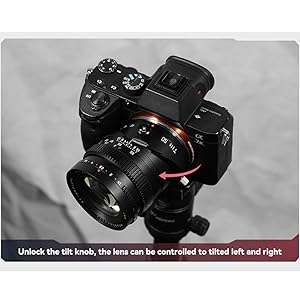
The tilt mechanism allows you to shift the plane of focus, creating unique effects such as the 'miniature' or 'diorama' look, or extending the depth of field along a specific plane.
- Unlock Tilt: Locate the tilt lock knob (refer to Figure 2.3) and loosen it to allow the lens to tilt.
- Ṣatunṣe Igun Titẹ: Gently tilt the lens up to 8 degrees in any direction. Observe the effect through your camera's viewoluwari tabi LCD iboju.
- Lock Tilt: Once the desired tilt angle is achieved, tighten the tilt lock knob to secure the lens position.
- Rotate Tilt Axis: The lens can also rotate 0°-490° to change the direction of the tilt effect. Loosen the rotation lock knob (refer to Figure 2.4), rotate the lens to the desired orientation, and then tighten the lock knob.

Figure 4.1: Demonstrates how the tilt function can alter the plane of focus, bringing multiple subjects into sharpness.

Figure 4.2: Illustrates the partial focus function, where only a specific area remains sharp while others are blurred.
olusin 4.3: Example of the miniature effect achievable with the tilt function, transforming a scene into a small-scale model.
5. Itọju
Proper care and maintenance will prolong the life and performance of your lens.
- Ninu: Use a soft, lint-free cloth or a lens brush to remove dust from the lens surfaces. For smudges, use a specialized lens cleaning solution and a microfiber cloth. Avoid touching the glass elements directly with your fingers.
- Ibi ipamọ: When not in use, store the lens with both front and rear caps attached in a dry, cool place, away from direct sunlight and extreme temperatures. Consider using a dehumidifying cabinet if you live in a humid environment.
- Mimu: Always handle the lens by its barrel, not by the glass elements. Avoid dropping or subjecting the lens to strong impacts.
6. Laasigbotitusita
6.1 Camera Not Recognizing Lens / Shutter Not Releasing
As a manual lens, it lacks electronic contacts to communicate with the camera body. If your camera does not recognize the lens or the shutter will not release:
- Ojutu: Navigate to your camera's menu and enable the 'Release without Lens' or 'Shoot without Lens' option. This setting allows the camera to operate even when no electronic lens is detected.
6.2 Images Are Too Dark or Too Bright
Since aperture is set manually on the lens, and exposure is not automatically controlled by the camera:
- Ojutu: Adjust your camera's shutter speed and ISO settings to achieve correct exposure. In Aperture Priority (A) mode, the camera will automatically set the shutter speed based on your chosen aperture and ISO. In Manual (M) mode, you control all three parameters.
6.3 Difficulty Achieving Sharp Focus
Manual focusing can be challenging, especially with a large aperture:
- Ojutu: Utilize your camera's built-in focusing aids such as focus peaking (highlights in-focus areas) and magnification assist (zooms into the image for precise focusing). Practice is key to mastering manual focus.
7. Awọn pato
| Brand | TTARTISAN |
| Orukọ awoṣe | 50mm F1.4 Tilt Manual Lens |
| Ifojusi Gigun | 50mm |
| O pọju Iho | F1.4 |
| Iboju Kere | F16 |
| Lẹnsi Iru | Tilt Shift |
| Awọn iṣagbesori ibaramu | Sony E-Mount (Full Frame) |
| Àlẹmọ Iwon | 62mm |
| Ijinna Idojukọ to sunmọ | 0.5m |
| Awọn abẹfẹlẹ diaphragm | 12 |
| Optical Design | 7 eroja ni 6 awọn ẹgbẹ |
| Igun ti View | Awọn iwọn 45 |
| Iwọn | Isunmọ. 452g |
| Titẹ Igun | Awọn iwọn 8 |
| Igun Yiyi | 0°-490° |
| Idojukọ Iru | Idojukọ Afowoyi |
8. Atilẹyin ọja ati Support
8.1 atilẹyin ọja Alaye
This TTArtisan lens comes with a 1-odun atilẹyin ọja from the date of purchase. This warranty covers manufacturing defects and workmanship under normal use. It does not cover damage caused by misuse, accidents, unauthorized modifications, or improper storage.
8.2 Onibara Support
For technical assistance, warranty claims, or any questions regarding your TTArtisan 50mm F1.4 Tilt Manual Lens, please contact TTArtisan customer support through their official website or the retailer from whom you purchased the product. Please have your proof of purchase and product serial number available when contacting support.