
Ọrọ Iṣaaju
This manual provides essential information for the safe and efficient operation of your Saba SA40S77A11 40-inch Full HD Smart Android TV. Please read these instructions carefully before using the product and retain them for future reference. This television combines Full HD resolution with the Android 11 operating system, offering integrated smart features like Chromecast and Airplay, along with versatile connectivity options.
Alaye Aabo pataki
Always observe the following safety precautions to prevent electric shock, fire, or damage to the television.
- Ma ṣe fi TV han si ojo tabi ọrinrin.
- Ma ṣii TV casing; tọka gbogbo iṣẹ si oṣiṣẹ ti o peye.
- Rii daju pe fentilesonu to dara ni ayika TV. Ma ṣe dina awọn ṣiṣi atẹgun.
- Gbe TV sori iduro, ipele ipele lati ṣe idiwọ lati ja bo.
- Dabobo okun agbara lati rin lori tabi pinched.
- Yọ TV kuro lakoko iji manamana tabi nigbati a ko lo fun igba pipẹ.
- Keep small objects and liquids away from the TV to prevent them from entering the unit.
Package Awọn akoonu
Rii daju pe gbogbo awọn nkan wa ninu apoti:
- Saba SA40S77A11 40-inch Full HD Smart Android TV
- Remote Control (with 2x AAA 1.5V batteries)
- Mini AV Adapter Cable
- Okun agbara
- TV Stand (if not pre-assembled)
- Afowoyi Olumulo (iwe-ipamọ yii)
Ṣeto
1. So Iduro naa pọ (Aṣayan)
If your TV stand is not pre-assembled, carefully attach it to the bottom of the television using the provided screws. Ensure the TV is placed face down on a soft, clean surface to prevent screen damage during this process.

Aworan: Iwaju view of the Saba SA40S77A11 TV with its silver stand attached, ready for placement.
Alternatively, the TV can be wall-mounted using a compatible VESA mount (sold separately). Refer to the wall mount's instructions for installation.
2. Asopọmọra Agbeegbe
So awọn ẹrọ ita rẹ pọ mọ awọn ibudo ti o yẹ ni ẹhin tabi ẹgbẹ ti TV.
- HDMI: Fun awọn ẹrọ orin Blu-ray, awọn afaworanhan ere, awọn apoti ṣeto-oke, ati bẹbẹ lọ.
- USB: For USB drives to play media or connect compatible accessories.
- Antenna/Cable: Connect an antenna or cable TV signal for DVB-T2/S2/C reception.
- Àjọlò: Fun asopọ intanẹẹti ti a firanṣẹ.
- Kekere AV: Use the provided adapter cable for older analog devices.

Aworan: Apa view of the Saba SA40S77A11 TV, illustrating the various input and output ports for connecting external devices.
3. Agbara Titan ati Eto Ibẹrẹ
After connecting all necessary cables, plug the power cord into an electrical outlet. Press the power button on the remote control or on the TV itself.
The first time you turn on the TV, a setup wizard will guide you through initial configurations:
- Aṣayan ede: Yan ede ti o fẹ julọ.
- Isopọ nẹtiwọki: Connect to your Wi-Fi network or use an Ethernet cable for internet access.
- Akọọlẹ Google: Wọlé pẹ̀lú àkọọ́lẹ̀ Google rẹ láti wọlé sí Google Play Store àti àwọn ẹ̀yà Android TV mìíràn.
- Iwoye ikanni: Scan for available digital TV channels (DVB-T2/S2/C).
Awọn ilana Iṣiṣẹ
1. Latọna jijin Iṣakoso Loriview
The remote control allows you to navigate the TV's interface and control various functions. Common buttons include:
- Agbara: Tan TV si tan tabi paa.
- Iṣawọle: Yan orisun titẹ sii (HDMI, AV, TV).
- Lilọ kiri (Sókè/Sàn/Òsì/Ọ̀tún) & Ó DÁRA: Fun lilọ kiri akojọ aṣayan ati yiyan.
- Iwọn didun (+/-): Ṣe atunṣe ipele iwọn didun.
- Ikanni (P+/P-): Ayipada TV awọn ikanni.
- Ile: Pada si iboju ile Android TV.
- Pada: Pada si iboju iṣaaju tabi akojọ aṣayan.
- Oluranlọwọ Google: Mu iṣakoso ohun ṣiṣẹ.
2. Smart Android TV Features
Your Saba TV runs on Android 11, providing access to a wide range of smart features.

Image: The Saba SA40S77A11 TV screen showing the Android TV home interface with various streaming app icons and content recommendations.
- Google Play itaja: Download and install your favorite streaming apps, games, and utilities.
- Chromecast ti a ṣe sinu: Cast content (videos, photos, music) from your compatible smartphone, tablet, or computer directly to the TV.
- Ofurufu: Stream content from Apple devices to your TV.
- Iṣakoso ohun: Use the Google Assistant button on your remote to search for content, control smart home devices, and get information using voice commands.
3. Aṣayan Orisun Input
Press the "Input" button on your remote control to cycle through available input sources (e.g., HDMI 1, HDMI 2, AV, TV Tuner). Select the desired source for your connected device.
Itoju
1. Ninu TV
- Yọọ TV nigba gbogbo ṣaaju ṣiṣe mimọ.
- Lo asọ ti o gbẹ lati nu iboju ati minisita.
- Fun abori aami lori iboju, sere dampen awọn asọ pẹlu omi tabi a specialized iboju regede. Maṣe fun omi sokiri taara sori iboju.
- Yago fun lilo abrasive ose, waxes, tabi epo.
2. Software imudojuiwọn
Android TV rẹ le gba awọn imudojuiwọn sọfitiwia lorekore lati mu ilọsiwaju ṣiṣẹ ati ṣafikun awọn ẹya tuntun. Rii daju pe TV rẹ ti sopọ si intanẹẹti lati gba awọn imudojuiwọn wọnyi. O le nigbagbogbo ṣayẹwo fun awọn imudojuiwọn ninu awọn TV ká eto akojọ labẹ "Nipa" tabi "System Update."
Laasigbotitusita
Ti o ba pade awọn iṣoro pẹlu TV rẹ, tọka si awọn ọran ti o wọpọ ati awọn ojutu wọnyi:
| Isoro | Owun to le Solusan |
|---|---|
| Ko si agbara | Ṣayẹwo boya okun agbara ti wa ni edidi ni aabo sinu TV ati iṣan ogiri. Gbiyanju iṣan ti o yatọ. Rii daju pe awọn batiri isakoṣo latọna jijin ko dinku. |
| Ko si aworan, ṣugbọn ohun wa | Ensure the correct input source is selected. Check cable connections (HDMI, AV). Try restarting the TV. |
| Ko si ohun, ṣugbọn aworan wa | Check the volume level and ensure the TV is not muted. Verify audio settings in the TV menu. Check external audio device connections if applicable. |
| Ifiranṣẹ "Ko si ifihan agbara" | Verify the antenna/cable connection. Ensure the correct input source is selected. Perform a channel scan if using the TV tuner. |
| Ko le sopọ si Wi-Fi | Rí i dájú pé ráútà Wi-Fi rẹ wà nílẹ̀, ó sì ń ṣiṣẹ́. Tún tẹ ọ̀rọ̀ ìpamọ́ Wi-Fi náà. Gbìyànjú láti tún TV àti ráútà náà bẹ̀rẹ̀. |
| Isakoṣo latọna jijin ko ṣiṣẹ | Rọpo awọn batiri. Rii daju pe ko si awọn idena laarin isakoṣo latọna jijin ati sensọ IR ti TV. |
Awọn pato
Below are the technical specifications for the Saba SA40S77A11 TV:
| Ẹya ara ẹrọ | Ẹ̀kúnrẹ́rẹ́ |
|---|---|
| Brand | Saba |
| Nọmba awoṣe | SA40S77A11 |
| Iwon iboju | 40 inches (aguntan 100.3 cm) |
| Ifihan ọna ẹrọ | LED |
| Ipinnu | 1920 x 1080 (HD ni kikun) |
| Eto isesise | Android 11 |
| Oṣuwọn sọtun | 60 Hz |
| Asopọmọra | Wi-Fi, Ethernet, Bluetooth, HDMI, USB |
| Pataki Awọn ẹya ara ẹrọ | Flat screen, Chromecast, Airplay |
| Lapapọ Awọn ibudo USB | 1 |
| Awọn irinše to wa | Mini AV adapter cable, Remote control with 2x AAA 1.5V batteries |
| Awọn iwọn Ọja (DxWxH) | 22.9 x 89.8 x 56.8 cm |
| Kilasi Ṣiṣe Agbara Agbara (SDR) | G |
| Lilo Agbara (SDR) | 47.0 W / 1000h |
| Lilo Agbara (Iduro-ṣinṣin) | 0.4 W |
| Minimum Software Updates Guaranteed Until | Alaye ko si |
| Minimum Spare Parts Availability | Alaye ko si |

Image: EU Energy Label for the Saba SA40S77A11 TV, showing energy efficiency class G and power consumption of 47 kWh/1000h.
Fun alaye diẹ sii, ṣabẹwo si Database database EPREL.
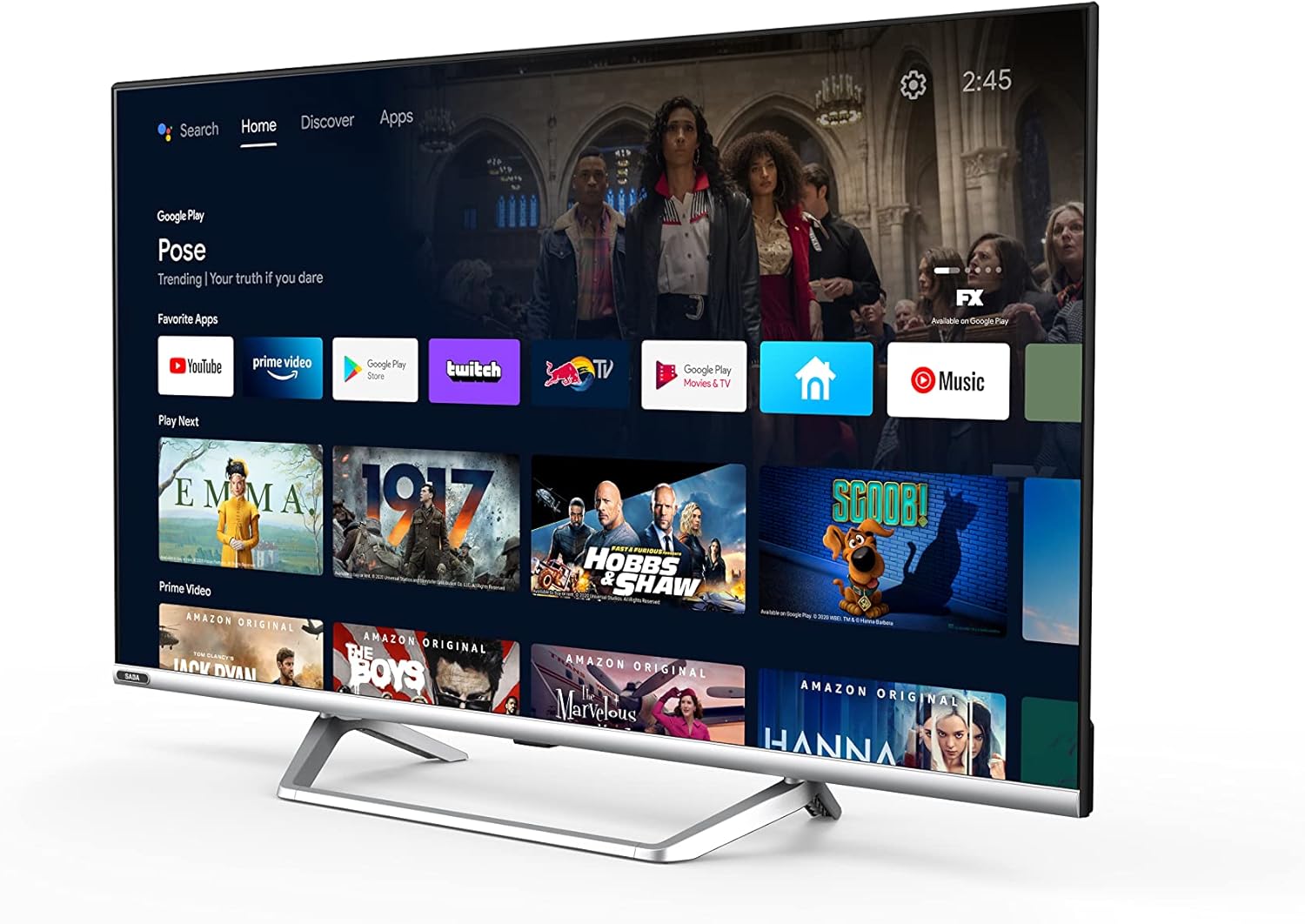
Image: Official product information sheet for the Saba SA40S77A11 TV, detailing various technical parameters and energy consumption data.
Atilẹyin ọja ati Support
The manufacturer provides a minimum general warranty period of ọdun meji 2 for this product. For specific warranty terms and conditions, please refer to the warranty card included with your product or contact the retailer where the TV was purchased.
For technical support, troubleshooting beyond this manual, or inquiries regarding spare parts and software updates, please contact Saba customer service or your local dealer. Information regarding the guaranteed availability of spare parts and software updates is not explicitly provided in the product specifications.