Ọrọ Iṣaaju
This manual provides detailed instructions for the installation, operation, and maintenance of your SEAOURA LED Aquarium Light with Timer, Model SR-619. Please read this manual thoroughly before use to ensure proper function and safety.
Alaye Aabo
- Ensure the power supply matches the light's voltage requirements (DC 20V).
- Do not operate the light if the power cord or plug is damaged.
- Always unplug the light before performing any maintenance or cleaning.
- Ọja yii jẹ apẹrẹ fun lilo aquarium nikan.
- Jeki kuro ni arọwọto awọn ọmọde.
- The light is IP68 waterproof and can be fully submerged. However, the controller and power adapter are not waterproof and must be kept dry.
Package Awọn akoonu
Jẹrisi pe gbogbo awọn ohun kan wa ninu package:
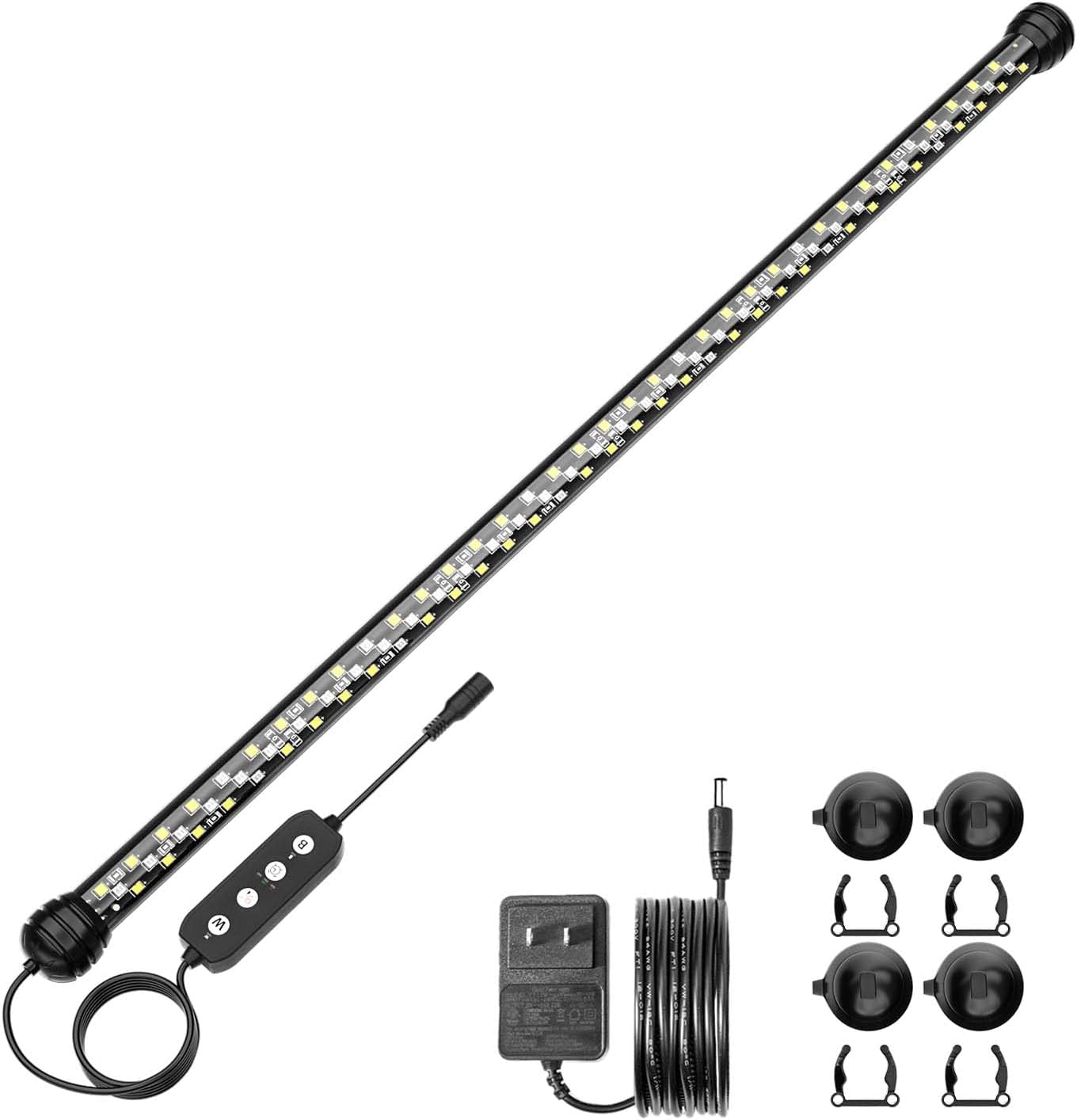
- SEAOURA LED Aquarium Light (Model SR-619, 22.8 inch)
- External Controller with Timer
- Adapter agbara
- Suction Cups (for mounting)
- Mounting Clips (for mounting)
Ọja Awọn ẹya ara ẹrọ
- Customizable Mode: Control duration (6h/10h/12h), brightness (10 levels), and colors (3 modes: White/Blue/Red/Green, White/Red/Green, or Blue only).
- IP68 Waterproof & Solid Fixation: Submersible 3-layer design with extra-large silicone suction cups for secure attachment to glass or acrylic walls, both inside and outside the aquarium.
- Optimal Full Spectrum: Combination of 6500K white, red, green, and blue lights for healthy plant and fish growth, with an 89% CRI for natural colors.
- Awọn LED Didara: Equipped with SMD2835 chips arranged in 3 rows for powerful, uniform illumination, with 10 adjustable brightness levels.
- Auto On/Off & Memory Functions: Daily programmable timer. Settings are retained after a power outage, and the timer restarts when power is restored. Features gradual 15-minute sunrise and sunset effects.
Ṣeto
- Attach Mounting Accessories: Secure the suction cups or clips to the ends of the light bar. The light is designed to be rotatable and movable within the clips for optimal positioning.
- Gbe Imọlẹ naa si:
- Submerged Installation: Press the suction cups firmly against the inside glass wall of your aquarium. Ensure the light is fully submerged for optimal performance and safety.
- Under Lid Installation: Attach the light to the underside of your aquarium lid using the clips or suction cups, ensuring it is securely fastened.
- Connect Controller and Power: Connect the light bar to the external controller, then connect the controller to the power adapter. Plug the power adapter into a suitable electrical outlet. Ensure the controller and power adapter are kept away from water.


Awọn ilana Iṣiṣẹ
The external controller allows you to manage the light's settings. Familiarize yourself with the buttons:
- "W" Button: Controls the White/Red/Green lighting mode.
- Power/Brightness Button: Turns the light On/Off and adjusts brightness levels.
- Bọtini Aago: Sets the daily lighting duration.
- "B" Button: Controls the Blue-only lighting mode.
Awọn ọna itanna
The light offers three primary color modes:
- White/Red/Green Mode: Provides a full spectrum for plant growth and vibrant fish colors. Activated via the "W" button.
- All Lights On Mode: Combines all available LEDs for maximum illumination.
- Blue Only Mode: Creates a moonlight effect, ideal for nighttime viewing. Activated via the "B" button.

Atunṣe Imọlẹ
Press the Power/Brightness button repeatedly to cycle through 10 levels of brightness (0% to 100%).
Aago Išė
The timer allows for automatic daily on/off cycles with gradual sunrise/sunset effects.
- Press the Timer button to select a duration: 6 hours, 10 hours, or 12 hours.
- The light will turn on at the set time each day and turn off after the selected duration.
- The light features a 15-minute gradual increase in brightness (sunrise effect) at the start of the cycle and a 15-minute gradual decrease (sunset effect) at the end.

Iranti Išė
Ni ọran ti agbara kan otage, the light will remember your last settings (mode, brightness, and timer) and resume operation automatically once power is restored. The timer cycle will restart from the point of power restoration.
Itoju
- Ninu: Nigbagbogbo nu ọpa ina pẹlu asọ, damp cloth to remove algae or mineral deposits. Ensure the light is unplugged before cleaning. Do not use abrasive cleaners.
- Awọn ife mimu: Periodically check the suction cups for secure attachment. If they lose suction, clean them and the aquarium surface thoroughly before reattaching.
- Okun Agbara: Inspect the power cord and adapter for any signs of damage. Replace immediately if damage is found.
Laasigbotitusita
| Isoro | Owun to le Fa | Ojutu |
|---|---|---|
| Imọlẹ ko tan. | Kò sí agbára, ìsopọ̀ tí ó dẹ́kun, adapter tí ó ní àbùkù. | Check power outlet. Ensure all connections are secure. Test with another adapter if available. |
| Ina flickers tabi dims lairotẹlẹ. | Unstable power, faulty connection, internal issue. | Check power supply. Ensure connections are tight. If problem persists, contact customer support. |
| Iṣẹ aago ko ṣiṣẹ ni deede. | Incorrect setting, power interruption. | Re-set the timer. Ensure continuous power supply. The memory function should restore settings after an outage. |
| Suction cups lose grip. | Idọti dada, awọn agolo afamora wọ. | Clean the aquarium glass and suction cups thoroughly. If cups are old or damaged, they may need replacement. |
Awọn pato
| Ẹya ara ẹrọ | Ẹ̀kúnrẹ́rẹ́ |
|---|---|
| Brand | SEAOURA |
| Nọmba awoṣe | SR-619 |
| Ọja Gigun | 22.8 inches (58 cm) |
| Approximate Overall Dimensions (L x W x H) | 3.05 x 17.78 x 3.05 cm |
| Iwọn | 363 g |
| Wattage | 12 Wattis |
| Iṣagbewọle Voltage | AC 100-240V |
| O wujade Voltage | DC 20V |
| Imọlẹ Orisun Orisun | LED (SMD2835 chips) |
| Iwọn otutu awọ | 6500 Kelvin (White LEDs) |
| Atọka Rendering Awọ (CRI) | 89.00 |
| Flux Imọlẹ | 1020 lm |
| Mabomire Rating | IP68 (light bar only) |
| Ohun elo | Ṣiṣu, ABS |
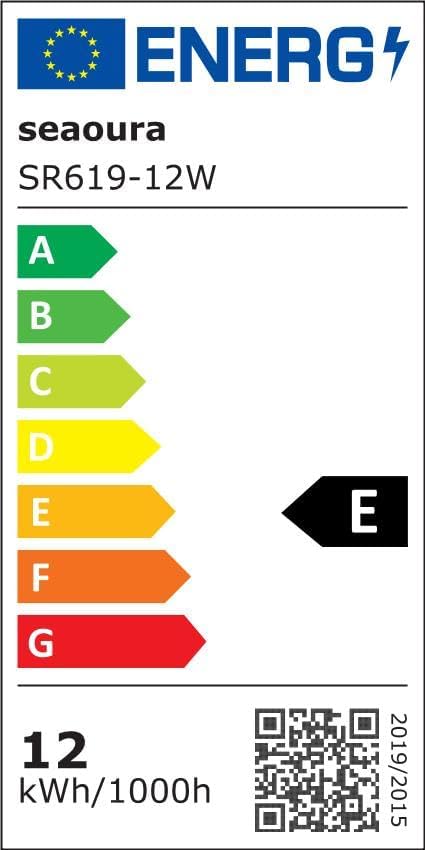
| Agbara Agbara Kilasi | E (View EPREL details) |

Atilẹyin ọja ati Support
For warranty information or technical support, please refer to the seller's contact information provided at the point of purchase or visit the official SEAOURA brand store on Amazon: SEAOURA Brand Store.
Jọwọ ṣe idaduro ẹri rira rẹ fun eyikeyi awọn ibeere atilẹyin ọja.