
1. Ifihan
This manual provides detailed instructions for the KOSPET Tank S2 Smart Watch. Please read this guide thoroughly to understand the watch's functions, setup procedures, and maintenance recommendations. Proper use ensures optimal performance and longevity of your device.

The KOSPET Tank S2 Smart Watch, showcasing its main display and rugged design.
2. Package Awọn akoonu
Jẹrisi pe gbogbo awọn ohun kan wa ninu package:
- 1x KOSPET Tank S2 Smart Watch
- 1x Okun gbigba agbara
- 1x Itọsọna olumulo
- 1x Tempered Film (Screen Protector)

Illustration of the KOSPET Tank S2 Smart Watch and its included accessories.
3. Key Awọn ẹya ara ẹrọ
- Military Standard Quality: Built to military standards, passed 15 military-grade tests for durability, wear resistance, and salt spray resistance. Features a third-generation Corning Gorilla screen.
- Built-in GPS & Navigation: Works with 6 Satellite Positioning Systems (L1 and L5 signals) for accurate activity tracking, planned route returns, and data sharing via the KOSPET FIT App.
- Altitude, Pressure & Compass: Includes an internal compass, altitude pressurization, and altimeter sensor to display current location altitude and barometric pressure.
- Ultra-light Body & AMOLED Display: Weighs 50 grams with a comfortable silicone strap. Features a 1.32-inch AMOLED display with 100% RGB color gamut, always-on mode, and high brightness for clear visibility.
- 5ATM & IP69K Waterproof: Seamless PC unibody design allows immersion up to 50m deep, suitable for swimming, diving, and surfing.
- 176 Sports Modes with Smart Recognition: Offers 176 sports modes, including smart recognition for walking, running, cycling, elliptical trainer, and others, automatically tracking your activity.
- Women's Health & Multifunctional: Provides 24H sleep tracking, heart rate, blood oxygen monitoring, and calorie tracking. Accurately tracks menstrual cycles. Includes Bluetooth calling, AI Voice control, remote photography, music control, alarm, sedentary reminder, weather forecast, and SOS.

The 1.32-inch AMOLED display offers vibrant colors and high resolution.

The watch is designed for water activities with 5ATM and IP69K waterproof ratings.
4. Eto Itọsọna
4.1. Ngba agbara Watch
Before first use, fully charge your KOSPET Tank S2 Smart Watch using the provided magnetic charging cable. Align the charging pins with the contacts on the back of the watch until it snaps into place.
4.2. App sori
Download the 'KOSPET FIT' app from the Google Play Store (for Android devices) or the Apple App Store (for iOS devices).
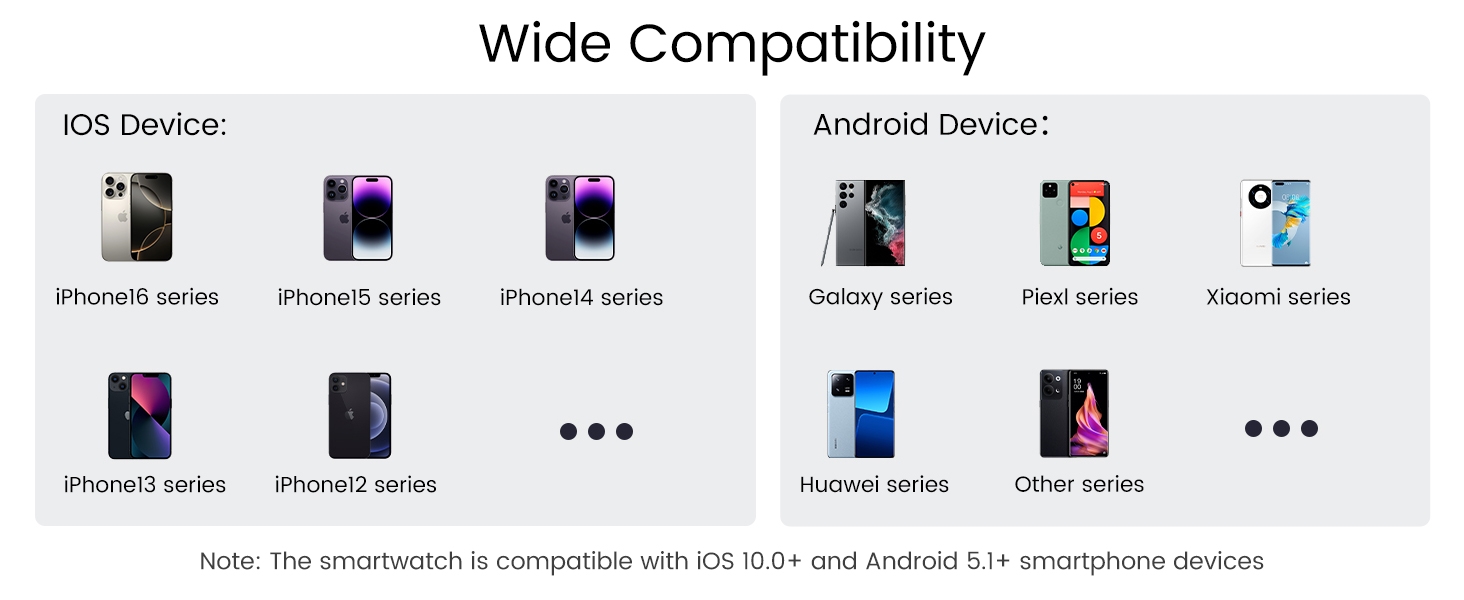
Visual guide for connecting the smartwatch to your phone.
4.3. Sopọ pẹlu Foonu Rẹ
- Rii daju pe Bluetooth foonu rẹ ti wa ni titan.
- Open the 'KOSPET FIT' app.
- Go to 'Device' and tap 'Add a new device'.
- Select your KOSPET Tank S2 from the list of available devices and confirm pairing on both the app and the watch.
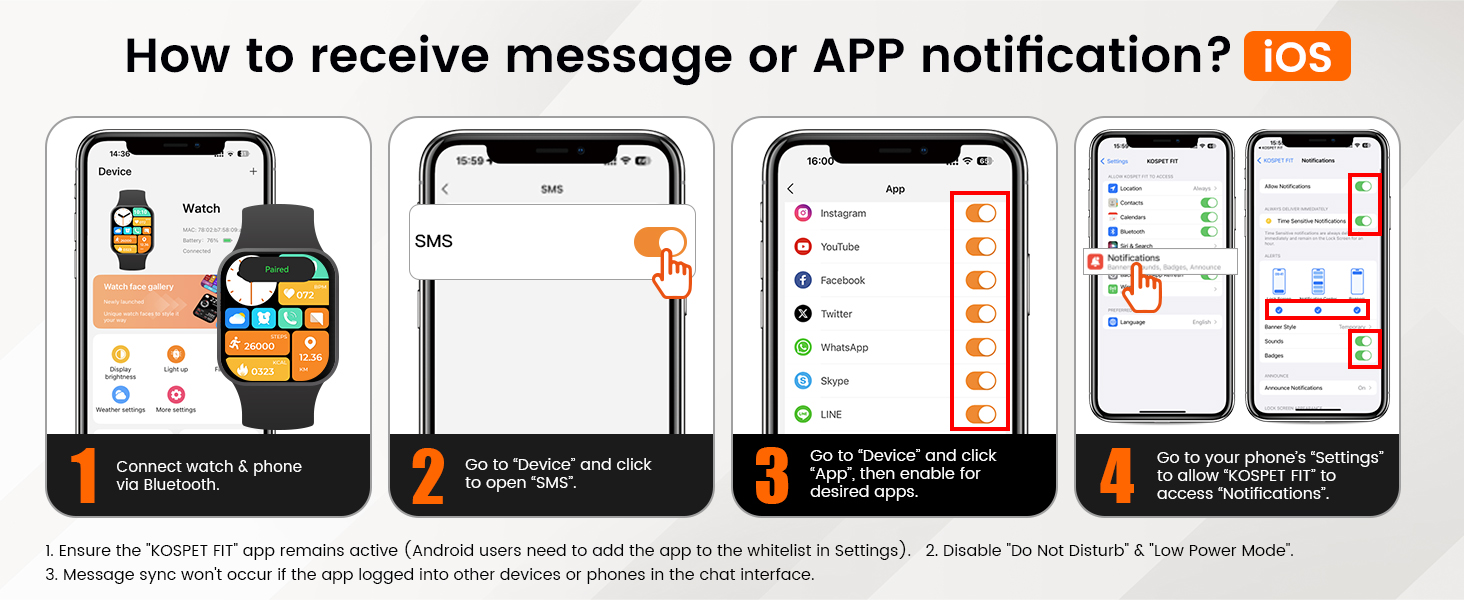
4.4. Receiving Notifications (iOS)
- Connect your watch and phone via Bluetooth.
- In the 'KOSPET FIT' app, go to 'Device' and tap 'SMS' to enable SMS notifications.
- In the app, go to 'Device' and tap 'App', then enable notifications for desired applications.
- Go to your phone's 'Settings' > 'Bluetooth' > 'KOSPET FIT' > 'Allow Notifications' to grant access.

Configuring notifications for iOS devices.
4.5. Receiving Notifications (Android)
- Connect your watch and phone via Bluetooth.
- In the 'KOSPET FIT' app, go to 'Device' and tap 'SMS Reminder' to enable SMS notifications.
- Allow 'KOSPET FIT' to access notifications when prompted.
- In the app, go to 'Device' and tap 'App Reminder', then enable notifications for desired applications.
Configuring notifications for Android devices.
5. Awọn ilana Iṣiṣẹ
5.1. Fihan ati Awọn Oju Agogo
The 1.32-inch AMOLED display supports an always-on mode. Swipe left/right or up/down to navigate through menus and features. Customize your watch face from over 200 styles available in the KOSPET FIT app or directly on the watch.
5.2. Awọn ipo ere idaraya
The watch offers 176 sports modes. It features smart recognition for 6 common activities (walking, running, cycling, elliptical trainer, etc.), automatically starting tracking when detected. Access specific sports modes from the main menu to track your workouts.

The watch supports over 170 sports modes with smart recognition.
5.3. Abojuto Ilera
- Oṣuwọn Ọkàn: 24-hour continuous heart rate monitoring.
- Atẹgun ẹjẹ: Ṣe àkíyèsí ipele atẹ́gùn nínú ẹ̀jẹ̀ rẹ.
- Titele orun: Awọn orin orun stages (deep, light, REM) and provides analysis via the app.
- Ilera Awọn Obirin: Accurately tracks menstrual cycles and provides predictions.
- Stress & Emotion: Monitor stress levels and emotional state.

The watch includes a dedicated women's health monitor for menstrual cycle tracking.
5.4. GPS àti Ìtọ́sọ́nà
The built-in GPS tracks your activity routes. You can review and share your performance data through the KOSPET FIT App. The watch also supports route back functionality.

Track your outdoor activities with the built-in GPS.
5.5. Altitude, Barometric Pressure, and Compass
Utilize the integrated compass for navigation, and monitor real-time altitude and barometric pressure changes, especially useful for outdoor adventures.
5.6. Bluetooth Calling & AI Voice Assistant
Answer or make calls directly from your watch when connected to your phone via Bluetooth. Use the AI Voice Assistant for hands-free control and quick information access.

The watch supports Bluetooth calls, AI voice assistant, and instant message reminders.
5.7. Awọn iṣẹ miiran
The watch includes features such as music control, alarm, sedentary reminder, weather forecast, remote photography, and an SOS function for emergencies.
6. Itọju ati Itọju
- Ninu: Máa nu aago àti okùn déédéé pẹ̀lú aṣọ rírọ̀, damp asọ. Yago fun awọn kẹmika lile.
- Ifihan omi: While waterproof, avoid prolonged exposure to hot water, steam, or high-pressure water jets. Rinse with fresh water after exposure to saltwater.
- Gbigba agbara: Lo okùn gbigba agbara ti a pese nikan. Rii daju pe awọn olubasọrọ gbigba agbara jẹ mimọ ati gbẹ ṣaaju gbigba agbara.
- Ibi ipamọ: Tọju aago naa ni itura, aye gbigbẹ nigbati o ko ba lo.
- Aabo iboju: Apply the tempered film for added screen protection.
7. Laasigbotitusita
- Wo ti ko tan: Rii daju pe aago naa ti gba agbara ni kikun.
- Ko le so pọ pẹlu foonu: Make sure Bluetooth is enabled on your phone and the watch is within range. Restart both devices and try again.
- Awọn iwifunni ko gba: Check app notification settings on both the watch app and your phone's system settings. Ensure the KOSPET FIT app is running in the background and not restricted by power-saving modes.
- Awọn alaye ilera ti ko pe: Ensure the watch is worn snugly on your wrist. Avoid excessive movement during measurements.
- GPS kò sopọ̀ mọ́ ara wọn: Rii daju pe o wa ni agbegbe ti o ṣii pẹlu mimọ view ti ọrun.
8. Imọ ni pato
| Ẹya ara ẹrọ | Sipesifikesonu |
|---|---|
| Brand | KOSPET |
| Nọmba awoṣe | TANK S2 |
| Iwon iboju | 1.32 inches |
| Ifihan Iru | AMOLED |
| Mabomire Rating | 5ATM & IP69K |
| GPS | GPS tí a ṣe sínú rẹ̀ (Àwọn Ètò Ìgbékalẹ̀ Sátẹ́láìtì Mẹ́fà) |
| Agbara Batiri | 380 Milionuamp Awọn wakati |
| Asopọmọra Technology | Bluetooth |
| Eto isesise | Compatible for Android and iOS |
| Iwọn Nkan | 50 Giramu (1.76 iwon) |
| Ọja Mefa | 11 x 1.72 x 0.54 inches |
| Pataki Awọn ẹya ara ẹrọ | Activity Tracker, Always On Display, Cycle Tracking, GPS, Compass, Altimeter |
9. Atilẹyin ọja & Atilẹyin
The KOSPET Tank S2 Smart Watch comes with a standard manufacturer's warranty. For specific warranty details, please refer to the warranty card included in your package or visit the official KOSPET website. For technical support, troubleshooting assistance, or any product-related inquiries, please contact KOSPET customer service through their official channels.
Atilẹyin Ayelujara: Visit the KOSPET official webAaye fun awọn FAQ, awọn nkan atilẹyin, ati alaye olubasọrọ.
Iṣẹ onibara: Refer to your warranty documentation for direct contact methods.
10. Ọja Video Loriview
Official KOSPET TANK S2 Smart Watch overview video, demonstrating its features and design.


