
1. Ifihan
Thank you for choosing the OUILA Rechargeable LED Cabinet Light. This product is designed to provide convenient and efficient lighting for various indoor spaces such as cabinets, closets, kitchens, and hallways. Featuring a motion sensor, dimmable brightness, and easy installation, it enhances visibility and comfort.
Please read this manual thoroughly before installation and operation to ensure proper use and to maintain the product's longevity.

Image 1.1: OUILA LED Cabinet Light providing illumination in a kitchen setting.
2. Ọja Ipariview
Awọn ẹya pataki:
- Sensọ išipopada: Automatically detects movement within 3 meters (10 feet) in dark conditions.
- 3 Awọn ọna ṣiṣe: Night Sensing Mode, Always ON Mode, Always OFF Mode.
- Dimmingless Stepless: Adjustable brightness from 10% to 100%.
- Batiri gbigba agbara: Built-in 2500 mAh lithium polymer battery with Type-C charging.
- Fifi sori Rọrun: Integrated magnets for metal surfaces or included double-sided adhesive tape for other surfaces.
- Idaabobo Oju: Provides stable, comfortable, and flicker-free illumination.
- Apẹrẹ ti o tọ: High-quality aluminum alloy construction, anti-corrosion and anti-rust.
Awọn akoonu idii:
- OUILA LED Cabinet Light (Model GLS-C018)
- USB Iru-C Ngba agbara USB
- Double-sided Adhesive Tape
- Metal Plates (for magnetic mounting on non-metallic surfaces)
- Itọsọna olumulo
3. Awọn pato
| Paramita | Iye |
|---|---|
| Nọmba awoṣe | GLS-C018 |
| Awọn iwọn (L x W x H) | 41 x 4 x 0.9 cm (16.1 x 1.6 x 0.35 inches) |
| Iwọn | 250 g (0.55 lbs) |
| Ohun elo | Aluminiomu |
| Iwọn otutu awọ | 6000K (Cool White) |
| Flux Imọlẹ | 300 Lumens |
| Agbara | 5 Wattis |
| Agbara Batiri | Irin Litiọmu 2500 mAh |
| Gbigba agbara Port | USB Iru-C |
| Gbigba agbara Input | DC 5V-1A |
| Akoko gbigba agbara | 3-4 wakati |
| Àkókò Lílò (Agbara Kíkún) | Awọn wakati 4-80 (da lori ipo ati imọlẹ) |
| LED Lifespan | Titi di wakati 80,000 |
| Ibi sensọ išipopada | Titi de awọn mita 3 (10 ẹsẹ) |
| Iyipo sensọ igun | 100 iwọn |
4. Awọn ilana aabo
- Do not disassemble, repair, or modify the product. This may cause damage, electric shock, or fire.
- Keep the product away from water and high humidity environments to prevent damage to electronic components.
- Avoid exposing the product to direct sunlight or high temperatures for extended periods.
- Use only the provided USB Type-C cable and a compatible 5V-1A adapter for charging.
- Do not look directly into the LED light for prolonged periods, as it may cause eye strain.
- Jeki kuro ni arọwọto awọn ọmọde.
5. Eto ati fifi sori
The OUILA LED Cabinet Light offers two primary installation methods:
Method 1: Magnetic Adsorption (for metallic surfaces)
- Ensure the metallic surface is clean and dry.
- Simply place the back of the LED light directly onto the metallic surface. The built-in magnets will securely hold it in place.
Method 2: Adhesive Tape (for non-metallic surfaces)
- Clean and dry the desired installation surface thoroughly.
- Peel off the protective film from one side of the provided double-sided adhesive tape.
- Attach the adhesive tape to the metal plates (if using on non-metallic surfaces) or directly to the back of the light if the surface is suitable.
- Peeli kuro ni fiimu aabo lati apa keji ti teepu alemora.
- Press the light firmly onto the desired surface for a few seconds to ensure a strong bond.
The light can be easily removed from its mounted position for charging or use as a portable light source.

Image 5.1: Illustration of the two installation methods: built-in magnet and double-sided tape.
6. Awọn ilana Iṣiṣẹ
6.1 Charging the Light
Before first use, fully charge the light. Connect the provided USB Type-C cable to the charging port on the light and the other end to a 5V-1A USB power source (e.g., USB charger, power bank, computer USB port).
- Atọka gbigba agbara: A red light indicates charging; a green light indicates a full charge.
- Akoko gbigba agbara: Ni isunmọ awọn wakati 3-4 fun idiyele ni kikun.
- Igbesi aye batiri: A full charge provides 4 to 80 hours of use, depending on the selected mode and brightness level.
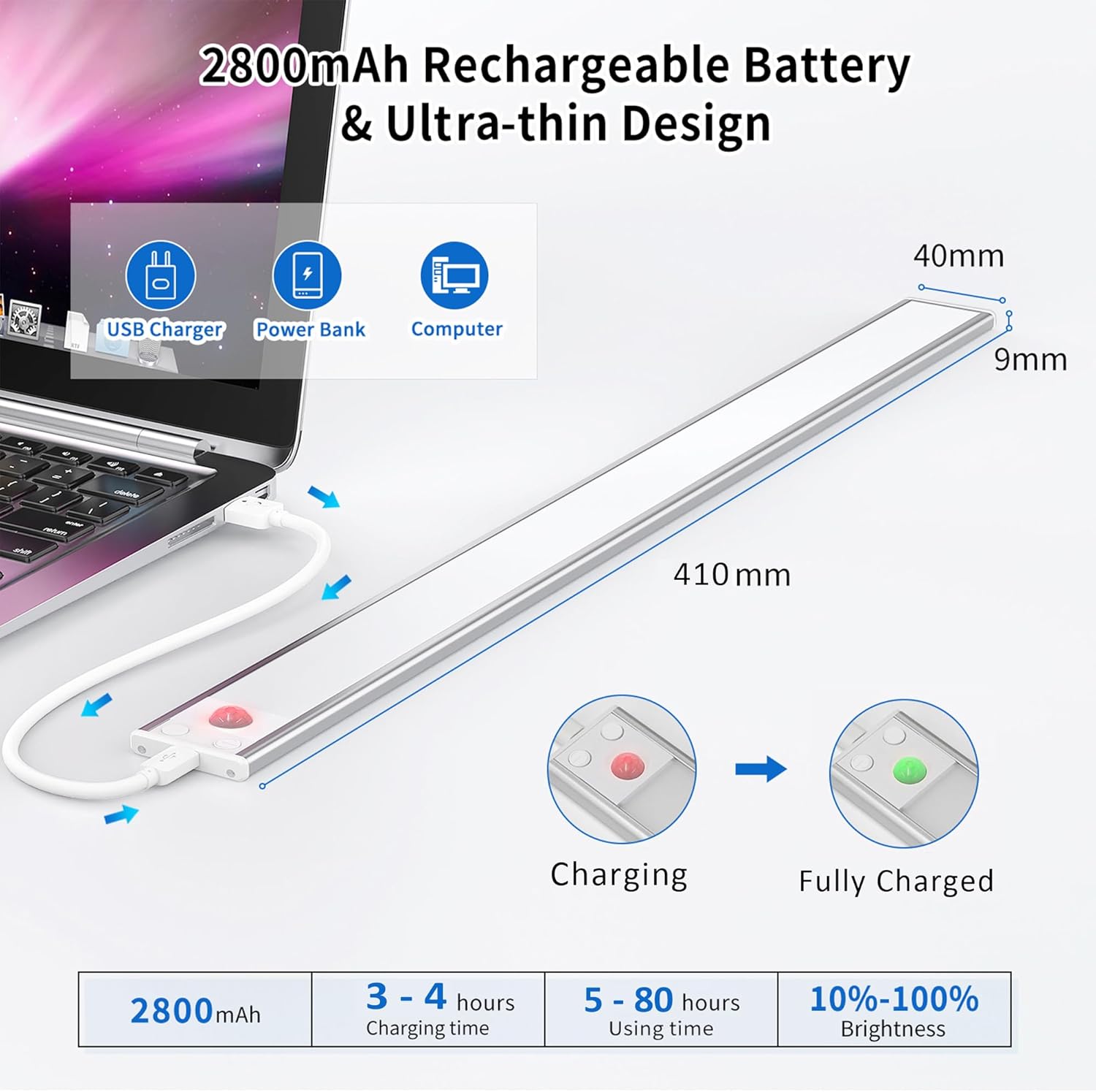
Image 6.1: Charging the OUILA LED Cabinet Light and battery indicators.
6.2 Awọn ọna ṣiṣe
The light features a control button to cycle through three modes:
- Always ON Mode: Press the button once. The light will remain continuously on, functioning as a standard light.
- Night Sensing Mode (Motion Sensor): Press the button a second time. The light will only activate when motion is detected in sufficiently dark conditions (ambient light below a certain threshold). It will turn off automatically after approximately 20 seconds if no further motion is detected, conserving energy.
- Always OFF Mode: Press the button a third time. The light will remain off.

Aworan 6.2: Pariview ti awọn ipo iṣiṣẹ mẹta naa.
6.3 Ṣíṣe àtúnṣe ìmọ́lẹ̀ (Ìdínkù láìsí ìpele)
When the light is on (in either Always ON or Night Sensing Mode), press and hold the control button to adjust the brightness. The brightness will cycle smoothly between 10% and 100%. Release the button when the desired brightness level is reached.

Image 6.3: Mode selection and stepless brightness adjustment.
7. Itọju
- Ninu: Wipe the light gently with a soft, dry cloth. Do not use abrasive cleaners or solvents.
- Itọju Batiri: To prolong battery life, avoid completely draining the battery frequently. Recharge the light when the brightness noticeably diminishes. If storing for a long period, charge the battery to about 50% every 3-6 months.
- Ibi ipamọ: Tọ́jú ìmọ́lẹ̀ náà sí ibi tí ó tutù tí ó sì gbẹ, tí kò sí ibi tí oòrùn lè tàn án tàbí ibi tí ó gbóná jù.
8. Laasigbotitusita
| Isoro | Owun to le Fa | Ojutu |
|---|---|---|
| Imọlẹ ko tan. | Battery is depleted. Incorrect mode selected. | Charge the light. Cycle through modes to ensure it's not in 'Always OFF' mode. |
| Sensọ išipopada ko ṣiṣẹ. | Not in Night Sensing Mode. Ambient light is too bright. Obstruction in sensor path. | Ensure the light is in Night Sensing Mode. Test in a darker environment. Clear any objects blocking the sensor. |
| Ina flickers tabi jẹ baibai. | Batiri kekere. | Gba agbara si ina ni kikun. |
| Ìmọ́lẹ̀ ń jábọ́ láti ojú ilẹ̀. | Improper installation. Surface not clean. | Re-install, ensuring surface is clean and dry. Apply firm pressure for adhesive tape. |
9. Atilẹyin ọja ati Support
OUILA products are manufactured with high-quality standards. For warranty information or technical support, please refer to the contact details provided with your purchase or visit the official OUILA webojula. Jọwọ ṣe idaduro ẹri rira rẹ fun awọn iṣeduro atilẹyin ọja.
10. Afikun Alaye
Eye Protection Feature:
The OUILA LED Cabinet Light is designed to provide a soft, flicker-free light source, reducing eye strain compared to traditional cabinet lights. This ensures a more comfortable visual experience.

Image 10.1: Comparison highlighting the eye protection features of the OUILA light.
Awọn ohun elo to pọ:
This light is suitable for a wide range of indoor applications, including but not limited to:
- Kitchen cabinets and under-counter lighting
- Awọn apoti ipamọ ati awọn aṣọ ipamọ
- Stairwells and hallways
- Workshops and garages
- Bookcases and display shelves
- Bedside lighting

Aworan 10.2: Examples of the OUILA LED light in various application scenarios.