Ọrọ Iṣaaju
This manual provides comprehensive instructions for the Thomson ROC4301 4-in-1 Web-Programmable Universal Remote Control. This device allows you to control up to four different infrared-controlled electronic devices, such as TVs, DVD players, Blu-ray players, Set-Top Boxes (STB), VCRs, and audio equipment, using a single remote.
The ROC4301 features web-based programming for easy setup and a continuously updated code database to ensure compatibility with a wide range of brands and models.
Key Awọn ẹya ara ẹrọ
- Controls up to 4 devices via one infrared remote control.
- Fast and easy programming via a web-based database accessible on PC, laptop, or tablet.
- Data transfer to the remote control is facilitated by a 3.5 mm jack cable (30 cm).
- Up to 4 devices can be programmed simultaneously.
- Compatible with TV, DVD, Blu-ray player, STB, VCR, and audio equipment.
- Continuously updated code database available online.
Eto ati siseto
The Thomson ROC4301 remote control is programmed using an online database, ensuring access to the latest device codes. This method requires a computer (PC, laptop, or tablet) with internet access and the included 3.5 mm jack cable.
Awọn igbesẹ fun Web-Based Programming:
- Mura Latọna jijin: Ensure fresh AAA batteries are installed in the remote control. (See "Maintenance" section for battery installation).
- Access the Programming Webojula: Ṣii a web browser on your PC, laptop, or tablet and navigate to the official Thomson remote control programming webAaye ayelujara naa. (Wo apoti ọja tabi ti olupese website for the exact URL).
- So Latọna jijin: Plug one end of the supplied 3.5 mm jack cable into the designated port on the remote control and the other end into the headphone jack of your computer.
- Yan Awọn Ẹrọ: On the programming website, follow the on-screen instructions to select the types of devices (e.g., TV, DVD, STB) and their respective brands and models you wish to control. The database will provide the necessary codes.
- Transfer Codes: Once you have selected your devices, initiate the data transfer process on the website. The codes will be transmitted through the audio jack to your remote control. Ensure your computer's volume is set to a suitable level as instructed by the webojula.
- Idanwo Latọna jijin: After the transfer is complete, disconnect the remote control from your computer. Test the remote with each programmed device to ensure all functions work correctly. If a device does not respond or functions are incorrect, repeat the programming process, trying alternative codes if available on the webojula.
Awọn web database is continuously updated, providing access to codes for new devices. You can program up to four devices simultaneously.
Ṣiṣẹ Iṣakoso Latọna jijin
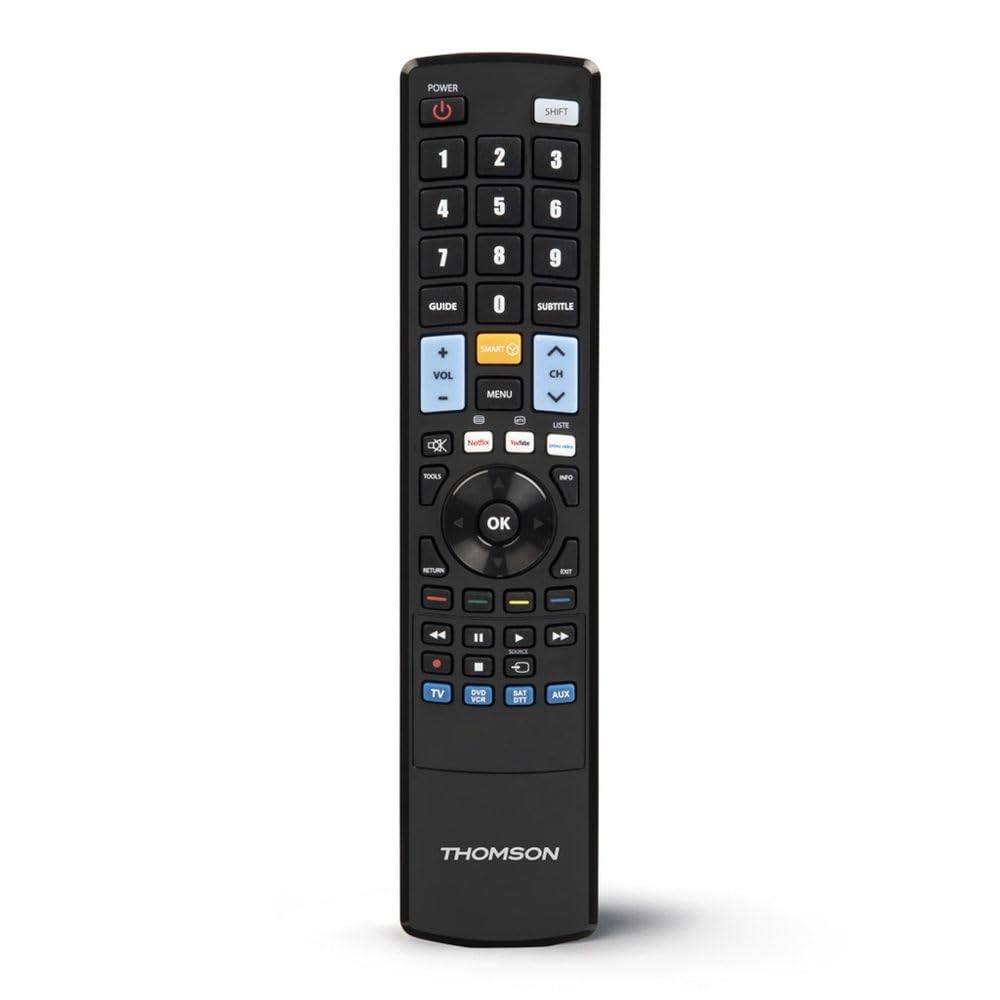
Once programmed, the Thomson ROC4301 functions like a standard remote control for your selected devices. It features 48 buttons designed for intuitive control.
Isẹ gbogbogbo:
- Aṣayan Ẹrọ: Use the dedicated device buttons (e.g., TV, DVD, STB, AUDIO) at the top of the remote to switch between controlling different devices. The remote will typically indicate which device is currently selected (e.g., via an LED indicator).
- Titan/Apapa: Tẹ awọn AGBARA bọtini lati tan tabi pa ẹrọ ti a yan.
- Ìkànnì/Ìwọ̀n: Lo awọn CHANNEL +/- ati Idibo +/- buttons to adjust channels and volume respectively.
- Lilọ kiri: The directional pad (up, down, left, right) and OK button are used for menu navigation on most devices.
- Nọmba bọtini foonu: Lo awọn bọtini nọ́mbà (0-9) lati tẹ awọn nọ́mbà ikanni tabi awọn ohun elo nọ́mbà miiran taara.
- Awọn bọtini iṣẹ: Other buttons such as Play, Pause, Stop, Fast Forward, Rewind, Menu, Exit, and colored function buttons will perform their corresponding actions on the selected device.
Ensure there is a clear line of sight between the remote control and the infrared receiver of the device you are operating. The maximum effective range is approximately 10 meters.
Itoju
Fifi Batiri sori ẹrọ ati Rirọpo:
The Thomson ROC4301 remote control requires two AAA batteries (included). When the remote's performance degrades or it stops responding, it's time to replace the batteries.
- Wa ideri iyẹwu batiri ni ẹhin isakoṣo latọna jijin.
- Gbe ideri si isalẹ tabi tẹ latch ki o gbe soke lati ṣii yara naa.
- Remove the old batteries, if any.
- Insert two new AAA batteries, ensuring the positive (+) and negative (-) terminals match the markings inside the compartment.
- Rọpo ideri iyẹwu batiri titi ti o fi tẹ ni aabo sinu aaye.
Pataki: Always dispose of used batteries responsibly according to local regulations. Do not mix old and new batteries, or different types of batteries.
Ninu:
Lati nu isakoṣo latọna jijin, lo asọ ti o gbẹ. Fun idoti alagidi, die-die dampFi omi bò aṣọ náà. Má ṣe lo àwọn ohun ìfọṣọ, àwọn ohun olómi, tàbí ọtí líle, nítorí pé wọ́n lè ba ojú ibi ìpamọ́ tàbí àwọn ohun èlò inú ilé jẹ́.
Laasigbotitusita
If you encounter issues with your Thomson ROC4301 universal remote control, try the following troubleshooting steps:
- Latọna jijin Ko Dahun:
- Check the batteries. Ensure they are correctly inserted and have sufficient charge. Replace them if necessary.
- Ensure there is a clear line of sight between the remote's IR emitter and the device's IR receiver. Obstructions can block the signal.
- Make sure you have selected the correct device mode (e.g., TV, DVD) on the remote.
- Ẹ̀rọ tí kò dáhùn lẹ́yìn ìṣètò:
- Re-program the remote for that specific device. The web database often provides multiple codes for a single brand/model. Try the next available code if the first one doesn't work.
- Ensure the 3.5 mm jack cable connection was secure and the computer's volume was adequate during programming.
- Verify that the device you are trying to control is indeed an infrared-controlled device.
- Àwọn iṣẹ́ kan tí kò ṣiṣẹ́:
- Even with the correct code, some advanced functions might not be fully supported by a universal remote.
- Try alternative codes for your device, as some codes might offer better functionality mapping.
- Programming Issues (e.g., data transfer failure):
- Ṣayẹwo asopọ intanẹẹti rẹ.
- Ensure your computer's audio drivers are up to date.
- Temporarily disable any sound enhancements or equalizers on your computer that might interfere with the audio signal.
- Try using a different computer or web browser if problems persist.
If these steps do not resolve the issue, please refer to the "Support" section for further assistance.
Awọn pato
| Brand | Thomson |
| Orukọ awoṣe | ROC4301 Web-Programmable Universal Remote Control 4-in-1 |
| Nọmba Awoṣe Nkan | 00132679 |
| Asopọmọra Technology | Infurarẹẹdi (IR) |
| Maximum Number of Supported Devices | 4 |
| Awọn ẹrọ ibaramu | TV, DVD, Blu-ray player, STB, VCR, Audio equipment |
| Adarí Iru | Iṣakoso bọtini |
| Nọmba ti Awọn bọtini | 48 |
| Ibiti o pọju | 10 Mita |
| Àwọ̀ | Dudu |
| Awọn batiri | Awọn batiri AAA 2 (pẹlu) |
| Ọja Mefa | 22.9 x 5.2 x 2.5 cm |
| Iwọn Nkan | 149.32 g |
| Olupese | Thomson |
| Ilu isenbale | China |
Alaye atilẹyin ọja
The Thomson ROC4301 Universal Remote Control comes with a 2-odun olupese ká atilẹyin ọja. Please retain your proof of purchase for warranty claims. For specific terms and conditions, refer to the warranty documentation included with your product or visit the official Thomson webojula.
Atilẹyin
For further assistance, updated device codes, or to access the web-based programming tool, please visit the official Thomson support website. You may also find FAQs and additional resources there.
If you require technical support, please contact Thomson customer service through the channels provided on their official webojula.
Ọja Pariview