
Ọrọ Iṣaaju
This manual provides instructions for the proper setup, operation, and maintenance of your Comix C-2031 Desk Calculator. This calculator is designed for general arithmetic tasks in home, office, or school environments, featuring a large 12-digit LCD display and dual power sources.

Key Awọn ẹya ara ẹrọ
The Comix C-2031 Desk Calculator is equipped with several features designed for ease of use and reliability:
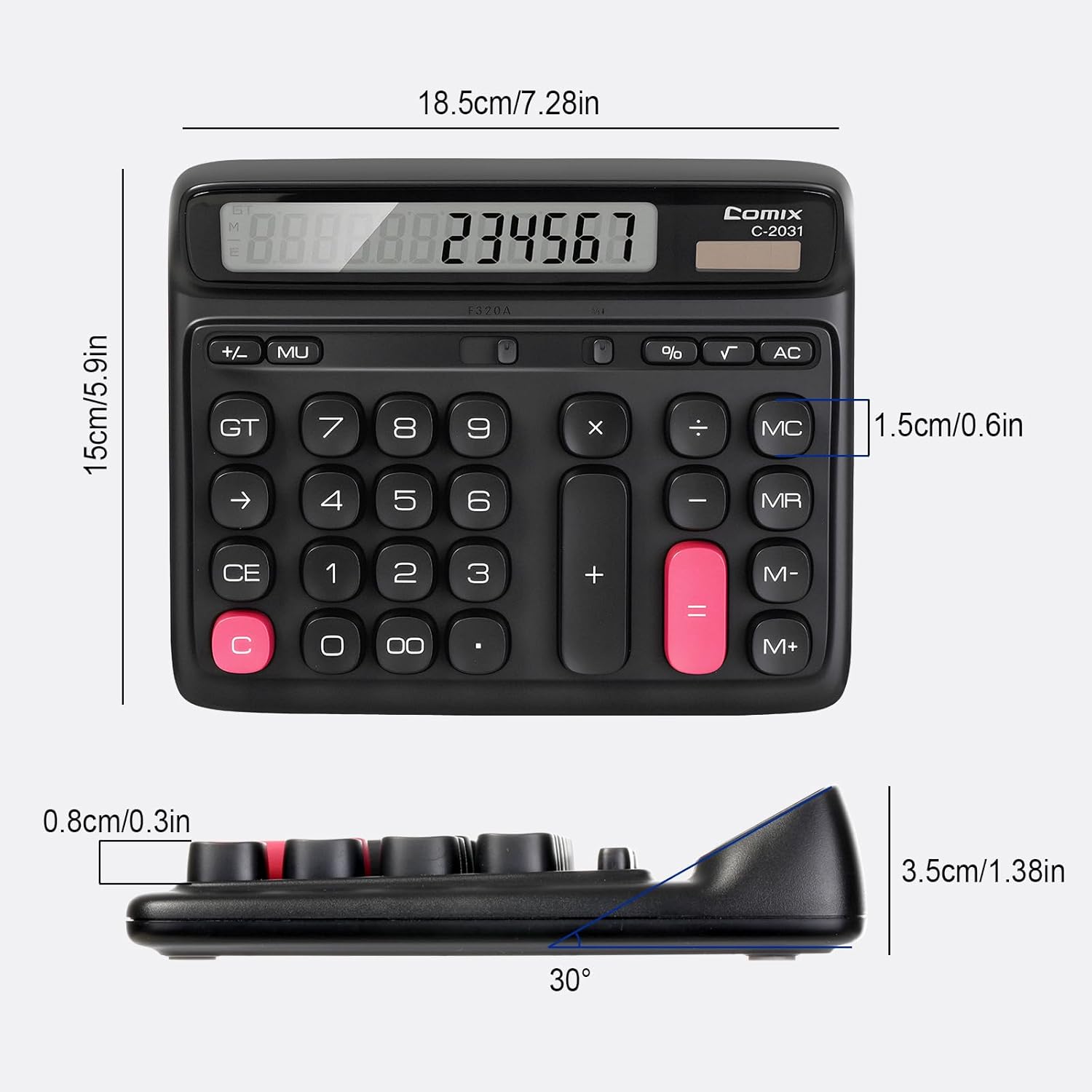
- 12-Digit Nla LCD Ifihan: Provides clear and accurate readings with a 30° tilt for comfortable viewing.
- Ergonomic Computer Key Design: Features round keys for comfortable touch and clear feedback, designed for efficient data entry.
- Orisun Agbara Meji: Operates on solar energy in well-lit conditions and includes a 1 AA battery for consistent performance, especially in low light.
- Ẹsẹ ti ko ni isokuso: Equipped with four non-slip feet to ensure stability on your desk during use.
- Iwọn Iwapọ: Measures 7.28 x 5.9 x 1.38 inches, fitting conveniently on any desk.

Ṣeto
Orisun agbara
The Comix C-2031 calculator utilizes a dual power system, operating on both solar energy and a single AA battery. For optimal display clarity and consistent operation, especially in environments with varying light conditions, using the AA battery is recommended.
- Agbara oorun: The calculator will automatically use solar power when sufficient light is available. Ensure the solar panel (located above the display) is exposed to light for operation without battery power.
- Fifi sori batiri:
- Wa ibi ipamọ batiri naa ni ẹhin ẹrọ iṣiro naa.
- Ṣii ideri iyẹwu batiri naa.
- Fi batiri AA kan sii, ni idaniloju polarity ti o pe (+/-).
- Pa ideri batiri naa ni aabo.

Awọn ilana Iṣiṣẹ
Familiarize yourself with the calculator's key functions for efficient use.

Awọn iṣẹ ipilẹ
- Ìtẹ̀síwájú Nọ́mbà: Press the number keys (0-9) to input digits.
- Ojuami eleemewa: Press the "." key for decimal values.
- Àfikún (+), Iyokuro (-), Ilọpo (×), Pipin (÷): Press the corresponding operator key after entering the first number, then enter the second number, and press "=" for the result.
- O dọgba (=): Displays the result of a calculation.
Clear Functions
- C (Clear the Screen): Clears the current entry on the display without affecting memory or ongoing calculations.
- CE (Ko titẹ sii): Pa nọmba ti o ti tẹ kẹhin kuro tabi iṣẹ ṣiṣe.
- AC (Clear All): Clears all entries, operations, and memory content, resetting the calculator to its initial state.
- Backspace (→): Ó pa nọ́mbà tó kẹ́yìn tí a ti fi sílẹ̀ rẹ́.
Awọn iṣẹ iranti
- M+ (Memory Plus): Adds the displayed number to the memory.
- M- (Memory Iyokuro): Subtracts the displayed number from the memory.
- MR (Iranti Iranti): Recalls the value stored in memory to the display.
- MC (Memory Clear): Clears the memory content.
Awọn iṣẹ to ti ni ilọsiwaju
- % ( Ogoruntage): Lílò fún ìpín ogoruntage isiro. Fun example, to calculate 10% of 200, enter 200 × 10 %, which will display 20.
- √ (Gbongbo onigun): Ṣe iṣiro root onigun mẹrin ti nọmba ti o han.
- GT (Gbigba Lapapọ): Accumulates the results of all calculations. Pressing GT displays the grand total.
- MU (Mark-Up): A lo fun awọn iṣiro ala ere.
Ọja Pariview Fidio
Itoju
- Ninu: Wipe the calculator with a soft, dry cloth. Do not use liquid cleaners or abrasive materials.
- Rirọpo Batiri: If the display becomes dim or unresponsive, replace the AA battery in the compartment on the back of the unit. Ensure proper polarity.
- Ibi ipamọ: Tọju ẹrọ iṣiro naa ni itura, aye gbigbẹ kuro lati orun taara ati awọn iwọn otutu to gaju.
Laasigbotitusita
| Isoro | Owun to le Fa | Ojutu |
|---|---|---|
| Ifihan ti ṣofo tabi baibai. | Ina ti ko to fun agbara oorun, tabi batiri kekere. | Move the calculator to a brighter area or replace the AA battery. |
| Awọn bọtini ko ni idahun. | Temporary software glitch or low power. | Press the AC button to reset. If the issue persists, replace the battery. |
| Awọn abajade iṣiro ti ko tọ. | Incorrect key sequence or function usage. | Review the operating instructions for the specific function. Press AC to clear all previous entries and start a new calculation. |
Awọn pato
- Awoṣe: C-2031
- Ifihan: Ifihan LCD Ńlá Àwọn Nọ́mbà Méjìlá
- Orisun Agbara: Solar and 1 x AA Battery (included)
- Awọn iwọn ọja: 7.28 x 5.9 x 1.38 inches (18.5 x 15 x 3.5 cm)
- Ìwọ̀n Nkan: 10.5 iwon (297.67 giramu)
- Iru bọtini: Ergonomic Computer Keys
- Awọn ẹya: 30° Tilt Display, Non-Slip Feet
Atilẹyin ọja ati Support
Comix products are manufactured with quality and reliability in mind. For any questions, technical support, or warranty inquiries, please refer to the contact information provided with your purchase or visit the official Comix webojula. Jọwọ ṣe idaduro ẹri rira rẹ fun awọn iṣeduro atilẹyin ọja.