
Montech SKY TWO (WHITE)
Montech Sky Two ATX Gaming Mid Tower Computer Case User Manual
Model: SKY TWO (WHITE) | Brand: Montech
1. Ifihan
This user manual provides comprehensive instructions for the Montech Sky Two ATX Gaming Mid Tower Computer Case. It covers setup, operation, maintenance, and troubleshooting to ensure optimal performance and longevity of your product. The Montech Sky Two is designed for high airflow and features dual tempered glass panels, pre-installed PWM ARGB fans, and extensive compatibility for modern PC components.
2. Key Awọn ẹya ara ẹrọ
- Seamless Visibility: Integrated front and side panels provide clear views of your interior. A fine mesh, extending to the PSU chamber, is complemented by pre-installed ARGB fans, enhancing the overall aesthetic.
- Revolutionary Airflow: SKY TWO boasts a new design with reversed fan blades for side-panel air intake, rear exhaust, and direct GPU cooling in the PSU chamber.
- Future-Ready Build: SKY TWO supports GPUs up to 400mm, CPU coolers up to 168mm, and 210mm high-wattage PSUs, providing ample space and removing all constraints for your next-gen setup.
- Effortless Cable Management: SKY TWO's innovative design includes a cable channel and three Velcro strips, ensuring easy and tidy cable organization for a clean-looking PC.
- Ifihan Imọlẹ didan: AX120 and RX120 fans boast 21 lighting effects. Switch between them effortlessly with the LED button or sync with your motherboard for a customized lighting experience.
3. Eto Itọsọna
Before beginning assembly, ensure you have all necessary components and tools. Carefully unpack the case and inspect for any damage. Refer to your motherboard and component manuals for specific installation steps. The Montech Sky Two case is designed for straightforward installation with features like removable panels and ampaaye iṣakoso okun waya le.
3.1 Fi sori ẹrọ paati
- Modaboudu: Install standoffs as required for your motherboard form factor (EATX/ATX/Micro ATX/Mini ITX). Secure the motherboard using screws.
- Olutọju Sipiyu: Install your CPU cooler, ensuring it does not exceed the maximum height of 168mm.
- Kaadi eya aworan (GPU): Install your GPU. The case supports GPUs up to 400mm in length. Vertical GPU mounting is also supported.
- Ipese Agbara (PSU): Install the PSU in the dedicated chamber. The case supports PSUs up to 210mm in length.
- Awọn awakọ ipamọ: Install SSDs (up to 3) and HDDs (up to 2) in the designated drive bays.
- Fans/Radiators: The case comes with 4 pre-installed ARGB PWM fans. Additional fan and radiator support includes: Top (120/240/280/360mm), Side (120/240mm - compatibility with GPU becomes 180mm with water cooling installed), PSU shroud (120mm*2), Rear (120mm*1).
3.2 USB Management
Utilize the integrated cable channel and three Velcro straps located behind the motherboard tray to route and secure cables. This ensures optimal airflow and a clean internal appearance.
4. Awọn ilana Iṣiṣẹ
Once all components are installed and connected, close the side panels. Connect your peripherals (monitor, keyboard, mouse) and power cable. Press the power button on the front I/O panel to start your system. The pre-installed ARGB fans will illuminate upon power-on.
4.1 ARGB ina Iṣakoso
The AX120 and RX120 fans feature 21 built-in lighting effects. Use the dedicated LED button on the front I/O panel to cycle through these effects. Alternatively, connect the ARGB lighting to your motherboard's ARGB header (5V 3-pin) to synchronize lighting with your motherboard's software for customized control.
4.2 Iwaju Mo / Eyin Ports
The front I/O panel includes USB 2.0 ports (2), USB 3.0 ports (2), and a USB Type-C port for convenient connectivity.
5. Itọju
Regular maintenance helps ensure optimal performance and extends the lifespan of your computer case and components.
- Awọn Ajọ Eruku: The Montech Sky Two includes mesh dust filters. Periodically remove and clean these filters to prevent dust buildup and maintain optimal airflow.
- Ninu inu: With the system powered off and unplugged, use compressed air to remove dust from internal components and fans. Avoid touching components directly.
- Ode Ninu: Wipe the exterior surfaces, including the tempered glass panels, with a soft, damp asọ. Yago fun abrasive ose.
6. Laasigbotitusita
Abala yii n ṣalaye awọn ọran ti o wọpọ ti o le ba pade.
| Isoro | Owun to le Fa | Ojutu |
|---|---|---|
| System ko ni agbara lori. | Power cable disconnected, PSU switch off, front panel connectors incorrect. | Check all power connections, ensure PSU switch is ON. Verify front panel header connections to motherboard. |
| Fans are not spinning or ARGB lights are off. | Fan cables disconnected, ARGB controller issue, motherboard ARGB header not configured. | Check fan power and ARGB connections. Ensure ARGB controller is powered. Verify motherboard ARGB software settings. |
| Afẹ́fẹ́ afẹ́fẹ́ tí kò dára tàbí iwọn otutu gíga. | Dust buildup on filters/fans, incorrect fan orientation, obstructed vents. | Clean dust filters and fans. Ensure fans are oriented correctly for intake/exhaust. Remove any obstructions. |
7. Awọn alaye ọja
| Ẹya ara ẹrọ | Ẹ̀kúnrẹ́rẹ́ |
|---|---|
| Brand | Montech |
| jara | SKY TWO (WHITE) |
| Nọmba awoṣe | SKY TWO (WHITE) |
| Iru Irú | Ile-iṣọ Mid |
| Àwọ̀ | Funfun |
| Ohun elo | Gilasi ibinu |
| Iwọn Nkan | 17.44 iwon |
| Awọn iwọn Ọja (LxWxH) | 16.93 x 8.46 x 19.29 inches |
| Modaboudu Ibamu | ATX, Micro ATX, Mini ITX |
| GPU Ibamu | Ti o de 400mm |
| Sipiyu kula Iga | Ti o de 168mm |
| PSU Ipari | Ti o de 210mm |
| Wakọ Bays | 3 x SSD, 2 x HDD |
| Awọn onijakidijagan ti a ti fi sii tẹlẹ | 4 x PWM ARGB Fans |
| Iwaju Awọn Ibudo I / O | 2 x USB 2.0, 2 x USB 3.0, 1 x USB Type-C |
| Ọna Itutu | Afẹfẹ |
| Awọ Imọlẹ | RGB |
8. Media ọja
8.1 ọja Images

Iwaju view of the Montech Sky Two White PC Case, showcasing the dual tempered glass and pre-installed ARGB fans.

Interior front view of the Montech Sky Two White PC Case, highlighting the fan placement and spacious design.

Apa view of the Montech Sky Two White PC Case, showing the solid side panel with ventilation.
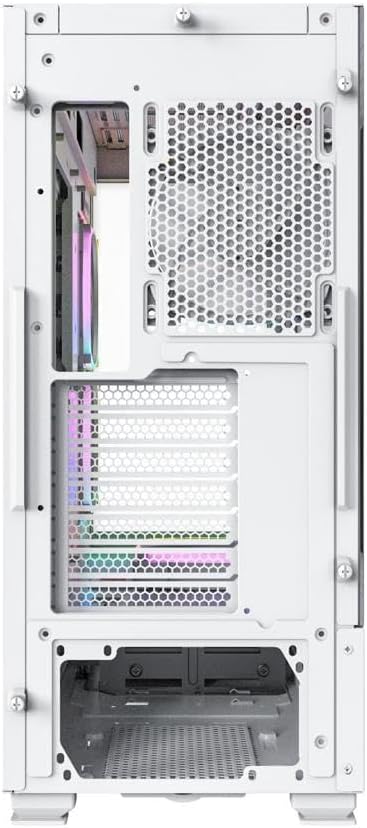
Ẹyìn view of the Montech Sky Two White PC Case, detailing the I/O and expansion slots.

Ti abẹnu view of the Montech Sky Two White PC Case, demonstrating effective cable management features.

Diagram illustrating the unique side intake airflow design of the Montech Sky Two White PC Case.
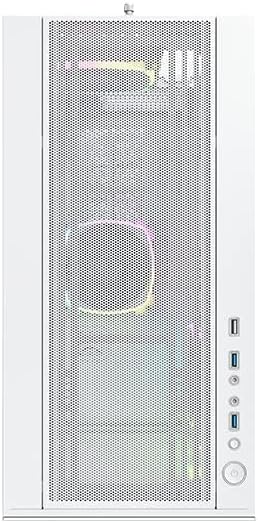
Close-up of the Montech Sky Two White PC Case front panel, showing the mesh design and I/O ports.
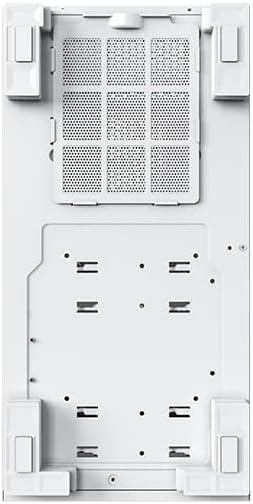
Isalẹ view of the Montech Sky Two White PC Case, showing the removable dust filter and feet.
8.2 Awọn fidio ọja osise
Ifihan fidio ọja osiseasing the Montech Sky Two PC case features, including fan support, component compatibility, and unique airflow design. This video highlights the case's internal layout and various specifications.
9. Atilẹyin ọja ati Support
Montech products are backed by a manufacturer's warranty. For specific warranty terms and conditions, please refer to the warranty card included with your product or visit the official Montech website. For technical support, troubleshooting assistance, or replacement parts, please contact Montech customer service through their official channels. Keep your proof of purchase for warranty claims.
Ask a question about this manual
Ask about setup, troubleshooting, compatibility, parts, safety, or missing instructions. Manuals+ will review the question and use this page’s manual context to help answer it.