
1. Ifihan
This manual provides essential information for the installation, operation, and maintenance of your Montech Titan Gold 850W ATX 3.0 Power Supply. This high-end power supply is designed for gaming systems, featuring 80 Plus Gold and Cybenetics Gold certifications, fully modular cabling, and readiness for PCIe 5.0 with a new 12VHPWR connector. Please read this manual thoroughly before installation and use to ensure proper functionality and safety.

Figure 1: Montech Titan Gold 850W Power Supply and its retail packaging.
2. Alaye Aabo
Always observe the following safety precautions to prevent injury or damage to your power supply and system components:
- Rii daju pe ipese agbara ti ge asopọ lati inu iṣan agbara AC ṣaaju fifi sori ẹrọ tabi mimu.
- Maṣe ṣii ipese agbara casing. Iwọn gigatages are present inside, and there are no user-serviceable parts.
- Fi sori ẹrọ ipese agbara ni agbegbe ti o ni afẹfẹ daradara, kuro lati awọn orisun ooru, oorun taara, ati ọrinrin.
- Lo awọn kebulu modulu nikan ti a pese pẹlu ipese agbara yii. Lilo awọn kebulu ti ko ni ibamu le fa ibajẹ.
- Rii daju pe gbogbo awọn asopọ ti joko ni aabo ṣaaju ṣiṣe agbara lori eto naa.
3. Package Awọn akoonu
Jẹrisi pe gbogbo awọn ohun kan wa ninu package:
- Montech Titan Gold 850W Power Supply Unit
- Set okùn modulu (pẹlu okùn 12VHPWR)
- AC Agbara okun
- Iṣagbesori skru
- Cable Ties/Velcro Straps
- Afowoyi Olumulo (iwe-ipamọ yii)

Figure 2: Included modular cables and accessories for the power supply.
4. Eto ati fifi sori
Tẹle awọn igbesẹ wọnyi lati fi ipese agbara rẹ sori ẹrọ:
- Mura Ọran PC rẹ: Ensure your PC case is compatible with ATX power supplies.
- Gbe PSU soke: Secure the power supply into the designated PSU bay in your PC case using the provided mounting screws. Ensure the fan is oriented correctly for optimal airflow (typically facing downwards if your case has a bottom vent).
- So awọn okun onirin pọ: Identify the necessary cables for your motherboard, CPU, graphics card(s), and storage devices. Connect these cables to the corresponding ports on the power supply. The fully modular design allows you to connect only the cables you need, reducing clutter.
- Sopọ si Awọn eroja: Route the connected cables through your case's cable management channels and connect them to your motherboard (24-pin ATX, 8-pin EPS/CPU), graphics card(s) (PCIe, including the 12VHPWR for compatible GPUs), and storage drives (SATA, Molex).
- Awọn isopọ to ni aabo: Double-check all connections to ensure they are firm and properly seated.

Olusin 3: Pariview of the modular cable connection ports on the power supply.
5. Awọn ilana Iṣiṣẹ
After installation, follow these steps to operate your power supply:
- Sopọ agbara AC: Plug the AC power cord into the power supply's AC inlet and then into a wall outlet or surge protector.
- Agbara Yi pada: Locate the main power switch on the rear of the power supply and flip it to the 'ON' (I) position.
- System Power On: Press the power button on your PC case to start your computer.
- Smart Zero Fan Feature: This power supply includes a 'Smart Zero Fan' switch. When enabled (ON), the fan will remain off under low load conditions for silent operation. The fan will automatically activate when the load increases to maintain optimal temperatures. If disabled (OFF), the fan will operate continuously.

Figure 4: Rear panel with main power switch and Smart Zero Fan control.
6. Itọju
To ensure the longevity and optimal performance of your power supply, periodic maintenance is recommended:
- Pipa eruku: Regularly clean dust from the power supply's fan intake and exhaust vents using compressed air. Ensure the power supply is turned off and unplugged before cleaning.
- Ayẹwo USB: Periodically check all modular cable connections for looseness or damage. Re-seat any loose cables.
- Awọn ipo Ayika: Maintain a clean, dry, and cool environment for your PC to prevent excessive heat and dust buildup.

olusin 5: Top view of the power supply, highlighting the fan grill for cleaning.
7. Laasigbotitusita
Ti o ba pade awọn ọran pẹlu ipese agbara rẹ, tọka si awọn iṣoro ti o wọpọ ati awọn ojutu wọnyi:
- Ko si Agbara:
- Ensure the AC power cord is securely plugged into both the power supply and the wall outlet.
- Verify the main power switch on the PSU is in the 'ON' (I) position.
- Check all modular cable connections, especially the 24-pin ATX and 8-pin EPS/CPU cables, for secure seating.
- Ṣe ìdánwò ibi ìtajà ògiri pẹ̀lú ẹ̀rọ mìíràn láti jẹ́rìí sí i pé ó ní agbára.
- Ètò ti pa láìròtẹ́lẹ̀:
- This could indicate an overload or overheating. Ensure your system's power consumption does not exceed the PSU's 850W capacity.
- Check for proper ventilation around the PSU and inside the PC case. Clean any dust buildup.
- Ensure the 'Smart Zero Fan' is functioning correctly or try disabling it to force continuous fan operation.
- Fan Not Spinning (under low load):
- If the 'Smart Zero Fan' feature is enabled, the fan will not spin under low loads. This is normal operation. The fan will activate when the system load increases.
- If the fan never spins even under high load with 'Smart Zero Fan' disabled, contact customer support.
8. Awọn pato
Detailed technical specifications for the Montech Titan Gold 850W Power Supply:
| Ẹya ara ẹrọ | Sipesifikesonu |
|---|---|
| Brand | Montech |
| Orukọ awoṣe | Titan Gold 850W (TIS0124) |
| Wattage | 850 Wattis |
| Ijade Wattage | 750 Watts (Note: Product title states 850W, specifications list 750W. Please verify with manufacturer if discrepancy is critical.) |
| Ijẹrisi ṣiṣe | 80 Plus Gold, Cybenetics Gold |
| Fọọmù ifosiwewe | ATX |
| Agbara Ipese Design | Modulu ni kikun |
| Asopọmọra Iru | ATX, PCIe 5.0 (12VHPWR) |
| Ọna Itutu | Air (1 Fan) |
| Iwọn Nkan | 7.52 iwon |
| Ọjọ Akọkọ Wa | Oṣu kejila ọjọ 13, ọdun 2022 |
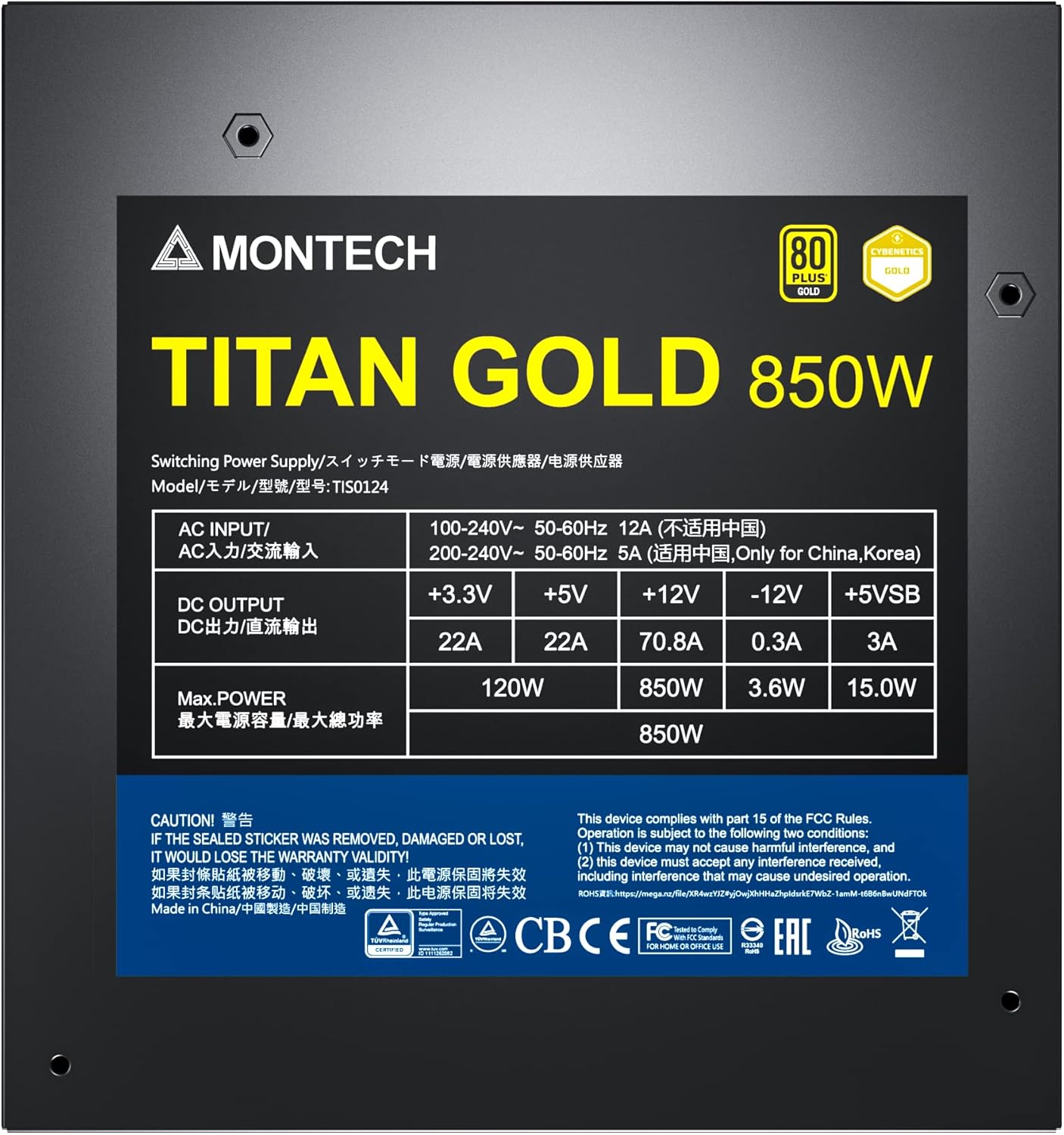
Figure 6: Product label displaying electrical specifications and certifications.
9. Atilẹyin ọja & Atilẹyin
The Montech Titan Gold 850W Power Supply comes with a 10-odun atilẹyin ọja, ensuring long-term reliability and peace of mind. For technical support, warranty claims, or further assistance, please visit the official Montech webojula tabi kan si wọn onibara iṣẹ Eka.
Jọwọ ṣe idaduro ẹri rira rẹ fun ijẹrisi atilẹyin ọja.