
JATRHG P1 EV-IEC-AC16-PV
JATRHG P1 Portable EV Charger User Manual
Model: EV-IEC-AC16-PV
1. Ifihan
Thank you for choosing the JATRHG P1 Portable EV Charger. This manual provides essential information for the safe and efficient operation of your charger. This portable charger is designed for electric vehicles equipped with a Type 2 charging port, offering adjustable current settings from 6A to 16A and a maximum power output of 3.6KW. It operates on 220V-230V AC and is built to CE and TUV standards with an IP-rated waterproof casing, ensuring compatibility and reliability for charging from any domestic outlet.
2. Alaye Aabo
Please read all safety warnings carefully before installation and use. Failure to follow these instructions may result in electric shock, fire, or serious injury.
- Fifi sori: This device must be installed by a qualified electrician, in accordance with local standards and regulations. Incorrect installation can cause risks of electrocution or fire.
- Lilo ti a pinnu: Use this equipment only for its intended purpose of charging compatible electric vehicles. Any modification or improper use can lead to damage or safety risks.
- Abojuto: Do not leave the device operating unattended. In case of a problem, such as unusual smells, smoke, or excessive heat, turn it off immediately and consult a professional.
- Ayika: Use the equipment under recommended conditions. Avoid exposure to excessive humidity, direct water immersion, or extreme temperatures outside the specified operating range (-30°C to +50°C).
- Itọju: Do not attempt to repair the device yourself. Entrust all repairs to a qualified technician. Unauthorized repairs will void the warranty and may pose safety hazards.
- Child and Animal Safety: Keep the equipment out of reach of children and animals to prevent accidental damage or injury.
- Ge asopọ: Always unplug the device from the power source and the vehicle in case of emergency, before cleaning, or when not in use for extended periods.
3. Package Awọn akoonu
Jẹrisi pe gbogbo awọn ohun kan wa ninu package:
- 1. Iṣakoso apoti
- 2. Type 2 Connector
- 3. Ngba agbara USB
- 4. Power Plug (Schuko type)
- 5. Itọsọna olumulo

Figure 3.1: Labeled components of the JATRHG P1 Portable EV Charger.
4. Ọja Ipariview
The JATRHG P1 Portable EV Charger consists of a central control box, a Type 2 vehicle connector, a power plug for the wall outlet, and a durable charging cable. The control box features an LED indicator to display charging status and buttons for adjusting current and setting charging schedules.
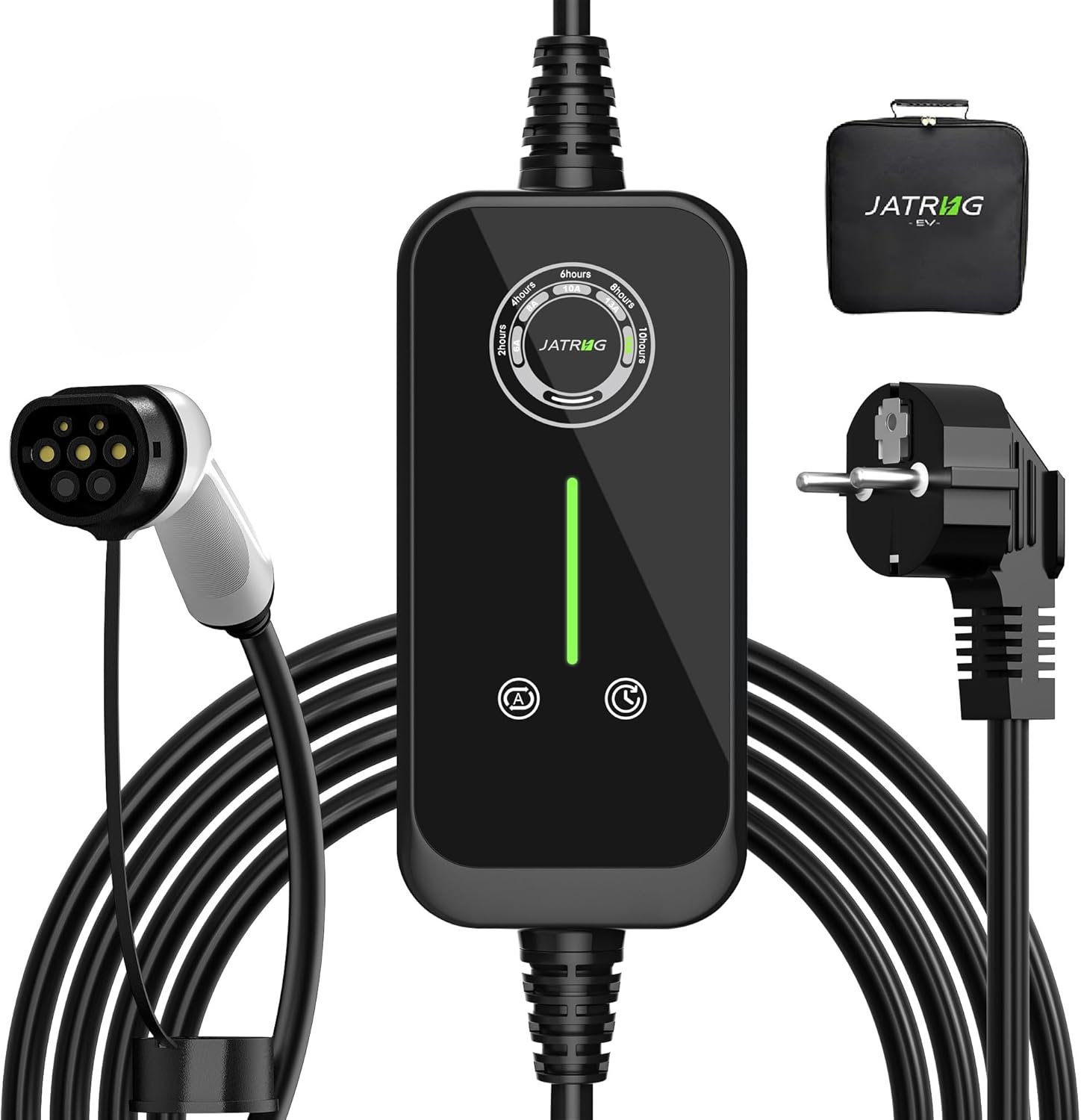
Figure 4.1: JATRHG P1 Portable EV Charger components.

Figure 4.2: Internal structure of the control box, highlighting compact design and cooling elements.
5. Eto
- Ṣayẹwo Ṣaja naa: Before each use, visually inspect the charger, cable, and connectors for any signs of damage, wear, or foreign objects. Do not use if any damage is observed.
- Sopọ si Ile-iṣẹ Agbara: Insert the power plug (Schuko type) firmly into a standard domestic 220V-230V AC outlet. Ensure the outlet is properly grounded and capable of handling the selected charging current.
- Sopọ mọ Ọkọ: Open your electric vehicle's charging port cover. Insert the Type 2 connector firmly into the vehicle's charging inlet. Ensure a secure connection.
- Jẹrisi Asopọmọra: The charger's LED indicator will illuminate, and the vehicle's dashboard should indicate that charging has begun or is ready to begin.

Figure 5.1: Charger connected to an electric vehicle.
6. Awọn ilana Iṣiṣẹ
The JATRHG P1 charger offers adjustable current settings and a scheduling function.
6.1. Current Settings
To adjust the charging current:
- Press the current settings button (labeled 'A' or with a current symbol) on the control box.
- Each press will cycle through the available current options: 6A, 8A, 10A, 13A, 16A.
- Select the desired current based on your vehicle's requirements and the capacity of your electrical outlet.
6.2. Schedule Settings
To set a delayed start time for charging:
- Press the schedule settings button (labeled with a clock symbol) on the control box.
- Each press will cycle through available delay options (e.g., 2 hours, 4 hours, 6 hours, 8 hours, 10 hours).
- The charger will begin charging after the selected delay period has elapsed.

Figure 6.1: Current and Schedule Setting buttons.
6.3. Agbara Tan / Paa
To turn the system off or restart it:
- Lati Pa: Press and hold the current settings button for 3 seconds. The system will power down.
- Lati Tun bẹrẹ: Press and hold the current settings button again for 3 seconds. The system will restart.

Figure 6.2: Power On/Off operation.

Nọmba 6.3: Alaye view ti awọn iṣakoso nronu.
7. Itọju
- Ninu: Disconnect the charger from both the power outlet and the vehicle before cleaning. Use a soft, dry cloth to wipe the control box and cables. Do not use abrasive cleaners, solvents, or immerse any part of the charger in water.
- Ibi ipamọ: When not in use, store the charger in a dry, cool place, away from direct sunlight and extreme temperatures. Ensure the cable is neatly coiled and not kinked or strained.
- Iṣẹ Ọjọgbọn: Do not attempt to open or repair the charger yourself. All maintenance and repair work must be performed by qualified personnel to ensure safety and maintain product integrity.
8. Laasigbotitusita
If you encounter issues with your JATRHG P1 EV Charger, please refer to the following common problems and solutions:
- Charger Not Starting:
- Ensure both the power plug and the Type 2 connector are securely inserted.
- Check the power outlet for functionality by plugging in another device.
- Verify that the charger is powered on (refer to Section 6.3).
- Check for any error codes or indicator lights on the control box and consult the vehicle's manual.
- Gbigba agbara lọra:
- Confirm the current setting is at the desired level (e.g., 16A for fastest charging, if supported by your outlet and vehicle). Refer to Section 6.1.
- Ensure no schedule delay is active (refer to Section 6.2).
- The vehicle's battery management system may limit charging speed based on battery state or temperature.
- Igbóná púpọ̀:
- If the control box or plug feels excessively hot, immediately disconnect the charger from the power source and the vehicle.
- Ensure the charger is used in a well-ventilated area and not covered.
- Contact customer support if overheating persists after ensuring proper ventilation and current settings.
- Atọka aṣiṣe:
- If an error light or code appears, disconnect the charger, wait a few minutes, and reconnect.
- If the error persists, contact customer support with details of the error indication.
If the problem cannot be resolved using these steps, please contact JATRHG customer support for assistance.
9. Awọn pato
| Ẹya ara ẹrọ | Sipesifikesonu |
|---|---|
| Brand | JATRHG |
| Nọmba awoṣe | EV-IEC-AC16-PV |
| Orukọ lọwọlọwọ | 6A, 8A, 10A, 13A, 16A (Adjustable) |
| Iṣagbewọle Voltage | 220V-230V AC |
| Ijade agbara ti o pọju | 3.6KW |
| Asopọmọra Iru | Iru 2 |
| USB Ipari | 5 Mita |
| Awọn iwọn otutu ti nṣiṣẹ | -30°C si +50°C |
| Awọn Ilana Abo | CE, TUV |
| Mabomire Rating | IP (as per description, suitable for outdoor use) |
| Iwọn Nkan | 2.85 kilo |
10. Atilẹyin ọja ati Support
JATRHG products are designed for reliability and performance. For specific warranty terms and conditions, please refer to the documentation provided with your purchase or visit the official JATRHG website. If you require technical assistance, have questions about your product, or need to report an issue, please contact JATRHG customer support through the retailer where you purchased the product or via the manufacturer's contact information.
Ask a question about this manual
Ask about setup, troubleshooting, compatibility, parts, safety, or missing instructions. Manuals+ will review the question and use this page’s manual context to help answer it.