
1. Ifihan
Thank you for choosing the Vetroo 1000W Black Power Supply. This power supply unit (PSU) is designed to provide stable and efficient power to your personal computer, especially for high-performance gaming and workstation builds. It features 80 Plus Gold certification for energy efficiency, full modular cabling for easy management, and is compliant with the latest ATX 3.1 and PCIe 5.1 standards. This manual provides essential information for safe installation, operation, and maintenance of your PSU.
2. Alaye Aabo
Please read and understand all safety warnings before installing or operating this product. Failure to follow these instructions may result in electric shock, fire, or serious injury.
- Gaju gigatage: The PSU contains high voltage components. Do not open the PSU casing. Ko si awọn ẹya ti o le lo ninu.
- Fifi sori Ọjọgbọn: Installation should be performed by qualified personnel. Incorrect installation can damage your system or the PSU.
- Ge asopọ agbara: Always disconnect the AC power cord from the wall outlet before installing, removing, or cleaning the PSU or any other components in your computer.
- Ilẹ: Ensure the PSU is properly grounded. Use only the provided power cord.
- Ayika: Operate the PSU in a dry, well-ventilated environment. Avoid exposure to moisture, extreme temperatures, or direct sunlight.
- Afẹfẹ: Do not block the ventilation openings of the PSU. Ensure adequate airflow around the unit.
- Iṣakoso USB: Ensure all cables are securely connected and routed to prevent interference with cooling fans or other components.
3. Package Awọn akoonu
Daju pe gbogbo awọn nkan wa ninu apo rẹ:
- Vetroo 1000W Black Power Supply Unit
- Modular Cable Set (including 24-pin ATX, 8-pin CPU, PCIe 5.1 12+4-pin, PCIe 6+2-pin, SATA, Molex, FDD cables)
- AC Agbara okun
- Iṣagbesori skru
- Cable Ties/Velcro Straps
- Afowoyi Olumulo (iwe-ipamọ yii)


4. Awọn ẹya Ọja
- 80 Plus Gold Ti a fọwọsi: Ensures high energy efficiency, reducing power consumption and heat generation.
- Fully Compliant with ATX 3.1 Specifications: Designed to meet the latest power delivery standards for modern PC components.
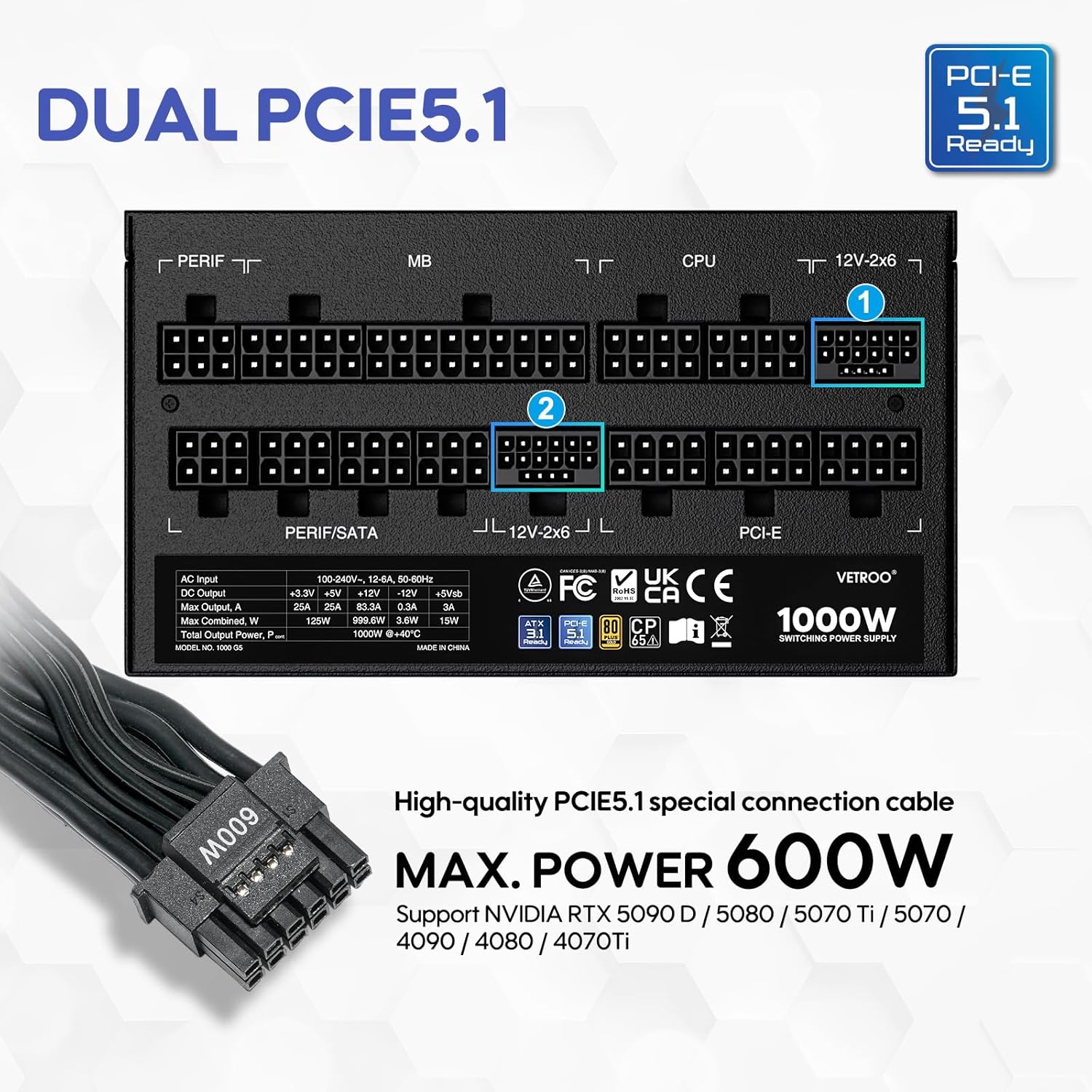
- PCIe Gen 5.1 Ti ṣetan: Equipped with dedicated 12+4-pin connectors for the latest PCIe 5.1 graphics cards, offering up to 600W power delivery. Also backwards compatible with PCIe 4.0 and 3.0.
- Premium 105° C Capacitors: Utilizes high-quality Japanese capacitors for enhanced stability, reliability, and extended lifespan.
- Apẹrẹ Modulu Kikun: Allows users to connect only the necessary cables, improving airflow and simplifying cable management within the PC case.
- Eco Mode with 120mm FDB Fan: Features a fluid dynamic bearing (FDB) fan that operates silently under low loads, with an Eco Mode switch to stop the fan entirely when power consumption is below 50%.
- Iwọn Iwapọ: Designed to fit comfortably in various PC chassis types.
- Aabo ti o ni kikun: Pẹ̀lú Orí Ìdìpọ̀tage Protection (OVP), Over Current Protection (OCP), Over Power Protection (OPP), Short Circuit Protection (SCP), Under Voltage Protection (UVP), and Over Temperature Protection (OTP).

5. Awọn pato
| Ẹya ara ẹrọ | Ẹ̀kúnrẹ́rẹ́ |
|---|---|
| Orukọ awoṣe | 1000G5 |
| Ijade Wattage | 1000 Wattis |
| Fọọmù ifosiwewe | ATX |
| Agbara Ipese Design | Modulu ni kikun |
| Ijẹrisi ṣiṣe | 80 Plus Gold |
| Iye owo ti ATX | ATX 3.1 setan |
| PCIe Standard | PCIe 5.1 Ready (Dual) |
| Ọna Itutu | Afẹfẹ (FDB FDB 120mm) |
| Awọn iwọn Ọja (L x W x H) | 5.9 x 5.5 x 3.4 inches |
| Iwọn Nkan | 5.83 iwon |
| Awọn ẹrọ ibaramu | Kọmputa ti ara ẹni |
| Asopọmọra Iru | ATX & PCIE |

6. Eto ati fifi sori
Follow these steps to install your Vetroo 1000W Power Supply:
- Mura Eto Rẹ: Rí i dájú pé kọ̀ǹpútà rẹ ti pa pátápátá àti pé ó ti yọ ìsopọ̀ mọ́ ògiri. Ṣí àpótí kọ̀ǹpútà rẹ láti wọ inú ibi tí a ti ń gbé PSU sí.
- Yọ PSU Atijọ kuro (ti o ba wulo): Ge gbogbo awọn kebulu kuro lati ipese agbara atijọ rẹ ki o yọ kuro ninu ẹnjini naa.
- Gbe PSU Tuntun naa: Carefully slide the Vetroo 1000W PSU into the designated power supply bay in your PC case. Secure it with the provided mounting screws.
- So awọn okun onirin pọ: Identify the necessary cables for your motherboard, CPU, graphics card(s), and storage devices. Connect these cables to the corresponding ports on the PSU first, then route them to your components.
- Modaboudu: So okùn ATX 24-pin pọ mọ modaboudu rẹ.
- Sipiyu: So okùn agbara CPU 8-pin (tabi 4+4-pin) pọ mọ modaboudu rẹ.
- Graphics Card(s): For modern GPUs, use the PCIe 5.1 12+4-pin cable. For older or additional GPUs, use the PCIe 6+2-pin cables.
- Storage/Peripherals: So awọn okun agbara SATA pọ mọ awọn SSDs/HDDs ati awọn okun Molex fun awọn ẹya ẹrọ miiran bi o ṣe nilo.
- Iṣakoso USB: Use the included cable ties or Velcro straps to organize cables, ensuring optimal airflow and a tidy build.
- Awọn isopọ Ipari: Close your PC case. Connect the AC power cord to the PSU and then to a wall outlet or surge protector.

7. Awọn ilana Iṣiṣẹ
- Titan/Apapa: After all connections are secure, flip the main power switch on the back of the PSU to the 'ON' position. Your computer can now be powered on via its front panel button. To power off, shut down your computer normally, then flip the PSU switch to 'OFF' for complete power disconnection.
- Ipo Eco: The Vetroo 1000W PSU features an Eco Mode switch on the rear panel.
- Eco Mode ON: When the Eco Mode switch is in the 'ON' position, the PSU fan will remain off under low to moderate loads (typically below 50% load) for silent operation. The fan will automatically activate when the load increases or internal temperature rises.
- Eco Mode OFF: When the Eco Mode switch is in the 'OFF' position, the PSU fan will spin continuously regardless of the load, providing constant cooling.

8. Itọju
Itọju to dara ṣe idaniloju igbesi aye gigun ati iṣẹ aipe ti PSU rẹ:
- Pipa eruku: Periodically clean the PSU fan and ventilation grilles to prevent dust buildup, which can hinder cooling performance. Use compressed air to gently blow dust away. Always disconnect power before cleaning.
- Ayẹwo USB: Regularly check all modular cable connections to ensure they are secure and free from damage.
- Awọn ipo Ayika: Maintain a clean, dry, and well-ventilated environment for your PC to prevent excessive heat and moisture exposure to the PSU.
9. Laasigbotitusita
If you encounter issues with your Vetroo 1000W Power Supply, try the following steps:
- Ko si Agbara:
- Rí i dájú pé okùn agbára AC ti so mọ́ PSU àti ihò ìtajà ògiri dáadáa.
- Verify the main power switch on the PSU is in the 'ON' position.
- Check all modular cable connections, especially the 24-pin ATX and 8-pin CPU cables, to ensure they are fully seated.
- Ṣe ìdánwò ibi ìtajà ògiri pẹ̀lú ẹ̀rọ mìíràn láti jẹ́rìí sí i pé ó ní agbára.
- Àìdúróṣinṣin sí ètò/Ìpadé àìròtẹ́lẹ̀:
- Ensure your PSU wattage is sufficient for all your components, especially high-power GPUs.
- Ṣayẹwo fun fentilesonu to dara laarin ọran PC rẹ lati ṣe idiwọ igbona.
- Verify that all PCIe power cables to your graphics card(s) are correctly connected.
- If Eco Mode is enabled, try disabling it to see if continuous fan operation resolves the issue.
- Awọn Ariwo Alailẹgbẹ:
- If you hear a fan noise, ensure the PSU fan is not obstructed by cables or dust.
- If a 'coil whine' noise is present, it is often harmless but can sometimes indicate a component under stress. Ensure your system is not drawing excessive power.
If problems persist after performing these checks, please contact Vetroo customer support for further assistance.
10. Atilẹyin ọja ati Support
The Vetroo 1000W Black Power Supply comes with a 10-odun atilẹyin ọja lati ọjọ ti o ra. Atilẹyin ọja yi ni wiwa awọn abawọn ninu awọn ohun elo ati iṣẹ ṣiṣe labẹ lilo deede.
Atilẹyin ọja naa ko ni aabo:
- Bibajẹ ti o ṣẹlẹ nipasẹ ijamba, ilokulo, ilokulo, iṣan omi, ina, ìṣẹlẹ, tabi awọn idi ita miiran.
- Damage caused by operating the product outside the permitted or intended uses described by Vetroo.
- Damage caused by service (including upgrades and expansions) performed by anyone who is not a representative of Vetroo.
- Products or parts that have been modified to alter functionality or capability without the written permission of Vetroo.
For warranty claims or technical support, please visit the official Vetroo website or contact their customer service department with your product model and proof of purchase.