1. Ifihan
This manual provides essential information for the safe and efficient operation of your Admark K420 Class D Professional Power Amplifier. Please read this manual thoroughly before installation and use to ensure optimal performance and to prevent damage to the unit or other equipment. The Admark K420 is a high-performance, four-channel Class D amplifier designed for professional audio applications, delivering 2000 Watts per channel at 8 Ohms.
3. Package Awọn akoonu
Upon opening the package, please verify that all components are present and in good condition. If any items are missing or damaged, contact your dealer immediately.
- Admark K420 Professional Power Ampitanna
- AC Agbara okun
- Afowoyi Olumulo (iwe-ipamọ yii)
5. Eto
5.1 agbeko iṣagbesori
The Admark K420 is designed for standard 19-inch rack mounting and occupies 1U of rack space. Ensure the rack is stable and has adequate ventilation. Secure the amplifier using appropriate rack screws.
5.2 Ru Panel Awọn isopọ
The rear panel provides all input and output connections. Refer to the image below for a visual guide.

Image: Rear panel of the Admark K420 amplifier, displaying four XLR input connectors, four SpeakON output connectors, and the power inlet.
5.2.1 Asopọ agbara
Connect the supplied AC power cord to the power inlet on the rear panel and then to a suitable grounded AC power outlet. Ensure the amplifier's power switch is in the OFF position before connecting power.
5.2.2 Inpu Awọn isopọ
Use balanced XLR cables to connect your audio source (e.g., mixer, audio processor) to the XLR input connectors (CH A, CH B, CH C, CH D) on the rear panel. Ensure correct polarity.
5.2.3 o wu Awọn isopọ
Connect your loudspeakers to the SpeakON output connectors (OUTPUT CH A, OUTPUT CH B, OUTPUT CH C, OUTPUT CH D) using appropriate SpeakON cables. Ensure the impedance of your loudspeakers matches the amplifier's specifications (minimum 8 Ohms per channel for full power output). Observe correct wiring for stereo or bridged modes if applicable (refer to specific wiring diagrams on the unit or in advanced documentation).
6. Awọn ilana Iṣiṣẹ
The front panel of the Admark K420 provides controls and indicators for monitoring and adjusting the amplifier's operation.
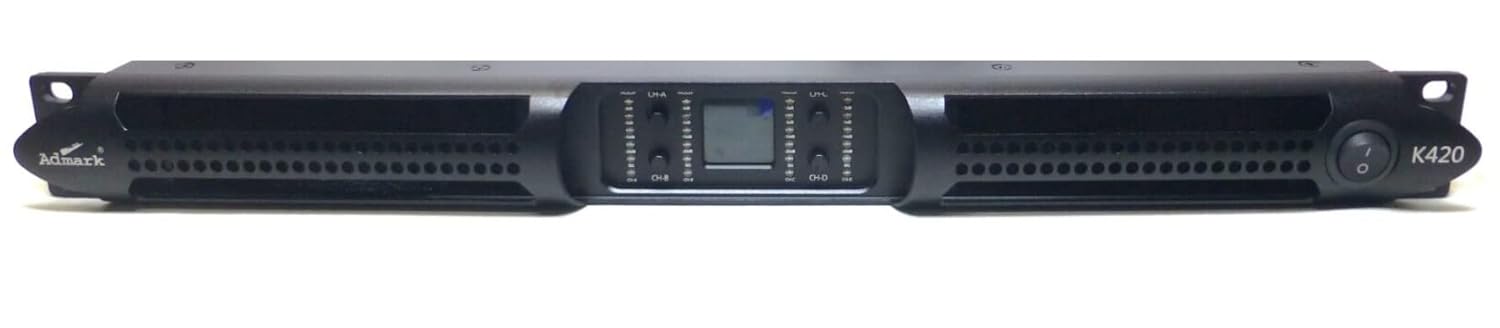
Image: Front panel of the Admark K420 amplifier, featuring the power switch, individual channel level controls, and LED indicators for signal, clip, and protection status.
6.1 Titan / Pa a
- Agbara Tan: Ensure all connections are secure and input levels are turned down. Press the power switch on the front panel. The power indicator LED should illuminate.
- Agbara Pa: Turn down all input levels, then press the power switch to turn off the amplifier.
6.2 Awọn iṣakoso Panel iwaju ati Awọn itọkasi
- Agbara Yi pada: Balu awọn amplifier tan tabi pa.
- Channel Level Controls: Individual rotary controls for adjusting the output level of each channel (CH A, CH B, CH C, CH D). Start with these controls fully counter-clockwise (minimum) and gradually increase to the desired level.
- Ifihan agbara LED: Illuminates when an audio signal is present on the corresponding channel.
- Agekuru LED: Illuminates when the output signal is clipping (distorting). Reduce the input level or channel level control immediately to prevent damage to speakers and the amplifier.
- Dabobo LED: Itanna nigbati awọn amplifier's protection circuitry is activated due to fault conditions (e.g., overheating, short circuit). The ampLifier yoo da iṣẹjade rẹ duro. Pa ẹrọ naa, yanju iṣoro naa, lẹhinna tan ina pada.
6.3 Ipilẹ isẹ
- Ensure all audio sources and speakers are connected correctly.
- Turn down all channel level controls on the amplifier.
- Power on your audio source equipment first, then the Admark K420 amplifier.
- Gradually increase the channel level controls on the amplifier to achieve the desired volume. Monitor the Signal and Clip LEDs.
- When finished, turn down the amplifier's channel level controls, then power off the amplifier, followed by your audio source equipment.
