
1. Ifihan
Thank you for choosing the CPVAN BC01 Pro Outdoor Solar Security Camera. This manual provides essential information for the proper installation, operation, and maintenance of your device. Please read this manual thoroughly before use and retain it for future reference.
Alaye Abo:
- Ensure the camera is installed in a location where it is protected from direct impact.
- Do not attempt to disassemble or modify the camera. This may void the warranty and cause damage.
- Use only the specified power source and charging methods.
- Jeki kamẹra ati awọn ẹya ara rẹ kuro ni arọwọto awọn ọmọde.
2. Ọja Ipariview
The CPVAN BC01 Pro is a wireless outdoor security camera designed for continuous surveillance with solar power. It features 1080P HD video, color night vision, PIR motion detection, and two-way audio communication.
Awọn ẹya pataki:
- Agbara Oorun: Integrated 5000mAh rechargeable battery with solar panel for continuous charging.
- Fídíò HD 1080P: Delivers clear 1920x1080 resolution images and videos.
- Oju Alẹ Awọ: Equipped with 8 IR LEDs and a powerful spotlight for full-color night vision.
- Iwari išipopada PIR: Advanced algorithms reduce false alarms and support AI identification of people, vehicles, and packages.
- Audio Ọna Meji: Communicate with visitors or deter intruders via the built-in microphone and speaker.
- IP66 Oju ojo: Designed to withstand dust and water splashes, operating in temperatures from -20°C to 50°C (-4°F to 122°F).
- 100% Wireless: Flexible installation with a 360° adjustable wall mount.
Awọn akoonu idii:
Daju pe gbogbo awọn nkan wa ninu apo rẹ:
- CPVAN BC01 Pro Camera
- Igbimọ Oorun (1.6W)
- Wall Mount Bracket (360° adjustable)
- Iṣagbesori skru ati Wall Plugs
- Okun Ngba agbara USB (mita 3)
- Itọsọna olumulo
- SIM Ejector Tool (for SD card slot access)

Image: Package contents of the CPVAN BC01 Pro camera system.
3. fifi sori
3.1 Gbigba agbara akọkọ
Before first use, fully charge the camera's internal battery using the provided USB cable and a 5V/2A power adapter (not included). This ensures the camera has sufficient power to operate during initial setup and periods of low sunlight.
3.2 Fifi sori ẹrọ Ohun elo
Gba awọn VicoHome APP from your smartphone's app store (iOS App Store or Google Play Store). Register an account and log in.
3.3 Ṣíṣepọ̀ Kámẹ́rà
- Open the VicoHome APP and tap the "+" icon to add a new device.
- Follow the on-screen instructions to select your camera model.
- Power on the camera. The camera will enter pairing mode (indicated by a flashing LED).
- So fóònù alágbékalẹ̀ rẹ pọ̀ mọ́ nẹ́tíwọ́ọ̀kì Wi-Fi 2.4GHz. Kámẹ́rà náà kò lè lo Wi-Fi 5GHz.
- Scan the QR code displayed on your phone screen with the camera lens. Hold the phone approximately 15-20 cm (6-8 inches) from the camera until you hear a confirmation sound.
- Nígbà tí o bá ti sopọ̀ mọ́ ara rẹ, sọ orúkọ kámẹ́rà rẹ kí o sì parí iṣẹ́ ìṣètò náà.
3.4 Iṣagbesori Kamẹra ati Igbimọ oorun
Yan ipo iṣagbesori ti o pese kedere view ti agbegbe ti o fẹ lati ṣe abojuto ati gba ample direct sunlight for the solar panel. The camera and solar panel are IP66 weatherproof, suitable for outdoor use.

Image: CPVAN BC01 Pro camera with solar panel for extended standby time.
- Samisi Awọn aaye Liluho: Lo akọmọ iṣagbesori bi awoṣe lati samisi awọn ihò dabaru lori ogiri.
- Awọn iho iho: Lu awọn ihò ni awọn ipo ti a samisi ki o si fi awọn pulọọgi ogiri sii.
- So awọn akọmọ: Securely fasten the camera and solar panel mounting brackets to the wall using the provided screws.
- Ṣatunṣe Igun: Adjust the camera and solar panel to the desired angles. The solar panel should be positioned to receive maximum direct sunlight throughout the day. The 3-meter cable allows for flexible placement of the solar panel away from the camera if needed.
- Solar Panel: Connect the solar panel cable to the charging port on the camera.

Image: The camera and solar panel are IP66 waterproof, suitable for all weather conditions.
4. Awọn ilana Iṣiṣẹ
4.1 Live View ati Gbigbasilẹ
Open the VicoHome APP and select your camera to access the live view. From here, you can manually record video, take screenshots, and monitor your property in real-time.
4.2 Išipopada erin ati titaniji
The camera uses PIR (Passive Infrared) motion detection to identify movement. When motion is detected, the camera will automatically record a video clip and send an alert notification to your smartphone.
- Ṣatunṣe Ifamọ: In the app settings, you can adjust the motion detection sensitivity to minimize false alarms.
- AI Recognition: The camera supports intelligent AI recognition (subscription may be required) to differentiate between people, vehicles, and packages, providing more precise alerts.
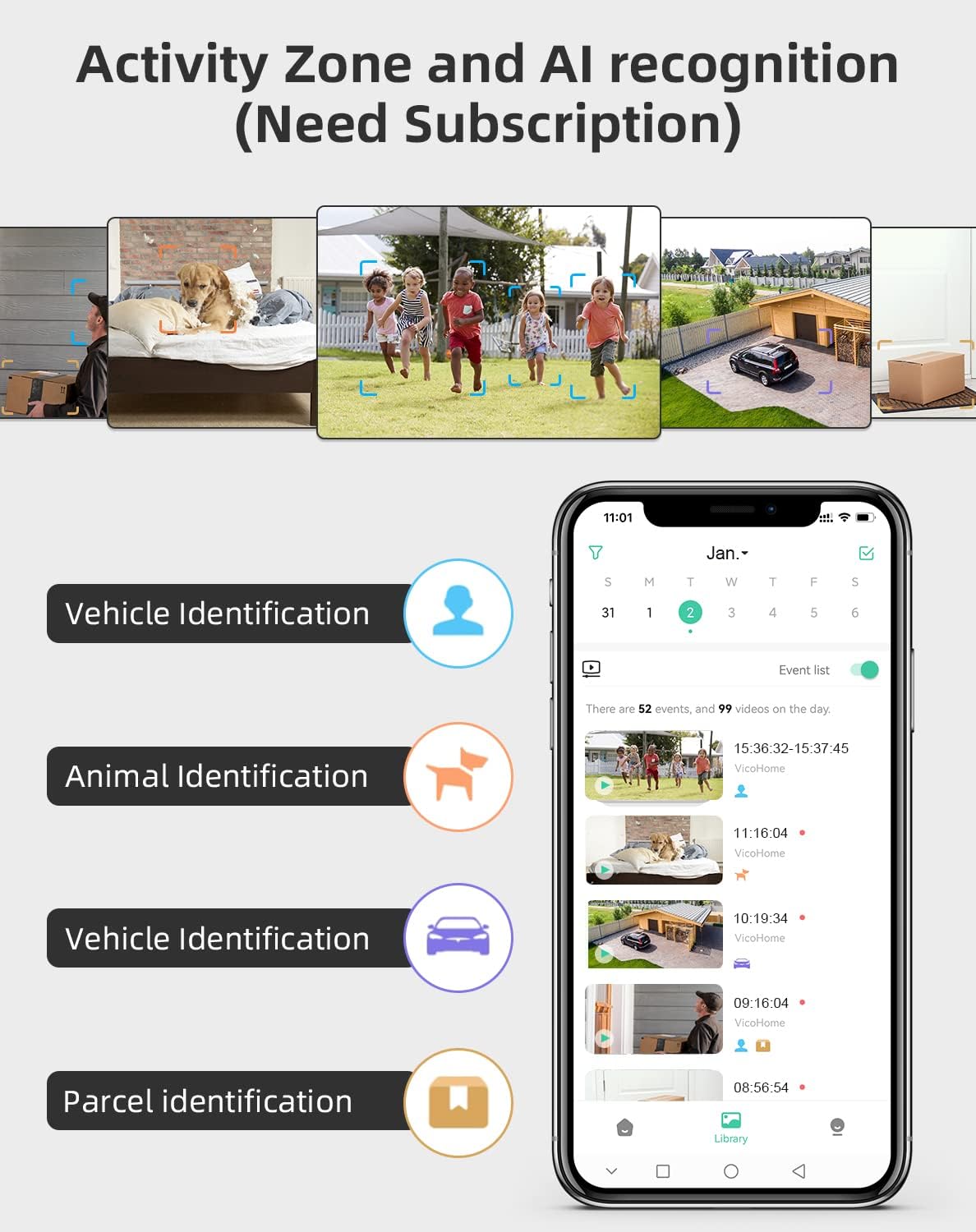
Image: Activity Zone and AI recognition features available through the VicoHome app (subscription may be required).

Image: Real-time alerts with built-in spotlight for clearer night visibility.
4.3 Meji-Ona Audio
Utilize the two-way audio feature to communicate through the camera. Tap the microphone icon in the live view interface to speak, and listen through the camera's speaker.

Image: Two-way talk feature allowing real-time communication.
4.4 Night Iran Awọn ọna
Kamẹra naa nfunni ni awọn ipo iran alẹ meji:
- Ipo infurarẹẹdi: Automatically activates in low light, providing clear black and white video.
- Oju Alẹ Awọ: The powerful built-in spotlight can be activated to provide full-color video at night.

Image: Comparison of White Light Mode (color night vision) and Infrared Mode.
4.5 Activity Zones
Ṣàlàyé àwọn agbègbè pàtó kan láàárín pápá kámẹ́rà náà view where you want to receive motion alerts. This helps focus surveillance on critical areas and further reduces unwanted notifications.
4.6 Ibi ipamọ Aw
The camera supports two storage methods for recorded video clips:
- Ibi ipamọ awọsanma: Access recorded events via the VicoHome cloud service (subscription may be required).
- Ibi ipamọ agbegbe: Insert a microSD card (up to 128GB, not included) into the camera's slot for local recording.

Image: Cloud storage and local SD card storage options.
5. Itọju
5.1 Ninu
- Regularly clean the camera lens with a soft, dry cloth to ensure clear image quality.
- Wipe the solar panel periodically to remove dust, dirt, or debris that may obstruct sunlight and reduce charging efficiency.
5.2 batiri Itọju
- Rí i dájú pé àwọn páànẹ́lì oòrùn náà gba ìmọ́lẹ̀ tó péye láti mú kí agbára bátírì máa gba.
- If the camera is installed in a location with limited sunlight, occasional manual charging via USB may be necessary.
- Avoid exposing the camera to extreme temperatures outside its operating range (-20°C to 50°C).
6. Laasigbotitusita
If you encounter issues with your CPVAN BC01 Pro camera, refer to the following common problems and solutions:
- Kamẹra ko sopọ mọ Wi-Fi: Rí i dájú pé nẹ́tíwọ́ọ̀kì Wi-Fi rẹ jẹ́ 2.4GHz. Ṣàyẹ̀wò agbára àmì Wi-Fi ní ibi tí kámẹ́rà náà wà. Tún ráùtù rẹ àti kámẹ́rà náà bẹ̀rẹ̀.
- No motion alerts: Check motion detection settings in the app. Ensure sensitivity is appropriate. Verify that activity zones are correctly configured.
- Didara aworan ti ko dara: Clean the camera lens. Ensure there are no obstructions in the field of view. Check network stability for live streaming.
- Batiri ko gba agbara: Ensure the solar panel is clean and receiving direct sunlight. Check the connection between the solar panel and the camera.
- Ohun afetigbọ ọna meji ko ṣiṣẹ: Check microphone and speaker permissions for the VicoHome app on your phone. Ensure volume settings are correct.
For further assistance, you can use the feedback function within the VicoHome APP:

Image: Sending feedback via the VicoHome app for technical support.
7. Awọn pato
| Ẹya ara ẹrọ | Sipesifikesonu |
|---|---|
| Nọmba awoṣe | BC01 |
| Brand | CPVAN |
| Asopọmọra Technology | Alailowaya (Wi-Fi 2.4GHz) |
| Orisun agbara | Agbara Oorun ati Agbara Batiri |
| Batiri | 1 Lithium-ion (included), 5000mAh |
| Oorun nronu Wattage | 1.6 Wattis |
| Voltage | 5 Volts |
| Ipinnu Gbigbasilẹ fidio | 1080p (1920x1080) |
| Viewigun igun | Awọn iwọn 120 |
| Ibiti Iran Night | 10 Mita |
| Night Iran Iru | Infrared and Color Night (with spotlight) |
| Pataki Ẹya | PIR Motion Detector, Two-Way Audio, AI Recognition |
| International Idaabobo Rating | IP66 |
| Awọn iwọn otutu ti nṣiṣẹ | -20°C si 50°C (-4°F si 122°F) |
| Iṣagbesori Iru | Ògiri Ògiri |
| Ọna Iṣakoso | Application (VicoHome APP) |
| Iṣeduro Lilo | Outdoor Security Surveillance |
| Sun-un Iru | Sun-un Optical |
8. Atilẹyin ọja ati Support
CPVAN products are designed for reliability and performance. For warranty information, please refer to the warranty card included in your product packaging or contact CPVAN customer support directly.
If you require technical assistance or have questions not covered in this manual, please contact our support team through the VicoHome APP's feedback section or visit the official CPVAN webaaye fun awọn alaye olubasọrọ.