
1. Ifihan
This manual provides essential information for the safe and efficient use of your SBS MAG 15W Wireless Charger. Please read these instructions carefully before using the device and retain them for future reference.
2. Ọja Ipariview
The SBS MAG 15W Wireless Charger is designed to provide convenient and fast wireless charging for a wide range of QI-compatible smartphones, including Android and Apple devices. Its compact design makes it ideal for use at home, in the office, or while traveling. The charger features Automatic Detection System (ADS) technology to optimize power delivery for your device.

Nọmba 2.1: The SBS MAG 15W Wireless Charger. This image shows the white, circular charging pad with the SBS logo and the integrated white USB-C cable coiled next to it.
Awọn ẹya pataki:
- Wireless charging for QI-compatible Android and Apple smartphones.
- MagSafe compatibility for magnetic attachment to iPhones with MagSafe charging.
- Provides up to 15W of power output.
- Automatic Detection System (ADS) technology adjusts power output (5W/7.5W/10W/15W) for optimal charging speed.
- Iwapọ ati apẹrẹ to ṣee gbe.
3. Eto
Follow these steps to set up your wireless charger:
- Sopọ si Orisun Agbara: Insert the USB-C connector of the wireless charger into a compatible power source. This can be a wall charger (not included) or an external power bank. Ensure the power source provides sufficient output (e.g., 5V DC 3A or 9V DC 2A) for optimal performance.
- Ibi: Place the wireless charging pad on a flat, stable surface.

Nọmba 3.1: USB-C Connector. This image shows a detailed view of the USB-C connector, which is used to power the wireless charger.
4. Awọn ilana Iṣiṣẹ
Once the charger is connected to a power source, it is ready for use.
- Gbe Ẹrọ Rẹ: Carefully place your QI-compatible smartphone onto the center of the wireless charging pad. For iPhones with MagSafe, the charger will magnetically align itself.
- Jẹrisi gbigba agbara: Your smartphone should indicate that it is charging. If not, adjust the position of your phone on the pad.
- Automatic Detection System (ADS): The integrated ADS technology will automatically detect your device's power requirements and adjust the output to 5W, 7.5W, 10W, or 15W to ensure the fastest possible safe charge. For example, iPhones typically charge at 7.5W.
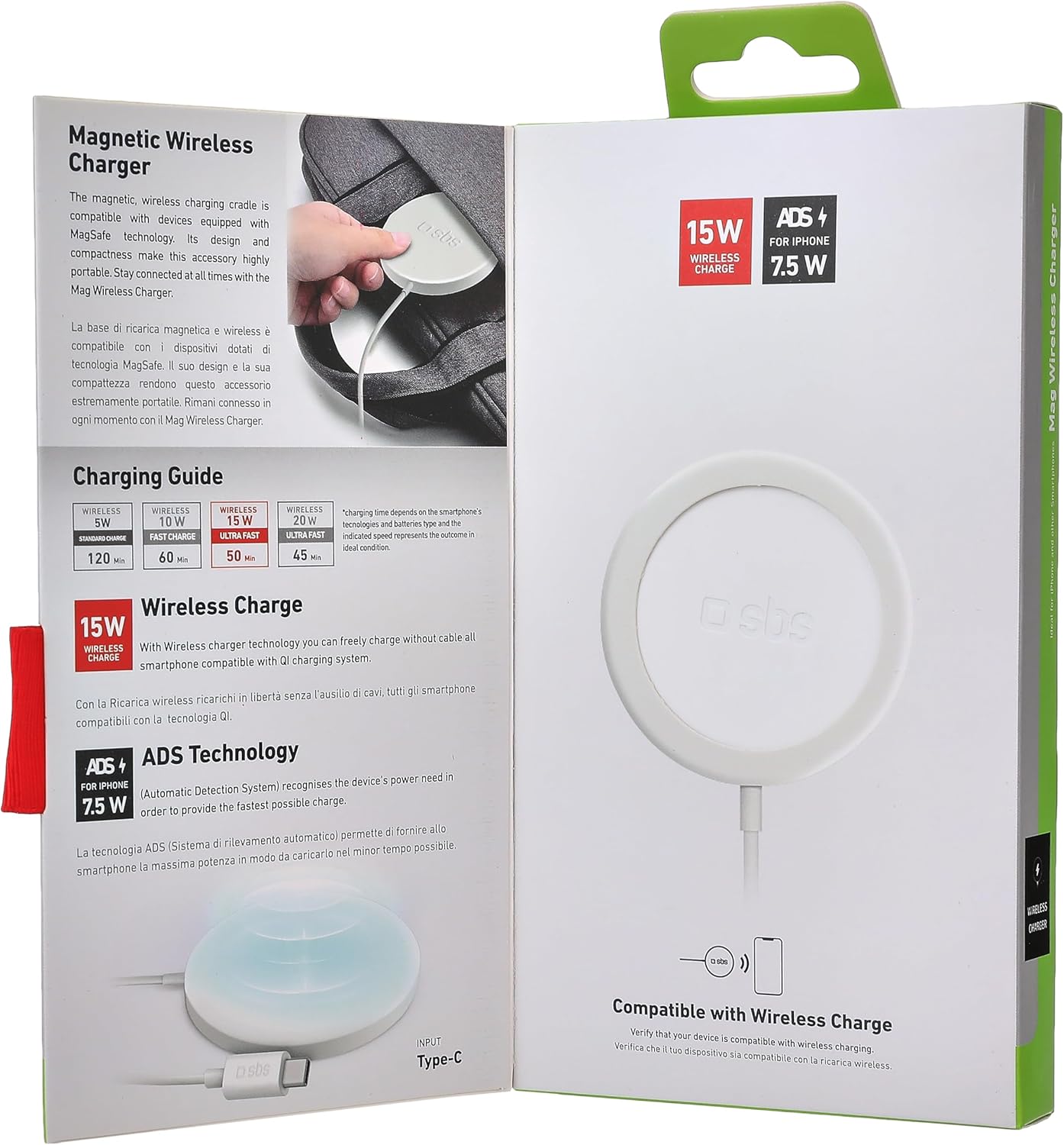
Nọmba 4.1: Charging Guide. This image from the product packaging illustrates the charging guide, showing different power outputs and estimated charging times for various devices.
Iṣe gbigba agbara:
- Up to 15W for compatible Android smartphones (e.g., full charge in approximately 50 minutes).
- 7.5W for compatible iPhones.
- Charging times may vary based on device model, battery level, and environmental factors.
5. Itọju
To ensure the longevity and optimal performance of your wireless charger, follow these simple maintenance guidelines:
- Ninu: Disconnect the charger from the power source before cleaning. Use a soft, dry cloth to wipe the surface of the charging pad. Do not use liquid cleaners or abrasive materials.
- Ibi ipamọ: Tí o kò bá lò ó, fi charger náà sí ibi tí ó tutù tí ó sì gbẹ, tí kò sí ìmọ́lẹ̀ oòrùn tààrà àti ooru tó le koko.
- Mimu: Avoid dropping the charger or subjecting it to strong impacts. Do not attempt to disassemble or repair the device yourself.
6. Laasigbotitusita
If you encounter issues with your SBS MAG 15W Wireless Charger, refer to the following common problems and solutions:
| Isoro | Owun to le Fa | Ojutu |
|---|---|---|
| Device is not charging or charging intermittently. |
|
|
| Iyara gbigba agbara lọra. |
|
|
7. Awọn pato
| Ẹya ara ẹrọ | Ẹ̀kúnrẹ́rẹ́ |
|---|---|
| Brand | SBS |
| Nọmba awoṣe | TECBCHGMAGW |
| Àwọ̀ | Funfun |
| Asopọmọra Iru | USB-C |
| Iṣagbewọle Voltage | 5V DC 3A / 9V DC 2A |
| Agbara Ijade | 5W / 7.5W / 10W / 15W (O pọju) |
| Awọn ẹrọ ibaramu | QI-compatible smartphones (Android, iPhone), MagSafe compatible iPhones |
| Pataki Awọn ẹya ara ẹrọ | Fast Charging, Automatic Detection System (ADS), Magnetic Alignment (MagSafe) |
| Awọn eroja To wa | 1 SBS Mag 15W Wireless Charger |
8. Atilẹyin ọja ati Support
Specific warranty information for the SBS MAG 15W Wireless Charger is not provided in the product details. For warranty claims or technical support, please refer to the documentation included with your purchase or contact the retailer or manufacturer directly.
Manufacturer: SBS SpA