
Ọrọ Iṣaaju
This manual provides essential information for the proper installation, operation, and maintenance of your RecPro RV 6-inch Coaxial Water-Resistant Speaker with RGB LED Lighting. Designed for both indoor and outdoor environments, including marine applications, this speaker delivers quality audio performance and customizable lighting. Please read these instructions thoroughly before installation and use to ensure optimal performance and safety.
Alaye Aabo
- Awọn Isopọ Itanna: Ensure all wiring is performed by a qualified individual and adheres to local electrical codes. Disconnect power before making any electrical connections.
- Omi Resistance: While water-resistant, these speakers are not designed for submersion. Ensure proper mounting to prevent water accumulation around connections.
- Awọn ipele Iwọn: Ifarahan gigun si awọn ipele iwọn didun giga le fa ibajẹ igbọran. Ṣatunṣe iwọn didun si ipele itunu.
- Iṣagbesori: Securely mount speakers to a stable surface to prevent detachment during vehicle movement or environmental conditions.
Ọja Pariview
The RecPro RV 6-inch Coaxial Speaker is engineered for durability and performance in various settings. Key features include:
- Apẹrẹ Alatako Omi: Suitable for marine, RV, and outdoor use.
- Imọlẹ LED RGB: Integrated lighting for aesthetic enhancement.
- Free-Air Design: Facilitates easy installation in diverse locations.
- Awọn eroja Didara: Features a cast aluminum basket and high-temperature voice coil for robust performance.
- Ikole ti o tọ: Tough, rigid plastic exterior resistant to corrosion and UV light.
- Mimu Agbara giga: Up to 150 watts max power handling.

Nọmba 1: Speaker components including the high-temperature voice coil, cast aluminum basket, and heavy-duty connection.

Nọmba 2: Key features of the speaker, emphasizing its 150-watt max power handling, resistance to corrosion and UV light, and waterproof design.
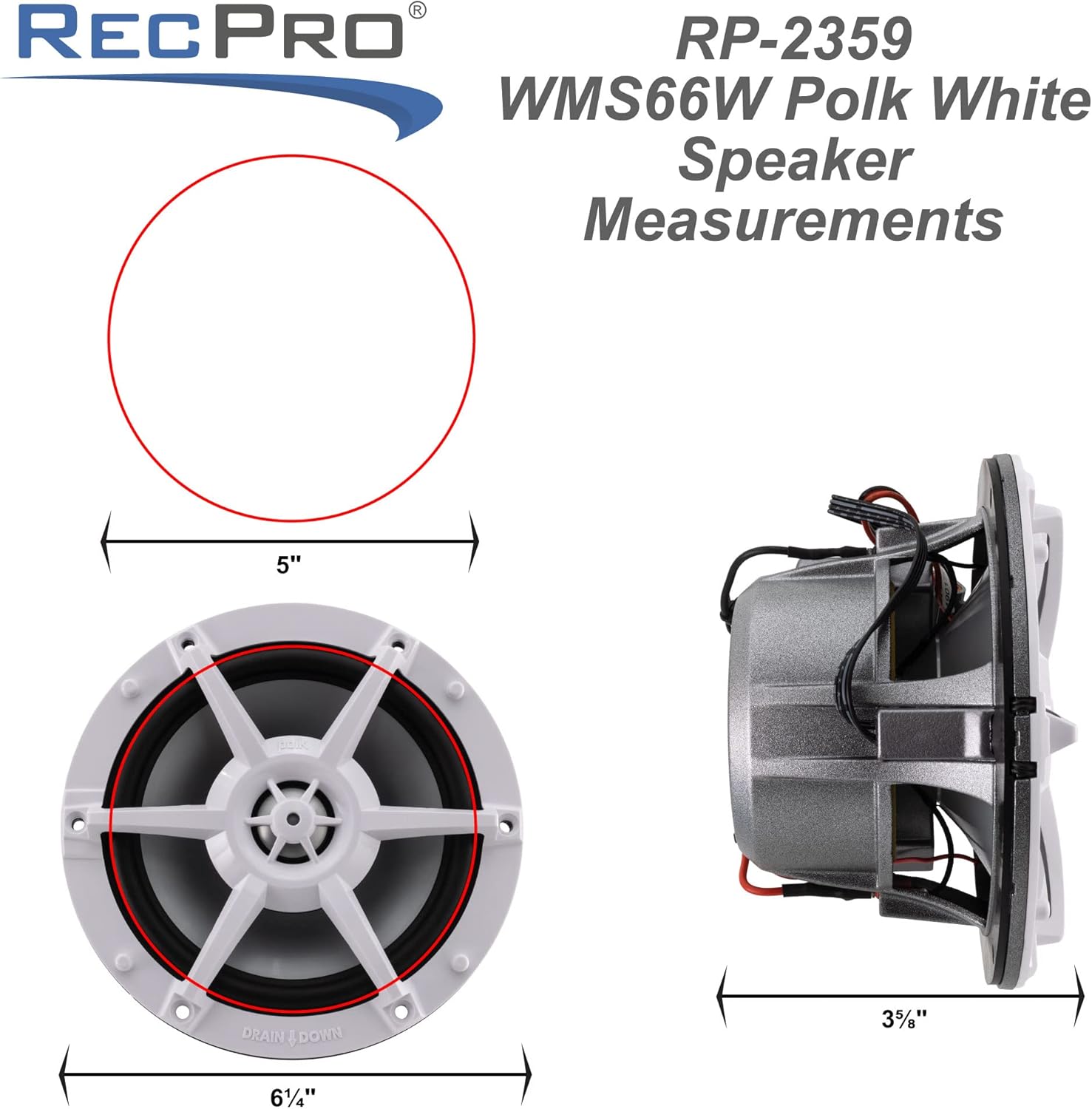
Nọmba 3: Speaker measurements, showing a 5-inch cutout diameter, 6 1/4-inch overall diameter, and 3 1/8-inch mounting depth.
Eto ati fifi sori
Proper installation is crucial for speaker performance and longevity. Due to its free-air design, this speaker can be installed without a dedicated enclosure, simplifying the process.
- Yan Ibi Igbesoke: Select a flat, stable surface that can accommodate the speaker's dimensions (refer to Figure 3). Ensure there is sufficient depth for the speaker magnet and wiring.
- Múra Ihò Ìfipamọ́: Using the provided template or the dimensions in Figure 3, carefully cut a 5-inch diameter hole for the speaker. Drill pilot holes for the mounting screws.
- Awọn isopọ onirin:
- Wiwa ohun afetigbọ: Connect the speaker's positive (+) and negative (-) terminals to the corresponding outputs on your audio amplifier or head unit. Ensure correct polarity for optimal sound.
- RGB LED Wiring: Connect the RGB LED wires to a compatible LED controller (sold separately). Follow the controller's instructions for power and signal connections.
- Gbé Agbọrọsọ kalẹ̀: Place the speaker into the prepared opening. Secure it using the provided mounting screws, tightening them evenly to prevent distortion of the speaker frame.
- Iṣe idanwo: After installation, test both the audio and RGB LED lighting to ensure all connections are correct and the speaker is functioning as expected.
Awọn ilana Iṣiṣẹ
Once installed, operating your RecPro speaker is straightforward:
- Sisisẹsẹhin ohun: Turn on your audio source (e.g., RV stereo, marine head unit). Adjust the volume and audio settings (bass, treble, balance, fader) on your audio device to achieve your desired sound quality.
- RGB LED Iṣakoso: The RGB LED lighting requires an external LED controller (not included). Refer to the instructions provided with your LED controller to select colors, patterns, brightness, and other lighting effects. Ensure the LED controller is powered on and properly connected to the speaker's LED wiring.
Itoju
Regular maintenance helps preserve the appearance and performance of your speakers:
- Ninu: Lo asọ, damp cloth to wipe down the speaker grilles and frame. Avoid abrasive cleaners or solvents, which can damage the finish or components. For stubborn dirt, a mild soap solution can be used, followed by rinsing with clean water and drying thoroughly.
- Ayewo: Periodically check all mounting screws and wiring connections to ensure they are secure. Loose connections can lead to poor sound quality or intermittent operation.
- Idaabobo Ayika: Although water-resistant and UV-resistant, prolonged exposure to extreme weather conditions can still affect the speaker's lifespan. Consider covering speakers when not in use for extended periods in harsh environments.
Laasigbotitusita
Ti o ba pade awọn ọran pẹlu agbọrọsọ rẹ, tọka si awọn iṣoro ti o wọpọ ati awọn ojutu wọnyi:
| Isoro | Owun to le Fa | Ojutu |
|---|---|---|
| Ko si ohun lati agbọrọsọ | Loose or incorrect audio wiring; amplifier off or faulty; audio source issue. | Check all audio connections for proper polarity and secure fit. Ensure amplifier is powered on and functioning. Verify audio source is playing. |
| Daru tabi ko dara ohun didara | Incorrect wiring polarity; damaged speaker cone; amplifier clipping; improper audio settings. | Check wiring polarity. Inspect speaker cone for damage. Reduce amplifier gain or volume. Adjust bass/treble settings on audio source. |
| RGB LEDs not lighting up or incorrect colors | Loose or incorrect LED wiring; faulty LED controller; power issue to LED controller. | Verify all LED wiring connections are secure and correct. Ensure LED controller is powered on and functioning. Consult LED controller manual for troubleshooting. |
| Išišẹ ti o lemọlemọ | Loose connections; faulty wiring; power fluctuations. | Inspect all wiring and connections for tightness. Check power supply to audio system and LED controller. |
Awọn pato
| Ẹya ara ẹrọ | Ẹ̀kúnrẹ́rẹ́ |
|---|---|
| Nọmba awoṣe | RP-2357 |
| Brand | RecPro |
| Agbọrọsọ Iru | Coaxial, Outdoor, Woofer |
| Iwọn | 6 inches |
| Àwọ̀ | Funfun |
| Mimu Agbara Max | 150 Wattis |
| Mabomire | Bẹẹni |
| UV sooro | Bẹẹni |
| Iṣagbesori Iru | Boat Mount, Coaxial (Free-Air Design) |
| Awọn irinše to wa | Speaker (1 unit) |
| UPC | 193652085836 |
| Olupese | RecPro |
Atilẹyin ọja ati Support
For warranty information, technical support, or service inquiries, please contact RecPro customer service. Details regarding product warranty coverage and how to obtain support are typically available on the manufacturer's official website or through your purchase documentation. Please have your model number (RP-2357) and proof of purchase ready when contacting support.
Ibi iwifunni: Refer to the RecPro official webaaye tabi apoti ọja rẹ fun awọn alaye olubasọrọ lọwọlọwọ julọ.