
1. Ifihan
This manual provides instructions for the safe and efficient use of your Displays2go D2G52039 Battery-Powered LED Display Case Accent Lights. These lights are designed to illuminate display cases, curio cabinets, and retail showcases, highlighting items with 120-lumen white LED light. Please read this manual thoroughly before use and retain it for future reference.
2. Package Awọn akoonu
- (2) Displays2go D2G52039 Display Case Accent Lights (Silver)
- Itọsọna olumulo
Note: 3 AAA batteries per light are required and not included.
3. Alaye Aabo
- Maṣe dapọ atijọ ati awọn batiri titun.
- Maṣe dapọ ipilẹ, boṣewa (carbon-zinc), tabi awọn batiri gbigba agbara (nickel-cadmium).
- Fi awọn batiri sii pẹlu polarity to pe (+ ati -).
- Yọ awọn batiri kuro ti a ko ba lo ọja naa fun igba pipẹ.
- Jeki awọn batiri kuro ni arọwọto awọn ọmọde.
- Do not expose the lights to water or excessive moisture. This product is for indoor use only.
- Do not attempt to disassemble or modify the lights.
4. Eto
4.1 Fifi sori batiri
- Locate the battery compartment cover on the underside of the light base.
- Twist or slide the cover to open the compartment.
- Insert three (3) AAA batteries into the compartment, ensuring correct polarity (+ and -) as indicated inside.
- Rọpo ideri iyẹwu batiri ni aabo.

Figure 1: Underside of the light base, indicating the battery compartment for AAA batteries.
4.2 Ibi
Place the accent lights on a flat, stable surface within your display case or desired area. The light head is adjustable, allowing you to tilt it to direct the light beam onto specific items.

Figure 2: The accent light with its adjustable head, ready for placement.
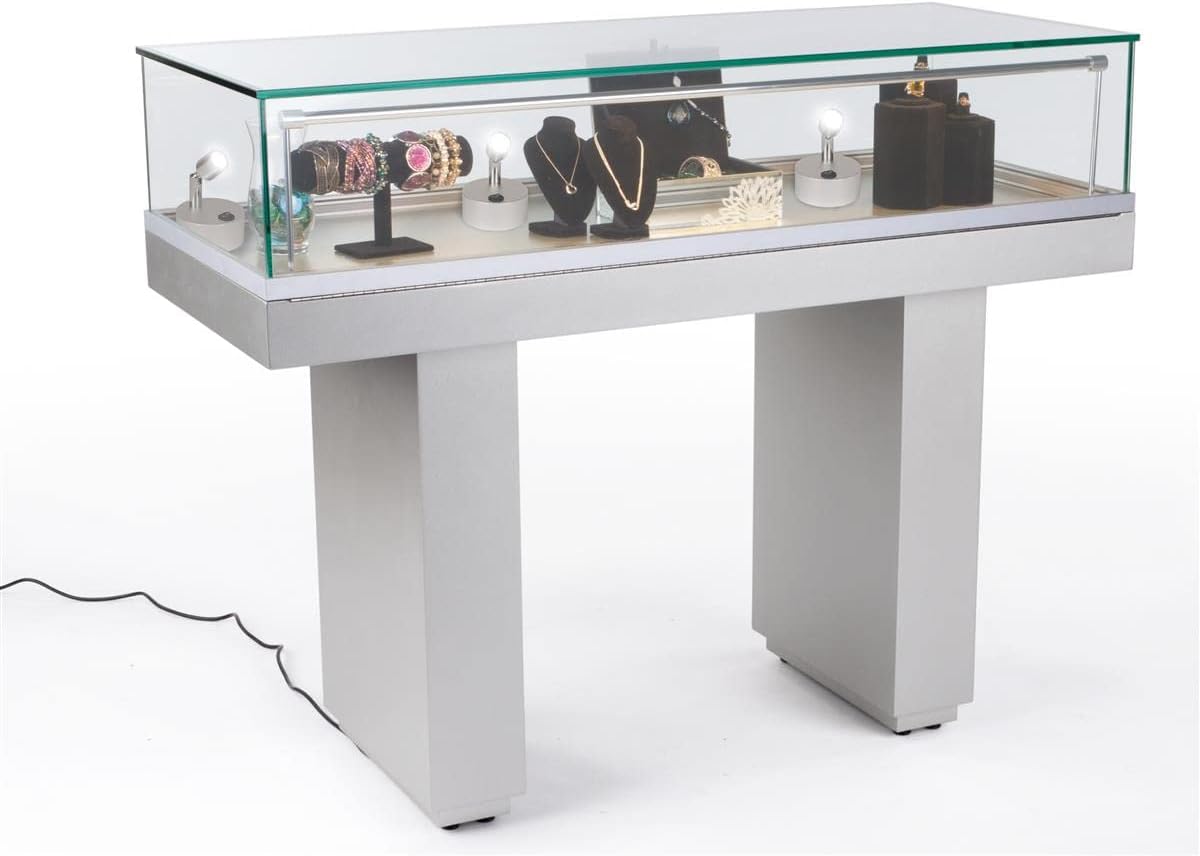
Olusin 3: Example of accent lights used within a display case to highlight various items.
5. Awọn ilana Iṣiṣẹ
Each accent light features a simple on/off switch located on its base.
- To turn the light ON, press the "I" side of the rocker switch.
- To turn the light OFF, press the "O" side of the rocker switch.

olusin 4: Isunmọ view of the rocker switch for turning the light on or off.
6. Itọju
6.1 Ninu
Wipe the lights with a soft, dry cloth. Do not use abrasive cleaners or solvents, as these may damage the finish or electronic components.
6.2 Batiri Rirọpo
When the light output diminishes, it is time to replace the batteries. Follow the battery installation steps in Section 4.1 to replace the three (3) AAA batteries. Dispose of used batteries responsibly according to local regulations.
7. Laasigbotitusita
| Isoro | Owun to le Fa | Ojutu |
|---|---|---|
| Imọlẹ ko tan. | Awọn batiri ti dinku tabi fi sori ẹrọ ti ko tọ. | Ṣayẹwo polarity batiri. Ropo pẹlu alabapade AAA batiri. |
| Imọlẹ jẹ baibai. | Awọn batiri ti wa ni kekere. | Ropo pẹlu alabapade AAA batiri. |
| Ina flickers. | Asopọ batiri ti o ni alaimuṣinṣin tabi awọn batiri ti o kere si. | Ensure batteries are securely seated. Replace with fresh AAA batteries. |
8. Awọn pato
| Ẹya ara ẹrọ | Ẹ̀kúnrẹ́rẹ́ |
|---|---|
| Nọmba awoṣe | D2G52039 |
| Brand | Awọn ifihan 2go |
| Imọlẹ Iru | LED |
| Ijade ina | 120 Lumens |
| Iwọn otutu awọ | 6000-6500K (Imọlẹ Funfun) |
| Orisun agbara | 3 x Awọn batiri AAA (Ko si) |
| Wattage | 1W |
| Voltage | 3.7V |
| Ohun elo | Aluminiomu |
| Àwọ̀ | Fadaka |
| Awọn iwọn (Lapapọ) | 3.0" L x 3.0" W x 3.9" H |
| iwuwo (kọọkan) | 0.28 lbs (isunmọ 4.5 iwon) |
| Awọn ẹya ara ẹrọ | Tilting head, Portable, Touch switch |
| inu ile / ita gbangba Lilo | Ninu ile Nikan |
9. Atilẹyin ọja ati Support
For warranty information or technical support, please contact Displays2go customer service. Refer to your purchase documentation for specific warranty terms and contact details.
You can also visit the official Displays2go website for additional resources and support information.


