
Ọrọ Iṣaaju
Thank you for choosing the Joyhill Coffee Scale with Timer. This digital scale is designed for high-precision measurements, ideal for brewing coffee, baking, cooking, and more. With its dual LED display, automatic and manual timing functions, and multiple unit options, it provides a seamless and accurate weighing experience. Please read this manual thoroughly before use to ensure proper operation and maintenance.
Awọn Itọsọna Aabo
- Do not immerse the scale in water or other liquids. The scale is water-resistant but not waterproof.
- Avoid placing the scale on uneven or unstable surfaces to ensure accurate readings.
- Do not overload the scale beyond its maximum capacity of 3kg (6.6lb).
- Jeki iwọnwọn kuro lati awọn iwọn otutu to gaju ati oorun taara.
- Use only the provided Type-C charging cable. Avoid using fast chargers that may damage the battery.
- Mọ iwọnwọn pẹlu asọ, damp asọ. Ma ṣe lo abrasive ose tabi kemikali.
Package Awọn akoonu
- Joyhill Coffee Scale
- Silikoni Idaabobo paadi
- Iru-C USB Ngba agbara USB
- Afowoyi Olumulo (iwe-ipamọ yii)
Ọja Awọn ẹya ara ẹrọ
- Iwọn Ti o Ga-Pẹpẹ: Equipped with upgraded high-precision single sensors, offering accuracy of 0.1g/0.005oz and a maximum weighing capacity of 3kg/6.6LB.
- Ifihan LED meji: Easy-to-read display for simultaneous control of time and weight.
- Awọn iṣẹ akoko: Features both automatic and manual timing modes for precise brewing control.
- Iyipada Ẹka: Supports switching between grams (g), milliliters (ml), ounces (oz), pounds (lb), pounds:ounces (lb:oz), and fluid ounces (fl'oz).
- Paadi Silikoni: Heat-insulated, waterproof, and non-slip silicone pad for enhanced stability and protection.
- Awọn bọtini Iṣakoso Fọwọkan: Four sensitive touch buttons for power/tare, unit selection, timing mode selection, and timer start/stop/reset.
- Tiipa Aifọwọyi: Automatically turns off after 5 minutes of inactivity to conserve energy.
- Beep Selection: Option to turn the operation beep sound on or off.

The Joyhill Coffee Scale offers high accuracy for precise measurements.

This multifunctional digital scale is suitable for a variety of kitchen weighing needs.
Ṣeto
Gbigba agbara ni ibẹrẹ
Before first use, fully charge the scale using the provided Type-C USB charging cable. Connect the cable to the scale's charging port and a compatible USB power source. The display will indicate charging status.
Placing the Silicone Pad
Place the silicone protective pad on the weighing platform. This pad is designed to be heat-insulated, waterproof, and non-slip, protecting the scale and ensuring stability during use.

The scale comes with a silicone pad and a Type-C charging cable for convenience.
Awọn ilana Iṣiṣẹ
Power On/Off and Tare Function (Ʉ / T button)
- Agbara Tan: Short press the Ʉ / T button to turn on the scale.
- Pẹlu: While the scale is on, short press the Ʉ / T button to reset the display to zero (tare function). This is useful for weighing ingredients in a container.
- Agbara Pa: Long press the Ʉ / T button to turn off the scale.
Unit Conversion (UNIT button)
Short press the UNIT button to cycle through the available weighing units: grams (g) > milliliters (ml) > ounces (oz) > pounds (lb) > pounds:ounces (lb:oz) > fluid ounces (fl'oz).
Timing Modes (MODE button and Timer button)
- Awọn ọna Yipada: Short press the MODE button to switch between manual timing mode and automatic timing mode.
- Àkókò Afowoyi: In manual mode, short press the Timer button (clock icon) to start or stop the timer. Long press the Timer button to reset the timer to zero.
- Akoko Aifọwọyi: In automatic mode, the timer will automatically start when weight is detected on the scale (e.g., when you start pouring water for coffee). The timer will automatically stop when the weight stabilizes after pouring.
- Beep Sound On/Off: Long press the MODE button to activate or deactivate the button voice function (beep sound).
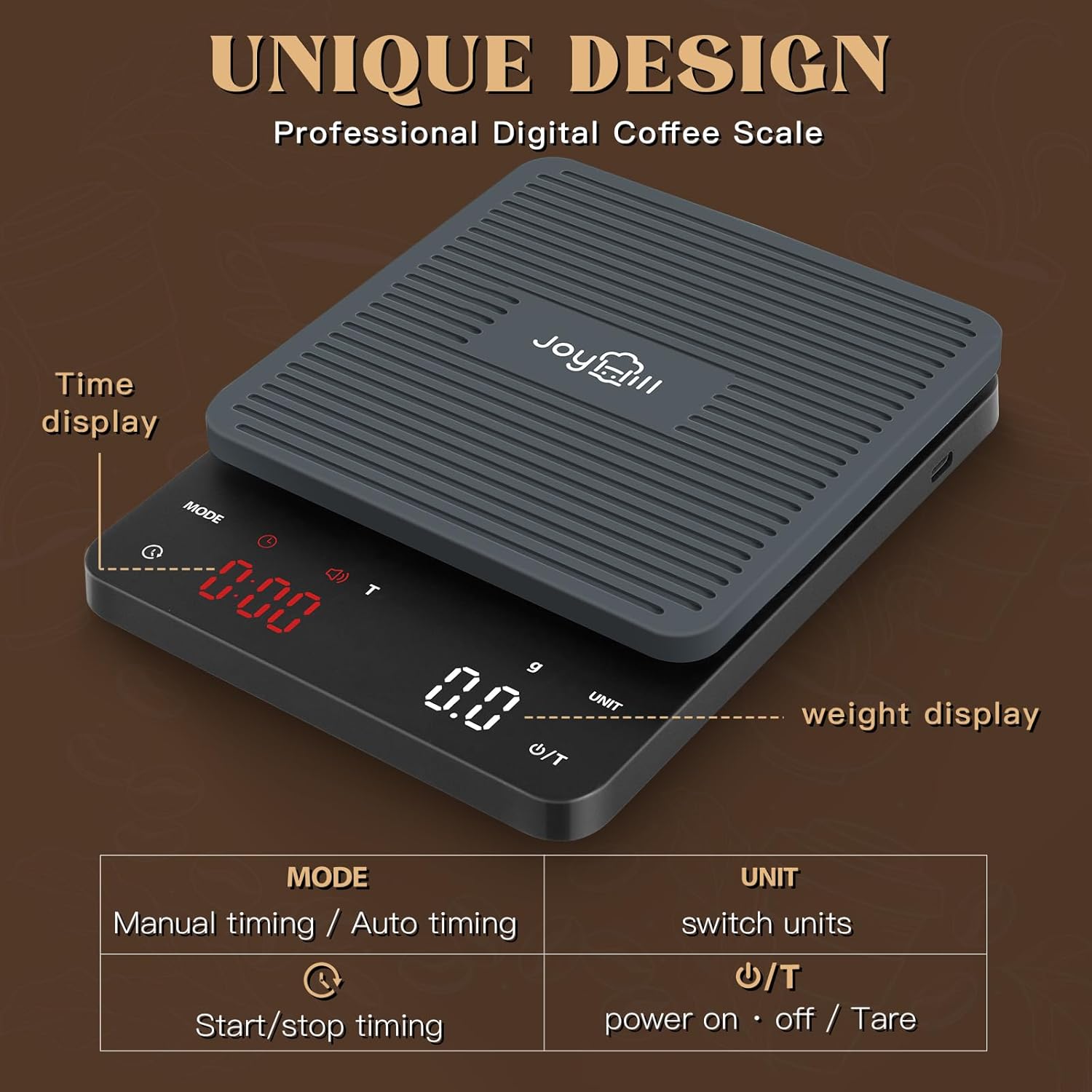
Pariview of the scale's display and touch control buttons.

Instructions for using the tare and automatic timing features.
Demonstration of the Joyhill Coffee Scale's unit conversion and timing functions.
Itọju ati Itọju
- Ninu: Wipe the scale surface and silicone pad with a soft, damp cloth. Do not use harsh chemicals, abrasive cleaners, or immerse the scale in water.
- Ibi ipamọ: Store the scale in a cool, dry place. The compact size (6.7''x5.0'') makes it easy to store in drawers or cabinets.
- Itọju Batiri: Charge the scale regularly, especially if it will not be used for an extended period. Avoid completely draining the battery frequently.

Regular cleaning helps maintain the scale's appearance and functionality.
Laasigbotitusita
| Isoro | Owun to le Fa | Ojutu |
|---|---|---|
| Iwọn ko ni tan-an. | Batiri kekere. | Charge the scale using the provided Type-C USB cable. Ensure the charger is not a fast charger (PD/IQ charging) as it may not be compatible. |
| Awọn kika ti ko pe. | Uneven surface; scale not tared; object exceeding max capacity. | Place the scale on a flat, stable surface. Press the Ʉ / T button to tare before weighing. Do not exceed 3kg (6.6lb). |
| Timer display is dim or hard to see. | Potential manufacturing variation or defect. | If the display is consistently dim, contact customer support for assistance. |
| Scale turns off unexpectedly. | Low battery; auto-off feature activated. | Recharge the scale. Note that the scale has an auto-off feature after 5 minutes of inactivity. If it turns off during active use, ensure it is fully charged. |
Awọn pato
| Ẹya ara ẹrọ | Ẹ̀kúnrẹ́rẹ́ |
|---|---|
| Nọmba awoṣe | EK2912R |
| Brand | JOYHILL |
| Ọja Mefa | 8.2 x 7 x 2 inches |
| Iwọn Nkan | 0.63 iwon |
| O pọju Agbara | 3kg / 6.6LB |
| Yiye | 0.1g / 0.005 iwon |
| Orisun agbara | 1 batiri litiumu ion (pẹlu) |
| Ifihan Iru | LED |
| Àwọ̀ | Dudu |
Atilẹyin ọja ati Support
For warranty information and customer support, please refer to the documentation included with your product or visit the official JOYHILL website. If you have any questions or encounter issues not covered in this manual, please contact JOYHILL customer service for assistance.