
Ọrọ Iṣaaju
The GOOLOO GTX180 Portable Power Station is a versatile and compact power solution designed for various applications, including home use, camping, hiking, and emergency situations. With a 180Wh capacity and multiple output ports, it can power a wide range of electronic devices and small appliances. This manual provides detailed instructions for the safe and efficient operation, charging, and maintenance of your power station.
Kini To wa
Upon unboxing your GOOLOO GTX180 Portable Power Station, please ensure all the following components are present:
- GOOLOO GTX180 Portable Power Station (Host)
- Oluyipada ọkọ ayọkẹlẹ
- Iru-C si Iru-C Ngba agbara Cable
- USB-A si okun USB-C
- Okun gbigbe
- Ìkọ́
- Apo gbigbe
- Itọsọna olumulo

Image: All components included with the GOOLOO GTX180 Portable Power Station.
Ọja Awọn ẹya ara ẹrọ
The GOOLOO GTX180 is equipped with several features designed for convenience, efficiency, and safety:
- Detachable and Portable Design: The power station is compact and lightweight (3.1 lbs), with a detachable inverter, making it highly portable for various uses.
- Agbara giga: Features a 180Wh (50000mAh) battery capacity, capable of charging multiple devices.
- Gbigba agbara yiyara: Supports 100W fast charging, allowing the unit to be fully charged in approximately 2 hours.
- Awọn Ibudo Ijade lọpọlọpọ: Equipped with 8 output ports, including 2 USB QC3.0, 1 USB-A (5V/2.4A), 1 USB-C (100W In/Out), 1 USB-C (30W Out), 1 AC outlet, 1 DC (15V/10A), and 1 car port, enabling simultaneous charging of up to 8 devices.
- Agbara Gbigba agbara Oorun: Compatible with solar panels that have a Type-C port, featuring a built-in MPPT controller for efficient solar charging.
- Smart Digital Screen: A 3.2-inch digital screen clearly displays input/output wattage, battery power percentage, and low temperature reminders.
- Ina LED pajawiri: Includes 3 modes of LED work lights: Flashlight, Strobe, and SOS, suitable for night lighting and emergency situations.
- 8 Battery Safety Features: Built-in protection features ensure safe operation, including safeguards against over-charge, over-current, short-circuit, low-temperature, high-temperature, over-voltage, and over-load, along with AI software management.
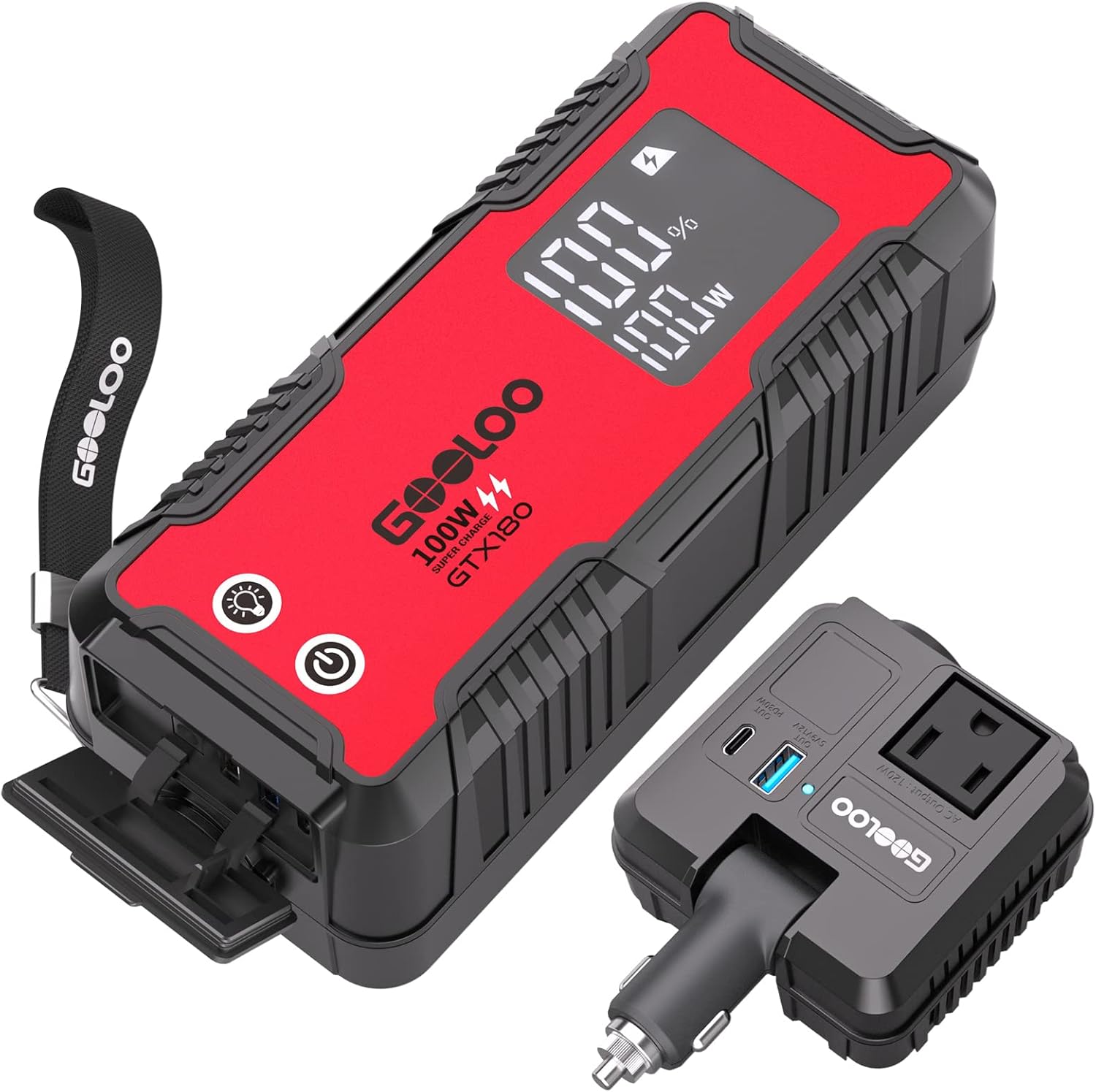
Image: The GOOLOO GTX180 Power Station with its detachable car inverter, highlighting its compact design and various ports.

Image: Visual representation of the 180Wh capacity and the 8 diverse output ports available on the power station.
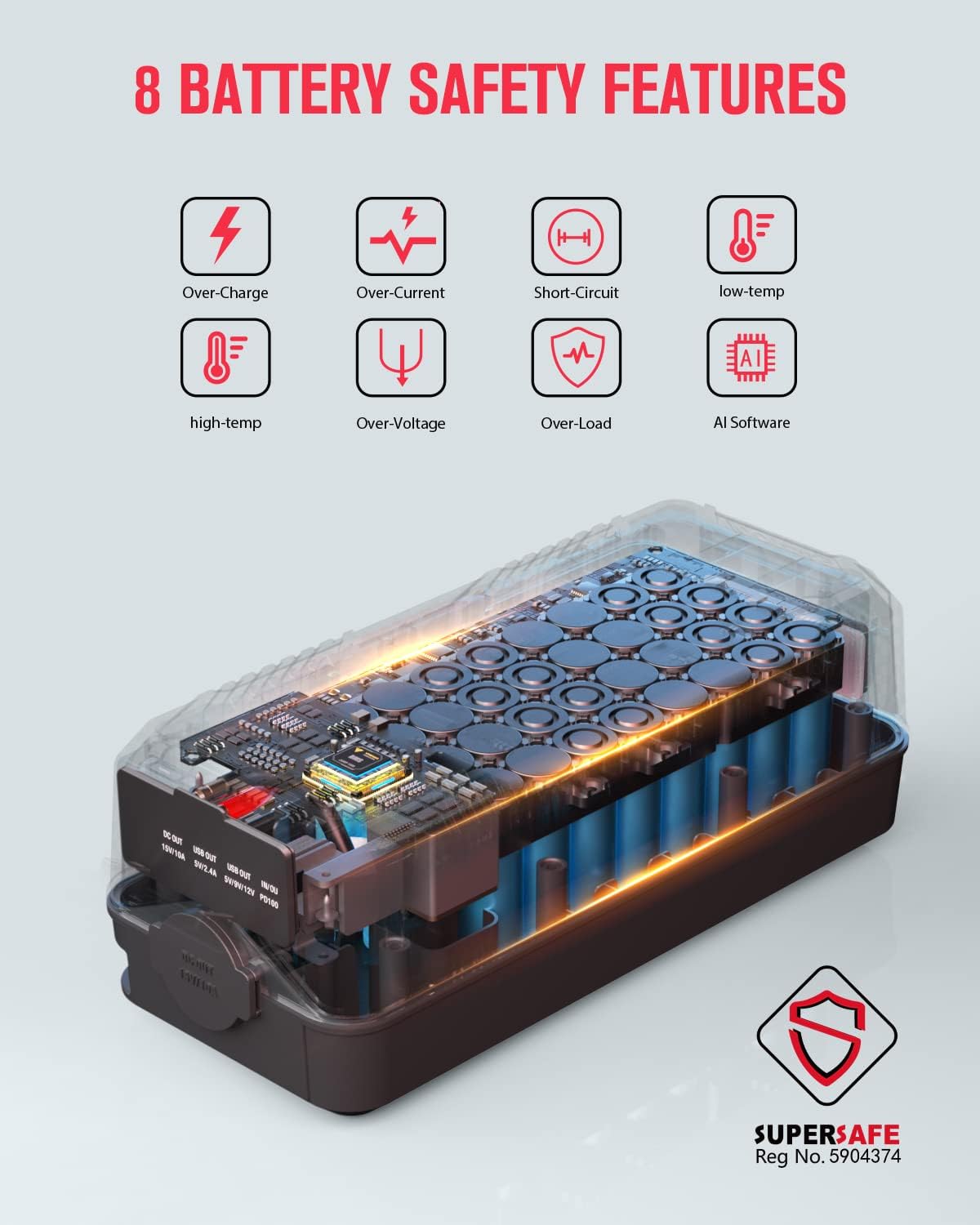
Image: An infographic illustrating the 8 comprehensive battery safety features integrated into the GOOLOO GTX180.
Eto & Ṣiṣẹ
To begin using your GOOLOO GTX180 Portable Power Station:
- Agbara Tan: Press the power button located on the unit. The 3.2-inch digital screen will illuminate, displaying the current battery percentage ati wattage alaye.
- Awọn ẹrọ Sopọ: Identify the appropriate output port for your device (USB-A, USB-C, AC outlet, or DC port). Plug your device's charging cable or power adapter into the corresponding port on the power station or the detachable car inverter.
- Using the Detachable Inverter: The car inverter can be plugged into the car port on the power station to provide AC power. It also features additional USB-A and USB-C ports. Ensure the inverter is securely connected before use.
- Iṣẹ Imọlẹ LED: Press and hold the light button to turn on the flashlight. Press it again for strobe mode, and a third time for SOS mode. Press and hold to turn off.
Fidio: Fidio yii pese alaye loriview of the GOOLOO Power Station, demonstrating its features, included accessories, and various charging capabilities for different devices. It highlights the compact size, multiple ports, and the detachable inverter for versatile power solutions.
Ngba agbara si Ibusọ Agbara
The GOOLOO GTX180 offers multiple convenient ways to recharge its internal battery:
- Gbigba agbara ogiri: Use the provided Type-C to Type-C charging cable with a compatible PD100W wall charger (not included) to achieve a full charge in approximately 2 hours.
- Gbigba agbara ọkọ ayọkẹlẹ: Connect the power station to your vehicle's 12V car socket using the car inverter and the appropriate cable. This method allows for convenient recharging while on the go.
- Gbigba agbara Oorun: For outdoor adventures, the power station can be recharged using compatible solar panels with a Type-C output. The built-in MPPT controller optimizes the charging speed from solar input.

Image: Visual guide to the various charging methods for the GOOLOO GTX180, including wall, car, and solar options, along with their approximate charging times.
Itoju
To ensure the longevity and optimal performance of your GOOLOO GTX180 Portable Power Station, follow these maintenance guidelines:
- Tọju ẹyọ naa ni itura, aye gbigbẹ kuro lati orun taara ati awọn iwọn otutu to gaju.
- Avoid exposing the power station to water or excessive moisture. While it has some water resistance, it is not fully waterproof.
- Charge the unit fully at least once every 3-6 months to maintain battery health, even if not in regular use.
- Mọ ode pẹlu asọ ti o gbẹ. Ma ṣe lo abrasive ose tabi epo.
- Pa awọn ibudo mọ kuro ninu eruku ati idoti.
Laasigbotitusita
If you encounter issues with your GOOLOO GTX180, consider the following common troubleshooting steps:
- Ẹka Ko Tii: Ensure the battery is charged. If the battery is depleted, connect it to a power source and allow it to charge for a few minutes before attempting to power on again.
- Awọn ẹrọ Ko Ngba agbara: Verify that the power station is turned on and has sufficient battery charge. Check that the cables are securely connected to both the power station and your device. Ensure the device's power requirements do not exceed the power station's output limits for the specific port.
- Idaabobo Apọju: If the unit shuts down unexpectedly, it may be due to an overload. Disconnect the devices, wait a few minutes, and then restart the power station. Reduce the load by connecting fewer or lower-power devices.
- Awọn ikilọ iwọn otutu: The smart digital screen may display a low or high temperature reminder. Operate the unit within its recommended temperature range (typically 0°C to 40°C or 32°F to 104°F) to prevent automatic shutdown.
Tí ìṣòro bá ń bá a lọ, jọ̀wọ́ wo abala àtìlẹ́yìn àti àtìlẹ́yìn fún ìrànlọ́wọ́ síwájú sí i.
Awọn pato
| Iwa | Ẹ̀kúnrẹ́rẹ́ |
|---|---|
| Nọmba awoṣe | GTX180 |
| Agbara Batiri | 180 Watt-hours (50000mAh) |
| Iwọn Nkan | 3.1 iwon |
| Ọja Mefa | 9.45 x 3.94 x 3.54 inches |
| Voltage (AC Output) | 110 Volt (AC) |
| Batiri Iru | Iọn Lithium (àwọn sẹ́ẹ̀lì 16 wà nínú rẹ̀) |
| Fast Charge Support | PD100W In/Out |
| Pataki Awọn ẹya ara ẹrọ | Detachable AC Outlet, Small Size & Quiet, Waterproof & Dustproof, 8 Safety Protections |
Atilẹyin ọja & Atilẹyin
The GOOLOO GTX180 Portable Power Station comes with an 18-osu atilẹyin ọja lati ọjọ ti o ra. Atilẹyin ọja yi ni wiwa awọn abawọn ninu awọn ohun elo ati iṣẹ ṣiṣe labẹ lilo deede.
For technical support, warranty claims, or any questions regarding your product, please contact GOOLOO customer service. Refer to the contact information provided on the product packaging or the official GOOLOO webojula fun awọn julọ soke-si-ọjọ support awọn ikanni.