
PPLEE CR1002M
Ìwé Ìtọ́sọ́nà Olùlò Ẹ̀rọ Ariwo Funfun PPLEE 5-in-1
Model: CR1002M
Ọrọ Iṣaaju
Thank you for choosing the PPLEE 5-in-1 White Noise Machine. This versatile device combines a white noise machine with 42 soothing sounds, a high-fidelity Bluetooth speaker, a dual digital alarm clock, a multi-color night light, and a convenient charging station. Designed to enhance your sleep quality, relaxation, and daily routine, this manual provides detailed instructions for setup, operation, and maintenance.

Figure 1: PPLEE 5-in-1 White Noise Machine Overview
Ohun ti o wa ninu Apoti
- 1 x PPLEE Bluetooth Noise Machine Alarm Clock
- 1 x 5V 2A Power Adapter and Cord
- 1 x Itọsọna olumulo
Eto Itọsọna
1. Asopọ agbara
Connect the provided 5V 2A power adapter to the DC jack on the back of the device and plug it into a standard electrical outlet. The device will power on automatically.
2. Battery Installation (Memory Function)
For memory function and to retain time/alarm settings during power outages, install 1 CR2032 battery (not included) into the battery compartment on the bottom of the unit. This battery does not power the main functions of the device, only the memory backup.
3. Ṣiṣeto Akoko naa
- Press and hold the 'TIME SET' button (usually labeled 'HOUR' or 'MIN' with a clock icon) until the hour display flashes.
- Use the 'HOUR' and 'MIN' buttons to adjust the time.
- Press 'TIME SET' again to confirm and exit time setting mode.
- To switch between 12-hour and 24-hour format, press the '12/24H' button.
Awọn ilana Iṣiṣẹ
Sound Machine Operation
The device offers 42 natural soothing sounds across four categories: white noise, fan sounds, lullabies, and nature sounds.
- Yiyan Awọn ohun: Press the 'SOUND' button (often represented by a music note or sound wave icon) to cycle through the available sound categories and individual sounds.
- Atunse iwọn didun: Use the 'VOL+' and 'VOL-' buttons to adjust the volume across 16 levels.
- Akoko oorun: Press the 'TIMER' button repeatedly to set an automatic shut-off timer for 15, 30, 60, 90, 120, 180, or 480 minutes. The display will show the selected time. To cancel the timer, press the 'TIMER' button until 'OFF' or no timer duration is displayed.

Figure 2: Sound Selection and Timer Functions
Bluetooth Agbọrọsọ Isẹ
Connect your smartphone or tablet wirelessly to play your favorite audio.
- Pipọpọ: Press the 'MODE' button until the Bluetooth icon appears on the display and starts flashing. On your device, enable Bluetooth and select 'CR1002M' (or similar) from the list of available devices. The icon will become solid when paired.
- Ohun ti n ṣiṣẹ: Once paired, play audio from your connected device. Use the 'PREV', 'PLAY/PAUSE', and 'NEXT' buttons on the machine to control playback, or control directly from your device.
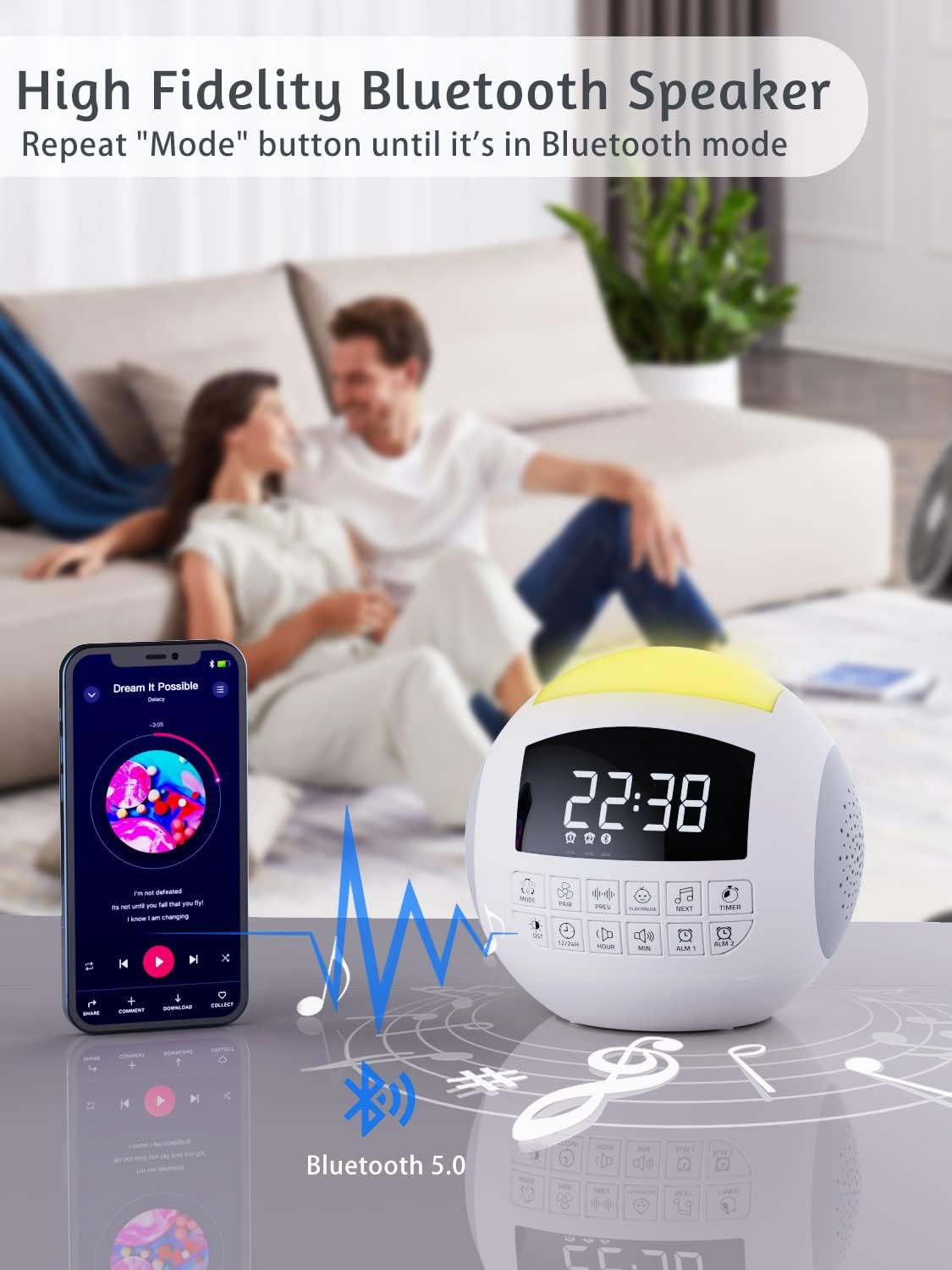
olusin 3: Bluetooth Asopọmọra
Alarm Clock Operation
The device features dual alarms with customizable sounds and snooze functionality.
- Eto Awọn itaniji: Press and hold 'ALARM 1' or 'ALARM 2' button until the alarm time flashes. Use 'HOUR' and 'MIN' buttons to set the desired alarm time. Press the alarm button again to confirm.
- Selecting Alarm Sound: After setting the time, press the alarm button again to select from 9 different alarm sounds.
- Ìmúṣiṣẹ́/Dídá ìkìlọ̀: Press the 'ALARM 1' or 'ALARM 2' button briefly to toggle the alarm on or off. An alarm icon will appear on the display when active.
- Iṣẹ́ lẹ́ẹ̀kọ̀ọ̀kan: When the alarm sounds, press the large 'SNOOZE' button on top to temporarily silence it for 9 minutes.

Figure 4: Dual Alarm Clock Settings
Night Light Isẹ
The integrated night light offers 7 colors and adjustable brightness.
- Yiyipada Awọn awọ: Press the 'LIGHT' button (often represented by a light bulb icon) to cycle through the 7 solid colors and a gradient color mode.
- Ṣiṣatunṣe Imọlẹ: Press and hold the 'LIGHT' button to adjust the brightness level (5 levels available).

Figure 5: 7-Color Night Light with Brightness Control
Gbigba agbara iṣẹ
The device includes a Type-C charging port for the unit itself and dual USB-A ports for charging external devices.
- Ngba agbara ẹrọ: The unit is powered via its Type-C port using the provided adapter.
- External Device Charging: Connect your smartphone, tablet, or other USB-powered devices to the dual USB-A ports on the back of the unit to charge them.

Figure 6: Charging Ports for External Devices
Iranti Išė
The memory function ensures that your time and alarm settings are retained even if the main power is interrupted, thanks to the installed CR2032 battery.

Figure 7: Memory Function with Battery Backup
Itoju
- Ninu: Mu ẹrọ naa nu pẹlu asọ ti o gbẹ. Ma ṣe lo awọn olutọpa omi tabi awọn ohun elo abrasive.
- Ibi ipamọ: Tọju ẹrọ naa ni itura, aye gbigbẹ nigbati o ko ba wa ni lilo fun awọn akoko gigun.
- Rirọpo Batiri: Replace the CR2032 battery annually or if memory function fails.
Laasigbotitusita
| Isoro | Owun to le Fa | Ojutu |
|---|---|---|
| Ẹrọ naa ko ṣiṣẹ. | Ohun ti nmu badọgba agbara ko ti sopọ tabi aṣiṣe iṣan. | Ensure adapter is securely plugged into device and a working outlet. |
| Ko si ohun tabi iwọn kekere. | Volume too low or incorrect sound selected. | Increase volume using 'VOL+' button. Cycle through sounds to ensure one is playing. |
| Bluetooth ko sopọ. | Ẹrọ ko si ni ipo sisopọ tabi jina si orisun. | Ensure device is in Bluetooth pairing mode (flashing icon). Move source closer. Try re-pairing. |
| Itaniji ko dun. | Itaniji ko muu ṣiṣẹ tabi iwọn didun kere ju. | Check if alarm icon is displayed. Increase alarm volume. Verify alarm time is set correctly. |
| Atunse akoko/eto lẹhin agbara outage. | CR2032 battery is dead or not installed. | Install or replace the CR2032 battery. |
Awọn pato
| Ẹya ara ẹrọ | Ẹ̀kúnrẹ́rẹ́ |
|---|---|
| Ọja Mefa | 5.32 x 5.95 x 6.1 inches |
| Iwọn Nkan | 1.39 iwon |
| Nọmba awoṣe | CR1002M |
| Àwọ̀ | Funfun |
| Orisun agbara | AC Powered (with CR2032 battery backup for memory) |
| Awọn orin Orin | 42 (White Noise, Fan, Lullabies, Nature Sounds) |
| Night Light Awọn awọ | 7 Colors + Gradient |
| Awọn ipele iwọn didun | 16 |
| Awọn ipele Imọlẹ | 5 |
| Aago | 15, 30, 60, 90, 120, 180, 480 iṣẹju |
| Awọn ohun itaniji | 9 |
| Gbigba agbara Ports | USB-A Meji |
Atilẹyin ọja ati Support
PPLEE products are designed for reliability and performance. For warranty information or technical support, please refer to the contact details provided with your purchase or visit the official PPLEE website. A digital version of this user manual is also available for download at https://manuals.plus/m/f23b430e063d58de8cd25ce8d0ed17a6ff4bc5a117e3aca8867779d575e1b4e3.
Ask a question about this manual
Ask about setup, troubleshooting, compatibility, parts, safety, or missing instructions. Manuals+ will review the question and use this page’s manual context to help answer it.