
1. Ifihan
The HiBy FD1 is a portable USB Digital-to-Analog Converter (DAC) and headphone amplifier designed to enhance audio quality from various devices. It features dual ES9118 audio chips for high-resolution sound and supports both single-ended and balanced headphone outputs.
This device is compatible with a wide range of operating systems and devices, including Android, iOS, Windows, macOS, smartphones, computers, tablets, and digital audio players.

Image 1: The HiBy FD1 USB Headphone Amplifier, showcasing awọn oniwe-iwapọ oniru.
Awọn ẹya pataki:
- Dual ES9118 Audio Chips: Provides high-resolution audio and enhanced decoding capabilities.
- Dual Crystal Oscillators: Lowers jitter and improves digital audio accuracy for 44.1x and 48x clocked audio signals.
- Awọn Ijade Ilọpo: Includes 3.5mm single-ended (SE) and 2.5mm balanced headphone outputs.
- Ibamu gbooro: Supports multiple system platforms including Android, iOS, Windows, and macOS.
- Atilẹyin Ohun Alailopin: Compatible with most lossless music formats, including native DSD128 decoding.
- Hardware USB Mode Switch: Allows switching between USB Audio 1.0 and 2.0 standards.
- Driverless Plug-and-Play: No charging required; automatically powers on when connected via USB and shuts down when unplugged.
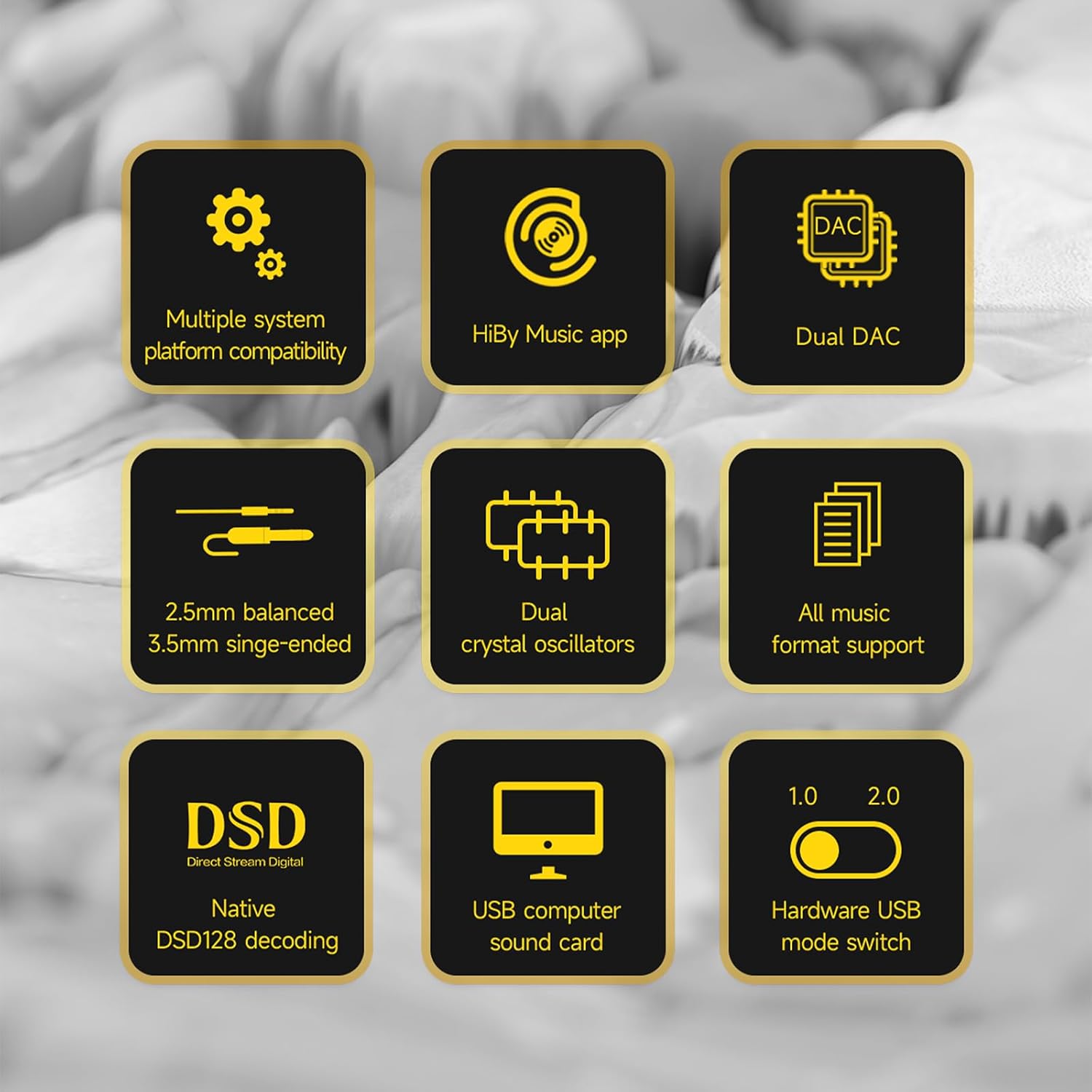
Image 2: A visual representation of the HiBy FD1's key features, including dual DAC, DSD support, and multiple system compatibility.
2. Eto
2.1 Nsopọ si Awọn ẹrọ
The HiBy FD1 connects to your source device (computer, smartphone, tablet) via its USB Type-C port. It is designed for driverless plug-and-play operation.
- For Android/Windows/macOS: Connect the FD1 using a compatible USB Type-C cable.
- For iOS Devices (iPhone/iPad): A Camera Connection Kit (CCK) cable is required for proper functionality.

Image 3: The HiBy FD1 connected to various devices, illustrating its broad compatibility with smartphones, tablets, and computers.
2.2 USB Mode Switch
The FD1 features a hardware switch to select between USB Audio 1.0 and USB Audio 2.0 standards. This switch is located on the side of the device.
- USB Audio 1.0: Provides driverless plug-and-play functionality on Windows 7/8/10. DSD audio is not supported in this mode.
- USB Audio 2.0: Offers driverless plug-and-play on Windows 10 (build 1703 and later). For DSD support on Windows, an additional driver installation may be required.

Image 4: Close-up of the HiBy FD1's hardware USB mode switch, allowing selection between 1.0 and 2.0 standards.
2.3 Titan / Pa a
The HiBy FD1 automatically powers on when connected to a USB source and automatically shuts down when disconnected. No external power button or charging is required as it draws power directly from the connected device.

Image 5: The HiBy FD1 connected to a smartphone and a laptop, demonstrating its plug-and-play functionality without external charging.
3. Awọn ilana Iṣiṣẹ
3.1 Nsopọ Awọn agbekọri
The HiBy FD1 offers two headphone output options:
- 3.5mm Single-Ended (SE) Output: For standard headphones.
- Iwontunwonsi 2.5mm: For headphones with a balanced connection, offering improved audio performance.
Connect your headphones to the appropriate port on the FD1.
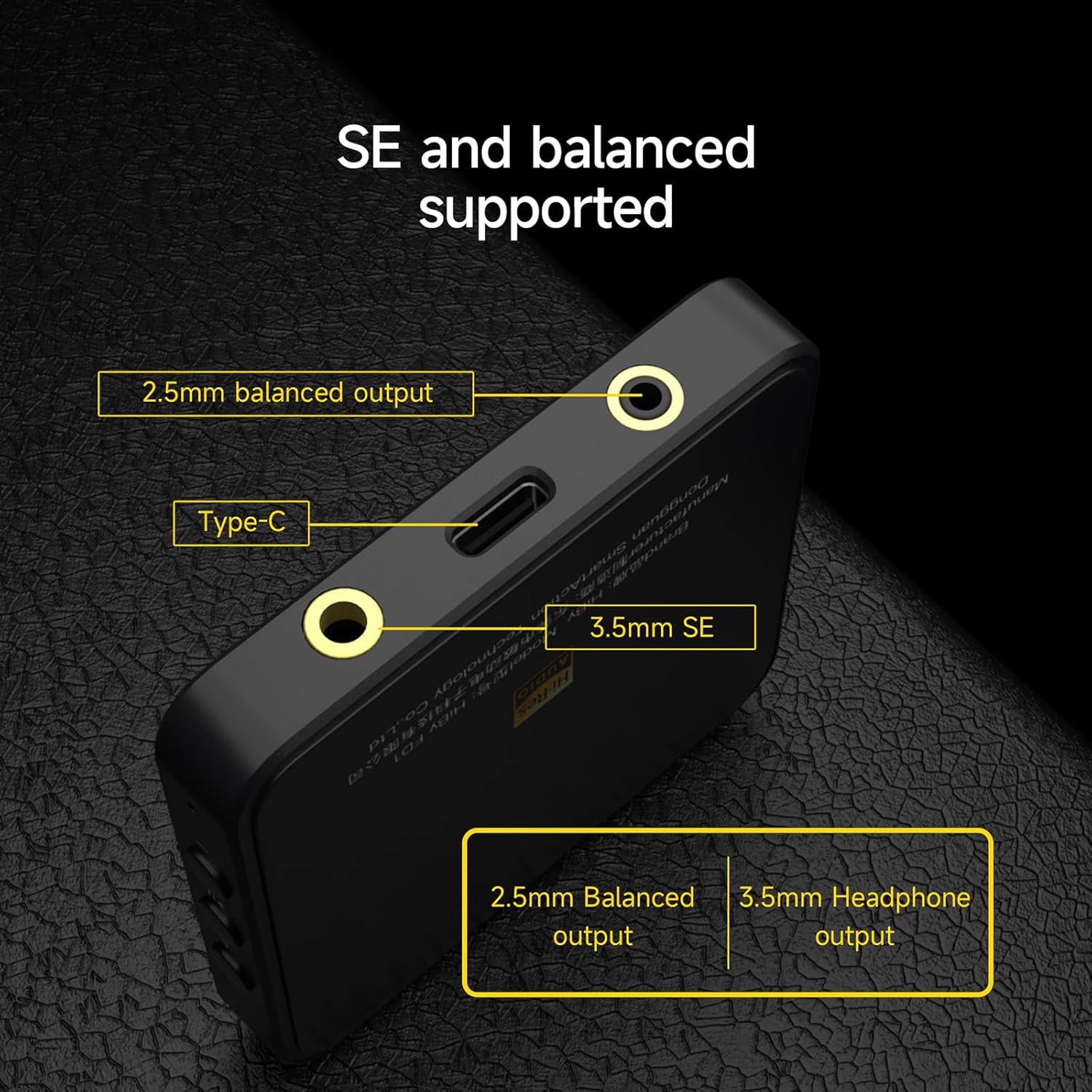
Aworan 6: alaye view of the HiBy FD1's ports, highlighting the 2.5mm balanced output, Type-C input, and 3.5mm single-ended output.
3.2 Playback and Controls
Once connected, the FD1 acts as an external sound card for your device. Play audio through your preferred music application. The FD1 features hardware buttons for basic playback control:
- Iwọn didun +: Fọwọ́ kan láti mú kí iwọ̀n pọ̀ sí i.
- Ṣiṣẹ/Daduro: Fọwọ ba lati mu ṣiṣẹ tabi da ohun duro duro.
- Iwọn didun -: Tẹ lati dinku iwọn didun.
3.3 Atọka Light Ipo
The FD1 includes an indicator light that changes color to reflect the current audio status and sampoṣuwọn:

Image 7: The HiBy FD1's hardware buttons (Volume+, Play/Pause, Volume-) and a table explaining the indicator light colors for different audio statuses.
| Ipo | Pupa | Alawọ ewe | Buluu | Funfun |
|---|---|---|---|---|
| Connected, not playing | ||||
| Playing at PCM 32k-48kHz | Bẹẹni | |||
| Playing at PCM 88.2k-192kHz | Bẹẹni | |||
| Playing at DSD | Bẹẹni |
Note: The table indicates which color is active for each status.
3.4 HiBy Music App
For optimal compatibility and advanced features, it is recommended to use the HiBy Music app, which offers an exclusive HQ USB Audio Access mode.
4. Itọju
To ensure the longevity and optimal performance of your HiBy FD1, follow these general maintenance guidelines:
- Jeki ẹrọ naa di mimọ nipa fifẹ rẹ pẹlu asọ ti o gbẹ. Yago fun lilo awọn kẹmika lile tabi awọn ohun elo abrasive.
- Tọju ẹrọ naa ni itura, aaye gbigbẹ kuro lati orun taara, awọn iwọn otutu ti o ga, ati ọriniinitutu giga.
- Yago fun sisọ ẹrọ naa silẹ tabi fifisilẹ si awọn ipa to lagbara.
- Do not attempt to disassemble or repair the device yourself, as this may void the warranty.
5. Laasigbotitusita
If you encounter issues with your HiBy FD1, consider the following basic troubleshooting steps:
- Ko si Ohun:
- Ensure the FD1 is securely connected to your source device and headphones.
- Check the volume levels on both your source device and the FD1.
- Verify that the correct audio output device (HiBy FD1) is selected in your operating system's sound settings.
- Test with different headphones or a different source device to isolate the problem.
- Ohun elo Ko Damọ:
- Gbiyanju ibudo USB miiran tabi okun USB.
- Ensure the USB mode switch on the FD1 is set correctly (1.0 or 2.0) for your operating system.
- Tun ẹrọ orisun rẹ bẹrẹ.
- For Windows 10 (build 1703 and later) with USB Audio 2.0 and DSD, ensure any necessary drivers are installed.
- Ohun ti o daru:
- Reduce the volume on your source device or the FD1.
- Ṣe idaniloju ohun ohun file ko baje.
- Ṣayẹwo fun kikọlu lati awọn ẹrọ itanna miiran.
Ti awọn igbesẹ wọnyi ko ba yanju ọrọ naa, jọwọ tọka si apakan atilẹyin fun iranlọwọ siwaju.
6. Awọn pato
| Ẹya ara ẹrọ | Sipesifikesonu |
|---|---|
| Nọmba awoṣe | HiBy FD1 |
| Brand | HiBy |
| Ni wiwo Hardware | USB Iru-C |
| Awọn ẹrọ ibaramu | Desktop, Laptop, Smartphones, Tablets (Android, iOS, Windows, macOS) |
| Data Link Ilana | USB |
| Data Gbigbe Oṣuwọn | 441 Megabits Per Second (Max) |
| Àwọn èèpo DAC | Dual ES9118 |
| Awọn abajade agbekọri | 3.5mm Oni-ipari Kan, 2.5mm Oniwọntunwọnsi |
| DSD Support | Native DSD128 decoding |
| Awọn ọna ohun afetigbọ USB | USB Audio 1.0, USB Audio 2.0 (switchable) |
7. atilẹyin ọja Information
HiBy products come with a 1-odun atilẹyin ọja from the date of purchase. This warranty covers manufacturing defects. If damage is not caused by human factors, parts will be replaced free of charge.
Jọwọ ṣe idaduro ẹri rira rẹ fun awọn iṣeduro atilẹyin ọja.
8. Atilẹyin
For technical support, warranty claims, or further inquiries regarding your HiBy FD1, please contact HiBy customer service through their official webaaye tabi alagbata lati ọdọ ẹniti o ti ra ọja naa.
You can visit the official HiBy store on Amazon for more information: HiBy Amazon Store