
Ọrọ Iṣaaju
The CAD Audio WX1000HH is a frequency agile UHF wireless handheld microphone system designed for clear and reliable audio transmission. Operating in the 510-570mHz frequency band, it offers 100 selectable channels to ensure optimal signal clarity and minimize interference. This system features convenient auto-scan and IR sync functions for quick setup and channel changes. Built with durable all-metal construction, the WX1000HH is suitable for various demanding environments. This manual provides essential information for setting up, operating, and maintaining your wireless microphone system.
Package Awọn akoonu
Jọwọ rii daju pe gbogbo awọn nkan ti a ṣe akojọ rẹ si isalẹ wa ninu package rẹ:
- WX1000HH Handheld Microphone Transmitter
- WX1000 UHF Wireless Receiver
- Adapta Agbara fun Olugba
- Agekuru gbohungbohun
- Rack Mount Hardware
- Antenna Relocation Kit
- Audio Cable (likely 1/4" TS to 1/4" TS or XLR to 1/4" TS)
- Afowoyi Olumulo (iwe-ipamọ yii)

Aworan 1: All components of the CAD Audio WX1000HH system, including the handheld microphone, receiver, power adapter, microphone clip, rack mount hardware, antenna relocation kit, and an audio cable.
Ṣeto
1. Eto olugba
- Ibi: Position the WX1000 receiver on a stable, flat surface or install it into a standard equipment rack using the included rack mount hardware. Ensure adequate ventilation around the unit.
- Asopọmọra Antenna: Connect the included antennas to the ANT connectors on the rear panel of the receiver. If rack-mounting, use the antenna relocation kit to position the antennas for optimal reception.
- Asopọ agbara: Connect the supplied power adapter to the DC INPUT on the rear of the receiver and then plug it into a suitable AC power outlet.
- Ijade ohun: Connect the receiver's audio output (Balanced XLR or Unbalanced 1/4" TS) to your mixer, amplifier, or PA system using an appropriate audio cable.

Aworan 2: The WX1000 UHF Wireless Receiver shown with rack mount ears attached, ready for installation into an equipment rack.

Aworan 3: Rear panel of the WX1000 receiver, showing the ANT connectors, Balanced XLR output, Unbalanced 1/4" TS output, and DC INPUT for power.
2. Handheld Microphone Setup
- Fifi sori batiri: Unscrew the bottom cap of the handheld microphone. Insert two fresh AA batteries, observing the correct polarity (+/-) as indicated inside the battery compartment.
- Fila to ni aabo: Screw the bottom cap back onto the microphone securely.

Aworan 4: The CAD Audio WX1000HH handheld microphone with its bottom cap removed, revealing the battery compartment for two AA batteries.
Awọn ilana Iṣiṣẹ
1. Agbara lori / Paa
- Olugba: Press the Power button on the front panel of the receiver. The display will illuminate.
- Gbohungbohun amusowo: Press and hold the power button on the microphone body until the display illuminates.
2. Channel Selection and Synchronization (IR Sync)
The WX1000HH system features 100 switchable UHF frequencies and an auto-scan function to find clear channels. Up to 20 systems can be used simultaneously.
- Ṣiṣayẹwo aifọwọyi: On the receiver, press the "SET" button to initiate an auto-scan. The receiver will search for and select an available, interference-free frequency.
- Imuṣiṣẹpọ IR: Once the receiver has selected a frequency, align the IR window on the handheld microphone with the IR sensor on the receiver (usually near the display). Press the "IR Sync" or "SET" button on the receiver (refer to receiver display for specific prompt). The frequency information will be transmitted to the microphone, synchronizing the two units.
- Ìmúdájú: Confirm that the frequency displayed on the microphone matches the frequency on the receiver.
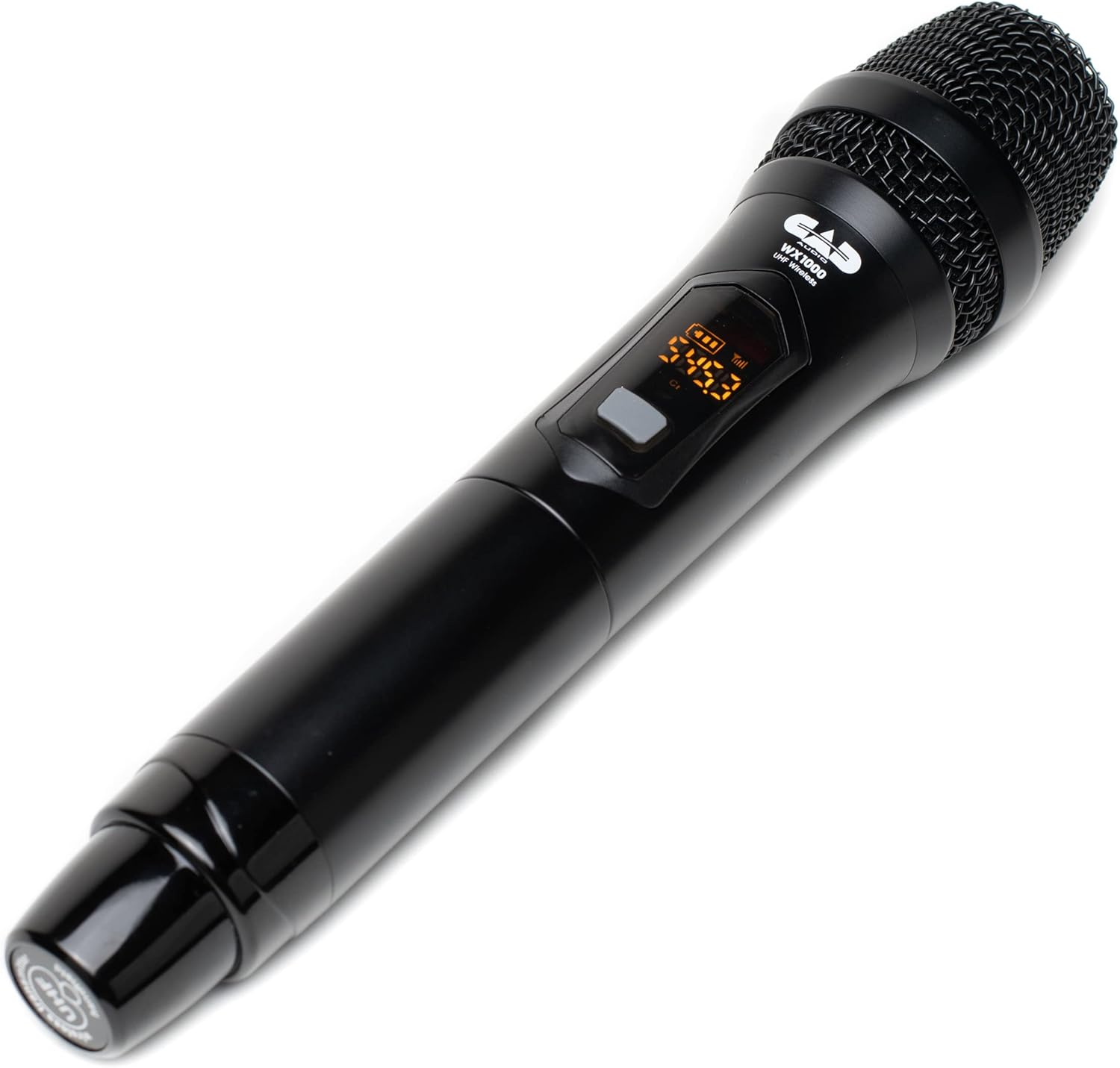
Aworan 5: Close-up of the CAD Audio WX1000HH handheld microphone's display, showing frequency and battery level indicators.
3. Awọn Atọka Ipele Batiri
Both the handheld microphone transmitter and the receiver feature battery level indicators. Monitor these indicators to ensure uninterrupted operation. The handheld microphone provides over 12 hours of operation with two AA batteries.
4. Ibiti nṣiṣẹ
The system offers an operating range of up to 295 feet (90 meters) between the transmitter and receiver under optimal conditions. Environmental factors, obstacles, and other wireless devices can affect this range.
5. Àwọn Lílò tí a dámọ̀ràn
This system is suitable for various applications including singing, speech, and karaoke.
Itoju
- Ninu: Use a soft, dry cloth to clean the exterior of the receiver and microphone. Do not use liquid cleaners or solvents.
- Rirọpo Batiri: Replace AA batteries in the handheld microphone when the low battery indicator appears. Always use fresh, high-quality batteries. Remove batteries if the microphone will not be used for an extended period.
- Ibi ipamọ: Tọju eto naa ni itura, aye gbigbẹ kuro lati orun taara ati awọn iwọn otutu to gaju.
Laasigbotitusita
| Isoro | Owun to le Fa | Ojutu |
|---|---|---|
| Ko si ohun lati gbohungbohun |
|
|
| Ìdènà tàbí àìdúró |
|
|
| Ibiti o ṣiṣẹ kukuru |
|
|
Awọn pato
| Awoṣe | WX1000HH |
| Gbohungbo Fọọmù ifosiwewe | Amusowo |
| Igbohunsafẹfẹ Band | UHF (510-570 MHz) |
| Nọmba ti awọn ikanni | 100 (Frequency Agile) |
| Ibiti nṣiṣẹ | Titi de 295 ẹsẹ (90 mita) |
| Orísun Agbára Mákróónù | 2 x AA batiri |
| Ìgbésí ayé Bátírì Máákrófónù | > Awọn wakati 12 |
| Ohun elo | Metal (Receiver), Metal (Microphone) |
| Ifihan Ibuwọlu-si-Noise | 75 dB |
| Asopọmọra Technology | XLR (Balanced), 1/4" TS (Unbalanced) |
| Awọn iwọn Ọja (Olugba) | 12.1 x 2.8 x 16 inches (L x W x H) |
| Iwọn Nkan | 4 poun (Eto) |
| UPC | 631922109757 |
Atilẹyin ọja ati Support
Fun alaye atilẹyin ọja ati atilẹyin imọ-ẹrọ, jọwọ tọka si CAD Audio osise webojula tabi kan si wọn onibara iṣẹ taara. Tọju iwe-ẹri rira rẹ bi ẹri rira fun eyikeyi awọn ibeere atilẹyin ọja.
CAD Audio Osise Webojula: www.cadaudio.com