
Ọrọ Iṣaaju
This manual provides detailed instructions for the proper use and maintenance of your Sunny CRS-300AT Android Smart LED TV Remote Control. This remote is designed for compatibility with AXEN LED TVs and features a dedicated Live TV button for convenient access to live broadcasts. Please read this manual carefully before using the remote control to ensure optimal performance and longevity.
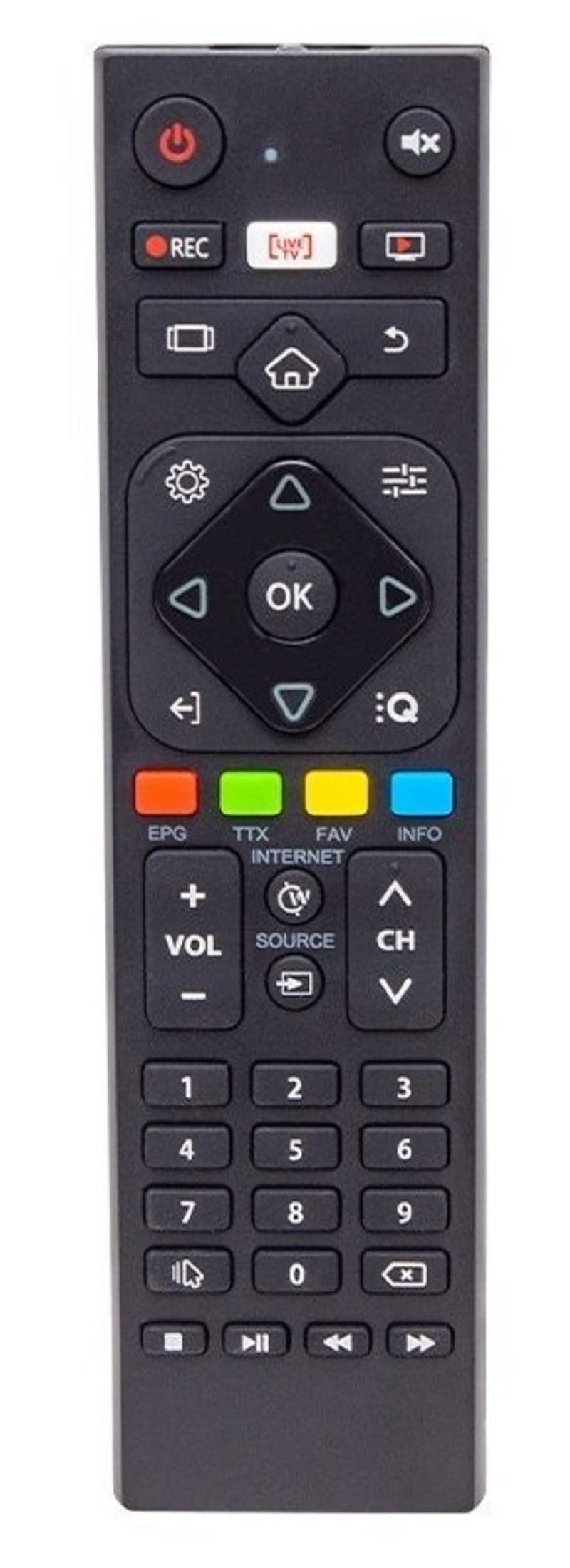
Image of the Sunny CRS-300AT remote control, showing its ergonomic design and button layout, including the dedicated Live TV button.
Ṣeto
Fifi sori batiri
- Wa yara batiri ni ẹhin isakoṣo latọna jijin.
- Gbe ideri apo batiri naa si isalẹ tabi si itọsọna ti ọfà fihan lati ṣii rẹ.
- Insert two AAA batteries (not included), ensuring the positive (+) and negative (-) terminals align correctly with the markings inside the compartment. Incorrect battery orientation can prevent the remote from functioning.
- Rọpo ideri iyẹwu batiri nipa gbigbe pada si aaye titi yoo fi tẹ ni aabo.
The remote control is an infrared (IR) device and does not require pairing. Once batteries are installed, it is ready for use with compatible AXEN LED TVs.
Awọn ilana Iṣiṣẹ
Point the remote control directly at your television's IR receiver. Ensure there are no obstructions between the remote and the TV.
Awọn iṣẹ bọtini
- Bọtini agbara (⏻): Tan TV si tan tabi paa.
- Iwọn didun soke/isalẹ (Iwọn + +--): Ṣe atunṣe iwọn didun ohun.
- Ikanni Soke/Isalẹ (Ch+/-): Ayipada TV awọn ikanni.
- Dakẹ (🔇): Pa tabi mu ohun TV kuro.
- Awọn bọtini nọmba (0-9): Directly select TV channels or input numbers.
- Awọn bọtini Lilọ kiri (▲ ▼ ◀ ▶): Lilö kiri nipasẹ awọn akojọ aṣayan ati awọn aṣayan.
- O dara/Bọtini Tẹ sii: Jẹrisi awọn aṣayan ninu awọn akojọ aṣayan.
- Bọ́tìnì Ìpadà/Pada: Pada si iboju iṣaaju tabi akojọ aṣayan.
- Bọtini Ile (🏠): Wọle si iboju ile Smart TV tabi akojọ aṣayan akọkọ.
- Live TV Button: Directly switches to live television broadcasting.
- Bọtini titẹ sii/Orisun: Changes the input source (e.g., HDMI 1, HDMI 2, AV).
- Bọtini Akojọ: Opens the TV's main settings menu.
Specific button layouts and functions may vary slightly depending on your TV model, but the core functions remain consistent.
Itoju
Ninu
- Mu ese isakoṣo latọna jijin kuro pẹlu asọ ti o gbẹ.
- Fun idoti alagidi, die-die dampen the cloth with water or a mild, non-abrasive cleaner. Do not spray liquids directly onto the remote.
- Avoid using harsh chemicals, solvents, or abrasive cleaning materials, as these can damage the remote's surface or internal components.
Itọju Batiri
- Rọpo awọn batiri nigbati idahun latọna jijin ba di onilọra tabi da iṣẹ duro.
- Ti a ko ba lo latọna jijin naa fun akoko ti o gbooro sii, yọ awọn batiri kuro lati yago fun jijo ati ibajẹ ti o pọju.
- Sọ awọn batiri ti a lo ni ibamu si awọn ilana agbegbe.
Ibi ipamọ
Store the remote control in a cool, dry place away from direct sunlight, extreme temperatures, and high humidity.
Laasigbotitusita
| Isoro | Owun to le Fa | Ojutu |
|---|---|---|
| Isakoṣo latọna jijin ko ṣiṣẹ. | Awọn batiri ti o ku tabi ti ko tọ ti fi sori ẹrọ. | Rọpo awọn batiri pẹlu awọn tuntun, ni idaniloju polarity ti o pe (+/-). |
| Isakoṣo latọna jijin ko ṣiṣẹ. | Obstruction between remote and TV's IR receiver. | Ensure a clear line of sight between the remote and the TV. Remove any objects blocking the signal. |
| Isakoṣo latọna jijin ko ṣiṣẹ. | Latọna jijin ti jinna si TV. | Move closer to the TV. The effective range for IR remotes is typically up to 7 meters (23 feet). |
| Some buttons are not responding. | O dọti tabi idoti labẹ awọn bọtini. | Nu iṣakoso latọna jijin naa gẹgẹ bi a ti ṣalaye ninu apakan Itọju. |
| TV is not responding to any remote commands. | TV's IR receiver might be faulty or blocked. | Check your TV's user manual for troubleshooting its IR receiver. Try restarting the TV by unplugging it for a few minutes. |
Awọn pato
- Awoṣe: Sunny CRS-300AT
- Brand: Sunny (Compatible with AXEN)
- Awọn ẹrọ ibaramu: Televisions (specifically AXEN LED TVs)
- Imọ-ẹrọ Asopọmọra: Infurarẹẹdi (IR)
- Orisun Agbara: Awọn batiri 2 x AAA (kii ṣe pẹlu)
- ASIN: B0BW4M6SRC
Alaye atilẹyin ọja
This product is typically covered by a manufacturer's warranty. For specific details regarding warranty duration, coverage, and claims process, please refer to the documentation provided with your purchase or contact the retailer where the product was acquired. Keep your proof of purchase for warranty purposes.
Atilẹyin
Ti o ba pade awọn ọran ti ko le yanju nipa lilo itọsọna laasigbotitusita, tabi ti o ba nilo iranlọwọ siwaju, jọwọ kan si:
- The retailer from whom you purchased the remote control.
- The manufacturer's customer support (refer to product packaging or manufacturer's weboju opo wẹẹbu fun awọn alaye olubasọrọ).
When contacting support, please have your product model (CRS-300AT) and proof of purchase readily available.