
Ekrist HX160Y8
Ekrist Portable Charger Power Bank 25,800mAh User Manual
Model: HX160Y8 | Brand: Ekrist
Ọrọ Iṣaaju
This user manual provides essential information for the safe and efficient operation of your Ekrist Portable Charger Power Bank 25,800mAh. Designed for on-the-go use, this power bank ensures your smart devices remain connected at all times. Featuring an advanced intelligent controlling IC, it offers enhanced safety, efficiency, and broad compatibility. Each unit undergoes 100% inspection and continuous aging tests to guarantee unprecedented convenience and reliable performance.
Ohun ti o wa ninu Apoti
- 1 x Ekrist 25800mAh Battery Portable Charger
- 1 x Okun USB C
- 1 x Itọsọna olumulo
Awọn pato
| Ẹya ara ẹrọ | Ẹ̀kúnrẹ́rẹ́ |
|---|---|
| Agbara | 25800mAh |
| Batiri Iru | Li-polymer (Grade A rated CE RoHs and UL certification) |
| Iṣawọle | 5V/3A |
| Abajade | Triple Output: 2x USB-A, USB-C (5V/3A) |
| Awọn iwọn | 0.72 x 2.95 x 5.94 inches (1.83 x 7.49 x 15.09 cm) |
| Iwọn Nkan | 11.8 iwon (335g) |
| Àwọ̀ | Alawọ ewe |
| Nọmba awoṣe | HX160Y8 |
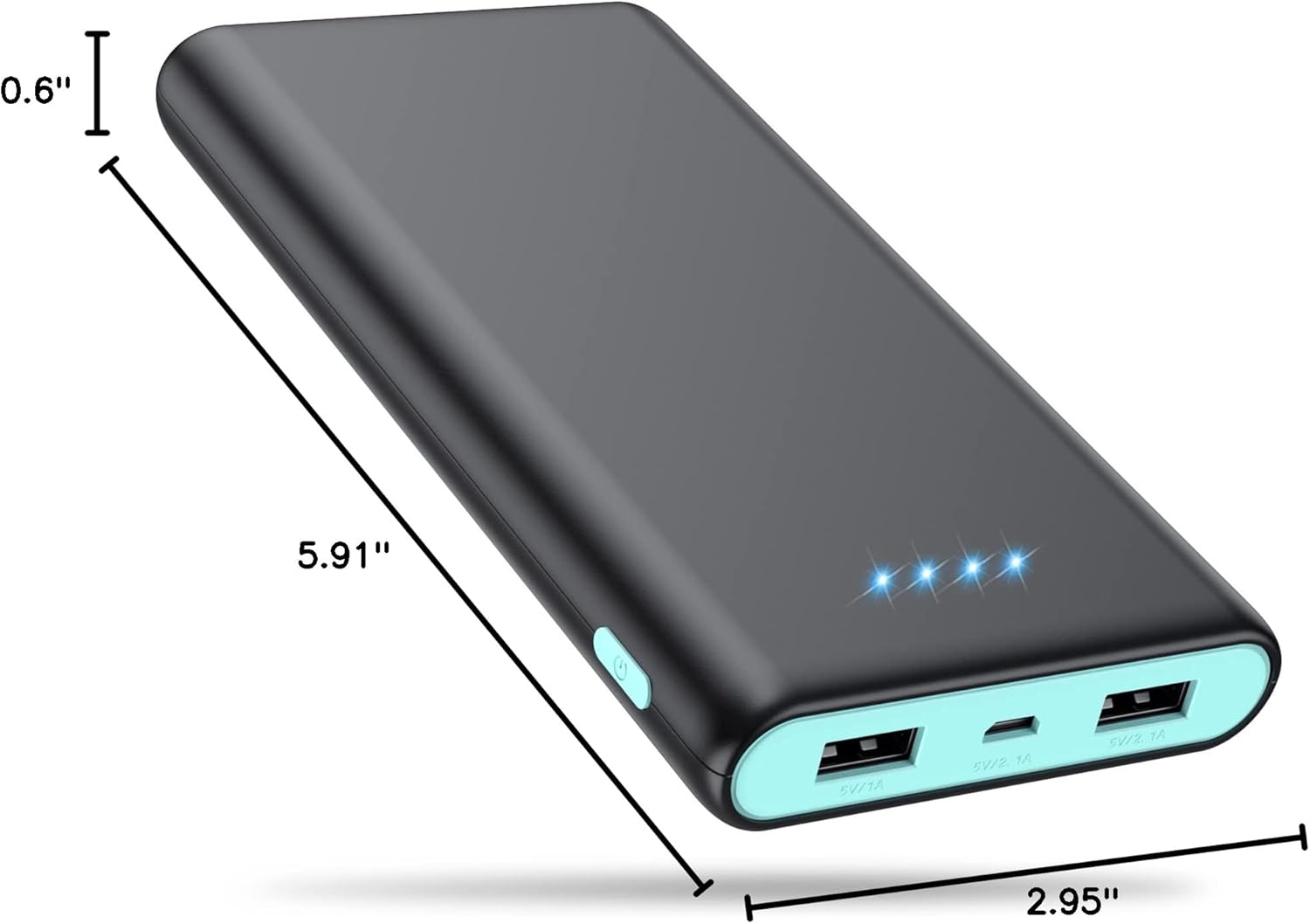
olusin 1: Awọn iwọn Ọja
Key Awọn ẹya ara ẹrọ
- Agbara-giga: With a 25800mAh capacity, this power bank can charge most smartphones 6-8 times, eliminating battery anxiety during travel or outdoor activities.
- Triple USB Charging & USB-C In/Out: Equipped with three USB ports (2.1A, 1A, and 3A USB-C), allowing you to charge up to three devices simultaneously without compromising charging speed.
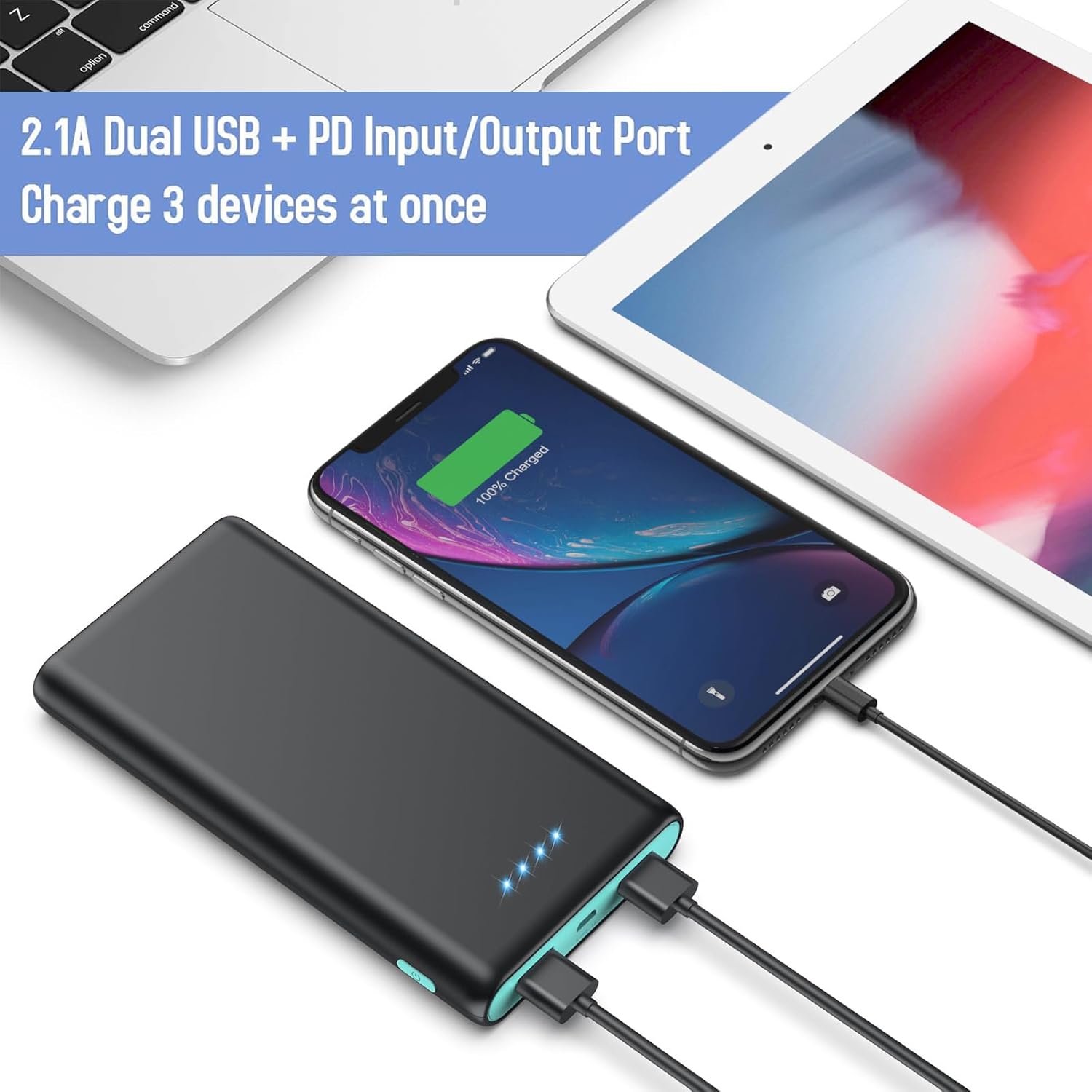
Figure 2: Triple Output Ports
- Intelligent Smart IC & Certified Safe: Features an advanced intelligent controlling IC for higher quality, safer, and more reliable performance. Built-in smart protection system ensures complete protection against overcurrent, high temperature, overcharge, and overvoltage.

Figure 3: Multiple Protection Features
- 4 LED Power Indicators: Four blue LED lights clearly show the remaining power level (25%~50%~75%~100%), allowing you to monitor the battery status at a glance.

Figure 4: LED Power Indicators
- Ibamu Agbaye: Compatible with a wide range of devices including iPhone (16/15/14/13/12/11/X/6/6s/7/8 Series), Android phones (Samsung Galaxy S25/S24/S23 Series, Google Pixel, Moto), tablets (iPad Pro), and other USB smart devices.

olusin 5: Gbogbo ẹrọ ibamu
- Flight Safe & Portable Design: Its lightweight and compact design makes it easy to carry in a pocket, bag, or fanny pack, and it is safe for air travel.

olusin 6: Iwapọ ati Apẹrẹ to šee gbe
Ṣeto
- Idiyele Ibẹrẹ: Before first use, fully charge the power bank. Connect the included USB-C cable to the power bank's USB-C port and connect the other end to a compatible AC adapter (not included). The LED indicators will light up to show charging progress. All four LEDs will be solid blue when fully charged.
- Ṣayẹwo Ipele Batiri: Briefly press the power button on the side of the power bank to check the current battery level indicated by the blue LED lights.
Awọn ilana Iṣiṣẹ
- Gbigba agbara si awọn ẹrọ rẹ:
- Connect your device's charging cable to one of the power bank's USB output ports (USB-A or USB-C).
- So opin miiran ti okun pọ si ẹrọ rẹ.
- The power bank will automatically begin charging your device. The blue LED indicators will remain lit during charging.

Àwòrán 7: Gbígba agbára lórí ọ̀pọ̀lọpọ̀ ẹ̀rọ
- Gbigba agbara si Bank agbara:
- Use the included USB-C cable or your original device's cable.
- Connect the USB-C end to the power bank's USB-C input/output port.
- Connect the other end to a USB wall charger (e.g., 2.1A or 3A for faster charging) or a computer USB port.
- The LED indicators will flash to show charging status and become solid when fully charged.
Itoju ati Itọju
- Jeki banki agbara kuro lati awọn iwọn otutu to gaju, oorun taara, ati awọn olomi.
- Yẹra fún kíkó tàbí kí o fi agbára pamọ́ sí àwọn ipa tó lágbára, nítorí pé èyí lè ba àwọn ẹ̀yà ara inú jẹ́.
- Mọ banki agbara pẹlu asọ ti o gbẹ. Maṣe lo awọn kẹmika lile tabi awọn ohun elo abrasive.
- Store the power bank in a cool, dry place when not in use. For long-term storage, it is recommended to charge it to about 50% every 3 months to preserve battery life.
Laasigbotitusita
- Banki Agbara Ko Ngba agbara:
- Rii daju pe okun gbigba agbara ti sopọ ni aabo si banki agbara ati orisun agbara.
- Try a different USB-C cable or AC adapter.
- Verify the power source (wall outlet, computer USB port) is functional.
- Ẹrọ Ko Ngba agbara lati Ile-ifowopamọ Agbara:
- Check if the power bank has sufficient charge (indicated by LED lights).
- Ensure your device's charging cable is properly connected to both the power bank and your device.
- Gbiyanju ibudo USB ti o yatọ lori banki agbara.
- Verify your device's charging cable is not damaged.
- Some devices may require a specific charging current; ensure compatibility.
- Gbigba agbara lọra:
- Ensure you are using a high-speed charging port (e.g., 2.1A or 3A USB-C) on the power bank and a compatible wall adapter.
- Using multiple ports simultaneously may reduce individual charging speeds.
- Check the quality of your charging cable; a low-quality or damaged cable can slow down charging.
Atilẹyin ọja ati Support
Ekrist provides 24 Months Support Services for your 25800mAh portable battery charger. This includes friendly, easy-to-reach support for any questions or issues you may encounter. Please refer to your purchase documentation for specific warranty claim procedures or contact Ekrist customer service directly for assistance.
For further assistance, please visit the official Ekrist support webojula tabi kan si wọn onibara iṣẹ egbe.
Ask a question about this manual
Ask about setup, troubleshooting, compatibility, parts, safety, or missing instructions. Manuals+ will review the question and use this page’s manual context to help answer it.