
1. Ifihan
O ṣeun fun riraasing the LFF LDR113-EU Kitchen Radio. This manual provides essential information for the safe and efficient operation of your device. Please read it thoroughly before use and retain it for future reference.
The LFF LDR113-EU is a versatile kitchen radio featuring DAB+, FM, and Bluetooth connectivity. It includes dual alarms, a sleep timer, and 60 station presets, designed for both tabletop use and under-cabinet mounting.
2. Alaye Aabo
- Orisun Agbara: Lo adapter agbara ti a pese nikan. Rii daju pe iwọn didun naa wa.tage ibaamu ti agbegbe rẹ ipese agbara.
- Omi ati Ọrinrin: Do not expose the device to water, rain, or excessive moisture. Avoid placing liquids near the radio.
- Afẹfẹ: Rí i dájú pé afẹ́fẹ́ tó péye wà ní àyíká ẹ̀rọ náà. Má ṣe dí àwọn ihò afẹ́fẹ́.
- Ooru: Pa ẹrọ naa mọ kuro ni awọn orisun ooru gẹgẹbi awọn radiators, awọn iwe-ipamọ ooru, awọn adiro, tabi awọn ohun elo miiran ti n ṣe ooru.
- Ninu: Disconnect from power before cleaning. Use a soft, dry cloth. Do not use liquid cleaners or aerosol cleaners.
- Ṣiṣẹ: Maṣe gbiyanju lati ṣiṣẹ ọja yi funrararẹ. Tọkasi gbogbo iṣẹ si oṣiṣẹ oṣiṣẹ ti o peye.
- Ibi: Place the radio on a stable, level surface or mount it securely according to the instructions.
3. Package Awọn akoonu
Jọwọ ṣayẹwo pe gbogbo awọn nkan wa ninu package:
- LFF LDR113-EU Kitchen Radio
- Adapter agbara
- Mounting Kit (screws, spacers, mounting template)
- Afowoyi Olumulo (iwe-ipamọ yii)
4. Ọja Ipariview
Mọ ara rẹ pẹ̀lú àwọn èròjà àti àwọn ìṣàkóso rédíò náà.

Nọmba 4.1: Iwaju view of the LFF LDR113-EU Kitchen Radio, showing the LCD display on the left, control buttons in the center, and a large rotary knob on the right. The buttons include power, mode, menu, info, preset, timer/sleep, and navigation arrows. The rotary knob is for volume and selection.

Nọmba 4.2: Diagram illustrating the key features of the LFF Kitchen Radio, including DAB/DAB+ radio, FM radio, two alarms, sleep timer, Bluetooth connectivity, and 60 station presets.
4.1. Awọn iṣakoso ati Ifihan
- Ifihan Awọ LCD: Ó ń fi ipò ìsinsìnyí, ìwífún ibùdó, àkókò, àti àwọn ètò hàn.
- Bọtini agbara: Yi redio si tan/pa.
- Bọtini Ipo: Switches between DAB+, FM, and Bluetooth modes.
- Bọ́tìnì Àkójọ/Ìwífún: Accesses menu options or displays station information.
- Awọn bọtini Tito tẹlẹ (1-5): Quick access to saved stations.
- Timer/Sleep Button: Sets sleep timer or alarm functions.
- Awọn bọtini lilọ kiri (Soke/isalẹ/osi/ọtun): Navigates through menus and station lists.
- Rotary Knob (Volume/Enter): Adjusts volume, scrolls through options, and confirms selections.
5. Eto
5.1. Asopọ agbara
- So adapter agbara pọ mọ ibudo DC IN ni ẹhin redio naa.
- Pulọọgi ohun ti nmu badọgba agbara sinu iṣan ogiri kan.
- Rédíò náà yóò tan tàbí yóò wọ inú ipò ìdúró.
5.2. Initial Scan (DAB+ and FM)
Upon first power-on, the radio will typically perform an automatic scan for DAB+ and FM stations. If not, follow these steps:
- Tẹ awọn Ipo bọ́tìnì láti yan DAB+ tàbí FM mode.
- For DAB+, the radio will usually initiate a full scan automatically. If not, navigate to the 'Full Scan' option in the DAB+ menu and press the rotary knob to confirm.
- For FM, navigate to the 'Auto Scan' option in the FM menu and press the rotary knob to confirm.
- The radio will search for available stations and store them.

Nọmba 5.1: The LFF Kitchen Radio's LCD color screen displaying the main menu with icons for Digital Radio (DAB+), FM Radio, and Bluetooth, indicating available modes.
6. Awọn ilana Iṣiṣẹ
6.1. Agbara Tan / Paa
Tẹ awọn Agbara button to turn the radio on or off (standby mode).
6.2. Aṣayan Ipo
Tẹ awọn Ipo button repeatedly to cycle through DAB+, FM, and Bluetooth modes.
6.3. Iṣẹ́ Rédíò DAB+
- In DAB+ mode, use the Soke / Isalẹ navigation buttons or the rotary knob to browse available stations.
- Press the rotary knob to select a station.
- Tẹ Akojọ / Alaye si view station information (e.g., program type, signal strength).
6.4. FM Radio isẹ
- Ni ipo FM, lo Soke / Isalẹ navigation buttons to tune to stations manually.
- Tẹ mọlẹ Soke / Isalẹ awọn bọtini fun wiwa ibudo laifọwọyi.
- Tẹ Akojọ / Alaye si view alaye ibudo.
6.5. Bluetooth Asopọmọra
Connect your smartphone or other Bluetooth-enabled device to the radio.
- Tẹ awọn Ipo button to select Bluetooth mode. The display will show 'Bluetooth Pairing'.
- Lori ẹrọ alagbeka rẹ, mu Bluetooth ṣiṣẹ ki o wa awọn ẹrọ to wa.
- Select 'LFF LDR113-EU' from the list of devices.
- Once connected, the radio display will show 'Bluetooth Connected'. You can now play audio from your device through the radio.
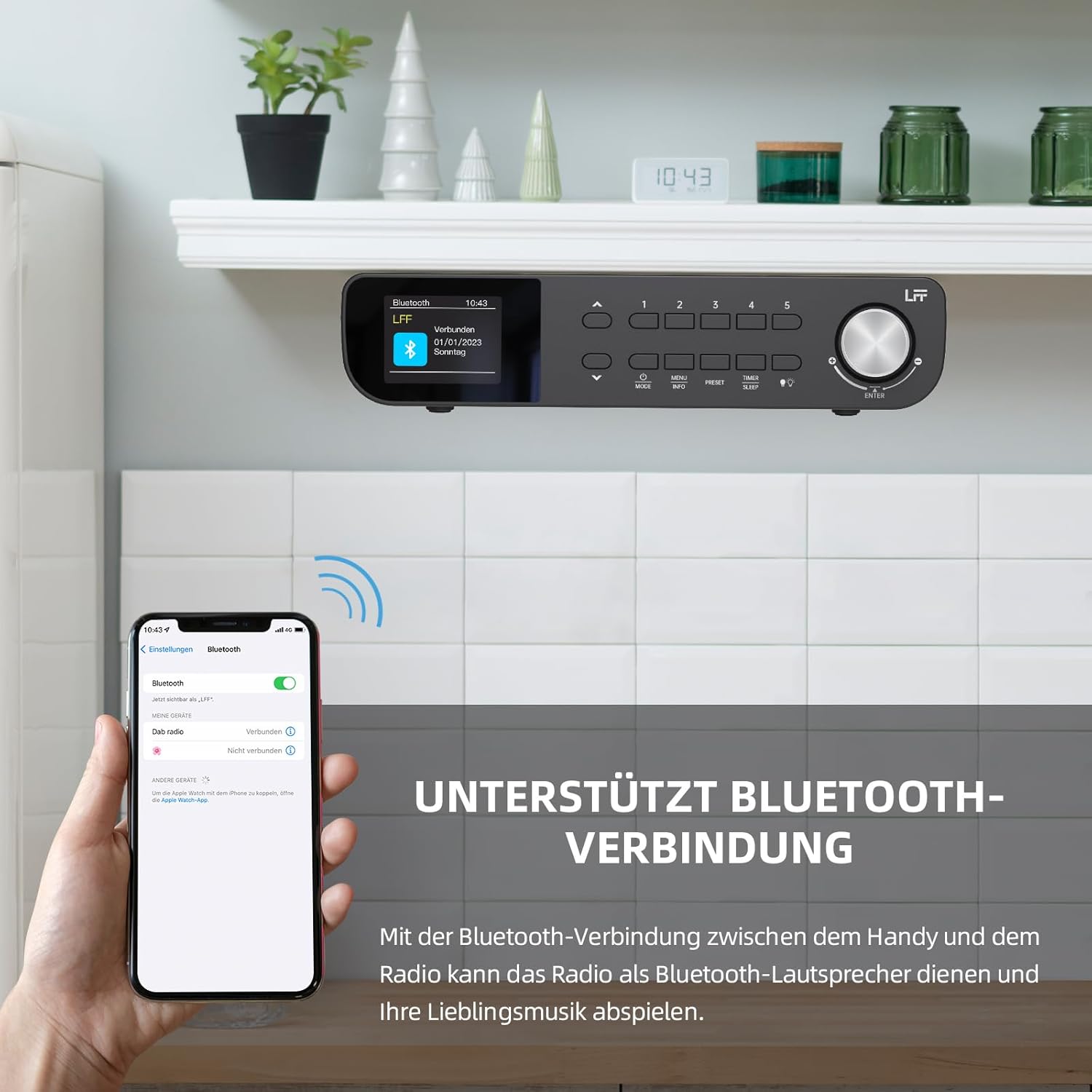
Nọmba 6.1: The LFF Kitchen Radio displaying a successful Bluetooth connection, with a smartphone screen showing the radio as a connected device.

Nọmba 6.2: Sun mo tipetipe view of the radio's display indicating 'LFF' and 'Connected' under the Bluetooth menu, confirming a successful pairing.
6.6. Eto Awọn itaniji
The radio features two independent alarms.
- Tẹ awọn Aago/Orun button repeatedly until 'Alarm 1' or 'Alarm 2' appears.
- Use the navigation buttons and rotary knob to set the alarm time, source (DAB+, FM, or Buzzer), and frequency (daily, weekdays, weekends, once).
- Confirm settings by pressing the rotary knob.

Nọmba 6.3: Close-up of the radio's display showing the current time and options to activate or deactivate Alarm 1 and Alarm 2.
6.7. Aago oorun
Aago oorun ngbanilaaye redio lati paa laifọwọyi lẹhin akoko ti a ṣeto.
- Tẹ awọn Aago/Orun button repeatedly until 'Sleep Timer' appears.
- Use the navigation buttons or rotary knob to select the desired sleep duration (e.g., 15, 30, 60 minutes).
- Jẹrisi nipa titẹ bọtini iyipo.

Nọmba 6.4: Close-up of the radio's display showing the 'Sleep Timer' setting, with an option to set the duration, for example, to 30 minutes.
6.8. Awọn tito tẹlẹ
Fipamọ́ tó àwọn ibùdó ayanfẹ́ mẹ́jọdínlógún fún wíwọlé kíákíá.
- Lati Ṣafipamọ Tito tẹlẹ: Tune to the desired station. Press and hold one of the Àkójọpọ̀ (1-5) buttons until 'Preset Saved' appears. For additional presets, use the 'Preset Store' option in the menu.
- Lati Ranti Tito tẹlẹ: Ni soki tẹ ọkan ninu awọn Àkójọpọ̀ (1-5) buttons. For other presets, navigate to 'Preset Recall' in the menu.
6.9. Ina LED
The radio includes an integrated LED light, useful for illuminating the area below if mounted under a cabinet.
- Tẹ awọn Imọlẹ button (if available, or navigate through menu) to turn the LED light on or off.

Nọmba 6.5: The LFF Kitchen Radio mounted under a kitchen cabinet, with its integrated LED light providing illumination to the countertop below.
6.10. Ifihan Imọlẹ
Adjust the display backlight brightness to suit your environment.
- Access the 'Display' or 'Settings' menu.
- Select 'Brightness' and choose from High, Medium, or Low settings.

Nọmba 6.6: A visual comparison of the LFF Kitchen Radio's display at three different backlight brightness levels: High, Medium, and Low, demonstrating the adjustable visibility.
7. Awọn ilana Iṣagbesori
The LFF LDR113-EU Kitchen Radio offers flexible placement options: tabletop or under-cabinet mounting.
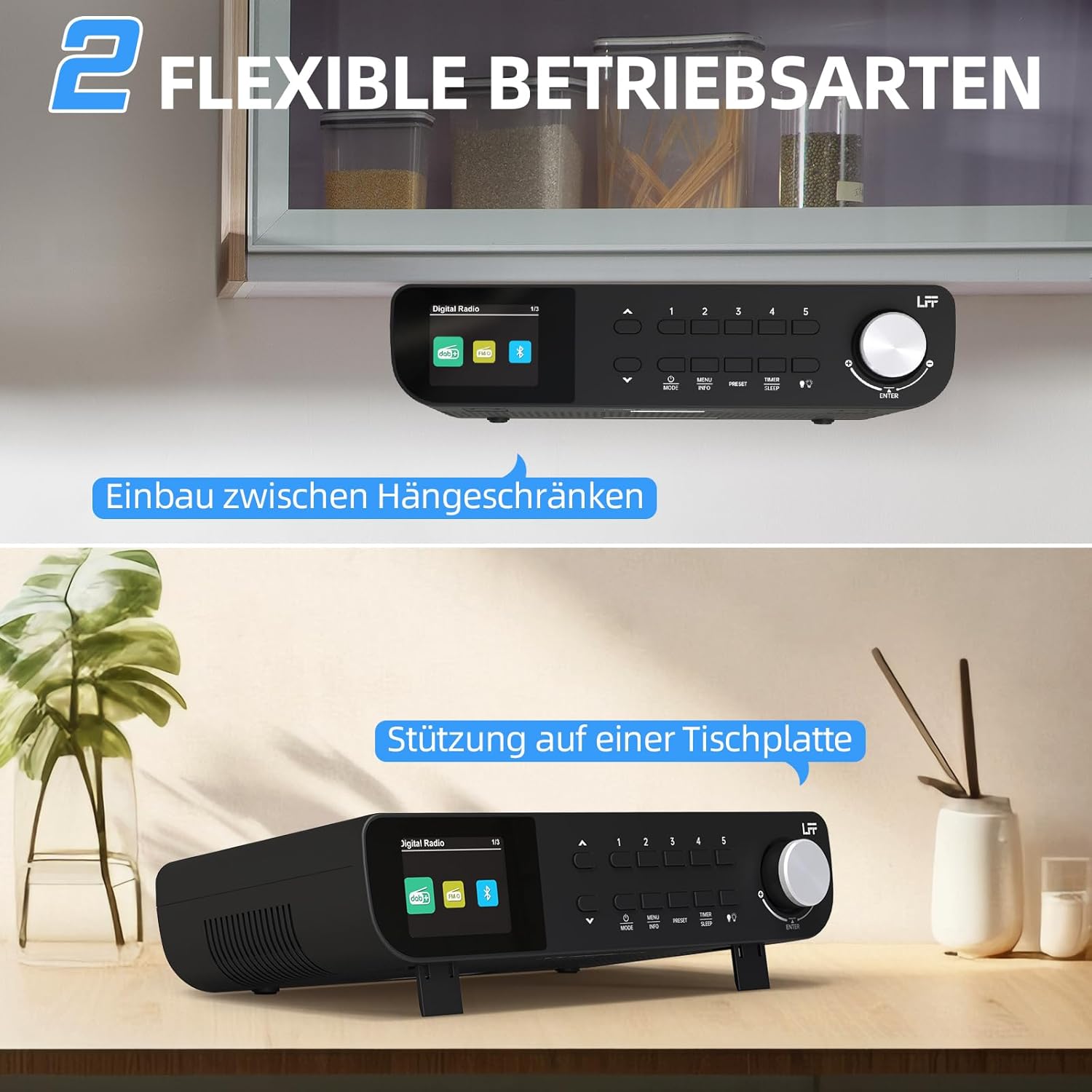
Nọmba 7.1: The LFF Kitchen Radio displayed in two common installation scenarios: mounted underneath a kitchen cabinet and placed freestanding on a tabletop.
7.1. Tabletop Placement
Simply place the radio on a stable, flat surface. Ensure it is not near the edge to prevent accidental falls.
7.2. Under-Cabinet Mounting
For under-cabinet installation, use the provided mounting kit.
- Mura Ibi: Choose a suitable location under a kitchen cabinet, ensuring there is enough space and access to a power outlet.
- Mark Drill Iho: Use the provided mounting template to mark the drill holes on the underside of the cabinet.
- Awọn Iho Pilot Lilu: Lilu awọn ihò awaoko ni awọn ipo ti o samisi.
- So Àwo Ìfisomọ́ra mọ́ (tí ó bá yẹ): Some models may include a separate mounting plate. Attach this to the cabinet using the screws.
- Secure the Radio: Align the radio with the mounting holes or plate and secure it using the provided screws. Ensure it is firmly attached.
- So agbara: Pulọọgi sinu ohun ti nmu badọgba agbara.

Nọmba 7.2: Detailed diagram showing the steps for under-cabinet mounting, including measuring distances (e.g., 58mm) and securing the radio with screws.
8. Itọju
- Ninu: To clean the radio, disconnect it from the power supply. Use a soft, dry, lint-free cloth. Do not use abrasive cleaners, waxes, or solvents.
- Eriali: Ensure the antenna is extended for optimal reception in DAB+ and FM modes. Handle it gently to avoid damage.
- Ibi ipamọ: If storing the radio for an extended period, disconnect it from power and store it in a cool, dry place.
9. Laasigbotitusita
| Isoro | Owun to le Fa | Ojutu |
|---|---|---|
| Ko si agbara | Ohun ti nmu badọgba agbara ko ti sopọ tabi aṣiṣe iṣan. | Ṣayẹwo asopọ agbara. Gbiyanju iṣan ti o yatọ. |
| Gbigba DAB+/FM ti ko dara to | Eriali ko gbooro sii, ifihan agbara ti ko lagbara, tabi kikọlu. | Fully extend the antenna. Reposition the radio. Perform a full scan. |
| Bluetooth ko sopọ | Radio not in pairing mode, device too far, or already connected to another device. | Rí i dájú pé rédíò wà ní ipò Bluetooth. Gbé ẹ̀rọ náà sún mọ́ ọn. Gé ẹ̀rọ mìíràn kúrò. |
| Ko si ohun | Volume too low, mute activated, or incorrect mode. | Increase volume. Check if mute is active. Ensure correct mode (DAB+, FM, Bluetooth). |
| Ifihan ko ṣiṣẹ | Brightness too low or device malfunction. | Adjust display brightness. If problem persists, contact support. |
10. Awọn pato

Nọmba 10.1: Diagram showing the dimensions of the LFF Kitchen Radio: 250mm length, 146mm width, and 55mm height.
| Ẹya ara ẹrọ | Ẹ̀kúnrẹ́rẹ́ |
|---|---|
| Brand | LFF |
| Nọmba awoṣe | LDR113-EU |
| Àwọ̀ | Dudu |
| Asopọmọra | Bluetooth |
| Ìmọ̀-ẹ̀rọ Àtúnṣe | DAB Plus, FM |
| Orisun agbara | Cable ina |
| Igbohunsafẹfẹ | 108 MHz (FM o pọju) |
| Awọn iwọn (L x W x H) | 250mm x 146mm x 55mm |
| Awọn tito tẹlẹ | 60 |
| Ifihan | LCD Color Screen |
| Pataki Awọn ẹya ara ẹrọ | Dual Alarms, Sleep Timer, Under-cabinet mounting option, LED Light |
11. Atilẹyin ọja ati Support
This product comes with a standard manufacturer's warranty. Please refer to the warranty card included in your package for specific terms and conditions. For technical support, troubleshooting assistance, or warranty claims, please contact your retailer or the LFF customer service department.