
1. Ifihan
Thank you for choosing the Arikasen Bluetooth 5.0 Wireless Earbuds. This manual provides detailed instructions on how to set up, operate, maintain, and troubleshoot your new earbuds. Please read this manual carefully before use to ensure optimal performance and longevity of your device.
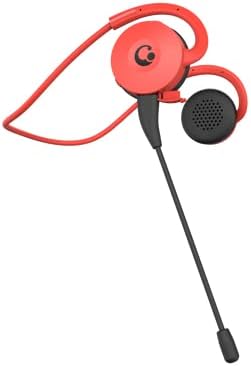
Figure 1.1: Arikasen Bluetooth 5.0 Wireless Earbuds (Red model shown).
2. Package Awọn akoonu
Ṣaaju ki o to bẹrẹ, jọwọ ṣayẹwo awọn akoonu inu package lati rii daju pe gbogbo awọn nkan wa:
- Arikasen Bluetooth 5.0 Wireless Earbuds
- Okun Ngba agbara USB
- Itọsọna olumulo
- Optional: Detachable Boom Microphone (if purchased with this accessory)
3. Eto
3.1. Ngba agbara si Earbuds
Before first use, fully charge the earbuds. Connect the provided USB charging cable to the charging port on the earbuds and plug the other end into a USB power source (e.g., computer USB port, wall adapter). The indicator light will show charging status and turn off or change color when fully charged.
3.2. Wọ awọn Earbuds
The earbuds are designed for on-ear comfort. Gently place the earbud over your ear, ensuring the ear hook sits securely behind your ear. The soft protein earpads provide a comfortable fit without pressure.
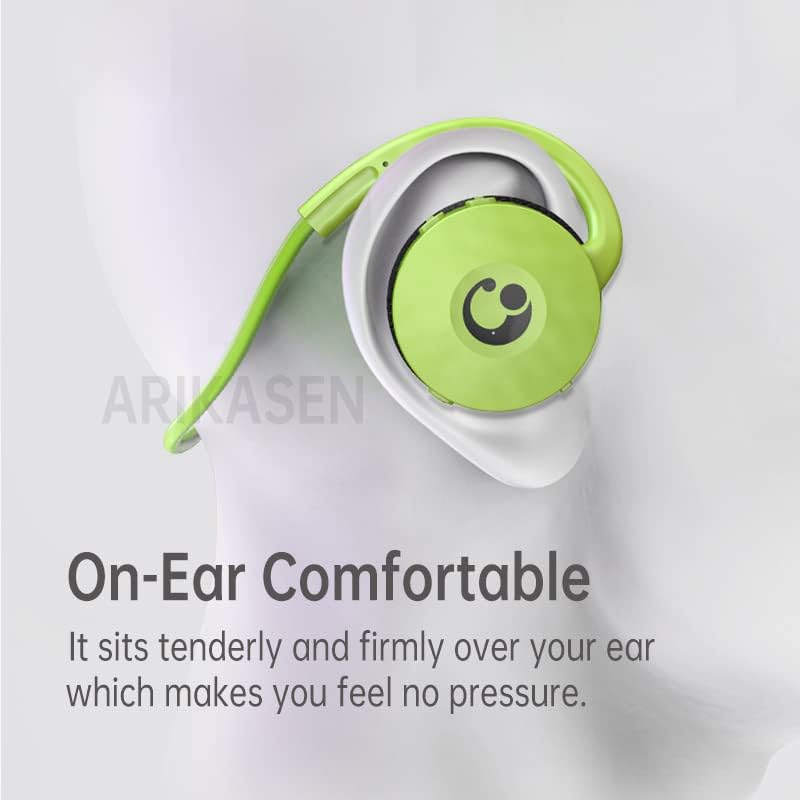
Figure 3.1: Proper placement of the earbud for comfortable on-ear wear.

Figure 3.2: Close-up of the soft protein earpads designed for long-lasting comfort.
4. Awọn ilana Iṣiṣẹ
4.1. Agbara Tan / Paa
- Agbara Tan: Press and hold the multi-function button for approximately 3 seconds until the indicator light flashes.
- Agbara Pa: Press and hold the multi-function button for approximately 5 seconds until the indicator light turns off.
4.2. Sisopọ Bluetooth
Láti so àwọn ètí ìgbọ́rọ̀ rẹ pọ̀ mọ́ ẹ̀rọ kan:
- Rii daju pe awọn agbekọri ti wa ni pipa.
- Press and hold the multi-function button for about 5-7 seconds until the indicator light flashes red and blue alternately. This indicates pairing mode.
- Lori ẹrọ rẹ (foonuiyara, tabulẹti, kọmputa), mu Bluetooth ṣiṣẹ ki o wa awọn ẹrọ to wa.
- Select "Arikasen Earbuds" (or similar name) from the list of found devices.
- Once connected, the indicator light on the earbuds will flash blue slowly or turn off, and you will hear a confirmation tone.

Figure 4.1: The compact design of the earbud, featuring Bluetooth 5.0 for low-latency transmission.
4.3. Sisisẹsẹhin Orin
- Ṣiṣẹ/Daduro: Tẹ bọtini iṣẹ-ọpọlọpọ lẹẹkan.
- Orin t’okan: Tẹ ki o si mu bọtini Iwọn didun + naa.
- Tẹlẹ Orin: Tẹ bọtini Iwọn didun ki o si mu.
- Iwọn didun Up: Tẹ bọtini didun + kukuru.
- Iwọn didun isalẹ: Tẹ bọtini didun kukuru.
4.4. Iṣakoso ipe
- Idahun/Ipe Ipari: Tẹ bọtini iṣẹ-ọpọlọpọ lẹẹkan.
- Kọ Ipe: Tẹ mọlẹ bọtini iṣẹ-ọpọlọpọ fun iṣẹju-aaya 2.
- Nọmba Ikẹhin Tun Tun: Double-tẹ awọn olona-iṣẹ bọtini.
4.5. Using the Optional Boom Microphone
If your earbuds include the detachable boom microphone, you can attach it to the designated port for enhanced voice clarity, especially during gaming or calls.

Figure 4.2: The earbud shown with the optional boom microphone attached for improved audio input.
5. Itọju
To ensure the longevity and optimal performance of your Arikasen Wireless Earbuds, follow these maintenance guidelines:
- Ninu: Use a soft, dry, lint-free cloth to clean the earbuds. Do not use abrasive cleaners, alcohol, or chemical solvents.
- Awọn paadi afikọti: The protein earpads are durable but can be gently wiped with a damp cloth if needed. Ensure they are completely dry before use.
- Omi Resistance: The earbuds are IPX5 water resistant, meaning they can withstand splashes and sweat. Do not submerge them in water or expose them to heavy rain. Dry them thoroughly if they get wet.
- Ibi ipamọ: Tọ́jú àwọn ètí ìgbọ́rọ̀ náà sí ibi tí ó tutù tí ó sì gbẹ, tí kò sí ìmọ́lẹ̀ oòrùn tààrà àti ooru líle koko.
- Gbigba agbara: Avoid overcharging. Disconnect the charging cable once the earbuds are fully charged.
6. Laasigbotitusita
Tí o bá ní ìṣòro pẹ̀lú àwọn ètítí rẹ, jọ̀wọ́ wo àwọn ìṣòro àti ìdáhùn tí ó wọ́pọ̀ wọ̀nyí:
| Isoro | Owun to le Fa | Ojutu |
|---|---|---|
| Earbuds ko ni agbara lori | Batiri kekere | Gba agbara awọn agbekọri naa patapata. |
| Ko le so pọ pẹlu ẹrọ | Earbuds not in pairing mode; Device Bluetooth off; Too far from device | Ensure earbuds are in pairing mode (flashing red/blue). Turn on device Bluetooth. Move earbuds closer to device (within 10 meters). |
| Ko si ohun tabi iwọn didun kekere | Volume too low; Earbuds not connected; Incorrect audio output selected on device | Increase volume on earbuds and device. Re-pair earbuds. Check device audio settings. |
| Didara ipe ti ko dara | Weak signal; Microphone obstructed | Move closer to your device. Ensure microphone is clear and positioned correctly. |
Ti iṣoro naa ba wa lẹhin igbiyanju awọn solusan wọnyi, jọwọ kan si atilẹyin alabara.
7. Awọn pato
| Ẹya ara ẹrọ | Ẹ̀kúnrẹ́rẹ́ |
|---|---|
| Awoṣe | B0BX5FGPQ4 |
| Asopọmọra Technology | Ailokun |
| Alailowaya Technology | Bluetooth 5.0 |
| Earcup Type | Ologbele-ìmọ |
| Agbara Ijade | 50mW |
| Nọmba ti Awakọ | 2 |
| Headphone Pad Material | Soft Sponge / Protein |
| Awakọ Iru | Neodymium |
| Diamita Awakọ | 30mm |
| Lapapọ ti irẹpọ iparun | 5% |
| Ibiti o ni ihamọ | Up to 32 Ohm |
| Omi Resistance Rating | IPX5 |
| Akoko ere | Titi di wakati 18 |
| Iṣakoso Iru | Iṣakoso iwọn didun |
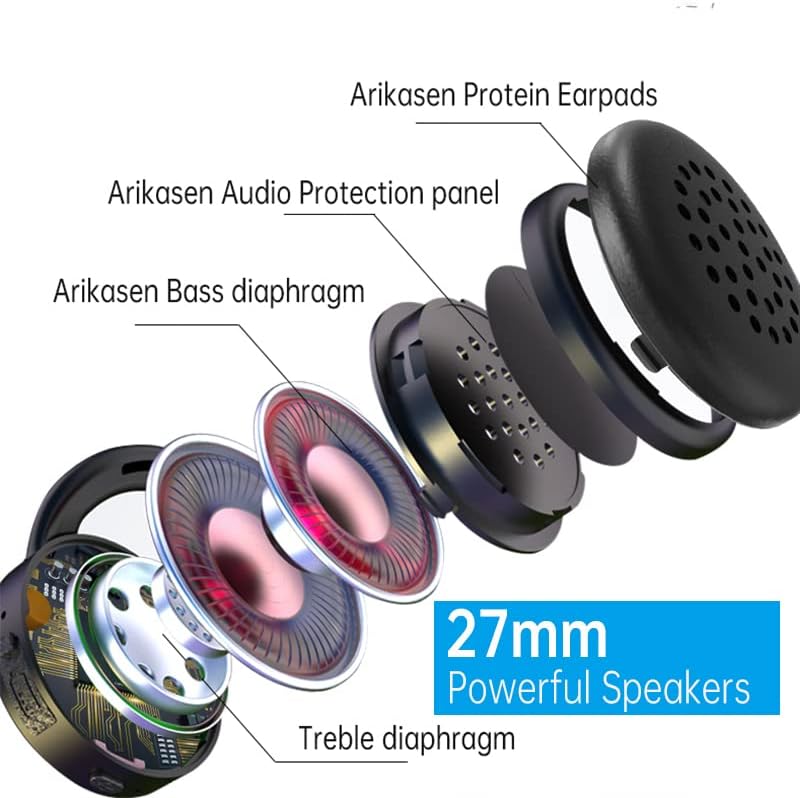
Figure 7.1: Internal components highlighting the 27mm powerful speakers.
8. Atilẹyin ọja ati Support
Arikasen is committed to providing high-quality products and excellent customer service. Your earbuds come with a 12-osu atilẹyin ọja lati ọjọ ti o ra.
Ibori Atilẹyin ọja: Atilẹyin ọja yii bo awọn abawọn iṣelọpọ ati awọn iṣoro ti o dide lati lilo deede. Ko bo ibajẹ ti o fa nipasẹ ilokulo, awọn ijamba, awọn iyipada ti a ko fun ni aṣẹ, tabi itọju ti ko tọ.
Ẹri itelorun Onibara: If you experience any product quality issues, please do not hesitate to contact us. We are dedicated to ensuring 100% customer satisfaction and will offer a full refund or a new replacement product if necessary.
Olubasọrọ Support: For warranty claims, technical assistance, or any other inquiries, please refer to the contact information provided on your purchase receipt or the seller's page on Amazon. Please have your model number (B0BX5FGPQ4) and purchase date ready when contacting support.