
Ọrọ Iṣaaju
Thank you for choosing the Genai True Wireless Earphones. This manual provides detailed instructions on how to set up, operate, maintain, and troubleshoot your new earphones. Please read this manual carefully before use to ensure optimal performance and longevity of your device.
Ọja Pariview
The Genai True Wireless Earphones feature a digital intelligence LED display on the charging case, tap control for easy operation, and Bluetooth 5.0 for stable connectivity. They are designed for comfortable in-ear wear and deliver clear stereo sound.
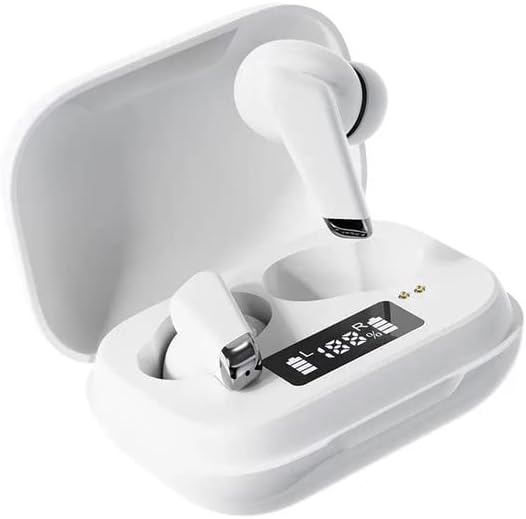
Image: Genai True Wireless Earphones in their charging case, showcasing the digital LED display indicating battery levels.
Awọn ẹya pataki:
- Sitẹrio Alailowaya otitọ (TWS): Seamless audio experience without cables.
- Tẹ ni kia kia Iṣakoso: Intuitive touch-sensitive controls for music and calls.
- Digital Intelligence LED Display: Shows real-time battery status of earbuds and charging case.
- Bluetooth 5.0: Ṣe idaniloju asopọ alailowaya iduroṣinṣin ati lilo daradara.
- Apẹrẹ Ninu-Eti Ergonomic: Comfortable and secure fit.
Eto Itọsọna
1. Ngba agbara si Earphones ati Case
- Idiyele Ibẹrẹ: Before first use, fully charge the charging case and earbuds. Place the earbuds into the charging case.
- Sopọ Ṣaja: So apoti gbigba agbara pọ mọ orisun agbara nipa lilo okun USB to baramu.
- Atẹle Ifihan LED: The digital LED display on the case will show the charging status and battery percentage. Ensure both earbuds and the case are fully charged before proceeding.

Image: The charging case with its digital LED display, indicating the charge level of both the case and the individual earbuds.
2. Sisopọ pẹlu Ẹrọ Rẹ
- Agbara Tan: Ṣí àpótí ìgbara. Àwọn agbekọri náà yóò tan-an láìfọwọ́sí, wọn yóò sì wọ inú ipò ìsopọ̀. O lè gbọ́ ìkéde tí a lè gbọ́.
- Mu Bluetooth ṣiṣẹ: Lori foonuiyara rẹ tabi ẹrọ Bluetooth miiran ti o ṣiṣẹ, lọ si awọn eto Bluetooth ki o mu Bluetooth ṣiṣẹ.
- Yan Ẹrọ: Look for "Genai Earphones" (or similar name) in the list of available devices and select it to connect.
- Ìmúdájú: Once successfully paired, you will hear a confirmation sound, and the earbuds will be ready for use.

Image: A visual representation of the Bluetooth 5.0 chipset, highlighting the stable wireless connection technology.
Awọn ilana Iṣiṣẹ
The Genai True Wireless Earphones feature intuitive tap controls. The specific functions may vary slightly, but common controls are listed below:
Titan / Paa
- Agbara Tan: Open the charging case, or long-press the touch area on both earbuds for a few seconds.
- Agbara Pa: Place the earbuds back into the charging case and close the lid, or long-press the touch area on both earbuds for several seconds until they power off.
Sisisẹsẹhin Orin
- Ṣiṣẹ/Daduro: Fọwọ ba ẹyọkan lori boya agbekọri.
- Orin t’okan: Fọwọ ba lẹẹmeji lori agbekọri ọtun.
- Tẹlẹ Orin: Fọwọ ba lẹẹmeji lori agbekọri osi.
Isakoso Ipe
- Idahun/Ipe Ipari: Tẹ ẹyọkan lori boya agbekọri lakoko ipe ti nwọle tabi ipe ti nṣiṣe lọwọ.
- Kọ Ipe: Tẹ gun lori boya agbekọri lakoko ipe ti nwọle.
Oluranlọwọ ohun
- Mu Oluranlọwọ Ohun ṣiṣẹ: Triple tap on either earbud (functionality may vary by device).
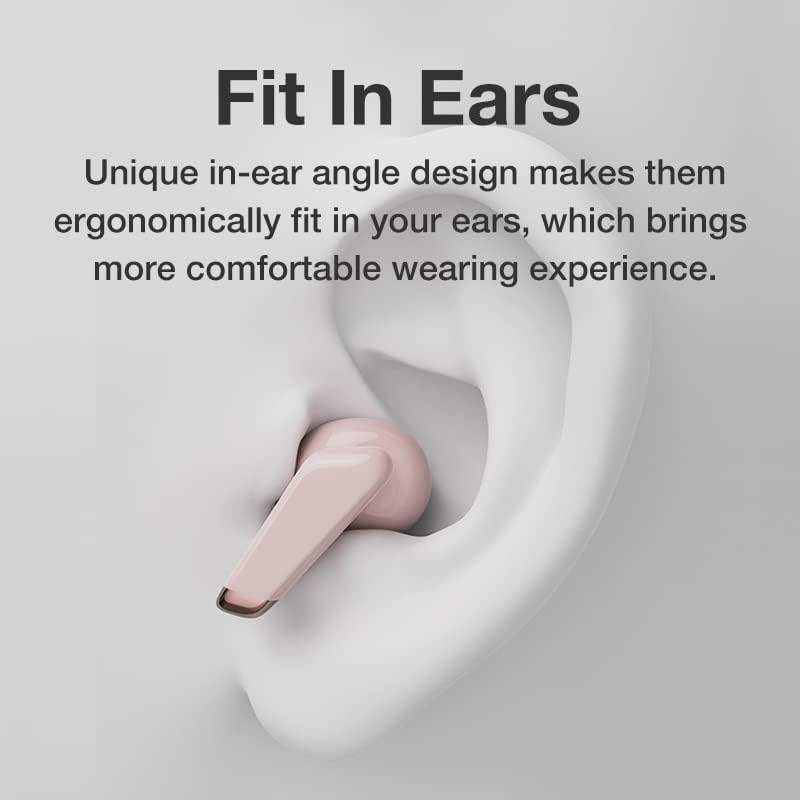
Image: An illustration showing an earbud comfortably and ergonomically fitted within the ear canal.
Itoju
Ninu
- Lo asọ ti o gbẹ, asọ ti ko ni lint lati nu afikọti ati apoti gbigba agbara.
- Ma ṣe lo awọn olutọpa abrasive, awọn nkanmimu, tabi awọn ohun elo aerosol.
- Gently clean the ear tips and speaker mesh to remove any earwax or debris.
Ibi ipamọ
- Tọju awọn agbekọri sinu apoti gbigba agbara wọn nigbati ko si ni lilo lati daabobo wọn ati jẹ ki wọn gba agbara.
- Yẹra fún títọ́jú rẹ̀ ní àwọn igbóná tó le koko, oòrùn tààrà, tàbí ọriniinitutu tó ga.
Laasigbotitusita
- Earbuds not pairing with each other or with device:
- Rii daju pe awọn agbekọri mejeeji ti gba agbara.
- Fi àwọn ètí ìgbọ́rọ̀ méjèèjì padà sínú àpótí ìgbóná, pa ìbòrí náà, dúró fún ìṣẹ́jú díẹ̀, lẹ́yìn náà ṣí ìbòrí náà lẹ́ẹ̀kan síi.
- On your device, forget/delete the "Genai Earphones" from the Bluetooth list and try pairing again.
- Ko si ohun tabi iwọn kekere:
- Ṣayẹwo ipele iwọn didun lori ẹrọ rẹ mejeeji ati awọn agbekọri.
- Rii daju pe awọn agbekọri ti sopọ daradara si ẹrọ rẹ.
- Nu eyikeyi idoti kuro lati apapo agbọrọsọ agbekọri.
- Awọn iṣoro gbigba agbara:
- Rii daju pe okun gbigba agbara ti sopọ ni aabo si ọran mejeeji ati orisun agbara.
- Daju pe orisun agbara n ṣiṣẹ.
- Nu awọn olubasọrọ gbigba agbara kuro lori mejeeji agbekọri ati ọran naa.
Awọn pato
| Ẹya ara ẹrọ | Ẹ̀kúnrẹ́rẹ́ |
|---|---|
| Awoṣe | B0BX5G53VT |
| Asopọmọra Technology | Ailokun (Bluetooth 5.0) |
| Earcups Iru | Ologbele-ìmọ |
| Nọmba ti Awakọ | 2 |
| Ọna gbigba agbara | Ngba agbara nla |
| Awọn paadi agbekọri Ohun elo | Silikoni |
| Diamita Awakọ | 10mm |
| Lapapọ ti irẹpọ iparun | 0.02% |
| Ibiti o ni ihamọ | Titi di 32 Ω |
| Ohun elo | Silikoni |
| Gbigbe Eti | Ninu Eti |
| Fọọmù ifosiwewe | Alailowaya otitọ |
Atilẹyin ọja ati Support
The Genai True Wireless Earphones come with a 12-osu atilẹyin ọja from the date of purchase, covering manufacturing defects. For any quality problems or support inquiries, please contact the seller directly through your purchase platform.
We are committed to ensuring 100% customer satisfaction. If you encounter any issues, please do not hesitate to reach out for assistance, including full refunds or replacements as applicable.