
ENDORFY EY3B006
Ìwé Ìtọ́sọ́nà Olùlò fún Itutu Omi Omi ENDORFY Navis F360 ARGB AIO CPU
Model: EY3B006
Ọrọ Iṣaaju
This user manual provides comprehensive instructions for the installation, operation, and maintenance of your ENDORFY Navis F360 ARGB All-in-One (AIO) CPU Water Cooler. Designed for high-performance cooling, this system features a 360mm radiator, a PWM-controlled pump, and three Fluctus 120 PWM ARGB fans to ensure optimal thermal management for your CPU.
Ọja Pariview
The ENDORFY Navis F360 ARGB is an advanced liquid cooling solution for modern computer systems. It consists of a radiator, a pump/cold plate assembly, and three 120mm fans, all integrated with Addressable RGB (ARGB) lighting for customizable aesthetics.

Nọmba 1: The ENDORFY Navis F360 ARGB AIO CPU Water Cooler, showing the 360mm radiator with three fans, connected to the CPU water block and pump assembly.
Awọn ẹya pataki:
- AiO Water Cooling: High-performance, pre-assembled water cooling loop, ready to install and maintenance-free.
- PWM-Controlled Pump: Quiet pump block with ceramic bearings and PWM control for efficient cooling.
- Three Fluctus 120 PWM ARGB Fans: Optimized for high static pressure, providing superb performance on water radiators at low noise levels.
- ARGB LED Lighting: Backlit pump and fans with independently controlled ARGB LEDs for customizable lighting effects.
- Nano Reset ARGB Controller: Built-in lighting can be controlled by compatible motherboards or independently with the included Nano Reset ARGB controller.
- Kink-Resistant Rubber Hoses: Internally reinforced tubes are flexible and easy to route, with outer sleeves protecting the tubes and providing a uniform look.
- Multi-Socket Compatibility: Redesigned mounting system is easy to install and compatible with all modern AMD and Intel sockets.

Nọmba 2: The Navis F360 ARGB installed inside a computer case, demonstrating its compact fit and the vibrant ARGB lighting of the fans and pump. This setup highlights the cooler's ability to provide effective cooling in demanding conditions.

Nọmba 3: A alaye view of the Fluctus 120 PWM ARGB fans, highlighting their serrated blade edge profile designed for quiet and efficient airflow. The image shows the pre-installed fans on the radiator.
Nọmba 4: Illustration of the PWM controlled pump and the 360-millimeter radiator, emphasizing the uncompromised cooling performance provided by these components, including the ceramic bearing in the pump.

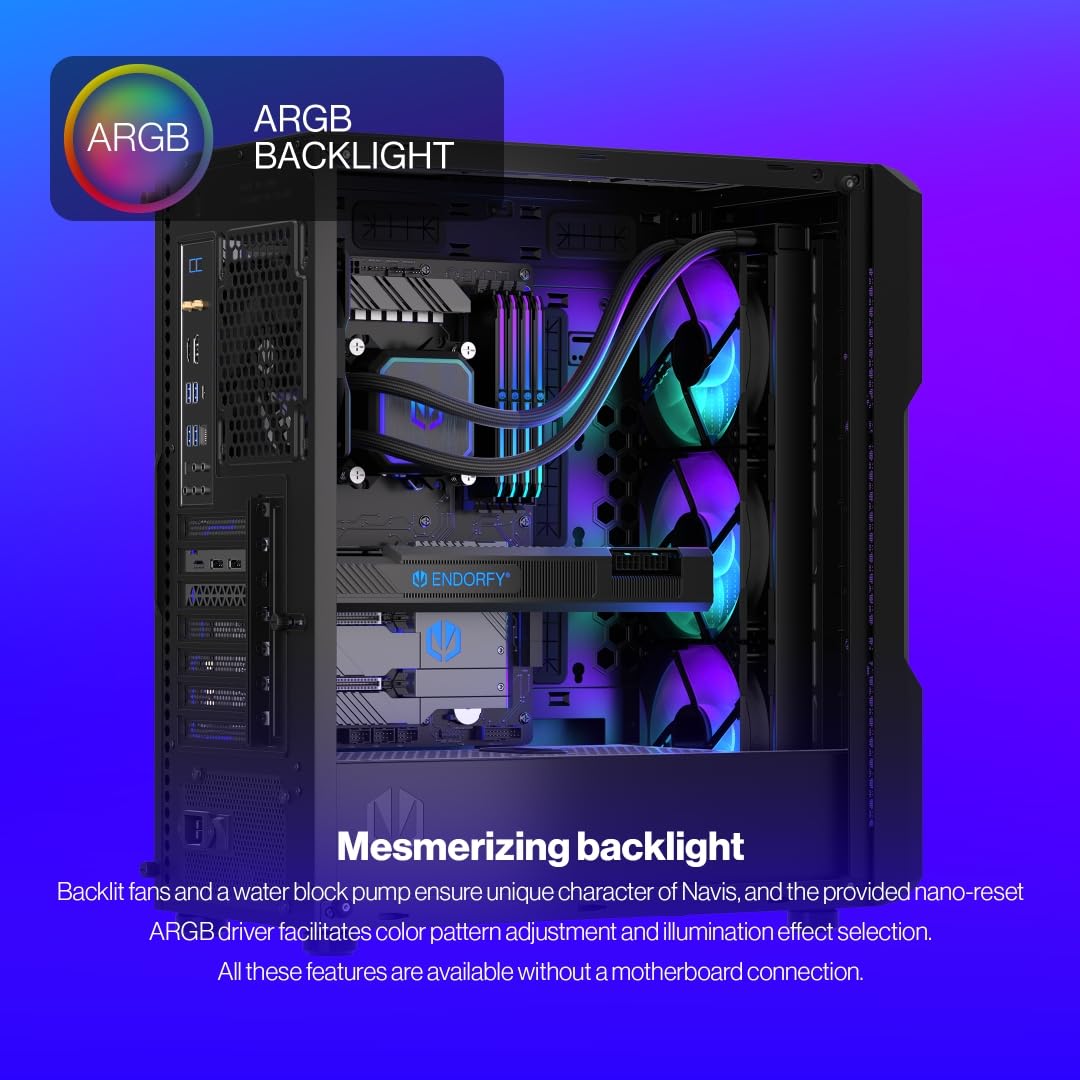
Nọmba 5: The mesmerizing ARGB backlight of the Navis F360 ARGB, showcasing the vibrant illumination of the fans and water block pump. The image also indicates that color patterns can be adjusted via the Nano Reset ARGB driver without a direct motherboard connection.

Nọmba 6: An image illustrating the convenient and simple installation process of the Navis F360 ARGB. The integrated water block pump frame and 39 cm long flexible tubes allow for versatile placement within a computer case.
Awọn pato
| Ẹya ara ẹrọ | Ẹ̀kúnrẹ́rẹ́ |
|---|---|
| Brand | ENDORFY |
| Nọmba awoṣe | EY3B006 |
| Ọja Mefa | 15.55"L x 4.72"W x 1.1"H (39.5 x 12 x 2.8 cm) |
| Iwọn | 3.15 iwon (1.43 kg) |
| Ọna Itutu | Omi |
| Awọn ẹrọ ibaramu | Awọn PC tabili |
| Ariwo Ipele | 14 dB (o kere ju) |
| Ohun elo fifa | Ceramic bearings |
| Iru Asopọ Agbara | 4-PIN (PWM) |
| Voltage | 12 Volts |
| Wattage | 8.46 watt |
| Included Thermal Compound | Pactum PT-3 |
| Sipiyu Socket Ibamu | Intel LGA 1700/1200/115x, AMD AM5/AM4 |
Eto ati fifi sori
Before beginning installation, ensure your computer is powered off and unplugged from the wall outlet. It is recommended to wear an anti-static wrist strap to prevent damage to components.
Awọn akoonu idii:
- ENDORFY Navis F360 ARGB AIO Cooler (Radiator with 3x Fluctus 120 PWM ARGB fans, pump/cold plate assembly, tubing)
- Ohun elo fifi sori ẹrọ fun awọn socket Intel ati AMD
- Pactum PT-3 Thermal Compound (pre-applied or in tube)
- Nano Reset ARGB Controller
- Afowoyi Olumulo (iwe-ipamọ yii)

Nọmba 7: The included Pactum PT-3 thermal paste and applicator. This easy-to-apply thermal paste ensures excellent heat removal performance, and the tube provides enough for several installations.
Awọn igbesẹ fifi sori ẹrọ:
- Mura modaboudu: Install the appropriate backplate for your CPU socket (Intel or AMD) onto the motherboard. Refer to your motherboard's manual for specific instructions on CPU and backplate installation.
- Rídíà òkè: Identify a suitable mounting location in your PC case for the 360mm radiator (e.g., top, front). The fans are pre-installed on the radiator for convenience. Secure the radiator to the case using the provided screws.
- Mura CPU: If thermal paste is not pre-applied to the cold plate, apply a small amount of the included Pactum PT-3 thermal compound to the center of your CPU's Integrated Heat Spreader (IHS).
- Install Pump/Cold Plate: Carefully align the pump/cold plate assembly with the mounting holes around your CPU socket. Gently lower the cold plate onto the CPU, ensuring even contact. Secure the pump assembly using the appropriate standoffs and thumb screws for your socket type. Tighten screws in a diagonal pattern until snug.
- Awọn okun Sopọ:
- So okùn PWM oní-pin 4 ti fifa pọ mọ akọsori CPU_FAN tabi AIO_PUMP lori modaboudu rẹ.
- Connect the fan's 4-pin PWM cable (from the daisy-chained fans) to a fan header on your motherboard or a fan controller.
- Connect the ARGB cables from the pump and fans to the Nano Reset ARGB Controller. Then, connect the controller to a SATA power connector from your power supply. If your motherboard supports ARGB, you can connect the controller to a 3-pin 5V ARGB header on your motherboard for software control.
- Iṣakoso USB: Ṣe ipa ọna gbogbo awọn kebulu daradara lati rii daju ṣiṣan afẹfẹ to dara ati kikọ mimọ.
For detailed visual guides and specific socket instructions, please refer to the official ENDORFY knowledge base: http://endorfy.com/kb/EY3B006
Isẹ
Once installed, the ENDORFY Navis F360 ARGB operates automatically based on your motherboard's fan and pump control settings. The PWM (Pulse Width Modulation) functionality allows the pump and fans to adjust their speed according to CPU temperature, providing efficient cooling while minimizing noise.
Iṣakoso Imọlẹ ARGB:
- Via Nano Reset ARGB Controller: If connected to the included Nano Reset controller, you can cycle through various lighting modes and colors by pressing the button on the controller.
- Via Motherboard Software: If the Nano Reset controller is connected to a compatible 3-pin 5V ARGB header on your motherboard, you can control the lighting effects using your motherboard's RGB software (e.g., ASUS Aura Sync, MSI Mystic Light, Gigabyte RGB Fusion, ASRock Polychrome Sync).
Itoju
The ENDORFY Navis F360 ARGB is designed to be a maintenance-free AIO liquid cooler. The closed-loop system means you do not need to refill or replace the coolant.
Itọju Niyanju:
- Pipa eruku: Periodically inspect the radiator fins and fan blades for dust buildup. Use compressed air or a soft brush to gently remove dust. Excessive dust can impede airflow and reduce cooling performance.
- Ayẹwo okun: Occasionally check the rubber hoses for any signs of kinks, leaks, or damage. While designed to be kink-resistant, ensuring they are not overly bent will prolong their lifespan.
- Ṣayẹwo Asopọmọra: Ensure all power and signal cables remain securely connected to the motherboard, power supply, and ARGB controller.
Laasigbotitusita
If you encounter issues with your ENDORFY Navis F360 ARGB, refer to the following common problems and solutions:
| Isoro | Owun to le Fa | Ojutu |
|---|---|---|
| Awọn iwọn otutu Sipiyu giga |
|
|
| Fans or Pump Making Unusual Noise |
|
|
| Imọlẹ ARGB Ko Ṣiṣẹ |
|
|
Atilẹyin ọja ati Support
The ENDORFY Navis F360 ARGB CPU Water Cooler comes with a 3-odun olupese ká atilẹyin ọja from the date of purchase, covering defects in materials and workmanship. This warranty does not cover damage caused by improper installation, accident, abuse, misuse, natural disaster, or unauthorized modification.
For technical support, warranty claims, or further assistance, please visit the official ENDORFY support page or contact their customer service:
Webojula: endorfy.com/contact
Please have your product model number (EY3B006) and proof of purchase ready when contacting support.
Ask a question about this manual
Ask about setup, troubleshooting, compatibility, parts, safety, or missing instructions. Manuals+ will review the question and use this page’s manual context to help answer it.