
1. Ifihan
This manual provides essential information for the safe and efficient operation of your DATOUBOSS 2000W 48V Pure Sine Wave Power Inverter. Please read these instructions carefully before installation and use. Keep this manual for future reference.
2. Awọn ilana aabo
Always observe the following safety precautions to prevent injury or damage to the inverter and connected devices:
- Ensure the inverter is connected to a 48V DC power source only. Connecting to an incorrect voltage yoo fa ipalara.
- Má ṣe fi inverter hàn sí òjò, ọrinrin, tàbí àwọn iwọn otutu tó le koko.
- Ensure adequate ventilation around the inverter to prevent overheating. Do not block the cooling fans.
- Maṣe ṣii inverter casing. Ko si awọn ẹya ti olumulo-iṣẹ ninu. Tọkasi gbogbo iṣẹ si oṣiṣẹ oṣiṣẹ.
- Pa awọn ohun elo ti o le fa ina kuro ninu inverter.
- Always connect the ground wire properly before operation.
- Disconnect the power source before making any connections or disconnections.
Awọn iṣẹ Idaabobo
Inverter ni ipese pẹlu awọn ẹya aabo pupọ lati rii daju pe iṣẹ ailewu wa:

Aworan 2.1: Six Protection Circuit Functions. This image displays the various safety mechanisms integrated into the inverter, including protection against low voltage, oke voltage, short circuits, overheating, overload, and reverse polarity connections.
- Kekere Voltage Itaniji: The buzzer sounds twice at 1 Hz intervals.
- Kekere Voltage Idaabobo: The buzzer sounds continuously three times at 1 Hz intervals, and output is shut off.
- Kekere Voltage Imularada: Output automatically restores when voltage returns to safe levels, and the buzzer stops.
- Apọjutage Idaabobo: The buzzer sounds four times at 1 Hz intervals, and output is shut off.
- Apọjutage Imularada: Output automatically restores when voltage returns to safe levels, and the buzzer stops.
- Idaabobo igbona ju: At 80°C ±5°C, the buzzer sounds five times at 1 Hz intervals, and output is shut off.
- Idaabobo Apọju: Automatic shutdown for 10 seconds, followed by automatic recovery for 5 seconds. If overload persists, it locks after three consecutive attempts.
- Idaabobo Circuit Kukuru: Immediate shutdown for 1 second, then locks.
3. Package Awọn akoonu
Jẹrisi pe gbogbo awọn ohun kan wa ninu package:
- 1 x DATOUBOSS 2000W 48V Pure Sine Wave Power Inverter
- 2 x Connection Cables (for DC input)
- 1 x Itọsọna olumulo (iwe yii)
- 1 x Isakoṣo latọna jijin
4. Ọja Ipariview
Familiarize yourself with the components of your inverter:

Aworan 4.1: Inverter Front Panel and Connections. This image highlights the various input/output ports, the digital display, power switch, ground wire connection, and the internal heat dissipation fans.
Awọn ẹya pataki:
- Ijade Sine Wave Pure: Provides clean and stable power suitable for sensitive electronics.
- Ijade Agbara giga: 2000W continuous power, 4000W peak power.
- Awọn Ibudo Ijade lọpọlọpọ: Two EU standard AC outlets, two 5V 2.1A USB ports, one QC3.0 fast charging port, and one Type-C port.
- Itutu ti o munadoko: Equipped with two intelligent cooling fans that activate based on temperature and load.
- Isakoṣo latọna jijin: Fun iṣẹ ti o rọrun lati ọna jijin.
- Ifihan Digital: Ṣe afihan igbewọle voltage, iwọn didun ti o wujadetage, and other operational status.
5. Awọn pato
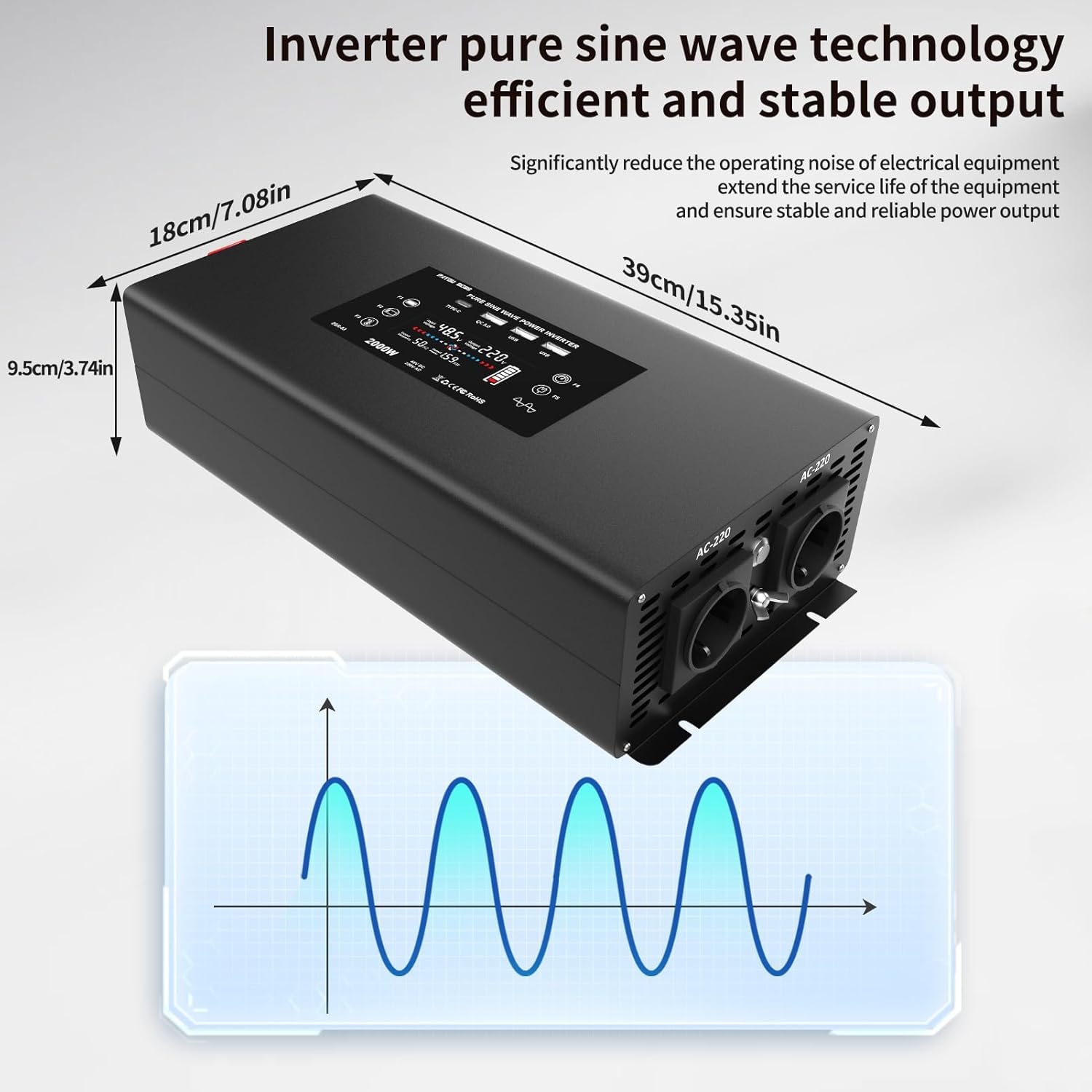
Aworan 5.1: Inverter Dimensions and Pure Sine Wave Output. This image provides the physical measurements of the inverter and visually represents its pure sine wave technology for stable power delivery.
| Paramita | Iye |
|---|---|
| Nọmba awoṣe | DN03-48V-2000W |
| Iṣagbewọle ipin Voltage | 48V DC (40-60V DC) |
| Iforukọsilẹ Ijade Voltage | 220-240V AC |
| Agbara Tesiwaju | 2000 Wattis |
| Agbara ti o ga julọ | 4000 Wattis |
| Iwajade Waveform | Wave Sine Sure |
| Ìgbìn THD | ≤3% |
| Ko si-Fifuye Lọwọlọwọ | 0.8A |
| Imudara Iyipada | ≥90% |
| Input Overvoltage Idaabobo | 60V ± 0.3V DC |
| Input Undervoltage Idaabobo | 40V ± 0.3V DC |
| Overheat Idaabobo | 80°C ±5°C |
| Ọna Itutu | Fan Itutu |
| Awọn iwọn Ọja (L x W x H) | 39 cm x 18 cm x 9.5 cm |
| Iwe-ẹri Ọja | CE, FCC, RoHS |
| Àwọ̀ | Dudu |
6. Fifi sori ẹrọ ati Oṣo
Tẹle awọn igbesẹ wọnyi fun fifi sori ẹrọ to dara:
- Yan Ibi kan: Select a dry, well-ventilated area away from direct sunlight, heat sources, and flammable materials. Ensure sufficient space around the inverter for airflow.
- Iṣagbesori: Securely mount the inverter on a stable surface using appropriate fasteners.
- Asopọ igbewọle DC:
- Ensure the inverter's power switch is OFF.
- Connect the supplied DC cables to the inverter's DC input terminals. Ensure correct polarity: red cable to positive (+), black cable to negative (-).
- Connect the other ends of the DC cables to your 48V battery bank. Again, ensure correct polarity. Tighten all connections securely to prevent loose contacts and arcing.
- Ilẹ: Connect the inverter's ground terminal to a reliable earth ground using a suitable ground wire. This is crucial for safety.
- Agbara Ibẹrẹ: After all connections are secure, switch on the 48V DC power source (e.g., battery switch). Then, press the power button on the inverter or use the remote control to turn it ON. The display should illuminate, indicating operational status.
7. Awọn ilana Iṣiṣẹ
Titan/Pa:
- Lati Tan: Press the power button on the inverter or the ON button on the remote control. The display will show input/output voltage.
- Lati Pa: Press the power button on the inverter or the OFF button on the remote control. The display will turn off.
Sísopọ̀ àwọn ẹ̀rọ AC:
The inverter provides two EU standard AC outlets. Ensure the total power consumption of your devices does not exceed 2000W.
- Plug your AC appliances into the AC outlets on the inverter.
- Turn on your appliances.
Lilo awọn ibudo gbigba agbara USB:
The inverter features two standard USB ports (5V 2.1A), one QC3.0 fast charging port, and one Type-C port.
- Connect your USB-compatible devices (e.g., smartphones, tablets) to the appropriate USB or Type-C port.
- The inverter will automatically provide power for charging.

Aworan 7.1: Wide Compatibility. This image illustrates the diverse range of appliances and devices that can be powered by the inverter, including laptops, coffee machines, and various household electronics.
Isẹ Iṣakoso Latọna jijin:
The included remote control allows you to power the inverter on and off from a distance, offering convenience, especially if the inverter is installed in a less accessible location.
- Point the remote control towards the inverter.
- Press the ON button to activate the inverter.
- Press the OFF button to deactivate the inverter.
8. Itọju
Regular maintenance ensures optimal performance and longevity of your inverter:
- Ninu: Máa fọ ìta inverter náà lẹ́ẹ̀kọ̀ọ̀kan pẹ̀lú aṣọ gbígbẹ tí ó rọ. Má ṣe lo àwọn ohun ìfọṣọ omi tàbí àwọn ohun èlò ìfọṣọ.
- Afẹfẹ: Ensure the cooling vents and fans are free from dust and obstructions. The intelligent cooling fans help dissipate heat efficiently.
- Awọn isopọ: Regularly check all DC input and ground connections to ensure they are tight and free from corrosion.
- Ibi ipamọ: If storing the inverter for an extended period, ensure it is clean, dry, and stored in a cool, well-ventilated area. Disconnect it from the power source.
9. Laasigbotitusita
Tọkasi tabili atẹle fun awọn ọran ti o wọpọ ati awọn ojutu wọn:
| Isoro | Owun to le Fa | Ojutu |
|---|---|---|
| Inverter ko tan | No DC input power; Loose connections; Blown fuse (external) | Ṣayẹwo awọn asopọ batiri ati voltage; Ensure cables are securely fastened; Check external fuses. |
| Kekere Voltage Alarm/Protection (Buzzer sounds 2-3 times) | Batiri voltage too low (below 40V DC) | Recharge or replace the battery. Reduce load. |
| Apọjutage Protection (Buzzer sounds 4 times) | Iwọn titẹ siitage ga ju (loke 60V DC) | Check charging system or battery voltage. Disconnect from source if voltage jẹ riru. |
| Overheat Protection (Buzzer sounds 5 times) | Inverter is too hot (above 80°C) | Reduce load; Ensure proper ventilation; Clean cooling vents/fans. Allow to cool down. |
| Apọju Idaabobo | Connected load exceeds 2000W continuous power | Reduce the total load by disconnecting some appliances. The inverter will attempt to restart. |
| Kukuru Circuit Idaabobo | Circuit kukuru ninu ohun elo ti a so mọ tabi okun waya | Disconnect all AC loads. Check appliances and wiring for short circuits. Restart the inverter. |
| No AC output, but inverter is ON | Appliance fault; Internal protection triggered | Check if the appliance is working correctly. Refer to protection functions above. |
If the problem persists after following these troubleshooting steps, please contact customer support.
10. Atilẹyin ọja ati Support
Atilẹyin ọja ti olupese:
This DATOUBOSS inverter comes with a 1-odun olupese ká atilẹyin ọja Láti ọjọ́ tí a rà á. Àtìlẹ́yìn yìí bo àwọn àbùkù nínú àwọn ohun èlò àti iṣẹ́ ọwọ́ lábẹ́ lílò déédéé. Kò bo ìbàjẹ́ tí ó ṣẹlẹ̀ nípasẹ̀ àìlòkulò, jàmbá, àtúnṣe tí a kò fún ní àṣẹ, tàbí fífi sori ẹrọ tí kò tọ́.
Atilẹyin Onibara:
For technical assistance, warranty claims, or any questions regarding your DATOUBOSS inverter, please contact the seller or manufacturer directly. Please have your product model number (DN03-48V-2000W) and proof of purchase available when contacting support.