
1. Ifihan
Thank you for choosing the Chihiros A Series LED Aquarium Light. This light is specifically designed to promote healthy growth of aquatic plants in your aquarium. Featuring 5730 LED chips and an 8000K color temperature, it provides optimal lighting conditions for a vibrant aquatic environment. Please read this manual carefully before installation and operation to ensure safe and efficient use.

Aworan 1: Oke-isalẹ view of the Chihiros A Series LED Aquarium Light.
2. Awọn ilana aabo
- Always disconnect the power supply before performing any maintenance or installation.
- Do not immerse the light unit or power adapter in water. This product is not submersible.
- Ensure your hands are dry when handling the power plug and socket.
- Jeki ina kuro lati awọn ohun elo ina.
- Do not attempt to disassemble or modify the light unit. Refer all servicing to qualified personnel.
- Rii daju voltage and frequency of your power supply match the specifications of the light.
- This product is intended for indoor aquarium use only.
3. Package Awọn akoonu
Jẹrisi pe gbogbo awọn paati wa ati ni ipo to dara:
- Chihiros A Series LED Aquarium Light Unit
- Adapter agbara
- Acrylic Stands (pre-attached or separate, depending on model)
- Wired Dimmer (included with some models)
Akiyesi: Additional accessories such as remote controllers, metal brackets, and hanging kits are sold separately.
4. Awọn pato
The Chihiros A Series LED Aquarium Light is available in various models with different lengths, power outputs, LED counts, and lumen ratings. Refer to the table below for detailed specifications.
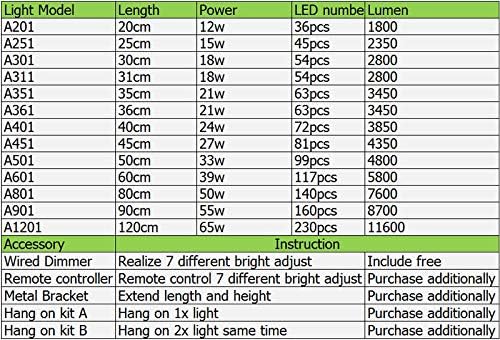
Image 2: Detailed specifications for various Chihiros A Series LED light models and available accessories.
| Awoṣe Imọlẹ | Gigun | Agbara | Nọmba LED | Lumen |
|---|---|---|---|---|
| A201 | 20cm | 12W | 36pcs | 1800 |
| A251 | 25cm | 15W | 45pcs | 2350 |
| A301 | 30cm | 18W | 54pcs | 2800 |
| A311 | 31cm | 18W | 54pcs | 2800 |
| A351 | 35cm | 21W | 63pcs | 3450 |
| A361 | 36cm | 21W | 63pcs | 3450 |
| A401 | 40cm | 24W | 72pcs | 3850 |
| A451 | 45cm | 27W | 81pcs | 4350 |
| A501 | 50cm | 33W | 99pcs | 4800 |
| A601 | 60cm | 39W | 117pcs | 5800 |
| A801 | 80cm | 50W | 140pcs | 7600 |
| A901 | 90cm | 55W | 160pcs | 8700 |
| A1201 | 120cm | 65W | 230pcs | 11600 |
Afikun Alaye ọja:
- Iwọn awọ: 8000K
- Iru LED: 5730 LED
- Pari Iru: Didan
- Ohun elo iboji: Polycarbonate
- Ara: Igbalode
- Awọn eroja to wa: Lamp ẹyọkan
- Ọna itanna: Dimmable
Alaye Ẹya:
- Wired Dimmer: Allows 7 different brightness adjustments. Included with some models.
- Adarí Latọna jijin: Enables 7 different brightness adjustments via remote. Purchase additionally.
- Akọmọ irin: Used to extend light length and height. Purchase additionally.
- Hang on Kit A: For hanging one light unit. Purchase additionally.
- Hang on Kit B: For hanging two light units simultaneously. Purchase additionally.
5. Eto
5.1 Ṣiṣii silẹ
Carefully remove all components from the packaging. Inspect the light unit and accessories for any signs of damage. Keep the packaging for future storage or transport.
5.2 Iṣagbesori Light
The Chihiros A Series LED light typically comes with acrylic stands for placement directly on the aquarium rim. Ensure the stands are securely attached to the light unit and positioned stably on the aquarium edges.

Image 3: Close-up of the light unit showing the acrylic stands.
If using optional accessories like metal brackets or hanging kits, follow their specific installation instructions. Ensure the light is positioned centrally over the aquarium for even light distribution.

Image 4: Chihiros A Series LED Aquarium Light installed over an aquarium.
5.3 Nsopọ Agbara
Connect the power adapter to the light unit. Then, plug the power adapter into a suitable electrical outlet. Ensure the connection is secure and dry.
6. Awọn ilana Iṣiṣẹ
6.1 Titan / Pa a
Once connected to power, the light can be turned on or off using the switch on the power cord or the wired dimmer, if included.
6.2 Siṣàtúnṣe Imọlẹ
If your light includes a wired dimmer, you can adjust the brightness through 7 different levels. Press the buttons on the dimmer to cycle through the brightness settings. If you have purchased a remote controller, refer to its specific instructions for brightness adjustment.
6.3 Recommended Usage for Aquatic Plants
For optimal aquatic plant growth, a photoperiod of 6-10 hours per day is generally recommended. The ideal brightness level will depend on the specific plant species, tank size, and CO2 injection. Start with a moderate brightness and duration, then gradually adjust based on plant response.
7. Itọju
- Ninu: Regularly wipe the light unit and acrylic stands with a soft, damp cloth to remove dust, water spots, and algae. Ensure the light is unplugged before cleaning. Do not use harsh chemicals or abrasive materials.
- Ayewo: Periodically check the power cord and adapter for any signs of damage or wear. Ensure all connections are secure.
- Afẹfẹ: Ensure the light unit has adequate ventilation to prevent overheating. Do not cover the light.
8. Laasigbotitusita
- Imọlẹ ko tan:
- Check if the power adapter is securely plugged into both the light unit and the electrical outlet.
- Rí i dájú pé ibi tí iná mànàmáná náà ti ń ṣiṣẹ́ nípa fífi ẹ̀rọ mìíràn sí i.
- Ensure the switch on the power cord or dimmer is in the 'On' position.
- Ìmọ́lẹ̀ náà ṣókùnkùn tàbí ó ń tàn yòò:
- Check the dimmer settings to ensure it's not set to the lowest brightness.
- Ensure all connections are secure. Loose connections can cause flickering.
- If using a remote, check its battery.
- Excessive heat from the light:
- Ensure there is proper ventilation around the light unit.
- Verify that the light is not covered by any objects.
Tí o bá rí àwọn ìṣòro tí a kò kọ síbí tàbí tí àwọn ìgbésẹ̀ ṣíṣe àtúnṣe kò bá yanjú ìṣòro náà, jọ̀wọ́ kan sí ìrànlọ́wọ́ oníbàárà.
9. Atilẹyin ọja ati Support
9.1 atilẹyin ọja Afihan
Ọja yi wa pẹlu kan 12-osu atilẹyin ọja from the date of purchase. During this period, if you experience any quality issues with the product, you are eligible for a full refund or a replacement.
9.2 Onibara Support
For any questions, concerns, or warranty claims, please do not hesitate to contact our customer service team. You can typically reach us through the seller's page on the platform where you purchased the product. Our team is committed to providing prompt and detailed assistance.