
1. Ifihan
Thank you for choosing the LFF DAB/FM Digital Radio YT81107. This manual provides essential information for the safe and efficient use of your new radio. Please read these instructions carefully before operating the device and retain them for future reference.
Alaye Aabo
- Ma ṣe fi ẹrọ naa han si ojo tabi ọrinrin lati yago fun ina tabi mọnamọna.
- Maṣe ṣii casing. Tọkasi gbogbo iṣẹ si oṣiṣẹ oṣiṣẹ.
- Lo ohun ti nmu badọgba agbara tabi awọn batiri nikan.
- Yẹra fún àwọn iwọn otutu tó le koko, oòrùn tààrà, àti àyíká eruku.
2. Ọja Ipariview
The LFF DAB/FM Digital Radio YT81107 offers versatile listening options with DAB+ and FM radio, Bluetooth connectivity, and convenient features like a dual alarm and sleep timer. Its compact design and dual power options make it suitable for various environments.
Key Awọn ẹya ara ẹrọ
- DAB+ and FM Digital Radio Tuner
- Bluetooth Connectivity for Audio Streaming
- Ifihan LCD Awọ ni kikun
- 60 Preset Stations (30 DAB+, 30 FM)
- Dual Alarm Clock Function
- Aago orun adijositabulu
- Jack agbekọri 3.5mm
- AC Power Adapter or Battery Operated (4x AA batteries, not included)

olusin 2.1: Iwaju view of the LFF DAB/FM Digital Radio highlighting its main features.
Awọn iṣakoso ati irinše
Familiarize yourself with the buttons and ports on your radio:

Àwòrán 2.2: Iwájú àti òkè view of the radio with labeled controls.
- Bọtini Agbara / Ipo: Turns the radio on/off and switches between modes (DAB, FM, Bluetooth).
- Bọ́tìnì Àkójọ/Ìwífún: Accesses menu settings or displays station information.
- Bọtini Itaniji: Sets and manages alarms.
- Awọn bọtini Tito tẹlẹ (1-5): Quickly access saved favorite stations.
- Volume Knob/Select: Rotates to adjust volume or navigate menus; press to confirm selection.
- Tuning/Scroll Buttons: Ó ń lọ kiri nípasẹ̀ àwọn ibùdó tàbí àwọn àṣàyàn àkójọ.
- Ifihan: Full-color LCD screen.
- Agbọrọsọ: Iṣagbejade ohun afetigbọ.
- Eriali: Eriali telescopic ti o gbooro fun gbigba redio.
- DC NI Port: Fun sisopọ ohun ti nmu badọgba agbara AC.
- Jack agbekari: 3.5mm o wu fun ikọkọ tẹtí.
- Abala Batiri: Located on the back for 4x AA batteries.
3. Eto
Agbara Redio
Your radio can be powered by the included AC adapter or by batteries for portable use.
- Agbara AC: Connect the supplied AC adapter to the DC IN port on the back of the radio and plug it into a standard wall outlet.
- Agbara Batiri: Open the battery compartment on the back and insert 4x 1.5V AA (LR6) batteries (not included), ensuring correct polarity. Close the compartment securely.

Figure 3.1: Power options and physical dimensions of the radio.
Atunṣe Antenna
Fun gbigba redio ti o dara julọ, fa eriali telescopic ni kikun. Ṣatunṣe ipo rẹ fun didara ifihan agbara to dara julọ.
4. Awọn ilana Iṣiṣẹ
Títan/Pa àti yíyàn Ipo
- Tẹ awọn Agbara / Ipo bọtini lati tan redio tabi pa.
- While on, press the Agbara / Ipo button repeatedly to cycle through available modes: DAB, FM, and Bluetooth.
DAB/FM Radio Operation
Ensure the antenna is fully extended for best reception.

Figure 4.1: Radio reception ranges and preset capacity.
- Ṣiṣayẹwo aifọwọyi: Ni DAB tabi ipo FM, tẹ mọlẹ Akojọ / Alaye button to initiate an automatic scan for available stations. The radio will store them automatically.
- Itọsọna Afowoyi: Lo awọn Tuning/Scroll awọn bọtini lati satunṣe igbohunsafẹfẹ pẹlu ọwọ.
- Selecting Stations: Yiyi awọn Volume Knob/Select to browse through available stations. Press the knob to select a station.
- Fifipamọ awọn tito tẹlẹ: Láti fi ibùdó kan pamọ́, yí i padà sí ibùdó tí o fẹ́, lẹ́yìn náà tẹ ọ̀kan nínú wọn kí o sì di mú Àwọn bọ́tìnì tí a ti ṣètò tẹ́lẹ̀ (1-5) until the display confirms it's saved. You can save up to 30 DAB+ and 30 FM stations.
- ÌRallNT Pres Awọn tito tẹlẹ: Ni soki tẹ ọkan ninu awọn Àwọn bọ́tìnì tí a ti ṣètò tẹ́lẹ̀ (1-5) to recall a saved station.
Ipo Bluetooth
Connect your smartphone, tablet, or other Bluetooth-enabled device to stream audio wirelessly.
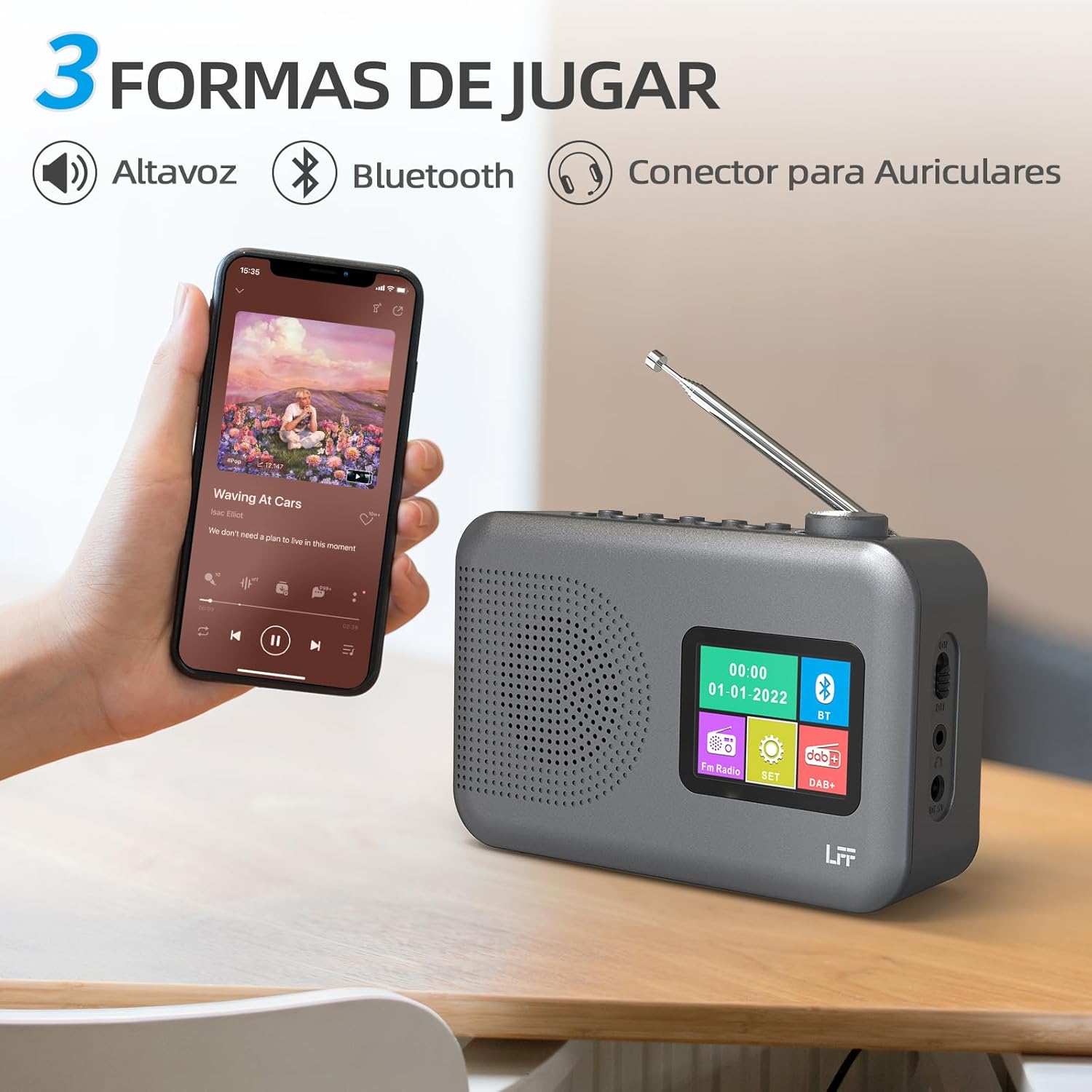
Figure 4.2: Bluetooth connectivity and audio playback options.
- Yi redio pada si ipo Bluetooth nipa lilo awọn Agbara / Ipo button. The display will show "Bluetooth Pairing" or similar.
- On your device, enable Bluetooth and search for "LFF YT81107" (or similar).
- Select the radio to pair. Once connected, you can play audio from your device through the radio's speaker.
- Ṣatunṣe iwọn didun nipa lilo redio Iwọn didun Iwọn or your connected device.
Iṣẹ aago itaniji
Ṣeto si awọn itaniji ominira meji.
- Tẹ awọn Itaniji button to enter alarm settings.
- Lo awọn Tuning/Scroll awọn bọtini ati Volume Knob/Select to set the alarm time, source (DAB, FM, or buzzer), and frequency (daily, weekdays, weekends, once).
- Tẹ awọn Itaniji button again to confirm and activate the alarm.
- When an alarm sounds, press any button (except Power) to snooze, or press the Agbara / Ipo bọtini lati pa a.
Aago orun
Aago oorun ngbanilaaye redio lati paa laifọwọyi lẹhin akoko ti a ṣeto.

Figure 4.3: Sleep timer function in use.
- Tẹ awọn Akojọ / Alaye bọtini lati wọle si akojọ aṣayan akọkọ.
- Navigate to the "Sleep Timer" option using the Tuning/Scroll awọn bọtini ati ki o tẹ awọn Volume Knob/Select.
- Select your desired duration (15, 30, 45, 60, 90, or 120 minutes) and confirm. The radio will automatically turn off after the selected time.
Agbekọri Lo
For private listening, connect standard 3.5mm headphones to the headphone jack on the side of the radio. The internal speaker will be muted automatically.
Note: This radio does not support Bluetooth headphones. The 3.5mm headphone jack is for wired headphones only.
5. Itọju
- Ninu: Mu redio nu pẹlu asọ ti o gbẹ. Ma ṣe lo abrasive ose tabi epo.
- Rirọpo Batiri: If using batteries, replace all four AA batteries when the low battery indicator appears on the display or when performance degrades. Ensure proper disposal of old batteries.
- Ibi ipamọ: If storing the radio for an extended period, remove the batteries to prevent leakage.
6. Laasigbotitusita
| Isoro | Owun to le Fa | Ojutu |
|---|---|---|
| Ko si agbara | AC adapter not connected or faulty; batteries depleted or incorrectly inserted. | Check AC adapter connection and power outlet. Replace batteries or ensure correct polarity. |
| Gbigba redio ti ko dara | Eriali ko tesiwaju; agbegbe ifihan agbara; kikọlu. | Tún eriali telescopic naa nà kí o sì ṣe àtúnṣe rẹ̀ pátápátá. Gbìyànjú láti gbé rédíò náà lọ sí ibòmíràn. |
| Bluetooth ko sopọ | Radio not in Bluetooth mode; device not in pairing mode; radio already connected to another device. | Ensure radio is in Bluetooth mode. Put your device in pairing mode. Disconnect from other Bluetooth devices. |
| Itaniji ko dun | Alarm not activated; volume too low; incorrect alarm settings. | Check alarm settings and ensure it is enabled. Increase volume. Verify alarm time and source. |
7. Awọn pato
| Ẹya ara ẹrọ | Ẹ̀kúnrẹ́rẹ́ |
|---|---|
| Nọmba awoṣe | YT81107 |
| Brand | LFF |
| Ìmọ̀-ẹ̀rọ Àtúnṣe | DAB+, FM |
| Awọn ẹgbẹ Redio Atilẹyin | DAB+ (174.928 - 239.2 MHz), FM (87.5 - 108 MHz) |
| Asopọmọra | Bluetooth, Jacki agbekọri 3.5mm |
| Orisun agbara | AC Adapter (included), 4x 1.5V AA (LR6) Batteries (not included) |
| Awọn iwọn (L x W x H) | 16.1 cm x 5.9 cm x 10.9 cm |
| Àwọ̀ | Grẹy |
| Pataki Awọn ẹya ara ẹrọ | DAB Radio, DAB Plus Radio, DAB+ Radio, FM Radio, Color Display, Bluetooth, Dual Alarm, Sleep Timer |
| Awọn ẹrọ ibaramu | Headphones, MP3 Player, Smartphone, Laptop, Speaker, Tablet |
8. Atilẹyin ọja ati Support
LFF is committed to providing high-quality products. If you encounter any quality issues with your LFF DAB/FM Digital Radio YT81107, please contact us directly. Our customer support team is available to assist you and resolve any problems you may experience.
Jọwọ tọka si iwe rira rẹ fun awọn ofin atilẹyin ọja kan pato ati alaye olubasọrọ.