
1. Ifihan
This manual provides detailed instructions for the installation, operation, and maintenance of your VIMIN VM-GS1620 18-Port Gigabit Ethernet Switch. Please read this manual thoroughly before using the device to ensure proper setup and optimal performance. Keep this manual for future reference.
2. Ọja Ipariview
The VIMIN VM-GS1620 is an unmanaged 18-port Gigabit Ethernet switch designed for high-speed network expansion. It features 16 Gigabit Ethernet ports (10/100/1000 Mbps) and 2 dedicated 1000Mbps uplink ports. The switch supports IEEE802.3af/at standards and includes a One Key VLAN function for enhanced network security and bandwidth management. Its durable metal housing allows for versatile desktop or rack-mount installation.
2.1 Iwaju ati ru Panels

Nọmba 1: Front and Rear Panels of the VIMIN VM-GS1620 Switch. The front panel displays 16 Gigabit ports (1-16), 2 Uplink ports (17-18), LED indicators for Power and Data, and a VLAN switch. The rear panel shows the AC power input.
Awọn ẹya ara Panel Iwaju:
- Awọn ibudo 1-16: 10/100/1000 Mbps Gigabit Ethernet ports for connecting network devices.
- Awọn ibudo 17-18 (Uplink): Dedicated 1000 Mbps Gigabit uplink ports for connecting to a router or main network.
- LED agbara: Ṣe afihan ipo agbara.
- Data/Link/Act LEDs: Indicate data activity and link status for each port.
- VLAN Switch: Toggles the One Key VLAN function on or off.
Awọn ẹya ara Panel Panel:
- Input Agbara AC: Connects to the provided power cord (AC/IN 100-240V).
2.2 Key Awọn ẹya ara ẹrọ
- Asopọmọra Iyara giga: 16 Gigabit Ethernet ports and 2 Gigabit uplink ports for fast data transfer.
- One Key VLAN: Enhances network security by isolating ports 1-16 while allowing communication with uplink ports.
- Idaabobo Alagidi: Features 4KV lightning protection for device and network safety.
- Apẹrẹ ti o tọ: Sturdy metal housing ensures longevity and efficient heat dissipation.
- Isẹ Ailopin: Provides quiet operation, suitable for various environments.
- Pulọọgi ati Ṣiṣẹ: No complex configuration required for basic network setup.
Nọmba 2: The VIMIN VM-GS1620 features a fanless, quiet design within a durable metal case for reliable performance.
3. Package Awọn akoonu
Please verify the contents of your package. If any items are missing or damaged, contact VIMIN support immediately.
- VIMIN VM-GS1620 18-Port Gigabit Ethernet Switch
- AC Agbara okun
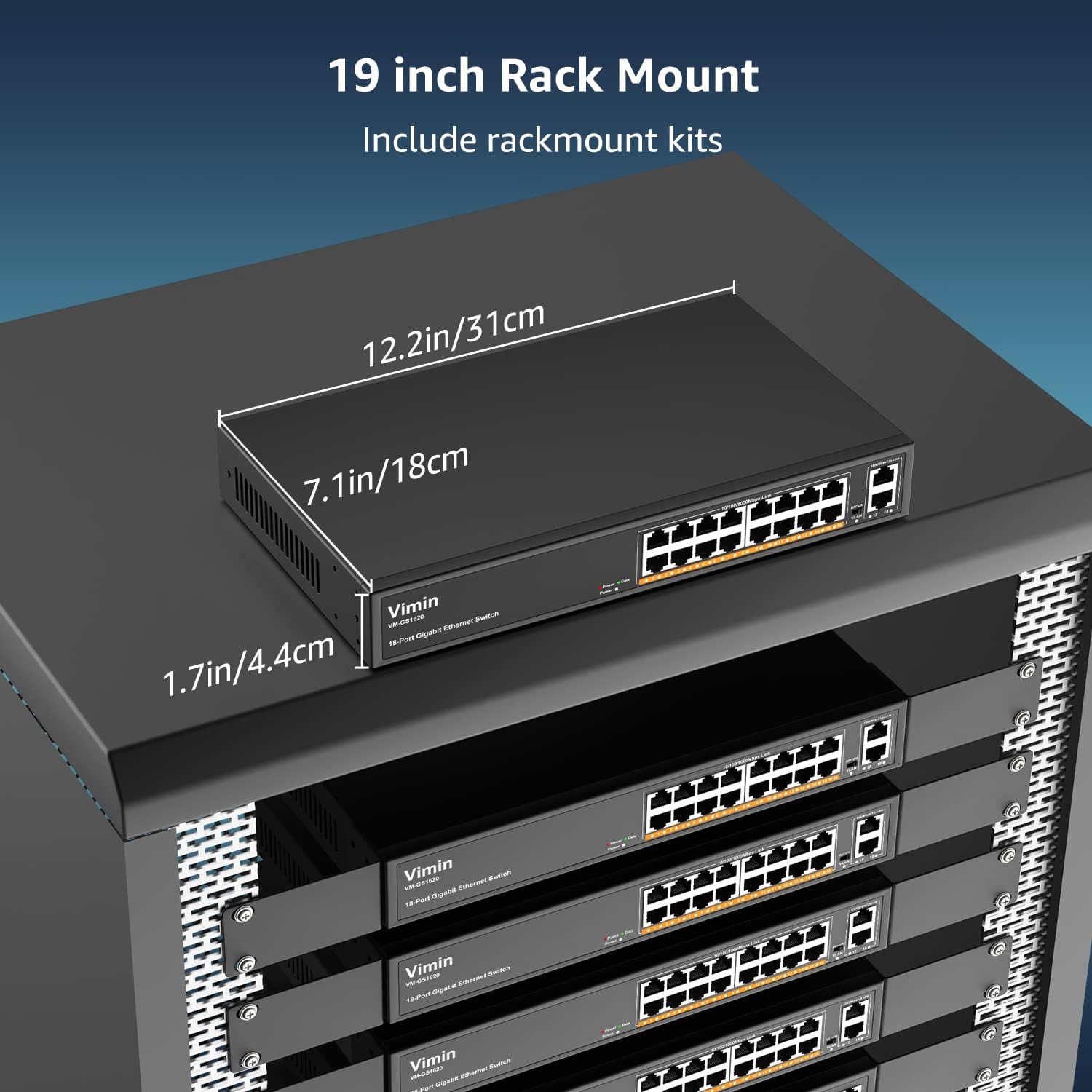
- Rack-Mount Kits (for 19-inch rack installation)
- Afowoyi Olumulo (iwe-ipamọ yii)
4. Awọn ilana iṣeto
4.1 Fifi sori ti ara
The VIMIN VM-GS1620 switch can be installed on a desktop or mounted in a 19-inch rack.
Ibi tabili:
- Gbe awọn yipada lori alapin, dada iduro.
- Ensure adequate ventilation around the device. Do not block the ventilation holes.
- Keep the switch away from heat sources, direct sunlight, and excessive moisture.
Fifi sori Oke-Rack:
- So awọn brackets agbeko ti a pese mọ awọn ẹgbẹ ti yipada nipa lilo awọn skru ti o wa ninu rẹ.
- Ṣe aabo iyipada sinu agbeko ohun elo 19-inch boṣewa nipa lilo awọn skru agbeko ti o yẹ (kii ṣe pẹlu).
- Ensure proper airflow within the rack to prevent overheating.

Nọmba 3: The VIMIN VM-GS1620 switch can be installed in a 19-inch rack using the included rack-mount kits. Dimensions are approximately 12.2in (31cm) wide, 7.1in (18cm) deep, and 1.7in (4.4cm) high.
4.2 Asopọ agbara
- Connect one end of the AC power cord to the power input on the rear panel of the switch.
- Plug the other end of the power cord into a standard electrical outlet (AC 100-240V).
- Agbara LED ti o wa lori iwaju yẹ ki o tan imọlẹ, ti o fihan pe iyipada naa n gba agbara.
4.3 Awọn isopọ nẹtiwọki
The VIMIN VM-GS1620 is a Plug and Play device, requiring no software configuration for basic operation.
- Connect your network devices (e.g., computers, printers, IP cameras, access points) to any of the Gigabit Ports 1-16 using standard Ethernet cables.
- Connect your router or main network backbone to one of the Uplink Ports 17-18.
- Once a device is connected and powered on, the corresponding Link/Act LED for that port will illuminate, indicating a successful connection and activity.

Nọmba 4: Simple Plug and Play connection. Insert an Ethernet cable into any available port.

Nọmba 5: Connection diagram illustrating power connection, device connections to the switch, and the resulting network functionality.
5. Awọn ilana Iṣiṣẹ
5.1 Ipilẹ isẹ
Once the switch is powered on and devices are connected, the VIMIN VM-GS1620 operates automatically. It functions as an unmanaged switch, forwarding data packets between connected devices at Gigabit speeds without requiring any user configuration.
5.2 One Key VLAN Mode
The switch features a physical VLAN switch on the front panel. This function allows you to quickly enable or disable VLAN isolation.
- VLAN OFF (Default): All ports (1-18) operate as a standard switch, allowing all connected devices to communicate with each other.
- VLAN ON: When the VLAN switch is set to ON, ports 1-16 are isolated from each other. Devices connected to ports 1-16 can only communicate with the uplink ports (17-18) and not directly with other devices on ports 1-16. This enhances network security and can improve bandwidth utilization by preventing broadcast storms within the isolated segments.

Nọmba 6: The One Key VLAN switch isolates ports 1-16 from each other, allowing them to communicate only with the uplink ports (17-18). This setup is useful for segmenting a network for security or performance.
6. Itọju
The VIMIN VM-GS1620 switch is designed for minimal maintenance. Follow these guidelines to ensure its longevity:
- Ninu: Lo asọ ti o tutu, ti o gbẹ lati nu ode ti yipada. Ma ṣe lo olomi tabi awọn olutọpa aerosol.
- Afẹfẹ: Ensure that the ventilation holes are not obstructed to allow for proper heat dissipation.
- Ayika: Operate the switch within its specified environmental conditions (temperature, humidity).
- Iṣakoso USB: Jeki awọn kebulu nẹtiwọọki ṣeto ati ofe lati awọn kinks tabi awọn tẹriba pupọ lati yago fun ibajẹ ifihan.
7. Laasigbotitusita
If you encounter issues with your VIMIN VM-GS1620 switch, refer to the following common troubleshooting steps:
- Ko si Agbara:
- Check if the power cord is securely connected to both the switch and the electrical outlet.
- Rí i dájú pé ibi tí iná mànàmáná náà ti ń ṣiṣẹ́.
- Rii daju pe ina LED agbara lori iwaju nronu wa ni imọlẹ.
- Ko si Ọna asopọ/Iṣẹ lori Ibudo kan:
- Rí i dájú pé okùn Ethernet so mọ́ ibudo iyipada ati ẹrọ ti a so mọra daradara.
- Gbiyanju okun Ethernet ti o yatọ lati ṣe akoso okun USB ti ko tọ.
- So ẹrọ pọ si ibudo ti o yatọ lori iyipada.
- Rí i dájú pé ẹ̀rọ tí a so pọ̀ náà ti ṣiṣẹ́ dáadáa, ó sì ń ṣiṣẹ́ dáadáa.
- Iyara Nẹtiwọọki o lọra:
- Ensure all connected devices and cables support Gigabit Ethernet (Cat5e or higher).
- Ṣayẹwo fun ijabọ nẹtiwọọki ti o pọ ju tabi awọn ohun elo aladanla bandiwidi.
- Consider enabling VLAN mode if network segmentation is desired to reduce broadcast domains.
- Devices Cannot Communicate (VLAN ON):
- If the VLAN switch is ON, devices on ports 1-16 are isolated from each other and can only communicate with uplink ports. This is expected behavior.
- If you require direct communication between all devices, ensure the VLAN switch is set to OFF.
If the problem persists after trying these steps, please contact VIMIN technical support.
8. Awọn pato
| Ẹya ara ẹrọ | Apejuwe |
|---|---|
| Awoṣe | VM-GS1620 |
| Awọn ibudo | 16 x 10/100/1000Mbps RJ45 Ports, 2 x 1000Mbps Uplink RJ45 Ports |
| Data Gbigbe Oṣuwọn | 1000 Megabits fun iṣẹju keji (Gigabit) |
| Yipada Agbara | 36 Gbps |
| Awọn ajohunše | IEEE 802.3, IEEE 802.3u, IEEE 802.3ab, IEEE 802.3x, IEEE 802.3af/at |
| VLAN atilẹyin | One Key VLAN (Port Isolation) |
| Monomono Idaabobo | 4KV |
| Agbara Input | AC 100-240V |
| Ohun elo ọran | Irin |
| Fifi sori ẹrọ | Desktop, 19-inch Rack-Mount |
| Awọn iwọn (Ẹrọ) | Isunmọ. 12.2 x 7.1 x 1.7 inches (31 x 18 x 4.4 cm) |
| Iwọn Nkan | 3.85 poun (1.75 kg) |
| Awọn ẹrọ ibaramu | Desktop, Gaming Console, Laptop, Printer, IP Camera, Access Point |
9. Atilẹyin ọja ati Support
VIMIN stands behind the quality and reliability of its products.
9.1 atilẹyin ọja Alaye
This VIMIN VM-GS1620 switch comes with a ọkan-odun atilẹyin ọja from the date of purchase. This warranty covers manufacturing defects and malfunctions under normal use. It does not cover damage caused by misuse, accidents, unauthorized modifications, or natural disasters.
9.2 Imọ Support
VIMIN provides s'aiye imọ support for this product. If you have any questions, require assistance with installation, or encounter any issues not covered in the troubleshooting section, please contact our professional technical team.

Nọmba 7: VIMIN offers dedicated customer support.
Ibi iwifunni:
- Imeeli: support@vimintech.com
- Our support team is available to provide 24-hour high-quality service.