1. Ifihan
This manual provides essential instructions for the operation and maintenance of your new Generic replacement remote control. This remote is designed to work with Tesla 43V505BUS Smart LCD LED HDTV TVs, as well as other compatible Audio/Video Players and Projectors. Please read this manual carefully before use to ensure proper functionality and to understand its features.
2. Ọja Ipariview
The replacement remote control is an aftermarket product designed to offer basic functionality for your compatible devices. It features an ergonomic design made from durable ABS material for comfortable handling.
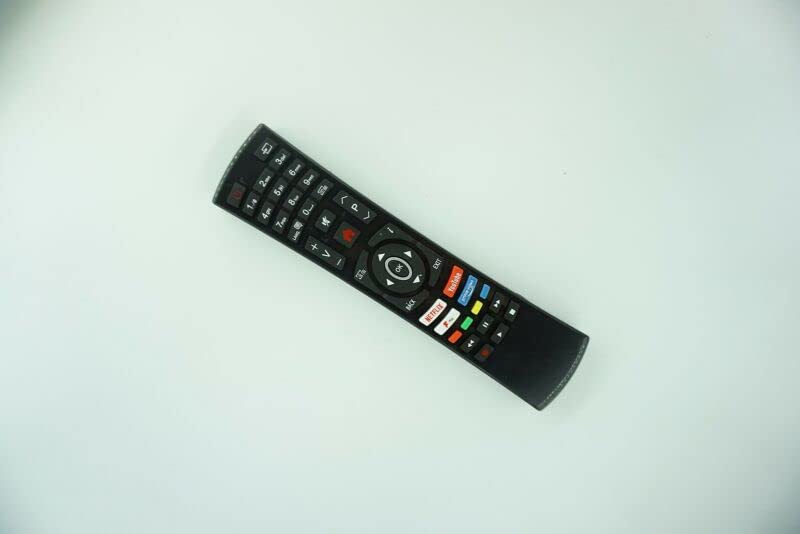
Nọmba 1: Iwaju view of the Generic Replacement Remote Control. The remote is black with various buttons for numbers, volume, channel, navigation, and quick access to streaming services like Netflix and YouTube.
This remote utilizes Infrared (IR) wireless communication for reliable control of your devices.
3. Eto
3.1 Fifi sori batiri
- Wa yara batiri ni ẹhin isakoṣo latọna jijin.
- Ṣii ideri iyẹwu batiri naa.
- Fi awọn batiri AAA meji (2) sii, ni idaniloju awọn ebute rere (+) ati odi (-) ni ibamu pẹlu awọn ami ti o wa ninu yara naa.
- Pa ideri batiri naa ni aabo.
Akiyesi: Batteries are not included with the remote control.
3.2 Initial Pairing / Programming
This replacement remote control requires no programming or setup. Once batteries are installed, it is ready for immediate use with compatible devices.
4. Awọn ilana Iṣiṣẹ
Point the remote control directly at the infrared receiver on your device (e.g., TV, DVD player, projector) and press the desired button.
4.1 Ipilẹ Awọn iṣẹ
- Bọtini agbara: Tan ẹrọ naa si tan tabi pa.
- Awọn bọtini nọmba (0-9): Fun yiyan ikanni taara.
- Volume Up/Down (+V/-V): Ṣe atunṣe ipele iwọn didun.
- Channel Up/Down (+P/-P): Ayipada awọn ikanni.
- Awọn bọtini lilọ kiri (Soke, Isalẹ, Osi, Ọtun, O DARA): Ti a lo fun lilọ kiri akojọ aṣayan ati yiyan.
- Awọn Bọtini Pada/Jade: Pada si iboju iṣaaju tabi jade ni akojọ aṣayan kan.
- Awọn bọtini Wiwọle Yara: Dedicated buttons for popular streaming services like Netflix and YouTube (functionality depends on device compatibility).
Akiyesi pataki: As this is an aftermarket replacement remote control, some advanced functions or specific features of your original remote may not be supported or may operate differently. This is not indicative of a product defect.
4.2 Awọn ẹrọ ibaramu
This remote is compatible with a variety of devices, including:
- Television (HDTV, Smart LCD LED TV)
- Audio/Video Players
- DVD/Blu-ray Players
- Home Theatre Systems
- Ṣeto Awọn apoti Top
- Awọn ọna Sitẹrio
- Awọn pirojekito
5. Itọju
5.1 batiri Itọju
- Remove batteries from the remote control if it will not be used for an extended period to prevent leakage.
- Maṣe dapọ atijọ ati awọn batiri titun.
- Má ṣe da oríṣiríṣi bátìrì pọ̀ (fún àpẹẹrẹ, alkaline àti rechargeable).
- Sọ awọn batiri ti a lo ni ifojusọna ni ibamu si awọn ilana agbegbe.
5.2 Ninu
Wipe the remote control with a soft, dry cloth. Avoid using liquid cleaners or abrasive materials, as these can damage the surface or internal components.
6. Laasigbotitusita
- Latọna jijin ko dahun:
- Ensure the remote is pointed directly at the device's IR receiver.
- Ṣayẹwo boya awọn batiri ti fi sori ẹrọ ni ọna ti o tọ pẹlu polarity ti o tọ.
- Rọpo awọn batiri atijọ pẹlu awọn tuntun.
- Rii daju pe ko si awọn idena laarin isakoṣo latọna jijin ati ẹrọ naa.
- Àwọn iṣẹ́ kan kò ṣiṣẹ́:
- This is a replacement remote control, and some functions may not be identical to the original remote. This is considered normal operation for a universal or replacement remote.
- Rí i dájú pé a ṣe àkójọ àwọn ẹ̀rọ rẹ gẹ́gẹ́ bí èyí tí ó báramu.
- Ijinna gbigbe kukuru:
- Rọpo awọn batiri pẹlu awọn tuntun.
- Ensure there are no strong light sources or other IR devices interfering with the signal.
7. Awọn pato
| Ẹya ara ẹrọ | Ẹ̀kúnrẹ́rẹ́ |
|---|---|
| Brand | Gbogboogbo |
| Nọmba awoṣe (ASIN) | B0BZ7M8XCT |
| Asopọmọra Technology | Infurarẹẹdi (IR) |
| Orisun agbara | Awọn batiri 2 x AAA (kii ṣe pẹlu) |
| Ohun elo | ABS/Ṣíṣíkà |
| Nọmba ti o pọju Awọn ẹrọ Atilẹyin | 1 |
| Awọn ẹrọ ibaramu | Ẹ̀rọ orin DVD/Blu-ray, Ilé eré, Àpótí Set Top, Ètò Sitẹrio, Tẹlifíṣọ̀n |
| Àwọ̀ | Black or white (color sent randomly) |
8. Atilẹyin ọja ati Support
Warranty information for this Generic replacement remote control is not provided in this manual. For specific warranty details or technical support, please contact the seller or retailer from whom you purchased the product. It is recommended to retain your proof of purchase for any warranty claims.