
Ankilo WA123W
Ankilo WA123W 10.5-inch LED Digital Alarm Clock User Manual
Model: WA123W
Ọrọ Iṣaaju
O ṣeun fun riraasing the Ankilo WA123W 10.5-inch LED Digital Alarm Clock. This manual provides detailed instructions for setting up, operating, and maintaining your new clock. Please read this manual thoroughly before use and retain it for future reference.

Image: The Ankilo WA123W digital alarm clock displaying time, temperature, and date.
Alaye Aabo
- Ma ṣe fi ẹrọ naa han si awọn iwọn otutu to gaju, imọlẹ orun taara, tabi ọriniinitutu giga.
- Yago fun sisọ silẹ tabi tẹriba ẹrọ si awọn ipa to lagbara.
- Lo adapter agbara ti a pese nikan tabi orisun agbara USB ti o baamu.
- Jeki kuro ni arọwọto awọn ọmọde.
- Do not attempt to disassemble or repair the device yourself. Contact customer support if service is required.
Package Awọn akoonu
- Ankilo WA123W Digital Alarm Clock
- Okun Agbara USB
- Itọsọna olumulo

Image: The Ankilo WA123W clock, USB cable, and user manual in its packaging.
Ọja Pariview
The Ankilo WA123W features a large LED display for clear visibility, showing time, date, and temperature. It includes dual alarms and adjustable brightness.
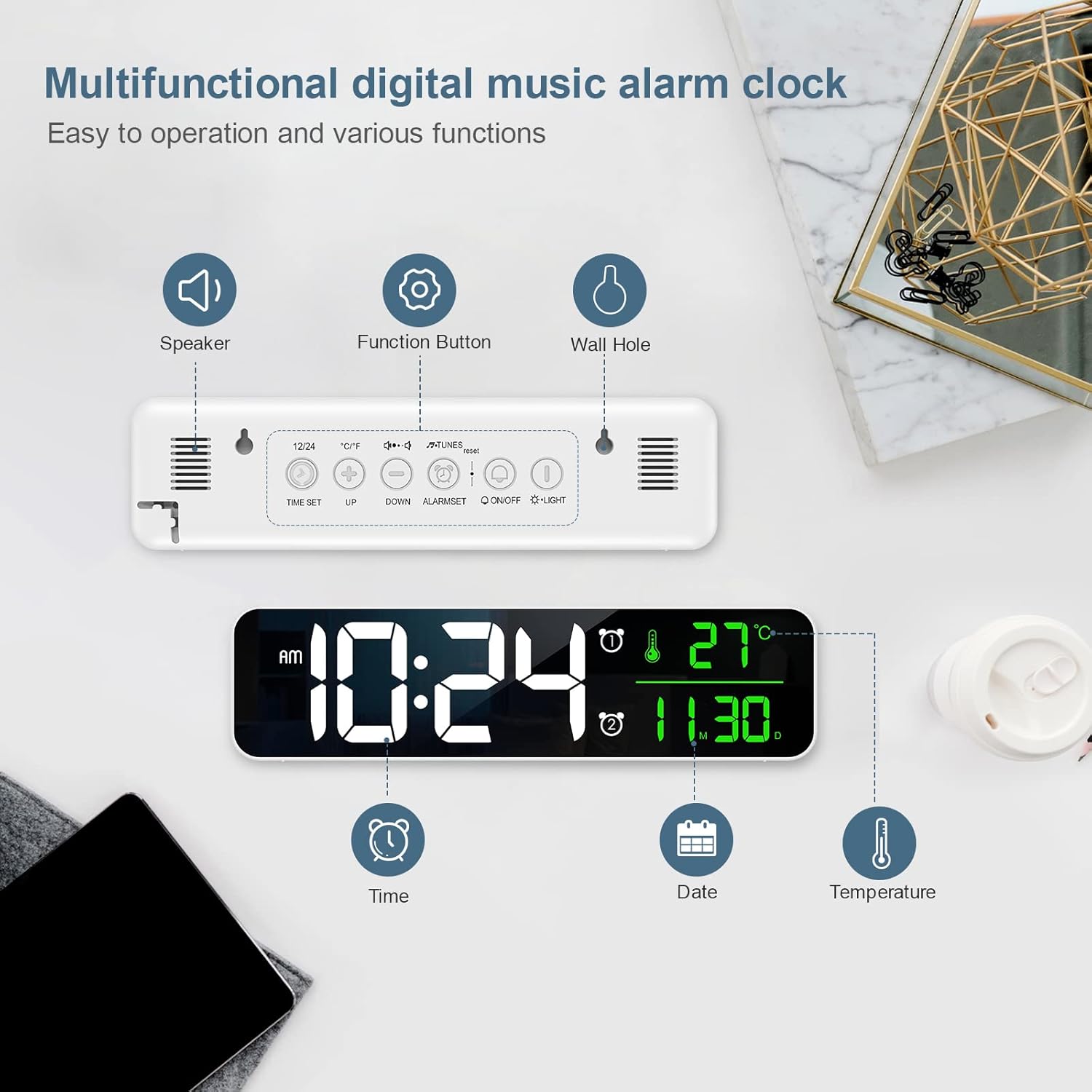
Image: Diagram showing the back panel with speaker, function buttons, and wall hole, along with display elements for time, date, and temperature.
Àwọn Ìṣàkóso àti Àwọn Ẹ̀yà Ìfihàn:
- Ifihan LED: Shows time, date, and temperature.
- Agbọrọsọ: For alarm sounds.
- Awọn bọtini iṣẹ: (e.g., TIME SET, UP, DOWN, ALARM SET, ON/OFF, LIGHT) located on the back for various settings.
- Wall Hole: Fun iṣagbesori odi.
Ṣeto
Ngba agbara:
- Connect the provided USB cable to the clock's power input port.
- So opin keji okun USB sinu adapter agbara USB ti o baamu (ko si ninu rẹ) tabi ibudo USB ti o ni agbara.
- Ifihan naa yoo tan imọlẹ, eyi ti o fihan pe aago naa ti tan ina.
Awọn aṣayan Ifipo:
The clock can be placed on a flat surface or mounted on a wall.

Image: Demonstrates the clock being wall-mounted and placed on a table.
- Ibi Tabili: Simply place the clock on any stable, flat surface.
- Iṣagbede ogiri: Use the integrated wall hole on the back of the clock to hang it securely on a wall hook or screw (not included).
Awọn ilana Iṣiṣẹ
Eto Aago ati Ọjọ:
- Tẹ awọn Akoko SET bọtini lati tẹ ipo eto akoko sii.
- Lo awọn UP ati SILE awọn bọtini lati ṣatunṣe awọn wakati.
- Tẹ Akoko SET again to move to minute setting, then adjust with UP/SILE.
- Tesiwaju titẹ Akoko SET láti yípo àwọn ètò ọdún, oṣù, àti ọjọ́, láti ṣàtúnṣe ọ̀kọ̀ọ̀kan pẹ̀lú UP/SILE.
- Tẹ Akoko SET igba to kẹhin lati jade kuro ni ipo eto.
- Lati yipada laarin ọna kika wakati 12 ati wakati 24, tẹ bọtini naa 12/24 button (if available, otherwise it might be part of time setting).
Setting Alarms (Dual Alarms):
Aago naa n ṣe atilẹyin fun awọn itaniji ominira meji.

Image: The clock display showing two alarm settings and volume levels.
- Tẹ awọn ALAGBARA SET button to select Alarm 1 or Alarm 2.
- Once an alarm is selected, press ALAGBARA SET again to enter alarm time setting.
- Lo UP ati SILE buttons to adjust the alarm hour and minute.
- Tẹ ALAGBARA SET to confirm and move to the next setting (e.g., alarm sound, snooze duration).
- Lati mu itaniji ṣiṣẹ/mu maṣiṣẹ, tẹ awọn TAN/PA button associated with the alarm (or cycle through modes with ALAGBARA SET until ON/OFF option appears).
- When the alarm sounds, press any button (except snooze/light) to stop it, or press the snooze/light button for snooze function.
Ṣiṣatunṣe Imọlẹ:
The clock features 5 levels of brightness adjustment.
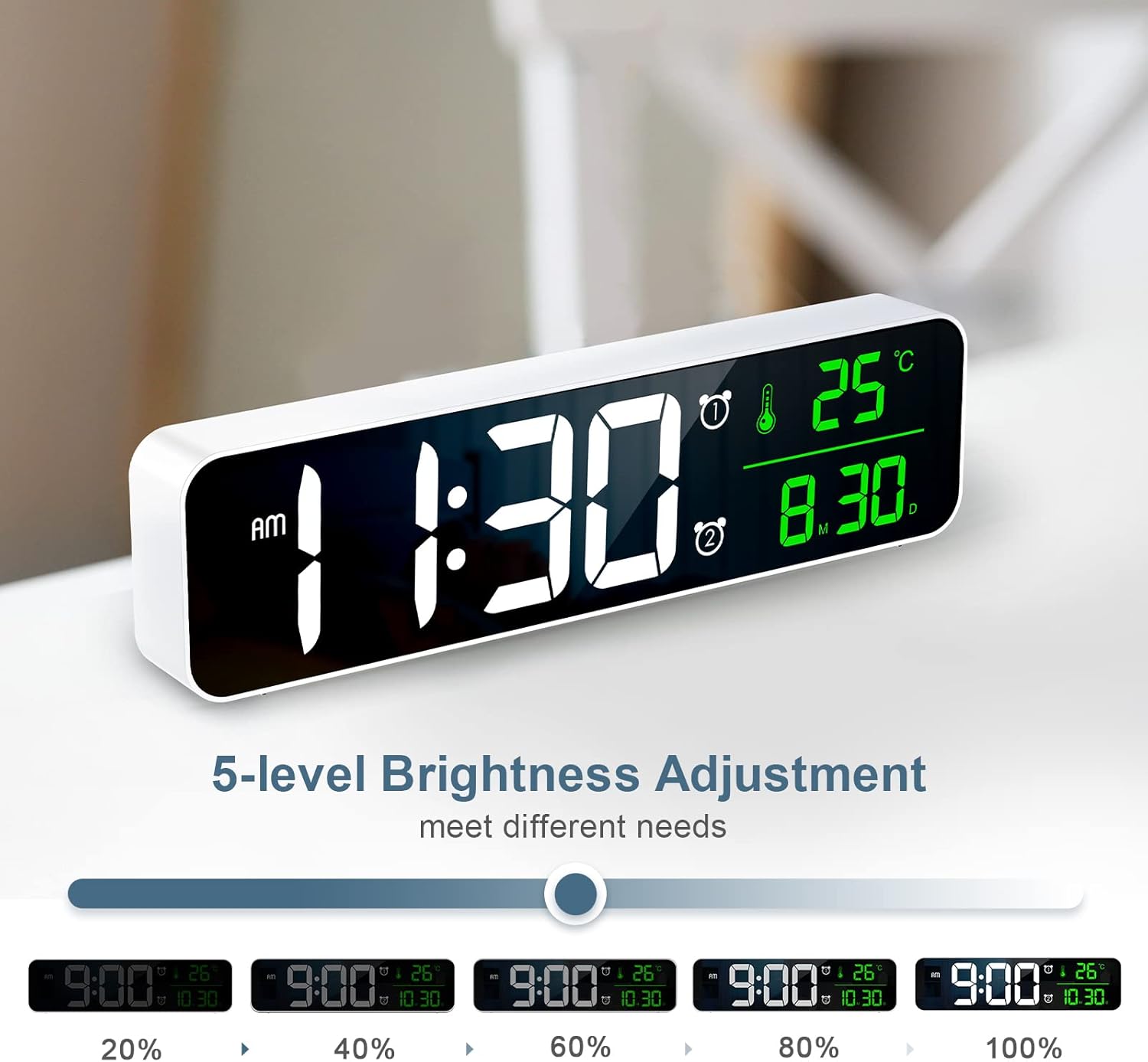
Image: Visual representation of the clock display at different brightness levels (20% to 100%).
- Tẹ awọn Imọlẹ button (or a dedicated brightness button) to cycle through the 5 brightness levels.
- Select the desired brightness for optimal visibility in different lighting conditions.
Ifihan otutu:
The clock displays the ambient temperature. To switch between Celsius and Fahrenheit:
- Tẹ awọn ° C / ° F button (if available) or a combination of buttons as indicated on the device (e.g., long press UP button).
Itoju
- Ninu: Mu aago naa nu pẹlu asọ ti o tutu, ti o gbẹ. Ma ṣe lo abrasive ose tabi epo.
- Ibi ipamọ: If storing for an extended period, disconnect the power cable and store in a cool, dry place.
Laasigbotitusita
| Isoro | Owun to le Fa | Ojutu |
|---|---|---|
| Clock does not turn on. | Ko si agbara tabi asopọ alaimuṣinṣin. | Ensure the USB cable is securely connected and the power source is active. Try a different USB port or adapter. |
| Display is too dim/bright. | Eto imọlẹ ko tọ. | Tẹ awọn Imọlẹ button to adjust brightness levels. |
| Itaniji ko dun. | Itaniji ko mu ṣiṣẹ tabi iwọn didun ti lọ silẹ ju. | Check if the alarm is set and activated. Ensure alarm volume is not muted or set to minimum. |
| Aago/ọjọ ti ko tọ. | A kò ṣètò àkókò/ọjọ́ dáadáa. | Follow the "Setting Time and Date" instructions to reset. |
Awọn pato
- Awoṣe: WA123W
- Iru ifihan: LED Digital
- Iwọn iboju: Isunmọ 10.5 inches (26.7 cm)
- Awọn iwọn (L x W x H): 5 x 3.81 x 10 cm
- Ìwúwo: 320 g
- Ohun elo: Acrylonitrile Butadiene Styrene (ABS)
- Orisun Agbara: Agbara USB
- Awọn ẹya: Calendar Display, Alarm, Charging Port

Image: The clock displaying time, temperature, and date, with dimensions indicated as 10.4 inches wide and 2.8 inches high.
Atilẹyin ọja ati Support
Ankilo products are designed for reliability and performance. For warranty information or technical support, please refer to the contact details provided with your purchase or visit the official Ankilo webojula.
Fun iranlọwọ siwaju sii, jọwọ kan si iṣẹ alabara.