
1. Ifihan
Thank you for choosing the HIKMICRO HEIMDAL H4D Digital Night Vision Monocular. This device is designed for observation in low light and complete darkness, featuring a high-resolution sensor and AMOLED display for clear imaging.
Awọn ẹya pataki:
- 1.39" AMOLED display with 454 x 454 resolution
- High-resolution 2560 x 1440 sensor
- Integrated 850 nm infrared illuminator with smart IR function
- Day/Night/Auto/Defog modes
- Ifiweranṣẹ Aworan Itanna (EIS)
- Detection range up to 200 meters
- Replaceable and rechargeable battery with over 4 hours of use
- Compact and portable design, waterproof and dustproof (IP67)
- Integrated 32 GB EMMC for storing recorded videos and photos
- Wireless connection via HIKMICRO Sight app, local album function
Awọn akoonu idii:
- HIKMICRO HEIMDAL H4D Digital Night Vision Monocular
- Batiri
- Aso eruku
- Apo aabo
- Okun ọwọ
- Okun USB-C
- Awọn ọna Itọsọna
2. Ọja Ipariview
Familiarize yourself with the components and controls of your HIKMICRO HEIMDAL H4D monocular.
Ifilelẹ ẹrọ
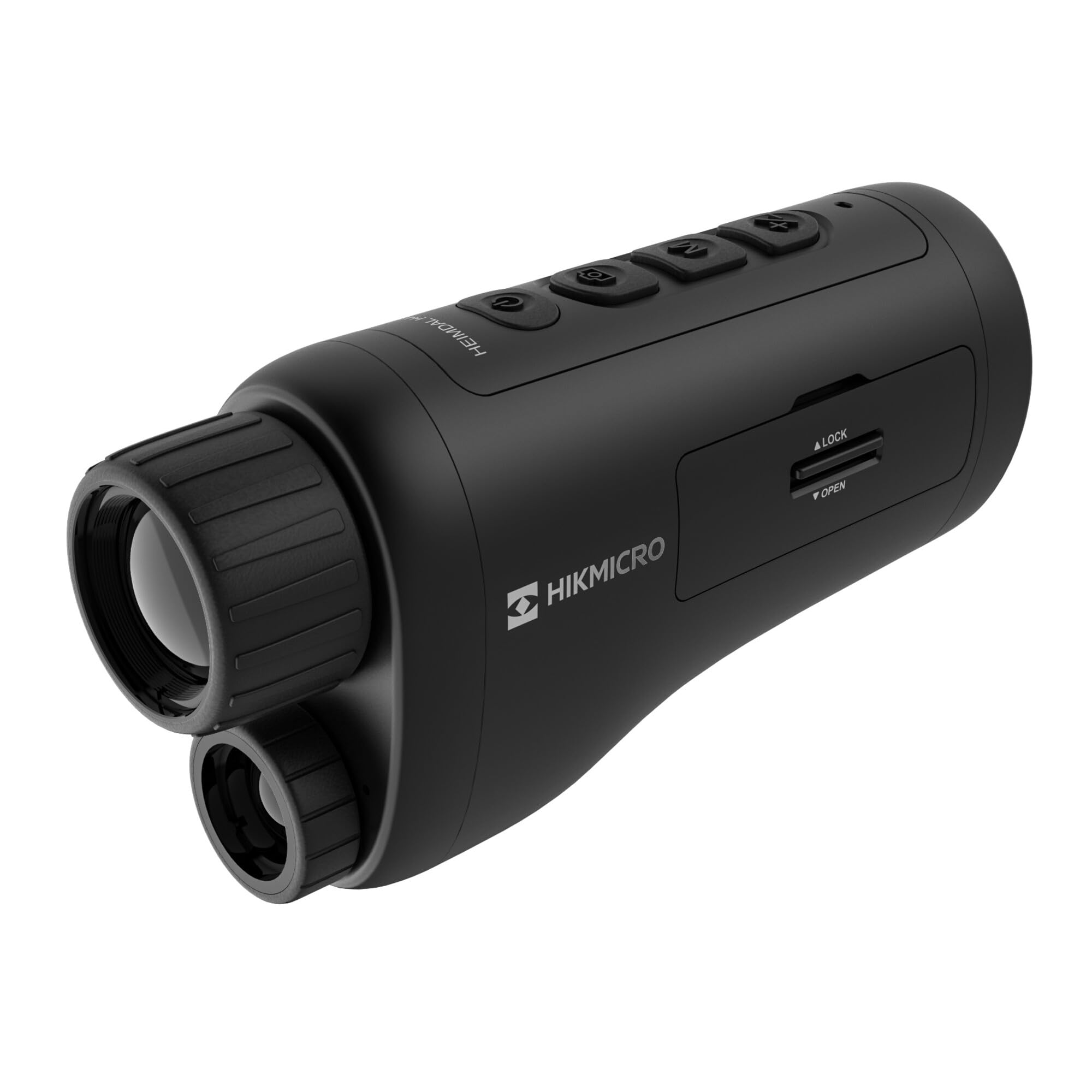
An angled view of the HIKMICRO HEIMDAL H4D monocular, showing its compact, ergonomic design and the main lens.
Awọn iṣakoso ati awọn bọtini

Oke view of the monocular showing the power button, photo/video record button, mode button, and zoom/IR adjustment buttons.
Lenses and Focus

Iwaju view displaying the objective lens and the integrated infrared illuminator.
Batiri Kompaktimenti

Apa view showing the battery compartment with 'LOCK' and 'OPEN' indicators.
3. Eto
Fifi sori batiri
- Wa yara batiri ni ẹgbẹ ti ẹrọ naa.
- Slide the lock mechanism to the 'OPEN' position.
- Fi batiri gbigba agbara sii, ni idaniloju polarity to pe.
- Close the compartment and slide the lock mechanism to the 'LOCK' position.
Ngba agbara si Batiri naa
Connect the device to a power source using the provided USB-C cable. The charging indicator will show the charging status.
Agbara akọkọ Lori
Press and hold the power button (usually marked with Ⓘ) until the HIKMICRO logo appears on the display.
4. Awọn ilana Iṣiṣẹ
Titan / Paa
- Agbara Tan: Tẹ mọlẹ bọtini agbara fun isunmọ awọn aaya 3.
- Agbara Pa: Press and hold the power button for approximately 3 seconds until the device shuts down.
Atunṣe idojukọ
Rotate the focus ring on the objective lens to achieve a clear image of your target.
Aṣayan Ipo
Press the 'M' (Mode) button to cycle through observation modes: Day, Night, Auto, and Defog.
Zoom and IR Adjustment
Use the '+' and '-' buttons to adjust the digital zoom level. These buttons also control the intensity of the infrared illuminator in night mode.
Gbigbasilẹ Fọto ati Fidio
- Ya Fọto: Press the photo/video button (usually marked with 📷) once to capture an image.
- Ṣe igbasilẹ fidio: Press and hold the photo/video button to start recording. Press again to stop.
Connecting to HIKMICRO Sight App
Download the HIKMICRO Sight app from your device's app store. Follow the in-app instructions to connect your monocular for live view, remote control, and media management.
5. Itọju
Ninu
- Use the provided dust cloth or a soft, lint-free cloth to clean the lenses.
- For stubborn dirt, use a lens cleaning solution specifically designed for optics.
- Mu ara ẹrọ nu pẹlu asọ, damp asọ. Ma ṣe lo abrasive ose tabi epo.
Ibi ipamọ
- Store the monocular in its protective bag in a cool, dry place when not in use.
- Yọ batiri kuro ti ẹrọ naa ko ba ni lo fun igba pipẹ.
Itọju Batiri
- Charge the battery regularly, even if not in frequent use, to maintain its lifespan.
- Yẹra fun awọn iwọn otutu ti o ga julọ lakoko gbigba agbara ati ibi ipamọ.
6. Laasigbotitusita
Wọpọ Oran ati Solusan
| Isoro | Owun to le Fa | Ojutu |
|---|---|---|
| Ẹrọ naa ko ṣiṣẹ. | Battery is depleted or incorrectly installed. | Gba agbara batiri naa. Rii daju pe batiri naa wa pẹlu polarity ti o tọ. |
| Aworan jẹ blurry. | Focus is not adjusted. | Rotate the focus ring on the objective lens until the image is clear. |
| Poor image quality in darkness. | Olutayo IR wa ni pipa tabi ṣeto si kikankikan kekere. | Activate the IR illuminator or increase its intensity using the '+' button. Ensure you are in Night mode. |
| Cannot connect to HIKMICRO Sight app. | Bluetooth/Wi-Fi is off on device or phone, or app is not updated. | Ensure Bluetooth/Wi-Fi is enabled on both devices. Restart the app and monocular. Check for app updates. |
| Ẹ̀rọ náà yóò dì tàbí kí ó má ṣe dáhùn. | Ibùgbé software glitch. | Perform a soft reset by holding the power button until the device restarts. If issue persists, contact support. |
7. Awọn pato
| Ẹya ara ẹrọ | Ẹ̀kúnrẹ́rẹ́ |
|---|---|
| Iwọn sensọ | 2560 x 1440 |
| Ifihan Iru | AMOLED |
| Ipinnu Ifihan | 454 x 454 |
| Iwọn Ifihan | 1.39 inches (3.5 cm) |
| Olulana Ifipura | Integrated 850 nm |
| Ibiti wiwa | Ti o to awọn mita 200 |
| Ibi ipamọ | 32 GB EMMC (internal) |
| Igbesi aye batiri | More than 4 hours (replaceable, rechargeable) |
| Mabomire Rating | IP67 |
| Awọn iwọn | 153 mm x 50 mm x 80 mm (6.02" x 1.97" x 3.15") |
| Iwọn | 375 Giramu (0.83 lbs) |
| Ohun elo | Ṣiṣu |
| Awọn ẹrọ ibaramu | Rifle, Compound Bow |
| Iṣagbesori Iru | Picatinny òke |
| Sport Use | Camping, Irinse |
| Àwọ̀ | Funfun |
8. Atilẹyin ọja ati Support
HIKMICRO products are covered by a limited warranty. For detailed warranty information, please refer to the official HIKMICRO webojula tabi kan si ti agbegbe rẹ onisowo.
For technical support, troubleshooting assistance, or service inquiries, please visit the official HIKMICRO support page or contact their customer service department.
Osise Webojula: www.hikmicrotech.com