
1. Alaye Aabo pataki
Jọwọ ka gbogbo awọn ilana ni pẹkipẹki ṣaaju apejọ ati lo. Daduro iwe afọwọkọ yii fun itọkasi ọjọ iwaju.
- Maṣe duro lori alaga.
- Má ṣe lo àga náà bí àwọn ẹ̀yà ara kan bá bàjẹ́ tàbí tí wọ́n bá sọnù.
- Rii daju pe gbogbo awọn boluti ati awọn skru ti wa ni wiwọ ni aabo ṣaaju lilo. Lorekore ṣayẹwo ki o tun-mu bi o ṣe pataki.
- Keep children and pets away during assembly. Small parts may be a choking hazard.
- Do not expose the chair to direct sunlight or extreme temperatures.
- The Bluetooth speakers contain a built-in battery. Do not use the speakers while charging.
- Maximum weight capacity: Information not explicitly provided, but general gaming chair limits are usually around 120-150kg. Users should refer to product packaging or official website for exact limits.
2. Package Awọn akoonu
Rii daju pe gbogbo awọn paati wa ṣaaju ki o to bẹrẹ apejọ. Ti eyikeyi awọn ẹya ba sonu tabi bajẹ, kan si atilẹyin alabara.
- Atẹhin sẹhin
- Timutimu ijoko
- Armrests (Left & Right)
- Legs/Base
- Hardware Apejọ (Skru, Awọn ifoso, Key Allen)
- Power Adapter for Bluetooth Speakers
- Lumbar Support Cushion (with vibration function)
- Timutimu Headrest
3. Eto ati Apejọ
Follow these steps to assemble your GTRACING Gaming Chair. It is recommended to have two people for assembly.
- So Ipilẹ: Secure the chair legs/base to the bottom of the seat cushion using the provided hardware.
- Fi Armrests sori ẹrọ: Attach the armrests to the sides of the seat cushion.
- Sopọ Backrest: Align the backrest with the seat cushion and secure it using the bolts.
- Important Note for Lumbar Support: If your model includes integrated side speakers, ensure these are properly positioned and connected before fully securing the backrest, as this may affect the fit of the lumbar support cushion. Some users have reported difficulty fitting the lumbar support if the side speakers are not attached first.
- Attach Headrest and Lumbar Support: Place the headrest and lumbar support cushions as desired. The lumbar support cushion has a vibration function.
- Ṣayẹwo Ipari: Ensure all connections are tight and the chair is stable before use.
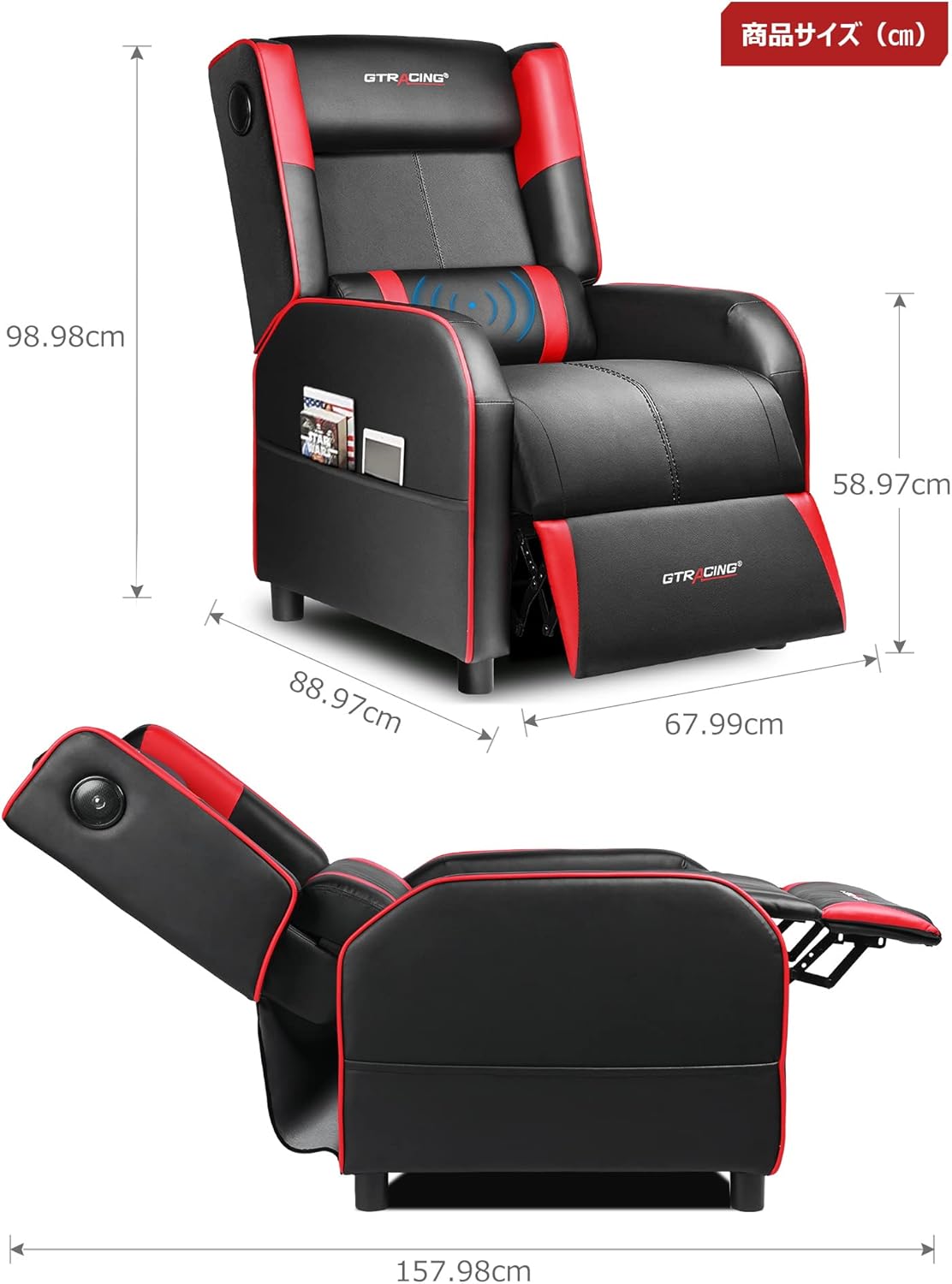
Image: Overall dimensions of the GTRACING Gaming Chair, showing height, width, and depth in both upright and reclined positions.
4. Awọn ilana Iṣiṣẹ
4.1 Iṣẹ́ Agbọrọsọ Bluetooth
Your GTRACING Gaming Chair features integrated Bluetooth 5.1 speakers for an immersive audio experience.
- Titan/Apapa: Locate the power button on the speaker control panel (usually on the side of the chair). Press and hold to power on or off.
- Pipọpọ: Once powered on, the speakers will enter pairing mode. On your device (PC, smartphone, tablet), search for Bluetooth devices and select "GTRACING Speaker" (or similar name) to connect.
- Ibi Asopọmọra: The speakers support a wireless connection range of approximately 15 meters (49 feet).
- Igbesi aye batiri: The built-in battery provides up to 15 hours of continuous playback on a full charge.
- Gbigba agbara: Connect the provided power adapter to the charging port on the speaker control panel. Note: The speakers cannot be used while charging.
- Ibamu Console: For PS4, PS5, XBOX, or SWITCH consoles, a dedicated USB adapter (sold separately) is required for low-latency connection (approx. 0.1 seconds delay).

Image: A user enjoying a game while seated in the GTRACING Gaming Chair, highlighting the integrated Bluetooth speakers located in the backrest for an immersive audio experience.
4.2 rọgbọkú Išė
Adjust the backrest to your preferred angle for various activities.
- Ibiti Atunse: The backrest can recline from 95° to 150°.
- Ilana Isunmọ: To recline, push the lever (usually on the right side of the chair) and lean back. Release the lever to lock the position.
- Integrated Ottoman: The ottoman extends and retracts in synchronization with the backrest, providing continuous leg support as you recline.
- Recommended Modes:
- 90° Game/Work Mode: Upright position for focused tasks.
- 115° Entertainment Mode: Slightly reclined for watching movies or casual browsing.
- 150° Nap Mode: Fully reclined for short rests or naps.
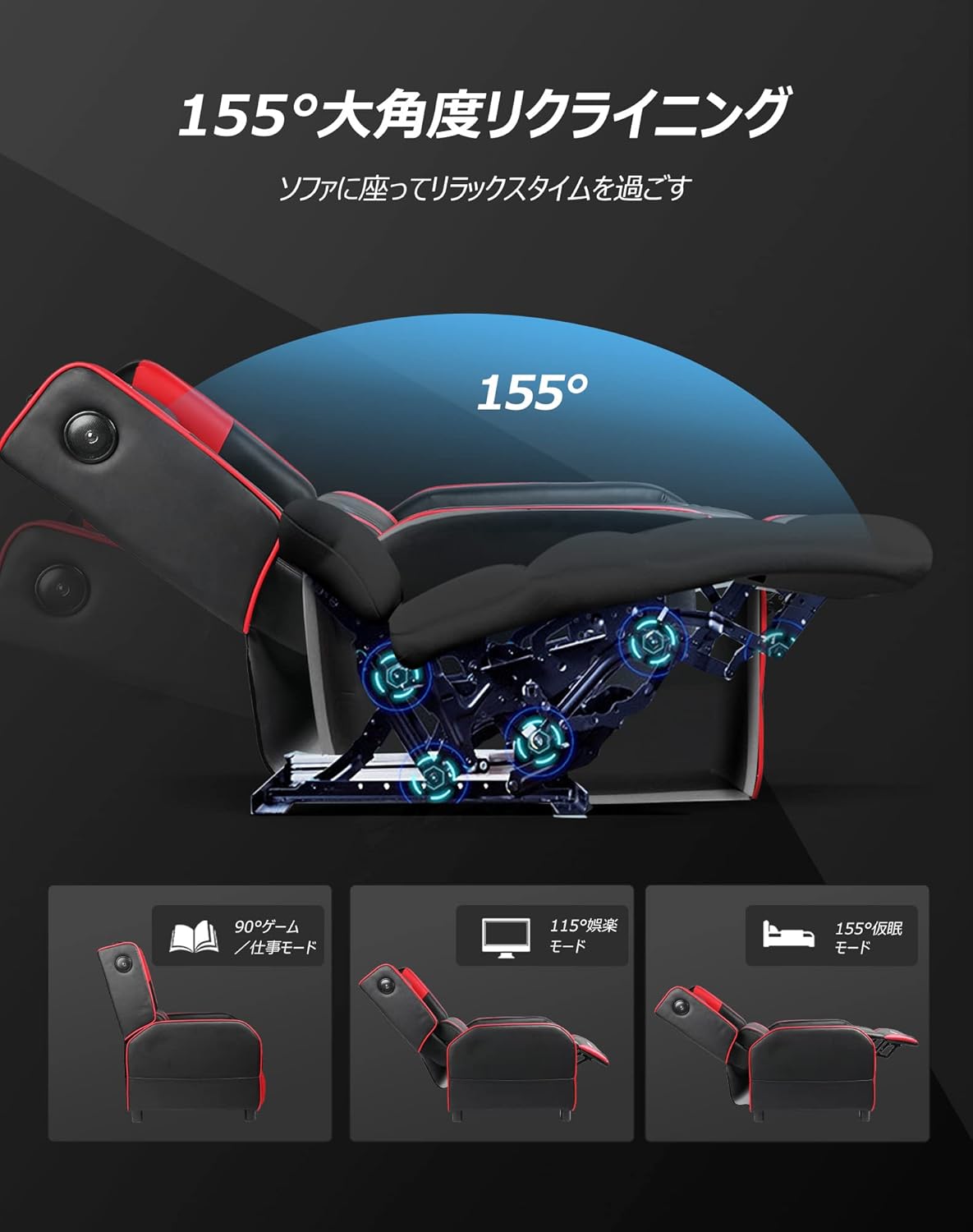
Image: Diagram illustrating the reclining function of the GTRACING Gaming Chair, showing the chair in upright (90°), entertainment (115°), and nap (155°) positions, with the ottoman extending accordingly.
4.3 Vibration Lumbar Support
The lumbar support cushion features a vibration function designed to alleviate lower back discomfort during prolonged sitting.
- Muu ṣiṣẹ: Connect the lumbar support's USB cable to a power source (e.g., USB port on a computer, power bank, or wall adapter).
- Awọn anfani: The vibration helps to distribute pressure, reducing stress on the pelvis, lumbar spine, and sacrum.
4.4 Seat Comfort Features
The seat cushion is engineered for superior comfort and support.
- Integrated Urethane Cushion: The seat uses a highly elastic, integrated molded urethane cushion.
- Internal Spring System: Springs are incorporated within the urethane for enhanced elasticity and durability.
- Thick Backrest and Seat: The generous padding of both the backrest and seat cradles the body, providing a sofa-like seating experience.

Aworan: Agbelebu-apakan view of the GTRACING Gaming Chair's seat cushion, detailing the layers of high-quality PU leather, high-rebound urethane, high-density urethane, internal pocket coils, and integrated molded urethane for optimal comfort and support.
5. Itọju
Proper care will extend the life and appearance of your gaming chair.
- Ninu: Mu ese nu pẹlu asọ, damp asọ. Yẹra fun awọn kẹmika lile tabi awọn olutọpa abrasive.
- Idasonu: Bọ silẹ lẹsẹkẹsẹ pẹlu asọ ti o mọ, ti o gbẹ.
- Ifojusi Imọlẹ Oorun: Yago fun ifihan pipẹ si imọlẹ orun taara lati ṣe idiwọ idinku ati ibajẹ ohun elo.
- Ṣiṣayẹwo ohun elo: Periodically check and tighten all screws and bolts to ensure stability.
6. Laasigbotitusita
If you encounter any issues, refer to the following common solutions.
- Bluetooth Speakers Not Connecting:
- Ensure the speakers are powered on and in pairing mode.
- Ṣayẹwo pe Bluetooth ti ṣiṣẹ lori ẹrọ rẹ.
- Move your device closer to the chair (within 15m).
- Gbagbe ẹrọ naa lati awọn eto Bluetooth rẹ ki o gbiyanju lati so pọ lẹẹkansii.
- Ensure the speakers are not currently charging.
- Lumbar Support Not Fitting During Assembly:
- As noted in the assembly section, ensure any integrated side speakers are attached before fully securing the backrest, as this can impact the fit of the lumbar support cushion.
- Reclining Mechanism Not Working Smoothly:
- Check for any obstructions around the reclining mechanism.
- Ensure the lever is fully engaged or disengaged.
- Verify that all assembly bolts related to the backrest are securely tightened.
7. Awọn pato
| Nọmba awoṣe | GT208M |
| Brand | JIJI |
| Ohun elo | Faux Leather (PU Leather) |
| Àwọ̀ | Pupa |
| Awọn iwọn Ọja (Titọ) | Approx. 80 cm (Depth) x 80 cm (Width) x 80 cm (Height) |
| Iwọn Ọja | 30 kg |
| Package Mefa | 77 cm x 69 cm x 52 cm |
| Package iwuwo | 28 kg |
| Igun rọgbọkú | 95° si 150° |
| Ẹya Bluetooth | 5.1 |
| Speaker Battery Life | Up to 15 hours (continuous playback) |
| Gbigba agbara Agbọrọsọ | Not usable while charging |
| Awọn ilana Itọju | Mu ese nu |
8. Atilẹyin ọja ati Support
For warranty information or technical support, please refer to the official GTRACING webojula tabi kan si wọn onibara iṣẹ taara.
GTRACING offers after-sales support for their products. Please retain your proof of purchase for any warranty claims.
O le rii nigbagbogbo awọn alaye olubasọrọ atilẹyin lori olupese webaaye tabi nipasẹ alagbata ti o ti ra ọja naa.