
Ọrọ Iṣaaju
This manual provides essential instructions for the safe installation, operation, and maintenance of your Kratos 69K-915 Half Dice Modular Ice Machine. This unit is designed for commercial foodservice environments and is NSF and UL certified, ensuring compliance with health and safety standards.
Please read this manual thoroughly before operating the machine and retain it for future reference.
Alaye Aabo
Awọn Itọsọna Aabo pataki:
- Nigbagbogbo ge asopọ agbara ṣaaju ṣiṣe eyikeyi itọju tabi mimọ.
- Rii daju didasilẹ to dara lati ṣe idiwọ mọnamọna itanna.
- Má ṣe lo ẹ̀rọ náà pẹ̀lú àwọn okùn tàbí àwọn púlọ́ọ̀gù tí ó ti bàjẹ́.
- Pa gbogbo awọn ṣiṣi atẹgun kuro ti awọn idiwọ.
- Ohun elo yii kii ṣe ipinnu fun lilo nipasẹ awọn eniyan (pẹlu awọn ọmọde) pẹlu idinku ti ara, imọlara tabi awọn agbara ọpọlọ, tabi aini iriri ati imọ, ayafi ti wọn ba ti fun wọn ni abojuto tabi itọnisọna nipa lilo ohun elo nipasẹ eniyan ti o ni iduro fun aabo wọn.
- Use only authorized service personnel for repairs.
Ọja Awọn ẹya ara ẹrọ

Image: Key features of the Kratos 69K-915 ice machine, including programmable digital controls, a hinged front panel for easy access, a digital screen displaying machine status, and an automatic cleaning cycle.
- Awọn iṣakoso oni-nọmba: Programmable and user-friendly digital controls for efficient operation.
- Ifihan ipo: An attractive digital screen displays the current ice machine status.
- Wiwọle Rọrun: Hinged front panel provides convenient access for cleaning and service.
- Fifọ aifọwọyi: Features an automatic cleaning cycle for simplified maintenance.
- Bin Overflow Prevention: Integrated system to prevent ice bin overflow.
- Air-Cooled Compressor: Efficient air-cooled compressor system.
- Apẹrẹ ti o le ṣoki: Units are stackable for increased production (adapter sold separately).
- Ikole ti o tọ: Sleek stainless steel body with black plastic trim.
- Imọlẹ inu: Power for the unit illuminates an LED light into the storage bin (sold separately).
Eto ati fifi sori
Proper installation is crucial for the optimal performance and longevity of your ice machine. It is recommended that installation be performed by a qualified technician.
1. Unpacking
- Carefully remove the ice machine from its packaging.
- Ṣe àyẹ̀wò ẹ̀rọ náà fún ìbàjẹ́ èyíkéyìí nínú ọkọ̀ ojú omi náà. Fi ìròyìn fún ẹni tó ń gbé e lọ lẹ́sẹ̀kẹsẹ̀.
- Remove all packing materials, tape, and protective films.
2. Ifiweranṣẹ
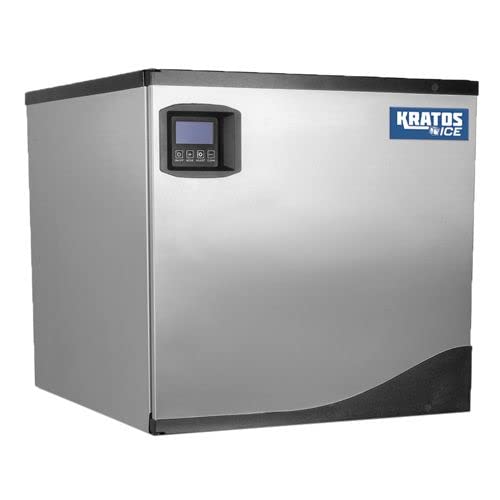
Image: The Kratos 69K-915 ice machine shown atop an optional ice bin, illustrating its modular design. The machine itself measures 22 inches wide, 24-3/5 inches deep, and 21 inches high.
- Place the ice machine on a level, sturdy surface capable of supporting its weight when full of ice.
- Ensure adequate clearance around the unit for proper air circulation, especially for the air-cooled compressor. Refer to local codes for specific requirements.
- The total dimensions of the unit are approximately 22"W x 24-3/5"D x 21"H.
- If stacking units, ensure the appropriate adapter is used (sold separately) and follow the adapter's installation instructions.
- An ice storage bin (sold separately) is required for collecting produced ice. Position the machine directly over the bin.
3. Asopọ Itanna
- Ẹyọ naa nilo ipese itanna 115 Volt.
- Ensure the electrical outlet is properly grounded and matches the machine's requirements.
- Maṣe lo awọn okun itẹsiwaju.
4. Omi Asopọ
- Connect the water supply line to the designated inlet on the ice machine.
- Install a water filter (recommended, not included) to ensure optimal ice quality and machine longevity.
- Connect the drain line to a suitable floor drain, ensuring proper slope for drainage.
- Check all connections for leaks before operating.
Awọn ilana Iṣiṣẹ
1. Ibẹrẹ ibẹrẹ
- After ensuring all connections are secure, plug the unit into the grounded electrical outlet.
- Tan ipese omi.
- Power on the machine using the main power switch, typically located on the control panel.
2. Using the Digital Controls
- The digital screen will display the current status of the ice machine.
- Use the programmable controls to adjust settings such as ice thickness or production cycles, if applicable. Refer to the on-screen menu for specific options.
- The LED light inside the storage bin will illuminate when the unit is powered, providing visibility.
3. Iṣelọpọ Yinyin
- The machine will begin its ice-making cycle automatically.
- The Kratos 69K-915 has a daily production capacity of up to 360 lbs of half-dice ice.
- The bin overflow prevention system will automatically stop ice production when the connected storage bin is full.
Itoju
Regular maintenance ensures efficient operation and extends the lifespan of your ice machine.
1. Automatic Cleaning Cycle
- Utilize the machine's automatic cleaning cycle regularly. Consult the digital control panel for instructions on initiating this cycle.
- This cycle helps to remove mineral deposits and maintain hygiene.
2. afọmọ Afowoyi
- Òde: Clean the stainless steel exterior with a mild detergent and a soft cloth. Avoid abrasive cleaners.
- Inu inu: For thorough cleaning, disconnect power and open the hinged front panel. Clean the evaporator and water system components as per industry best practices for commercial ice machines.
- Asẹ afẹfẹ: Regularly clean the air filter for the air-cooled compressor to ensure proper airflow and prevent overheating.
- Ajọ omi: Replace the external water filter (if installed) according to the manufacturer's recommendations.
Laasigbotitusita
Ṣaaju ki o to kan si iṣẹ, tunview Awọn iṣoro ti o wọpọ ati awọn solusan wọnyi:
| Isoro | Owun to le Fa | Ojutu |
|---|---|---|
| Ẹ̀rọ kò ṣe yìnyín | No power; Water supply off; Clogged water filter; High ambient temperature; Full ice bin sensor activated. | Check power connection; Ensure water supply is on; Replace water filter; Ensure proper ventilation; Empty ice bin. |
| Kekere yinyin gbóògì | Dirty air filter; Low water pressure; High ambient temperature; Scale buildup on evaporator. | Clean air filter; Check water pressure; Ensure proper ventilation; Run automatic cleaning cycle or descale manually. |
| Ariwo ti ko wọpọ | Àwọn èròjà tí ó dẹ̀; ìdínà afẹ́fẹ́; Ìṣòro ìfúnpọ̀. | Inspect for loose parts; Clear any obstructions from fan; Contact qualified service personnel for compressor issues. |
| Omi n jo | Loose water connections; Clogged drain line; Damaged components. | Tighten connections; Clear drain line; Contact service if components are damaged. |
Awọn pato
| Ẹya ara ẹrọ | Ẹ̀kúnrẹ́rẹ́ |
|---|---|
| Orukọ awoṣe | 69K-915 |
| Brand | Kratos |
| Irú yinyin | Idaji Dice |
| Daily Production Agbara | 360 iwon |
| Awọn iwọn (W x D x H) | 22" x 24-3/5" x 21" |
| Voltage | 115 Volts |
| Wattage | 22 watt |
| Compressor Iru | Afẹfẹ-tutu |
| Awọn iwe-ẹri | UL and NSF certified |
Alaye atilẹyin ọja
The Kratos 69K-915 Half Dice Modular Ice Machine comes with the following warranty:
- Atilẹyin ọja boṣewa: Atilẹyin ọja to lopin ọdun kan.
- Lilo ibugbe: Warranty is void if the unit is used in a residential setting.
- Food Trucks/Mobile Applications: 90-day limited warranty for units used in food trucks or mobile applications.
For detailed warranty terms and conditions, please refer to the official Kratos warranty documentation or contact customer support.
Onibara Support
If you require assistance, have questions, or need to report an issue, please contact Kratos customer support.
For the most current contact information, please visit the official Kratos webaaye tabi tọka si iwe rira rẹ.