
1. Ifihan
The XTUGA SEM100 is a professional wireless in-ear monitor system designed for stage performers, studio musicians, and lecturers. It provides crystal-clear, low-latency audio monitoring through UHF digital transmission, offering freedom of movement and reliable performance. This system features a rechargeable bodypack receiver, multiple frequency options, and versatile connectivity including Bluetooth and USB playback.
2. Package Awọn akoonu
Jọwọ rii daju pe gbogbo awọn ohun ti a ṣe akojọ rẹ si isalẹ wa ninu package rẹ. Ti awọn ohun kan ba nsọnu tabi bajẹ, jọwọ kan si atilẹyin alabara.
- Amunawa × 1
- Olugba apo-ara × 1
- Eriali × 1
- Agbohungbohun × 2
- Cable Line × 4
- Adaparọ Agbara × 1
- Afowoyi Olumulo × 1
3. Ọja Ipariview
Familiarize yourself with the components of your XTUGA SEM100 system.

Figure 3.1: XTUGA SEM100 Wireless In-Ear Monitor System, showing the transmitter, bodypack receiver, and earphones.
3.1 Bodypack olugba

Nọmba 3.2: Alaye view of the bodypack receiver, highlighting the power light, charging connector, and earphone jack.
- Imọlẹ Agbara: N tọka si ipo agbara ati asopọ.
- Asopọmọra gbigba agbara: Iru-C ibudo fun gbigba agbara ti abẹnu batiri.
- Jack Earphone: 3.5mm output for connecting in-ear monitors.
- Iboju LCD: Displays channel, group, stereo mode, and lock status.
- Awọn bọtini Iṣakoso: For navigation, volume adjustment, and frequency selection.
3.2 Atagba

olusin 3.3: Iwaju ati ki o ru view of the transmitter, showing input/output connectors, volume knobs, USB socket, and control buttons.
- Bọtini Eto Iṣẹ: Used to access and adjust system settings.
- Up/Down Selection Buttons: Fun awọn akojọ aṣayan lilọ kiri ati ṣatunṣe iye.
- Iboju LCD: Displays frequency, group, channel, and other operational information.
- Atọka Bluetooth: Imọlẹ nigbati Bluetooth ba ti sopọ.
- Agbara Yi pada: Titan atagba tan tabi paa.
- Last/Next Song Buttons: For controlling media playback via USB or Bluetooth.
- Bọ́tìnnì Ṣíṣe/Sánu duro: For controlling media playback.
- Socket USB: Fun ṣiṣiṣẹsẹhin drive USB.
- Bọtini Iwọn didun: Ṣe atunṣe iwọn didun ti o wu jade.
- Earphone Monitoring Socket: 3.5mm jack for direct monitoring from the transmitter.
- 6.35mm Output Connector: Ijade ohun.
- Awọn ọna asopọ igbewọle: For audio input sources.
- Socket Agbara: Fun sisopọ ohun ti nmu badọgba agbara.
- Eriali: Fun gbigbe ifihan agbara alailowaya.
4. Eto Itọsọna
4.1 Gbigba agbara akọkọ
Before first use, ensure the bodypack receiver is fully charged. Connect the Type-C charging cable to the bodypack and a suitable USB power source. A full charge takes approximately 2.5 hours and provides up to 6 hours of operation.

Figure 4.1: The bodypack receiver charging via its Type-C port, indicating a 2.5-hour charge time for 6 hours of use.
4.2 So Agbekalẹ naa pọ
- Connect the provided antenna to the ANT connector on the rear of the transmitter.
- Connect the power adapter to the Power Socket on the transmitter and plug it into an electrical outlet.
- Connect your audio source (e.g., mixing console, instrument) to the Input Connectors on the transmitter.
4.3 Connecting the Bodypack Receiver
- Connect your in-ear monitors to the 3.5mm Earphone Jack on the bodypack receiver.
4.4 Frequency Synchronization
The system supports 40 frequency options, organized into 4 groups with 10 frequencies each. To ensure proper operation, the bodypack receiver must be synchronized with the transmitter's frequency.

Figure 4.2: The transmitter and two bodypack receivers displaying synchronized frequencies.
- Agbara lori olugba ati olugba bodypack mejeeji.
- On the transmitter, use the Up/Down selection buttons to choose your desired frequency group and channel.
- On the bodypack receiver, long-press the middle button (often labeled 'SET' or similar) to initiate synchronization. The bodypack will automatically scan and lock onto the transmitter's frequency. The indicator light on the bodypack will remain on after successful connection.
5. Isẹ
Video 5.1: Demonstrates the setup, frequency selection, Bluetooth connection, and monitoring features of the XTUGA SEM100 system.
5.1 Agbara Tan / Pa
- Atagba: Press the Power Switch button on the front panel.
- Olugba Apo-ara: Long-press the power button on the top of the bodypack.
5.2 iwọn didun tolesese
- Olugba Apo-ara: Use the left and right navigation buttons on the bodypack to adjust the volume. The bodypack offers twelve levels of volume adjustment.
- Atagba: Use the Volume Knob on the front panel to adjust the overall output volume.
5.3 Mono/Stereo Switch
The bodypack receiver allows switching between mono and stereo monitoring modes.

Figure 5.1: The bodypack receiver's screen showing the option to switch between mono and stereo modes.
- On the bodypack receiver, press the appropriate button (refer to the bodypack's screen for indication) to toggle between mono and stereo modes.
5.4 Bluetooth/USB Playback
The transmitter supports playing accompaniment directly via Bluetooth or a USB drive.
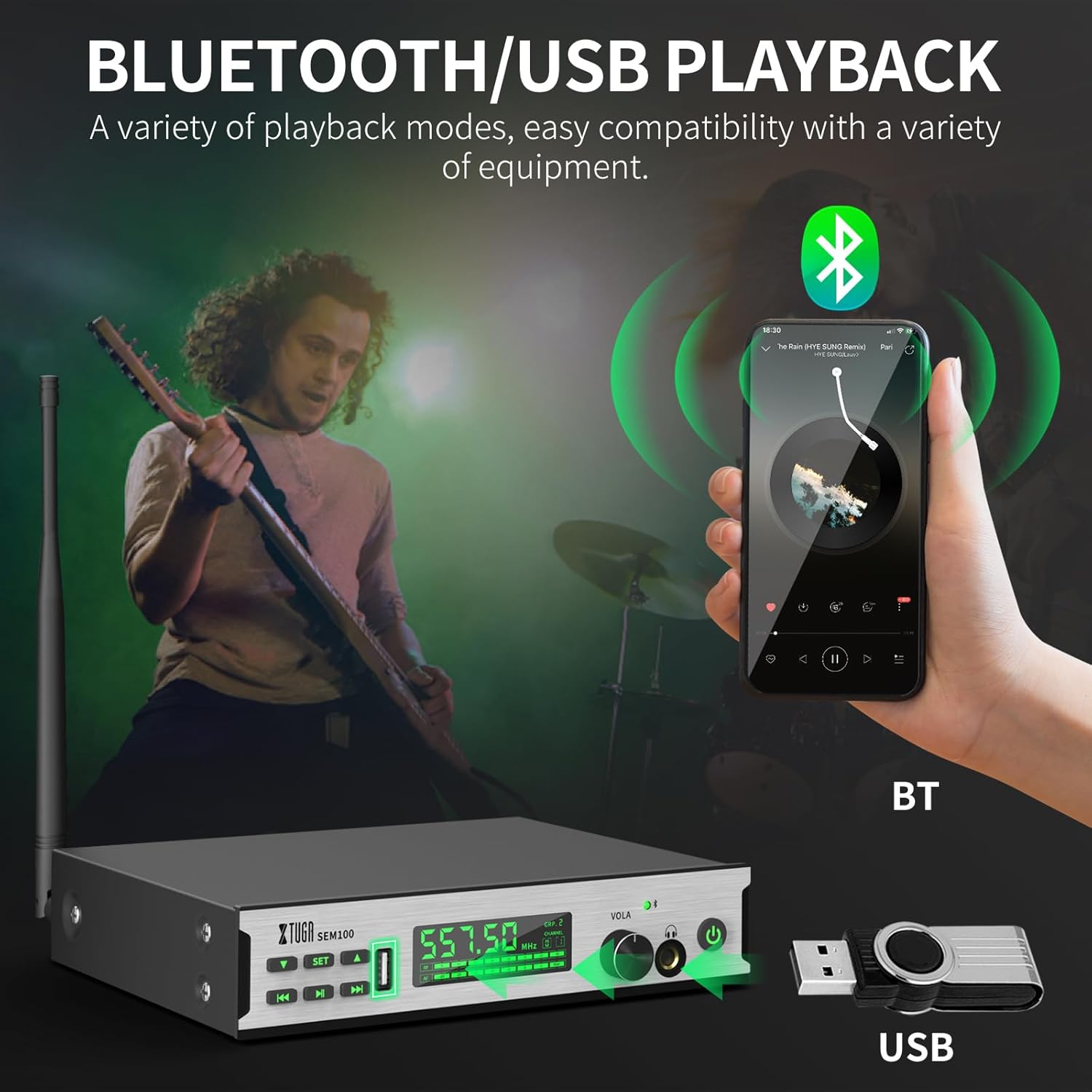
Figure 5.2: The transmitter connected to a smartphone via Bluetooth and a USB drive for accompaniment playback.
- Bluetooth: Enable Bluetooth on your smartphone or other device and pair with "XTUGA-SEM". The Bluetooth indicator on the transmitter will light up upon successful connection. Use the Play/Pause and Last/Next Song buttons on the transmitter to control playback.
- Sisisẹsẹhin USB: Fi awakọ USB kan ti o ni ohun ti o ni ninu files into the USB Socket on the transmitter. Use the Play/Pause and Last/Next Song buttons to control playback.
5.5 Iṣẹ́ Títìpa Ibojú
To prevent accidental changes during performance, the bodypack receiver features a lock screen function.

Figure 5.3: The bodypack receiver displaying a lock icon on its screen, indicating the lock function is active.
- Long-press the middle button on the bodypack receiver to activate or deactivate the lock screen function. When locked, a locking pattern or icon will appear on the screen, and controls will be unresponsive to prevent unintended adjustments.
6. Itọju
Proper maintenance ensures the longevity and optimal performance of your XTUGA SEM100 system.
- Ninu: Use a soft, dry cloth to clean the surfaces of the transmitter and bodypack receiver. Avoid using liquid cleaners or solvents.
- Ibi ipamọ: Store the system in a cool, dry place away from direct sunlight and extreme temperatures. When not in use for extended periods, ensure the bodypack receiver is charged periodically to maintain battery health.
- Itọju Batiri: Avoid fully discharging the bodypack's battery frequently. Recharge it regularly to prolong its lifespan.
7. Laasigbotitusita
If you encounter issues with your XTUGA SEM100 system, refer to the following common troubleshooting steps:
- Ko si Ohun:
- Rii daju pe atagba mejeeji ati olugba apo-ara wa ni agbara lori.
- Verify that the frequencies of the transmitter and bodypack are synchronized.
- Check all cable connections (audio input to transmitter, earphones to bodypack).
- Adjust volume levels on both the transmitter and bodypack.
- Ensure the bodypack is not in lock screen mode.
- Interference/Static:
- Change the frequency channel on the transmitter and re-synchronize the bodypack. The system offers 40 frequency options to avoid clashes.
- Ensure the transmitter and receiver are within the operating range (up to 213ft/65m).
- Minimize obstructions between the transmitter and receiver.
- Ṣàyẹ̀wò fún àwọn ẹ̀rọ alailowaya mìíràn tí ń ṣiṣẹ́ lórí àwọn ìpele tí ó jọra nítòsí.
- Igbesi aye batiri kukuru:
- Ensure the bodypack is fully charged (2.5 hours for 6 hours of use).
- Išẹ batiri le dinku lori akoko pẹlu lilo lọpọlọpọ.
8. Awọn pato
Key technical specifications for the XTUGA SEM100 Wireless In-Ear Monitor System:
| Ẹya ara ẹrọ | Sipesifikesonu |
|---|---|
| Brand | XTUGA |
| Nọmba awoṣe | SEM100 |
| Àwọ̀ | Dudu |
| Gbigbe Eti | Ninu Eti |
| Fọọmù ifosiwewe | Ninu Eti |
| Ipalara | 4 ohms |
| Jack agbekọri | 3.5 mm Jack |
| Asopọmọra Technology | Ailokun |
| Alailowaya Technology | Bluetooth |
| Bluetooth Ibiti | 65 Mita (ẹsẹ 213) |
| Ẹya Bluetooth | 4.0 |
| Iṣakoso Iru | Iṣakoso iwọn didun, Titari Bọtini |
| Ariwo Iṣakoso | Ko si |
| Iwọn Igbohunsafẹfẹ | 550MHz-580Mhz |
| Audio Driver Type | Iwontunwonsi Armature Driver |
| Ohun elo apade | Irin |
| Iwọn Nkan | 3.25 Kilograms (Total package weight) |
9. Atilẹyin ọja ati Support
XTUGA products are designed for reliability and performance. For warranty information, technical support, or service inquiries, please refer to the contact details provided in your product packaging or visit the official XTUGA webojula. Tọju iwe-ẹri rira rẹ bi ẹri rira fun awọn iṣeduro atilẹyin ọja.
For additional support, you may visit the XTUGA Store on Amazon: XTUGA Store