
1. Ifihan
Thank you for choosing the Donner DEK-610S 61-Key Electric Keyboard Piano. This comprehensive kit is designed for beginners and hobbyists, offering a rich musical experience with its versatile features and included accessories. This manual provides detailed instructions for setup, operation, maintenance, and troubleshooting to ensure you get the most out of your instrument.
2. Package Awọn akoonu
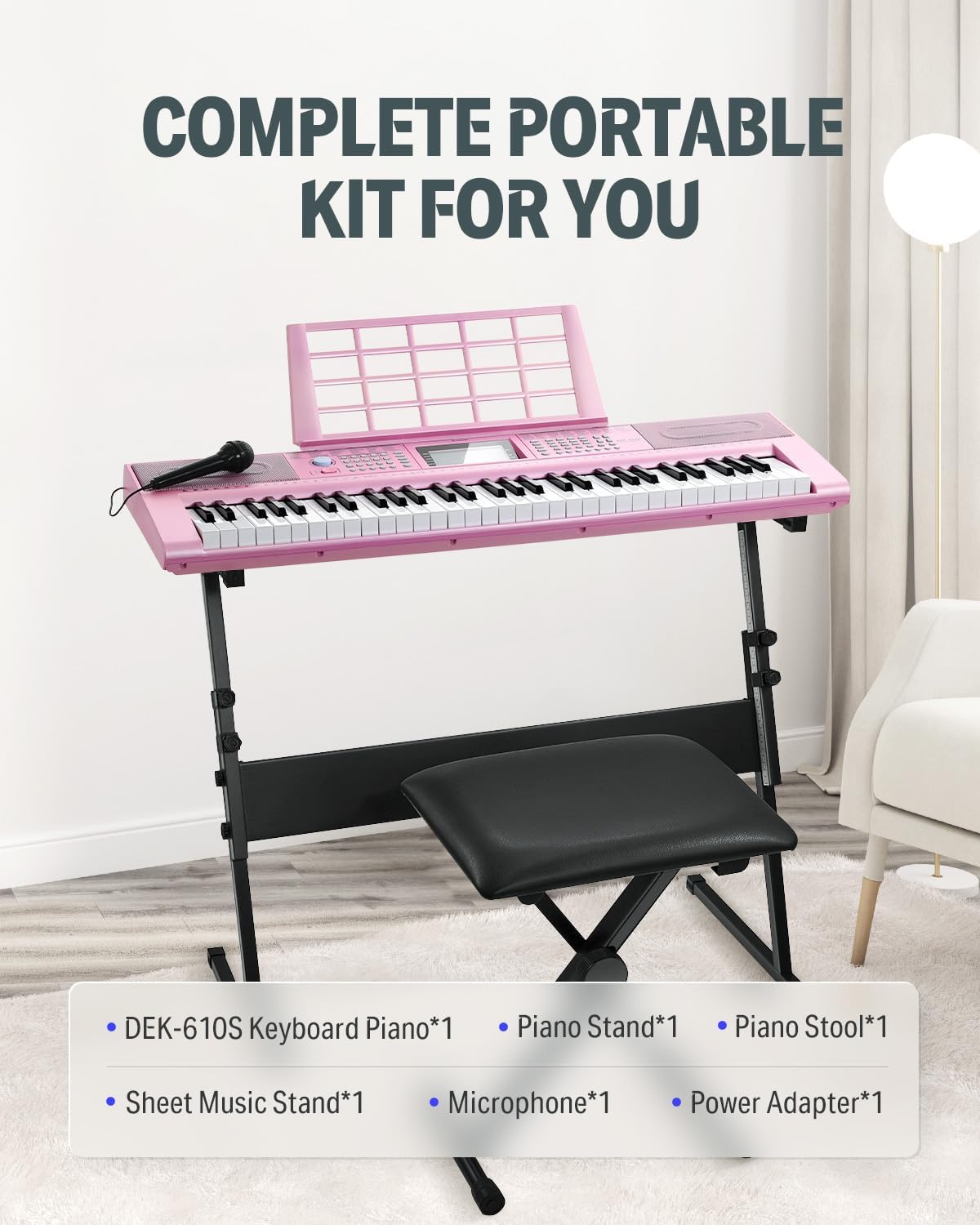
Upon opening your Donner DEK-610S kit, please verify that all the following items are included:
- Donner DEK-610S Keyboard Piano (1 unit)
- Adjustable Keyboard Stand (1 unit)
- Adjustable Piano Stool (1 unit)
- Sheet Music Stand (1 unit)
- Microphone (1 unit)
- Adapter agbara (ẹyọkan 1)

3. Awọn ilana iṣeto
- Assemble the Keyboard Stand: Unfold the keyboard stand and adjust its height to a comfortable playing position. Ensure all locking mechanisms are securely fastened.
- Gbe Keyboard naa: Carefully place the DEK-610S keyboard onto the assembled stand. Ensure it is stable and centered.
- Kó ìgò Piano jọ: Unfold the piano stool and adjust its height as needed for comfortable seating while playing.
- Attach the Sheet Music Stand: Fi àpótí orin sí inú ibi tí a yàn fún ọ lórí apá òkè ti keyboard.
- So agbara: Plug the power adapter into the DC9V-12V input jack on the rear panel of the keyboard. Then, plug the adapter into a standard electrical outlet.
- So Gbohungbohun pọ (Aṣayan): If using the microphone, plug its 3.5mm jack into the MIC input on the rear panel of the keyboard.
- So Agbekọri pọ (Aṣayan): For private practice, plug headphones with a 3.5mm jack into the PHONES output on the rear panel.

4. Awọn ilana Iṣiṣẹ
4.1 Agbara Tan / Pa
Tẹ awọn AGBARA button located on the control panel to turn the keyboard on or off.
Ifihan LCD 4.2
The integrated LCD display panel provides clear visual feedback on current functions, selected voices, rhythms, tempo, and other operational parameters.

4.3 Voices and Rhythms
The DEK-610S features 249 voices and 249 rhythms. Use the dedicated buttons and numeric keypad on the control panel to select your desired voice (instrument sound) or rhythm (accompaniment style).

4.4 Demo Songs and Teaching Functions
Explore the 50 built-in demo songs. The keyboard also includes 3 teaching functions to assist beginners in learning to play. Refer to the on-screen prompts and specific teaching modes for guided lessons.

4.5 Recording Feature
Use the "Record" function to capture your performances. This allows for playback and self-correction, aiding in practice and improvement. Consult the manual's specific section on recording for detailed steps.
4.6 Audio Output and Speakers
The DEK-610S is equipped with two built-in 10W speakers for clear, room-filling sound. For private practice, connect headphones to the 3.5mm PHONES jack.


5. Itọju ati Itọju
- Ninu: Lo asọ ti o rọ, ti o gbẹ lati nu dada ti keyboard. Fun idoti alagidi, die-die dampen the cloth with water and a mild soap solution, then wipe dry immediately. Avoid using abrasive cleaners, solvents, or waxes.
- Ibi ipamọ: When not in use, store the keyboard in a cool, dry place away from direct sunlight, extreme temperatures, and high humidity. If storing for extended periods, consider covering it with a dust cover.
- Mimu: Always handle the keyboard with care. Avoid dropping it or subjecting it to strong impacts, which can damage internal components.
- Adapter agbara: Disconnect the power adapter from the wall outlet and the keyboard when not in use or during electrical storms.
6. Laasigbotitusita
| Isoro | Owun to le Fa | Ojutu |
|---|---|---|
| Ko si ohun lati awọn agbohunsoke. | Volume is too low or muted. Headphones are plugged in. | Increase the master volume. Unplug headphones if connected. |
| Keyboard ko ṣiṣẹ lori. | Power adapter not connected or faulty. Power outlet not working. | Ensure power adapter is securely connected to both keyboard and outlet. Try a different outlet. |
| Awọn bọtini ko dahun. | Keyboard may be in a specific mode (e.g., demo mode) that disables key input. | Restart the keyboard. Check the selected mode on the LCD display and switch to a standard playing mode. |
| Gbohungbohun ko ṣiṣẹ. | Microphone not properly connected. Microphone volume too low. | Ensure microphone is fully plugged into the MIC input. Adjust microphone volume settings on the keyboard. |
7. Awọn pato
| Ẹya ara ẹrọ | Ẹ̀kúnrẹ́rẹ́ |
|---|---|
| Brand | Donner |
| Orukọ awoṣe | DEK-610S |
| Nọmba ti Awọn bọtini | 61 |
| Awọn ohun | 249 |
| Awọn ariwo | 249 |
| Awọn orin Demo | 50 |
| Awọn iṣẹ ikẹkọ | 3 |
| Polyphony | 32-akọsilẹ |
| Ifihan | LCD |
| Awọn agbọrọsọ | 2 x 10W Built-in |
| Asopọmọra | 3.5mm Jack (Headphones, Mic, Audio Input), USB, MIDI |
| Orisun agbara | Corded Electric (DC9V-12V) |
| Iwọn Nkan | 23.9 iwon |
| Package Mefa | 39 x 14.6 x 12 inches |
| Àwọ̀ | Pink Kit |
| Olorijori Ipele | Olubere |
| Pataki Ẹya | Gbigbe |
8. Atilẹyin ọja ati Support
For warranty information, product support, or technical assistance, please contact Donner customer service. Details regarding warranty coverage and support channels can typically be found on the official Donner webojula tabi nipasẹ rẹ ra iwe.
Visit the official Donner Store for more information: Donner Store on Amazon