
1. Ifihan
Thank you for choosing the Bimar VC77 Tower Fan. This manual provides important information regarding the safe operation, installation, maintenance, and troubleshooting of your new fan. Please read these instructions carefully before use and keep them for future reference.
The Bimar VC77 is an 80 cm tower fan designed for domestic indoor ventilation. It features 3 speed settings, a 60-minute timer, automatic right/left oscillation, and adjustable up/down tilt, powered by a 45W induction motor.
2. Awọn ilana aabo
IKILO: Ikuna lati tele awọn ilana aabo wọnyi le ja si mọnamọna, ina, tabi ipalara nla.
- This appliance is intended for domestic indoor use only. Do not use it for any other purpose. Any other use is considered improper and dangerous.
- Ensure the power outlet is easily accessible to quickly disconnect the plug in an emergency.
- Position the fan away from heat sources (open flames, gas stoves, etc.) and liquid containers to prevent water splashes.
- Do not insert any tools or fingers between the protective grille meshes of the fan.
- Má ṣe lo afẹ́fẹ́ pẹ̀lú okùn tàbí púlọ́gù tó ti bàjẹ́. Tí okùn ìpèsè bá bàjẹ́, olùpèsè, aṣojú iṣẹ́ rẹ̀, tàbí àwọn ẹni tó ní ìmọ̀ tó jọra gbọ́dọ̀ rọ́pò rẹ̀ kí ó má baà léwu.
- Always unplug the fan before cleaning or when not in use for extended periods.
- Jeki ohun elo naa kuro ni arọwọto awọn ọmọde ati awọn ohun ọsin.
- Má ṣe bo afẹ́fẹ́ nígbà tí o bá ń ṣiṣẹ́.
3. Ọja Ipariview
Familiarize yourself with the components of your Bimar VC77 Tower Fan.
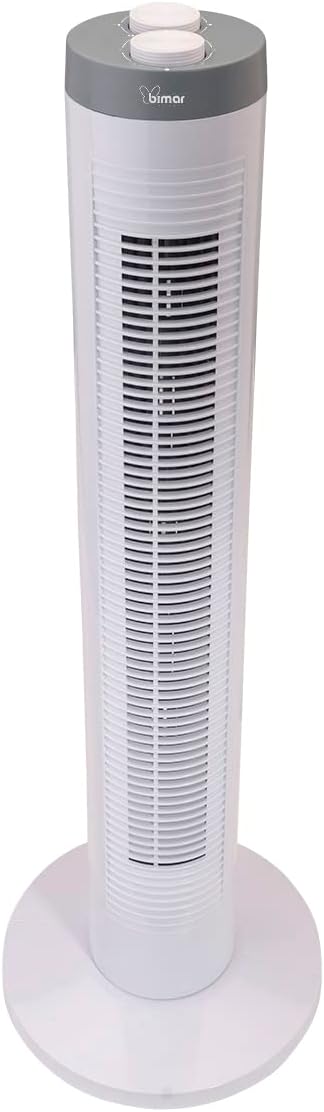
Aworan 3.1: Iwaju view of the Bimar VC77 Tower Fan, showing the main body, base, and control panel on top.

Aworan 3.2: Apa view of the Bimar VC77 Tower Fan, illustrating its compact design and the handle for easy transport.

Aworan 3.3: Detailed diagram of the fan's top control panel, indicating the knobs for speed selection, timer setting, and oscillation function.
Awọn eroja pataki:
- Ibi iwaju alabujuto: Located on the top of the fan, featuring selector knobs for various functions.
- Afẹfẹ iṣan Grille: Front grille through which air is expelled.
- Ipilẹ: Provides stability for the tower fan.
- Imudani Iṣọkan: Fun irọrun gbigbe ti ẹrọ naa.
- Okun Agbara: Fun asopọ si itanna iṣan.
4. Eto ati fifi sori
Follow these steps to set up your Bimar VC77 Tower Fan:
- Ṣii silẹ: Carefully remove the fan from its packaging. Retain the packaging for storage or if the product needs to be returned.
- Base Assembly (if required): Some models may require simple assembly of the base. Align the base parts and secure them according to the diagrams in the separate installation manual (if provided). Ensure the base is firmly attached for stability.
- Ibi: Place the fan on a flat, stable surface. Ensure there is adequate space around the fan for proper air circulation and oscillation. Avoid placing it near curtains or other objects that could obstruct airflow or get caught in the fan.
- Asopọ agbara: Plug the power cord into a standard 220-240V~ 50Hz electrical outlet. Ensure the outlet is easily accessible.
5. Awọn ilana Iṣiṣẹ
The Bimar VC77 Tower Fan is controlled via selector knobs located on the top panel.
- Titan/Apapa: Turn the speed selector knob to one of the speed settings (Min, Med, Max) to turn the fan on. Turn it to '0' to turn the fan off.
- Titunṣe Iyara Olufẹ: Rotate the speed selector knob to choose your desired airflow intensity:
- Min: Iyara kekere fun sisan afẹfẹ ti o rọra.
- Med: Iyara alabọde fun ategun afẹfẹ alabọde.
- O pọju: High speed for maximum cooling.
- Oscillation Aifọwọyi: To activate the automatic right/left oscillation, turn the oscillation knob to the 'ON' position. The fan will sweep air across a wider area. Turn the knob to 'OFF' to stop oscillation.
- Titẹ Ti o le ṣatunṣe: The fan head can be manually tilted up or down to direct the airflow vertically. Gently push or pull the top section of the fan to adjust the tilt angle.
- Iṣẹ Aago: Use the timer knob to set the fan to operate for a specific duration, up to 60 minutes. Rotate the timer knob clockwise to the desired time setting. The fan will automatically turn off once the set time has elapsed. To bypass the timer, ensure the timer knob is set to the 'ON' position (usually indicated by a continuous operation symbol or '0' if it's a countdown timer).
6. Itọju
Ninu deede ati itọju yoo rii daju igbesi aye gigun ati iṣẹ ṣiṣe ti olufẹ rẹ.
- Ninu:
- Yọọ igbafẹfẹ kuro nigbagbogbo lati iṣan agbara ṣaaju ṣiṣe mimọ.
- Lo asọ, damp cloth to wipe the exterior surfaces of the fan. Do not use abrasive cleaners, solvents, or harsh chemicals, as these can damage the plastic.
- For dust accumulation on the grilles, use a vacuum cleaner with a brush attachment or compressed air to gently remove dust. Do not attempt to disassemble the fan to clean internal components.
- Ensure the fan is completely dry before plugging it back in and operating it.
- Ibi ipamọ: Nigbati o ko ba wa ni lilo fun awọn akoko ti o gbooro sii, tọju afẹfẹ sinu apoti atilẹba rẹ tabi bo lati daabobo rẹ lati eruku. Tọju ni itura kan, ibi gbigbẹ.
7. Laasigbotitusita
If you encounter issues with your Bimar VC77 Tower Fan, refer to the following common problems and solutions:
| Isoro | Owun to le Fa | Ojutu |
|---|---|---|
| Fan ko ni tan-an. |
|
|
| Alailagbara tabi ko si ṣiṣan afẹfẹ. |
|
|
| Fan is noisy during operation. |
|
|
| Oscillation ko ṣiṣẹ. |
|
|
If the problem persists after trying these solutions, please contact Bimar customer support.
8. Awọn pato
| Ẹya ara ẹrọ | Ẹ̀kúnrẹ́rẹ́ |
|---|---|
| Orukọ awoṣe | VC77 |
| Brand | bimar |
| Iru | Tower Fan (Column Fan) |
| Giga | 81.5 cm |
| Awọn iwọn (DxWxH) | 26.8P x 26.8l x 81.5H cm |
| Iwọn | 2.4 kg |
| Orisun agbara | Okun Itanna |
| Voltage | 220-240V ~ 50Hz |
| Wattage | 45W |
| Motor Iru | Induction Motor |
| Nọmba ti Awọn iyara | 3 (Min / Med / Max) |
| Aago | Titi di iṣẹju 60 |
| oscillation | Automatic Right/Left |
| Titunse pulọọgi | Adjustable Up/Down |
| Ọna Iṣakoso | Bọtini / Knob |
| Ohun elo | Ṣiṣu |
| Ariwo Ipele | 45 Decibels |
| inu ile / ita gbangba Lo | Ninu ile |
9. Atilẹyin ọja ati Support
For warranty information, please refer to the documentation provided with your purchase or contact the retailer. Bimar products are designed for reliability and performance.
If you require technical assistance, have questions about your product, or need to report a fault, please contact Bimar customer support. You may also find additional resources, including detailed user and installation manuals, on the manufacturer's website or through the following links:
Please have your model number (VC77) and purchase details ready when contacting support.