
Ọrọ Iṣaaju
Thank you for choosing the Chieftec PPS-850FC-A3 850W ATX 3.0 Power Supply Unit. This manual provides essential information for the safe and efficient installation, operation, and maintenance of your new power supply. Please read this manual thoroughly before installation and retain it for future reference.
Awọn Itọsọna Aabo
- Máa yọ okùn agbára AC kúrò nínú ihò ògiri kí o tó fi tàbí yọ agbára náà kúrò.
- Do not open the power supply unit casing. Iwọn gigatagÀwọn ẹ̀yà ara wọn wà nínú rẹ̀, kò sì sí àwọn ẹ̀yà ara tí a lè lò láti fi ṣiṣẹ́.asing yoo sọ atilẹyin ọja di ofo.
- Ensure the power supply is installed in a well-ventilated area, free from excessive heat, humidity, or dust.
- Lo awọn kebulu modulu nikan ti a pese pẹlu ipese agbara yii. Lilo awọn kebulu ti ko ni ibamu le fa ibajẹ si PSU tabi awọn paati ti a ti sopọ.
- Ensure all connectors are securely attached before powering on the system.
- Ọja yii jẹ apẹrẹ fun lilo ninu awọn eto kọnputa ti ara ẹni. Maṣe lo fun idi miiran.
Package Awọn akoonu
Jọwọ ṣayẹwo awọn awọn akoonu ti rẹ package. Ti awọn ohun kan ba nsọnu tabi bajẹ, kan si alagbata rẹ.
- Chieftec PPS-850FC-A3 850W ATX 3.0 Power Supply Unit
- Modular Cable Set (including PCIe Gen 5 connector)
- AC Agbara okun
- Iṣagbesori skru
- Afowoyi Olumulo (iwe-ipamọ yii)
Eto ati fifi sori
Follow these steps to properly install your Chieftec PPS-850FC-A3 power supply unit.
1. Ṣayẹwo fifi sori ẹrọ tẹlẹ
- Ensure your computer case supports ATX form factor power supplies.
- Verify that your motherboard and other components are compatible with an 850W power supply and ATX 3.0 standard.
2. Fifi sori ti ara
- Gbigbe PSU: Carefully slide the power supply into the designated PSU bay in your computer case. Ensure the fan is oriented correctly for optimal airflow (typically facing down if there's a bottom vent, or facing inside the case). Secure the PSU with the provided mounting screws.
- Àwọn okùn onípele tí ń sopọ̀ mọ́ra: Identify the necessary modular cables for your system components (motherboard, CPU, GPU, storage drives). Connect them to the appropriate ports on the power supply.

Image: Chieftec PPS-850FC-A3 power supply shown with its retail packaging, highlighting the unit itself and a detailed view of the PCIe Gen 5 connector, which is essential for modern high-performance graphics cards.
- Connecting to Motherboard: So asopọ agbara akọkọ ATX 24-pin pọ mọ modaboudu rẹ.
- Connecting to CPU: Connect the 4+4-pin or 8-pin EPS/CPU power connector(s) to your motherboard.
- Connecting to GPU: For graphics cards, use the appropriate PCIe power connectors. For modern GPUs, utilize the dedicated 12VHPWR (PCIe Gen 5) connector if your GPU supports it.
- Connecting to Peripherals: Connect SATA power cables to SSDs/HDDs and Molex connectors to other peripherals as needed.
- Asopọ agbara AC: Once all internal connections are secure, connect the AC power cord to the power supply and then to a wall outlet.
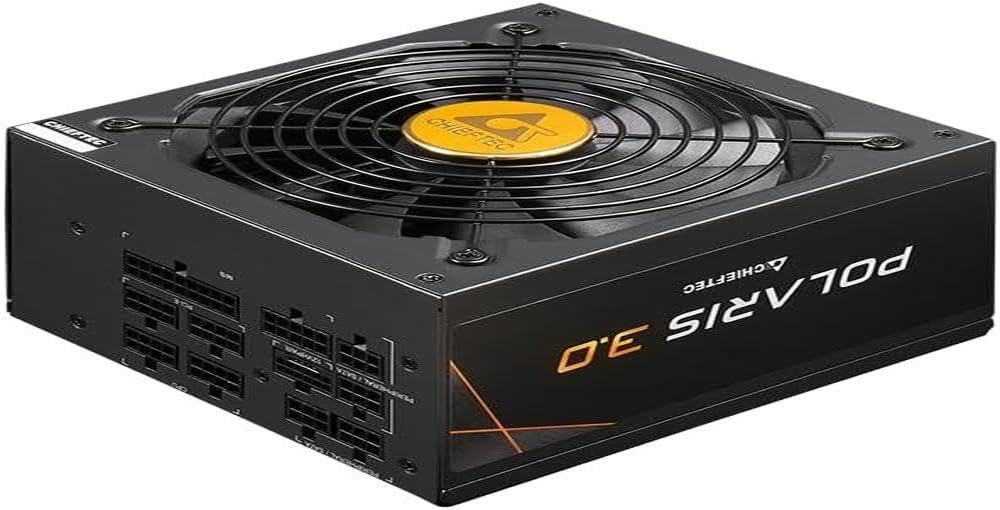
Aworan: A taara iwaju view of the Chieftec PPS-850FC-A3 power supply, showcasing its large cooling fan and the protective grille. The Chieftec logo is visible in the center of the fan.
Awọn ilana Iṣiṣẹ
After successful installation, ensure the power switch on the back of the PSU is in the 'ON' position (usually marked 'I'). You can then power on your computer system using the case's power button. The power supply will automatically manage power delivery to your components.
Itoju
- Ninu: Periodically clean the exterior of the power supply and its fan grille to prevent dust buildup, which can impede airflow and cooling performance. Use compressed air to gently remove dust. Ensure the system is powered off and unplugged before cleaning.
- Afẹfẹ: Ensure that the computer case has adequate ventilation and that the power supply's fan intake and exhaust are not obstructed.
- Iṣakoso USB: Proper cable management can improve airflow within your case, contributing to better cooling for all components, including the PSU.
Laasigbotitusita
Ti o ba pade awọn ọran pẹlu ipese agbara rẹ, tọka si awọn igbesẹ laasigbotitusita ti o wọpọ wọnyi:
- Ko si Agbara:
- Check if the AC power cord is securely connected to both the PSU and the wall outlet.
- Ensure the power switch on the PSU is in the 'ON' position ('I').
- Rí i dájú pé ibi tí a ti ń tà á ní ògiri náà ń ṣiṣẹ́ nípa fífi ẹ̀rọ mìíràn sí i.
- Confirm all internal power cables (24-pin ATX, CPU, GPU) are correctly and firmly seated.
- Àìdúróṣinṣin sí ètò/Ìpadé àìròtẹ́lẹ̀:
- This could indicate insufficient power or a faulty component. Ensure your system's power requirements do not exceed the PSU's 850W capacity.
- Check for overheating of components.
- Ensure the PSU fan is spinning freely and not obstructed.
- Awọn Ariwo Alailẹgbẹ:
- A rattling or grinding noise may indicate a fan issue. If the noise is persistent and loud, contact support.
- Coil whine (a high-pitched electronic noise) can occur under certain loads but is generally harmless.
If these steps do not resolve your issue, please contact Chieftec customer support or your retailer for further assistance.
Awọn pato
| Ẹya ara ẹrọ | Sipesifikesonu |
|---|---|
| Orukọ awoṣe | PPS-850FC-A3 |
| Brand | Chieftec |
| Awọn ẹrọ ibaramu | Kọmputa ti ara ẹni |
| Asopọmọra Iru | ATX |
| Ijade Wattage | 850 Wattis |
| Fọọmù ifosiwewe | ATX |
| Ọna Itutu | Afẹfẹ |
| Fan Iwon | 120 millimeters |
| O pọju Input Voltage | 230 Volts |
| Asopọmọra Iru Lo lori Cable | ATX |
| System Bus Connector Type | 4 Pin |
| UPC | 753263078131 |
Atilẹyin ọja ati Support
This Chieftec PPS-850FC-A3 power supply unit comes with a manufacturer's warranty. Please refer to the warranty card included in your package or visit the official Chieftec webAaye fun alaye atilẹyin ọja ofin ati ipo.
For technical support, product inquiries, or warranty claims, please contact Chieftec customer service through their official webaaye tabi alaye olubasọrọ ti a pese pẹlu rira rẹ.