
1. Ifihan
The Nextorage NX-P2SE series portable SSD offers high-speed data transfer and a compact design, ideal for various data storage needs. This manual provides essential information for setting up, operating, maintaining, and troubleshooting your device.
Key features include a maximum read speed of 1,050 MB/s and a maximum write speed of 1,000 MB/s, ensuring efficient handling of large files.

Image 1.1: Nextorage NX-P2SE Portable SSD.

Image 1.2: Stress-free, ultra-fast data transfer capabilities of the SSD, showing maximum read and write speeds.

Image 1.3: Ultra-compact design of the SSD, illustrating its small size and light weight (0.7 oz).
2. Eto
The Nextorage NX-P2SE SSD is designed for plug-and-play convenience. It comes pre-formatted in exFAT, making it ready for immediate use with various operating systems and devices.
2.1 Package Awọn akoonu
Jẹrisi pe package rẹ ni awọn nkan wọnyi ninu:
- Nextorage NX-P2SE Portable SSD
- USB Type-C to Type-C cable (approximately 10 7/8 inches / 30 cm)
- USB Type-C to USB Type-A cable (approximately 10 7/8 inches / 30 cm)
2.2 Nsopọ SSD
To connect the SSD to your device:
- Select the appropriate USB cable (Type-C to C or Type-C to A) for your host device.
- Connect one end of the cable to the USB Type-C port on the SSD.
- Connect the other end of the cable to an available USB port on your computer (Windows PC, Mac), PlayStation 5, or compatible iPhone.
- The SSD should be automatically recognized by your operating system.

Image 2.1: The NX-P2SE SSD connected to various devices, demonstrating its plug-and-play compatibility.
3. Awọn ilana Iṣiṣẹ
3.1 Data Gbigbe
Once connected, the SSD will appear as an external drive on your computer. You can drag and drop files to and from the SSD, or use your operating system's copy/paste functions for data transfer. The USB 3.2 Gen2 interface supports high-speed data transfer, significantly reducing transfer times for large files.

Image 3.1: High-speed data transfer performance of the SSD, showing sequential read and write speeds compared to a standard HDD.
3.2 Direct ProRes Video Recording (iPhone)
The NX-P2SE SSD supports direct ProRes video recording on compatible iPhones (e.g., iPhone 15 Pro/Pro Max, iPhone 16 Pro/Pro Max series). With an appropriate rig setup, this allows for extended recording durations without relying solely on the iPhone's internal storage.

Image 3.2: The NX-P2SE SSD used for direct ProRes video recording with an iPhone, supporting 4K 120fps.
3.3 ọja Video
Video 3.1: An official Nextorage video showcasing the product's use in creative workflows, including filming and data transfer scenarios.
4. Itọju
To ensure the longevity and performance of your Nextorage SSD, follow these maintenance guidelines:
- Idaabobo ti ara: The SSD includes a carrying pouch for protection against scratches and minor impacts during transport. Always use the pouch when carrying the device.
- Ninu: Use a soft, dry cloth to clean the exterior of the SSD. Avoid using liquid cleaners or abrasive materials.
- Iwọn otutu: Store and operate the SSD within recommended temperature ranges to prevent damage. Avoid extreme heat or cold.
- Iyọkuro ailewu: Nigbagbogbo kuro lailewu gbe SSD kuro lati kọmputa rẹ ṣaaju ki o to ge asopọ rẹ lati ṣe idiwọ ibajẹ data.

Image 4.1: The NX-P2SE SSD shown with its included carrying pouch, designed for easy and secure portability.
5. Laasigbotitusita
If you encounter issues with your Nextorage NX-P2SE SSD, consider the following common troubleshooting steps:
- Ohun elo Ko Damọ: Ensure the USB cable is securely connected to both the SSD and the host device. Try a different USB port or cable. Verify that your device's operating system is up to date and supports external storage.
- Awọn iyara Gbigbe lọra: Confirm that your host device's USB port supports USB 3.2 Gen2 (or at least USB 3.0/3.1) for optimal performance. Older USB 2.0 ports will result in significantly slower speeds. Ensure no other demanding tasks are running in the background.
- Ibajẹ data: Always safely eject the SSD before disconnecting it. Unexpected disconnections can lead to data loss or corruption.
- Igbóná púpọ̀: While designed for efficient heat dissipation, prolonged heavy use in confined spaces may cause the device to warm up. Ensure adequate airflow around the SSD.
If problems persist, refer to the Nextorage support webojula tabi kan si onibara iṣẹ fun siwaju iranlowo.
6. Awọn pato
| Ẹya ara ẹrọ | Sipesifikesonu |
|---|---|
| Nọmba awoṣe | NX-P2SE2TB/ENET |
| Digital Ibi Agbara | 2 TB |
| Lile Disk Interface | USB 3.0 (USB 3.2 Gen2 compatible) |
| Asopọmọra Technology | USB |
| Iyara kika ti o pọju | 1,050 MB/s |
| Iyara Kọ ti o pọju | 1,000 MB/s |
| Iwọn Nkan | 0.564 iwon (isunmọ 16g) |
| Awọn iwọn Ọja (LxWxH) | 2.6 x 1.57 x 0.35 inches (isunmọ 66 x 40 x 9 mm) |
| Àwọ̀ | Dudu |
| Awọn ẹrọ ibaramu | Desktop, Laptop, PlayStation 5, iPhone (ProRes recording) |
| Pre-formatted File Eto | exFAT |
7. Atilẹyin ọja ati Support
Nextorage provides comprehensive support for its products.
7.1 atilẹyin ọja Alaye
The Nextorage NX-P2SE SSD comes with a 3-year warranty, providing peace of mind regarding product defects and performance.
7.2 Data Recovery Software
Included with your purchase is access to Memory Card File Rescue data recovery software. This software can assist in recovering lost or accidentally deleted data. Note: This software does not support recovery of copyright-protected data and does not guarantee data recovery in all circumstances.
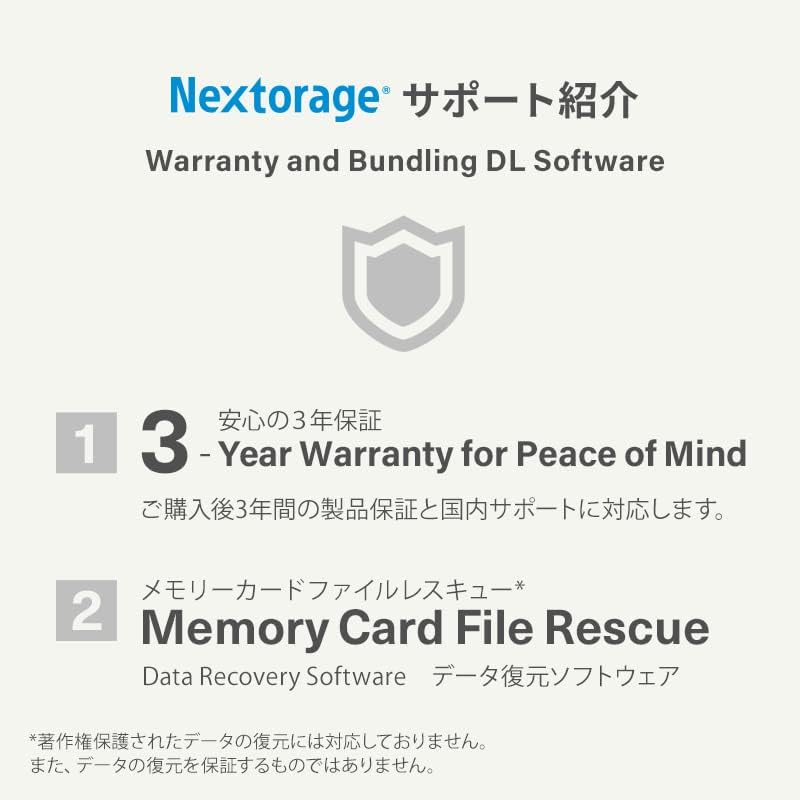
Aworan 7.1: Pariview of Nextorage support, including 3-year warranty and Memory Card File Rescue software.