
1. Ifihan
Thank you for choosing the HOREVO LED Ceiling Light with Remote Control and Bluetooth Speaker. This flush mount light fixture is designed to provide versatile lighting and audio entertainment for various indoor spaces. It features dimmable and color-changing LED lights, an integrated Bluetooth speaker, and convenient remote control operation. Please read this manual thoroughly before installation and use to ensure proper function and safety.
2. Alaye Aabo
- Aabo Itanna: Installation should be performed by a qualified electrician or a person with sufficient electrical knowledge to avoid electric shock or fire hazards. Always turn off the main power supply at the circuit breaker before beginning installation or maintenance.
- Voltage: Rii daju pe ipese agbara voltage bá ohun tí a fẹ́ kí ó wà nínú ẹ̀rọ náà mu (110 Volts).
- Ibi: This fixture is designed for indoor use. To ensure long-term durability and optimal performance, avoid installation in areas with sustained high humidity, such as certain bathrooms, despite its water resistance level.
- Mimu: Handle the light fixture with care to prevent damage. Do not modify the product in any way.
3. Package Awọn akoonu
Rii daju pe gbogbo awọn paati wa ṣaaju fifi sori ẹrọ:
- HOREVO LED Ceiling Light Fixture
- Isakoṣo latọna jijin
- Installation Hardware (screws, wire nuts, etc. - may vary, refer to actual packaging)
- Afowoyi Olumulo (iwe-ipamọ yii)
4. Awọn ẹya Ọja
- Agbọrọsọ Bluetooth ti a dapọ: Connect your smartphone or other Bluetooth-enabled devices to play audio directly through the light fixture.
- Itanna Dimmable: Adjust brightness from 1% to 100% using the remote control.
- Color Changing (RGB) & Color Temperature Adjustment: Choose from 7 single RGB colors, gradient color modes, or adjustable white light from 2700K (warm) to 6500K (cool daylight).
- Isakoṣo latọna jijin: Conveniently manage all light and speaker functions.
- LED Lilo Agbara: 24W power consumption, equivalent to a 150W incandescent bulb, saving over 85% on energy bills.
- CRI ti o ga ju 80+: Renders colors vividly and accurately.
- Iṣẹ Iranti: Retains last used settings for light color and brightness.
- Iṣẹ ṣiṣe akoko: Ṣeto aago kan fun pipa laifọwọyi.
5. Awọn ilana fifi sori ẹrọ
This is a wired light fixture and requires proper electrical installation. If you are unsure about any steps, consult a qualified electrician.
- Pa Agbara: Before starting, ensure the power supply to the installation area is completely turned off at the main circuit breaker.
- Ṣetan Ilẹ Iṣagbesori: Ensure the ceiling surface is clean, dry, and capable of supporting the fixture's weight.
- Àká Òkè: So bracket fifi sori ẹrọ mọ apoti asopọ ni aja nipa lilo awọn skru ti a pese.
- Awọn isopọ Waya: Connect the fixture's wires to the household electrical wires according to local electrical codes. Typically, connect the black wire from the fixture to the black wire from the ceiling (live), the white wire from the fixture to the white wire from the ceiling (neutral), and the ground wire to the ground wire. Secure connections with wire nuts.
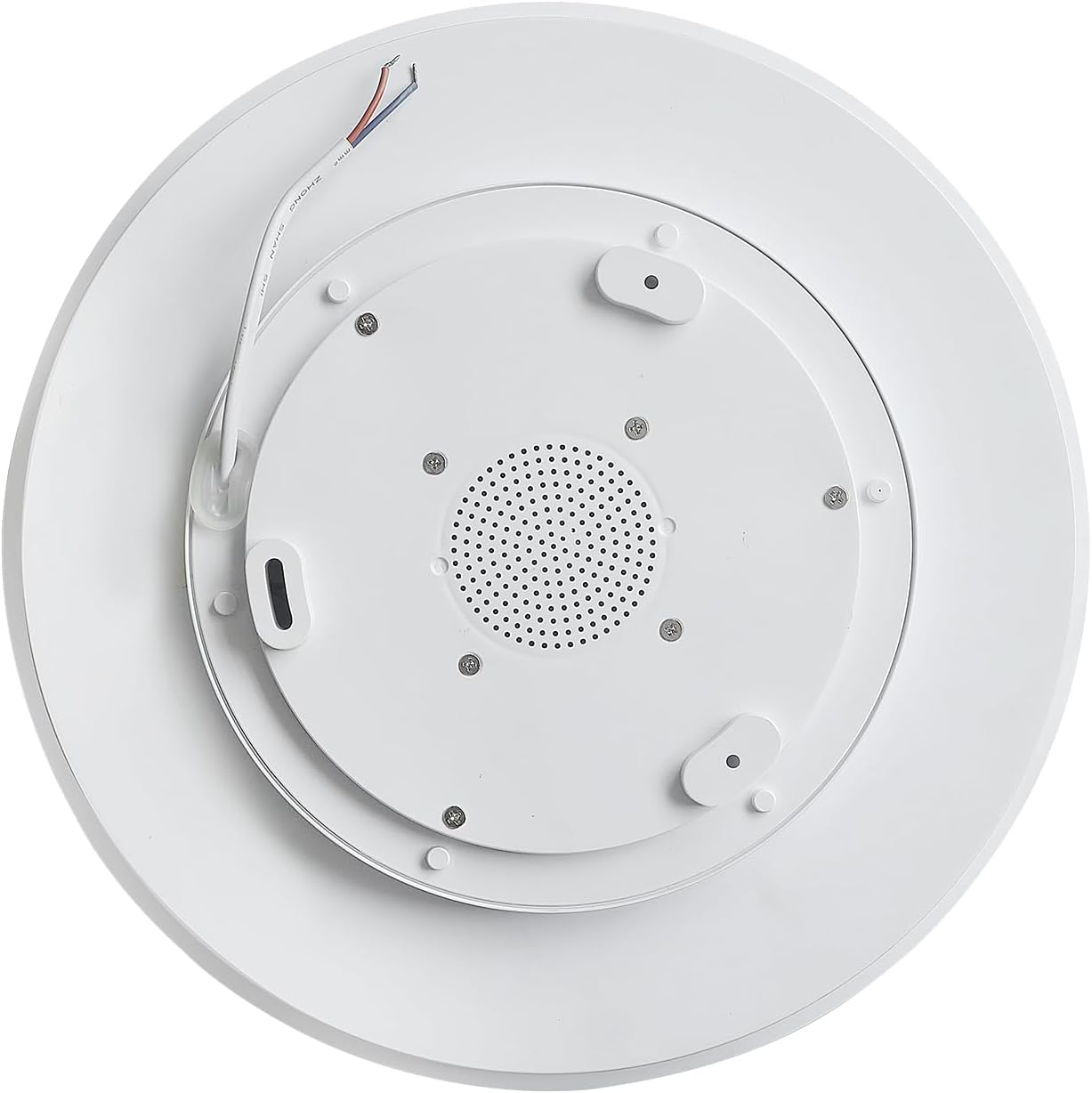
- Imuduro to ni aabo: Carefully push the wired connections into the junction box. Align the fixture with the mounting bracket and secure it in place with the provided screws.
- Pada Agbara pada: Once the fixture is securely installed, turn the main power supply back on at the circuit breaker.
6. Awọn ilana Iṣiṣẹ
6.1 Latọna Iṣakoso Awọn iṣẹ
The included remote control allows full command over the light and speaker features.

- Bọtini agbara: Tan ina tabi pa.
- Atunse Imọlẹ: Mu tabi dinku agbara imọlẹ.
- Color Temperature (K) Buttons: Adjust white light from warm (2700K) to neutral (4000K) to cool (6500K).
- Bọtini RGB: Cycles through various single color and gradient RGB modes.
- Awọn iṣakoso orin: Play/Pause, Skip Forward/Backward, Volume Up/Down for the Bluetooth speaker.
- Iṣẹ ṣiṣe akoko: Activates a timer for automatic light shut-off.
6.2 Sisopọ Bluetooth
To connect your device to the integrated Bluetooth speaker:
- Rii daju pe imuduro ina ti wa ni titan.
- Lori foonuiyara tabi ẹrọ Bluetooth ti o ṣiṣẹ, lọ si awọn eto Bluetooth.
- Wa fun available devices and select "AnSLong".
- Ti o ba beere fun ọrọ igbaniwọle, tẹ "1111".
- Once connected, you will hear a confirmation tone from the speaker. You can now play audio through the light fixture.
Note: Only one mobile phone can be connected to the light's Bluetooth at the same time. Disconnect the current device to connect another.
6.3 Color Changing and Dimming
The light offers a wide range of lighting options:
- Àwọn Ìlànà Ìmọ́lẹ̀ Funfun: Use the 'K' buttons on the remote to cycle between 2700K (warm), 4000K (neutral), and 6500K (cool daylight) white light.
- Awọn ipo Awọ RGB: Press the 'RGB' button to activate the full-spectrum color-changing feature. This includes 7 single color light modes and gradient colorful lights.
- Dimming: Use the brightness adjustment buttons to set the light intensity from 1% to 100% for any chosen color or white light setting.

7. Itọju
- Ninu: Ensure the power is off before cleaning. Wipe the fixture with a soft, dry cloth. Do not use abrasive cleaners or solvents, as they may damage the finish.
- Rirọpo Boolubu: A ti so orisun ina LED pọ mọ ara wọn, kii ṣe ohun ti olumulo le rọpo.
8. Laasigbotitusita
| Isoro | Owun to le Fa | Ojutu |
|---|---|---|
| Imọlẹ ko tan. | Kò sí agbára, kò sí wáyà tí ó dẹ̀, kò sì sí ohun èlò tí ó ní àbùkù. | Ṣàyẹ̀wò ẹ̀rọ ìdènà. Ṣàyẹ̀wò àwọn ìsopọ̀ wáyà. Tí ìṣòro náà bá ń bá a lọ, kan si olùrànlọ́wọ́. |
| Isakoṣo latọna jijin ko dahun. | Remote battery low, remote not paired, interference. | Replace remote batteries. Try switching between warm and cool light by quickly pressing the wall switch. Ensure no obstructions between remote and light. |
| Awọn oran asopọ Bluetooth. | Incorrect pairing, device too far, interference. | Ensure "AnSLong" is selected and password "1111" is used. Move device closer to the light. Disconnect other Bluetooth devices. |
| Light color changes unexpectedly when using wall switch. | This is a feature. | The light is designed to cycle through warm and cool white light by quickly toggling the wall switch. Use the remote for precise control. |
9. Awọn pato
| Ẹya ara ẹrọ | Ẹ̀kúnrẹ́rẹ́ |
|---|---|
| Nọmba awoṣe | X002 |
| Brand | HOREVO |
| Orisun agbara | Okun Itanna |
| Wattage | 24 Wattis |
| Voltage | 110 Volts |
| Imọlẹ | 1800 Lumens |
| Iwọn otutu awọ | 2700K - 6500K (A le dínkù) |
| Awọ Imọlẹ | RGB, White |
| Ọna Iṣakoso | Isakoṣo latọna jijin |
| Ohun elo | Irin, Ṣiṣu |
| Awọn iwọn (L x W x H) | 11.02"L x 11.02"W x 2.36"H |
| Iwọn Nkan | 1.1 iwon |
| Iru fifi sori ẹrọ | Ẹke Fula |
| inu ile / ita gbangba Lilo | Ninu ile |
10. Atilẹyin ọja ati Support
This HOREVO LED Ceiling Light comes with a Atilẹyin ọja to lopin. For specific details regarding warranty coverage, duration, and terms, please refer to the product packaging or contact the seller directly through your purchase platform.
For technical support, troubleshooting assistance beyond this manual, or to inquire about replacement parts, please contact HOREVO customer service or the seller from whom you purchased the product. Please have your model number (X002) and purchase details ready when contacting support.


